
Nissan Rogue (T33) 2021-Present Owner’s Manual & User Guide: Intercooler cooling system
Basic information
The intercooler cooling circuit of the Nissan Rogue is factory-filled with a 50/50 mixture of Genuine NISSAN Long Life Antifreeze/Coolant (blue) and water. This blend protects the system all year and includes corrosion inhibitors.
No extra additives are required for the intercooler system.
WARNING
- Do not remove the radiator or reservoir cap while the engine is hot. High-pressure fluid can escape and cause severe burns.
- The reservoir uses a pressure-type cap. Always use a genuine NISSAN cap to avoid intercooler or engine damage.
CAUTION
- Avoid using coolant sealers or additives — they may obstruct the intercooler cooling passages.
- When adding coolant, use only Genuine NISSAN Long Life Antifreeze/Coolant (blue) or an approved equivalent with minimum protection down to −34ºF (−37ºC).
Checking intercooler coolant level
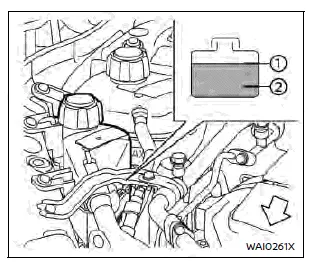
Check coolant only when the engine is cold. If the level is below MIN, top up to the MAX mark and tighten the cap securely.
If coolant is frequently required, the intercooler system of your Nissan Rogue should be inspected by a NISSAN dealer.
Changing intercooler coolant
The intercooler coolant is maintenance-free. If replacement becomes necessary, a NISSAN dealer should perform the service to prevent overheating issues.
WARNING
- Never replace coolant when the engine is hot.
- Avoid removing the radiator or reservoir cap during high temperature conditions.
- Prevent skin contact with used coolant. Wash immediately if contact occurs.
- Keep coolant away from children and pets.
Dispose of intercooler coolant legally according to local environmental requirements.
Other materials:
C10b7-16 Parking Brake Power Supply
DTC Description
DTC DETECTION LOGIC DTC No.
CONSULT screen terms
(Trouble diagnosis content) DTC detection condition
C10B7
16
Parking brake power supply
(Parking brake power supply)
Diagnosis condition
When ignition switch ON.
Signal (terminal)
Ignition power supply
...
Engine compartment check locations
KR15DDT engine model
Engine coolant reservoir
Engine oil dipstick
Engine oil filler cap
Brake fluid reservoir
Battery
Fuse/fusible link box
Intercooler coolant reservoir
Window washer fluid reservoir
Drive belt
Air cleaner
NOTE:
Your Nissan Rogue may not be equipped with an engine ...
P0112 Iat Sensor
DTC Description
DTC DETECTION LOGIC DTC
CONSULT screen terms
(Trouble diagnosis content) DTC detection condition
P0112
00
IAT SEN/CIRCUIT-B1
(Intake air temperature sensor 1 circuit low bank 1)
Diagnosis condition
—
Signal (terminal)
Intake air temperature sensor sign ...