
Nissan Rogue (T33) 2021-Present Owner’s Manual & User Guide: Engine cooling system
Basic information
The cooling system is factory-filled with a pre-mixed 50/50 ratio of Genuine NISSAN Long Life Antifreeze/Coolant (blue) and water. This mixture protects the Nissan Rogue year-round from freezing and overheating.
The coolant contains anti-corrosion additives, so extra system additives are not necessary.
WARNING
- Never remove the radiator or reservoir cap when the engine is hot. Serious burns can result from high-pressure fluid escaping.
- The reservoir uses a pressure-type cap. Always use a genuine NISSAN cap to prevent engine damage.
- After shutting off a hot engine, the cooling fan may continue operating for up to 10 minutes. Keep clear of moving parts.
CAUTION
- Avoid cooling system additives such as sealants — they may clog internal passages and damage system components.
- When adding coolant, use only Genuine NISSAN Long Life Antifreeze/Coolant (blue) or an approved equivalent.
- Factory coolant lasts 105,000 miles (168,000 km) or 7 years. Mixing other coolant types will shorten coolant life.
Checking engine coolant level
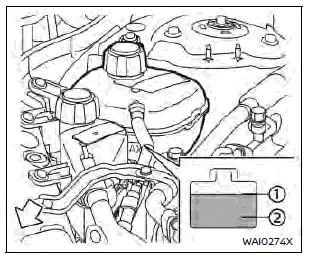
Check coolant in the reservoir only when the engine is cold. If the level is below the MIN mark, open the cap and fill to the MAX mark. Tighten the cap securely after topping up.
If the Nissan Rogue frequently needs coolant, the system should be inspected by a NISSAN dealer.
Changing engine coolant
The coolant change procedure is detailed in the NISSAN Service Manual and can be performed at a dealership. Incorrect servicing may reduce heater efficiency or lead to overheating.
WARNING
- Do not drain or replace coolant when the engine is hot.
- Never open the radiator or reservoir cap when the system is hot — escaping fluid can cause severe burns.
- Avoid skin contact with used coolant. Wash immediately if contact occurs.
- Keep coolant away from children and animals.
Dispose of used coolant properly in accordance with local regulations.
Check your local regulations.
Other materials:
Can. Precaution. Precautions
Precautions
PRECAUTIONS FOR SUPPLEMENTAL RESTRAINT SYSTEM (SRS) AIR BAG AND SEAT BELT PRE-TENSIONER
: Precautions
The Supplemental Restraint System such as “AIR BAG� and “SEAT BELT
PRE-TENSIONER�, used along with a front seat belt, helps to reduce the
risk or severit ...
Simplified Confirmation by Birds-Eye View Screen
Work Procedure
If the front grille upper is removed or replaced, perform the simplified confirmation by birds-eye view screen.CAUTION:
This procedure should only be performed if the front grille upper has been removed or replaced.
Perform camera calibration when removing or replacing each ...
P052a Intake Valve Timing Control
DTC Description
DTC DETECTION LOGIC DTC
CONSULT screen terms
(Trouble diagnosis content) DTC detection condition
P052A
00
CAMSHAFT POSITION TIMING B1
(Cold start “A� camshaft position timing over-advanced bank 1)
Diagnosis condition
Cold condition
Signal (terminal)
...