
Nissan Rogue (T33) 2021-Present Owner’s Manual & User Guide: Engine oil
Checking engine oil level
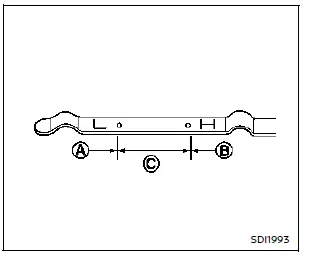
- Park the vehicle on a level area and apply the parking brake.
- Warm up the engine to operating temperature.
- Shut the engine off and wait at least 10 minutes.
- Remove the dipstick, wipe it clean, then fully reinsert it.
- Remove the dipstick again and check the oil level. It must fall within range C. If it is below A, add the recommended oil, but do not exceed level B.
- Confirm the level again after filling.
Some oil consumption between service intervals is normal, especially depending on driving conditions.
CAUTION
Check oil level regularly — running the Nissan Rogue with low oil can damage the engine and is not covered by warranty.
Changing engine oil and filter
Basic information
WARNING
- Used engine oil must be disposed of correctly. Never dump oil on the ground. NISSAN recommends having the oil changed at a dealership.
- Engine oil may be hot — avoid burns when draining it.
- Long-term exposure to used oil may cause skin irritation; wash immediately after contact.
- Store used oil safely out of children's reach.
Vehicle set-up
1. Park the Nissan Rogue on a level surface and apply the parking brake.
2. Warm up the engine until it reaches operating temperature.
3. Turn the engine off and wait at least 10 minutes.
4. Raise the vehicle using a proper floor jack and support it with jack stands.
- Place the safety jack stands under the Nissan Rogue jack-up points.
- A suitable adapter should be positioned on the jack stand saddle.
5. Remove the engine undercover.
- Release the clips around the edges of the undercover.
- Remove the remaining bolts holding it in place.
CAUTION
Always use the correct lifting and support points to avoid damage to the Nissan Rogue body structure.
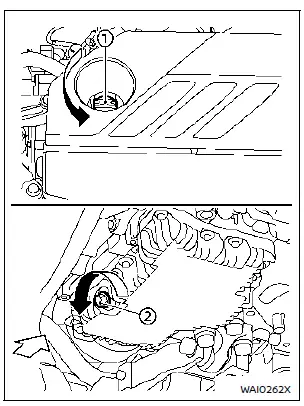
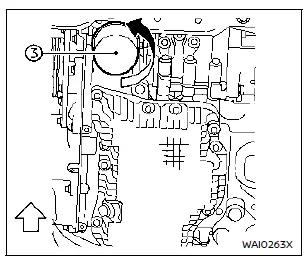
- Oil filler cap
- Oil drain plug
- Oil filter
Engine oil and filter
1. Position a large drain pan beneath the Nissan Rogue drain plug.
2. Remove the oil filler cap.
3. Loosen the drain plug with a wrench and allow all oil to drain completely.
CAUTION
The engine oil may be hot — avoid burns while draining.
WARNING
- Prolonged contact with used engine oil can be harmful. Avoid skin exposure.
- Wash thoroughly with soap if oil contacts your skin.
- Keep used oil out of children’s reach.
- Used oil must be disposed of properly.
- Follow all local disposal regulations.
4. Use an oil filter wrench to loosen the filter, then unscrew it by hand.
5. Clean the mounting surface with a clean cloth.
CAUTION
- Ensure no old gasket material remains on the engine surface to prevent leaks.
- Keep the dipstick inserted during oil filling to prevent spillage from the dipstick tube.
6. Lightly coat the new filter’s gasket with clean oil.
7. Screw on the new filter until resistance is felt, then tighten more than 2/3 turn.
Oil filter tightening torque:
11–15 ft-lb (15.0–21.0 N·m)
8. Clean and reinstall the drain plug with a new washer. Tighten securely:
22–27 ft-lb (30.0–37.0 N·m)
Do not overtighten.
9. Refill the engine with the recommended oil and install the filler cap firmly.
Refer to “Capacities and recommended fluids/lubricants� for approximate amounts. Always use the dipstick to confirm the correct final level.
10. Start the engine and inspect the area around the drain plug and oil filter for leaks. Correct if needed.
11. Shut off the engine, wait 10+ minutes, and recheck the oil level. Add oil if necessary.
After the operation
1. Reinstall the undercover in the reverse order of removal.
2. Carefully lower the vehicle back to the ground.
3. Reset the Oil Control System along with the oil and filter maintenance reminder.
Other materials:
Dtc/circuit Diagnosis. B2c20-12 Starter Control Relay
DTC Description
DTC DETECTION LOGIC DTC No.
CONSULT screen items
(Trouble diagnosis content) DTC detecting condition
B2C20-12
Starter control relay
(Starter control relay)
Diagnosis condition
Ignition switch ON
Signal (terminal)
Starter cut relay signal
Threshold
W ...
Basic information
The following are approximate capacities for your Nissan Rogue.
Actual refill capacities may vary slightly. When refilling, always follow the procedure described in the "8. Do-it-yourself" section to confirm the proper amount for your Nissan Rogue.
Fuel
Engine oil
Drain and refill
Genuine "NI ...
P0340 Intake Camshaft Position Sensor
DTC Description
DTC DETECTION LOGIC DTC
CONSULT screen terms
(Trouble diagnosis content)
DTC detection condition
P0340
00
CMP SEN/CIRC-B1
(Camshaft position sensor “A� circuit bank 1 or single sensor)
Diagnosis condition
Engine: Cranking or running (idle speed or more ...