
Nissan Rogue (T33) 2021-Present Owner’s Manual & User Guide: Instrument panel
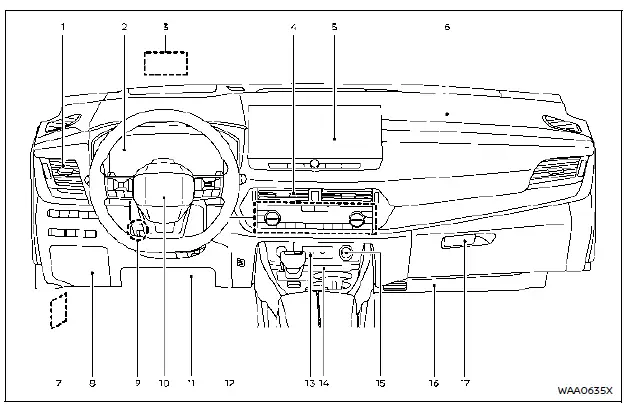
The instrument panel in the Nissan Rogue is designed to keep essential controls within easy reach, combining comfort and convenience for everyday driving.
- Side ventilator
- Meters and gauges/Clock
- Head Up Display (HUD)*
- Center ventilator
- Audio system** or navigation system**
- RearView Monitor*
- Intelligent Around View Monitor*
- Bluetooth Hands-Free Phone System**
- Front passenger supplemental air bag
- Hood release handle
- Fuse box cover
- Tilt and telescopic steering lock lever
- Driver supplemental front-impact air bag
- Driver supplemental knee air bag
- Heater and air conditioner control
- Defroster switch
- Deicer switch*
- Heated seat switches*
- Heated steering wheel switch*
- USB (Universal Serial Bus) connection ports**
- Wireless charger*
- Power outlet
- Front passenger supplemental knee air bag
- Glove box
The layout of the Nissan Rogue instrument panel may vary slightly depending on trim level and equipment, but all versions keep frequently used functions clearly organized for the driver.
*: if so equipped
**: See the separate NissanConnect Owner's Manual.
Other materials:
Moonroof
Basic information
WARNING
In an accident you could be thrown from the vehicle through an open moonroof. Always wear seat belts and use proper child restraints when driving the Nissan Rogue.
Do not allow anyone to stand up or extend any part of their body out of the moonroof opening while the vehi ...
Precaution. Precautions
Precaution for Supplemental Restraint System (SRS) "AIR BAG" and "SEAT BELT PRE-TENSIONER"
The Supplemental Restraint System such as “AIR BAG� and “SEAT BELT
PRE-TENSIONER�, used along with a front seat belt, helps to reduce the
risk or severity of injury to the driver and front passeng ...
C1f36-55 Configuration
Without Propilot Assist 2.1
DTC Description
DTC DETECTION LOGIC DTC
CONSULT screen terms
(Trouble diagnosis content) DTC detection condition
C1F36
55
CONFIG UNFINISHED
(Configuration unfinished)
Diagnosis condition
When engine is running
When AEB system is ...