
Nissan Rogue (T33) 2021-Present Service Manual: Ignition Coil, Spark Plug and Rocker Cover
Exploded View
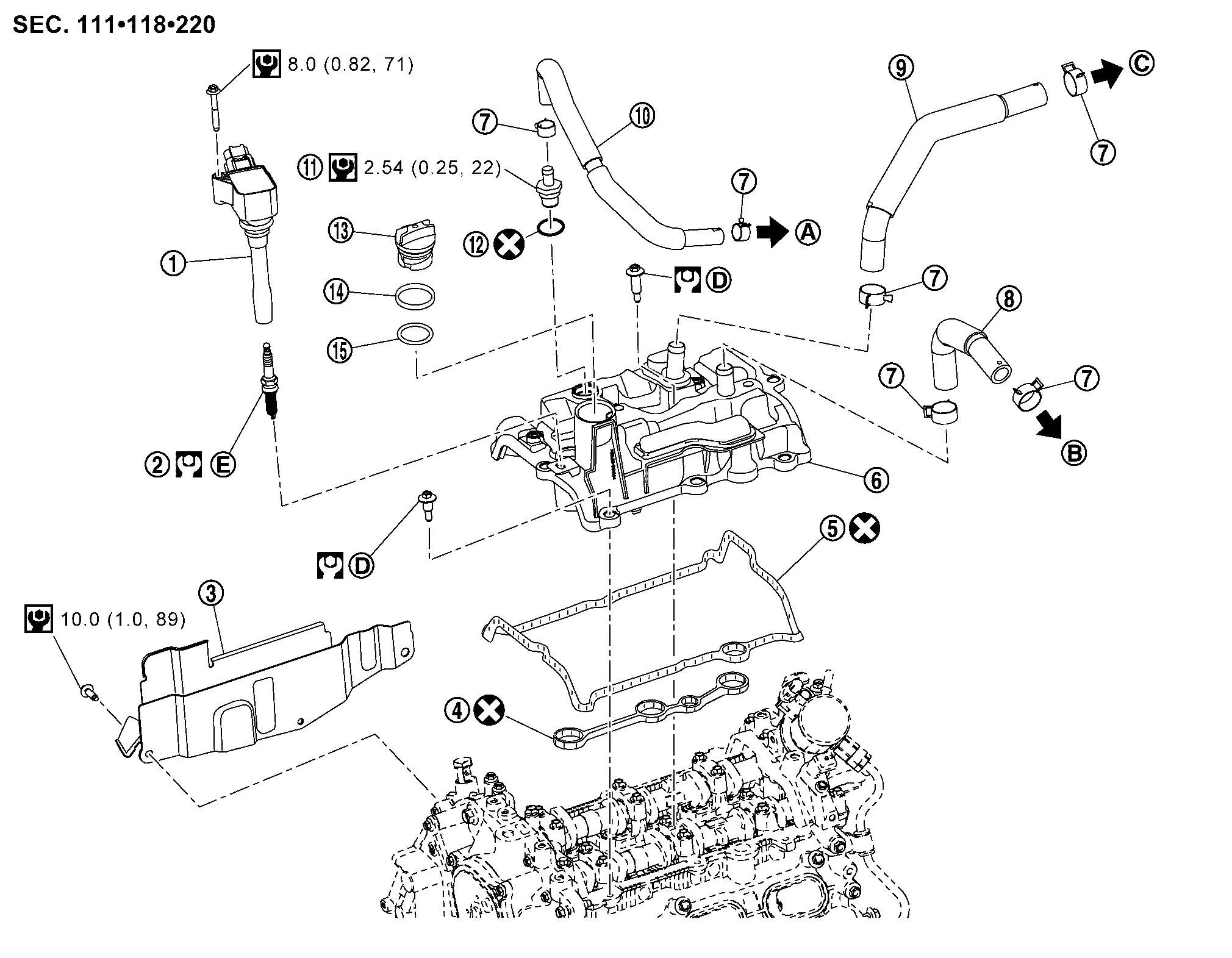
 |
Ignition coil |  |
Spark plug |  |
Cover (right) |
 |
Rocker cover gasket |  |
Rocker cover gasket |  |
Rocker cover |
 |
Clamp |  |
Resonator hose |  |
Turbo hose |
 |
Blow-by hose |  |
PCV valve |  |
O-ring |
 |
Oil filler cap |  |
Oil filler gasket 1 |  |
Oil filler gasket 2 |
 |
To Intake manifold. Refer to Exploded View. |  |
To Resonator. Refer to Exploded View. |  |
To Air duct. Refer to Exploded View. |
 |
Comply with the installation procedure when tightening. Refer to Removal and Installation. |  |
Comply with the installation procedure when tightening. Refer to Removal and Installation. | ||
 |
: N·m (kg-m, ft-lb) | ||||
 |
: N·m (kg-m, in-lb) | ||||
 |
: Always replace after every disassembly. | ||||
Removal and Installation
REMOVAL
Removal charge air cooler. Refer to Removal and Installation.
Disconnect the harness connectors from the ignition coils.
Remove the ignition coils.
Disconnect the harness clip from the rocker cover and reposition harness.
Remove the PCV hose and blow-by hose from the rocker cover.
Loosen the rocker cover bolts in reverse of the sequence shown.
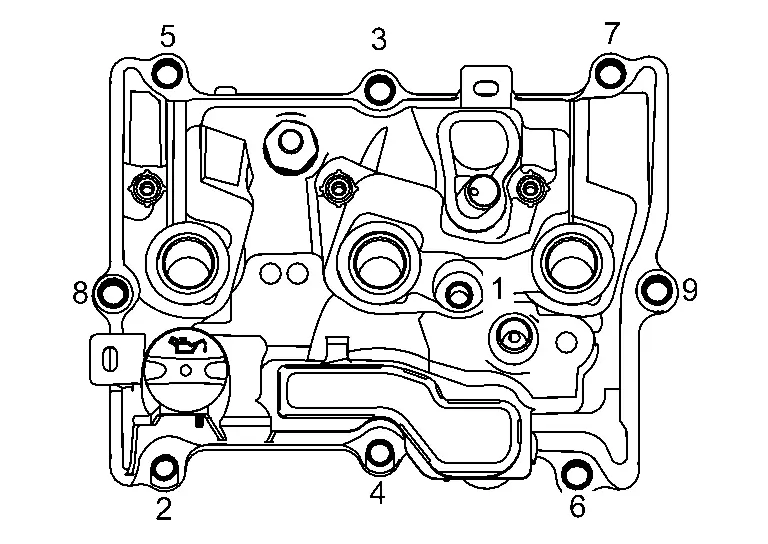
Remove the rocker cover and rocker cover gasket.
CAUTION:
-
Do not reuse rocker cover gasket.
-
Do not drop or shock rocker cover.
-
Discard any rocker cover which has been dropped or shocked.
Remove the oil filler cap if necessary.
Remove the PCV valve if necessary.
CAUTION:
Do not reuse O-ring.
INSTALLATION
Apply liquid gasket to the positions shown.
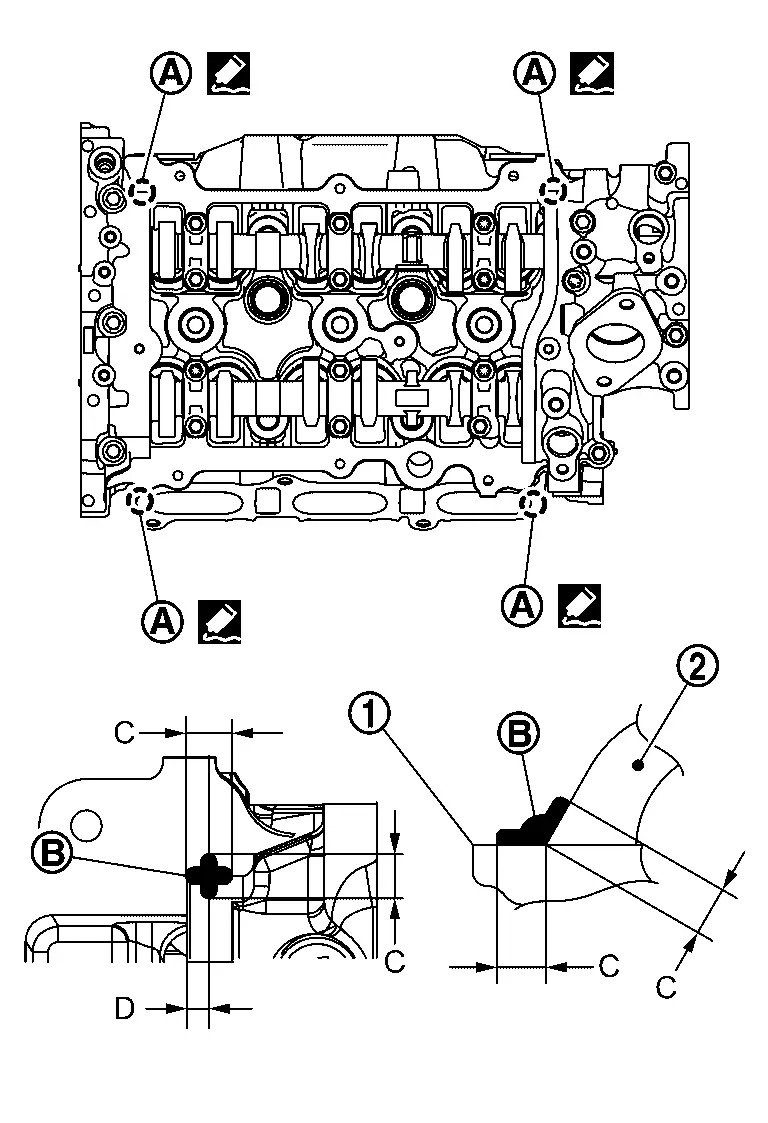
-
Use Genuine RTV Silicone Sealant or an equivalent. Refer to Recommended Chemical Products and Sealants.
|
: Cylinder head |
|
: Camshaft bracket |
| C | : 10 mm (0.39 in) |
| D | : 4 mm (0.16 in) (Application position of liquid gasket from the end surface of the camshaft bracket) |
Install rocker cover gasket to rocker cover.
CAUTION:
-
Do not reuse rocker cover gasket.
-
Do not drop or shock rocker cover.
-
Discard any rocker cover which has been dropped or shocked.
 NOTE:
NOTE:
Make sure rocker cover gasket is securely installed in the groove in the rocker cover.
Install the rocker cover and tighten the bolts to the specified torque in the sequence shown.
| Step 1 |
: 1.96 N·m (0.20 kg-m, 17 in-lb) |
| Step 2 |
: 8.33 N·m (0.85 kg-m, 74 in-lb) |
Install the cover (right) and tighten the bolts to the specified torque in the sequence shown.
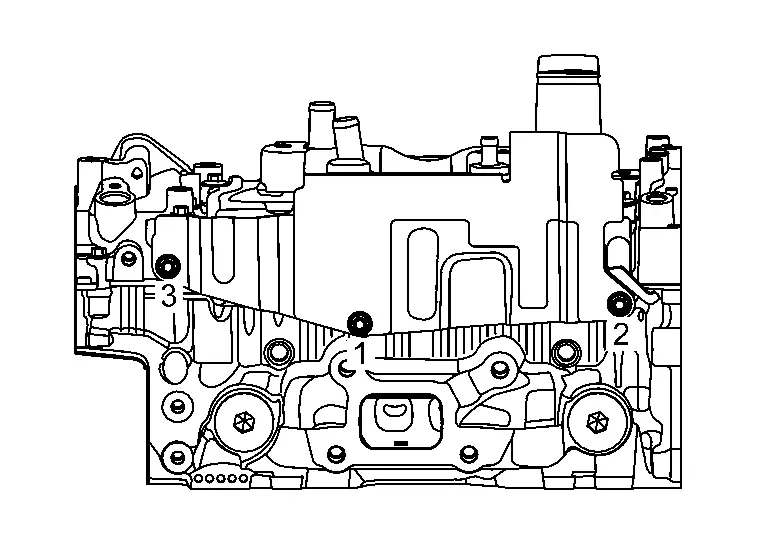
| Cover (right) bolts |
: 10.0 N·m (1.0 kg-m, 89 in-lb) |
Installation of the remaining components is in the reverse order of removal.
Other materials:
Basic Inspection. Tire Pressure Sensor Id Registration
Description
This procedure must be performed.
After replacement of a tire pressure sensor or BCM.
After replacement of tire or road wheel.
NOTE:
ID registration is unnecessary if there are no change in
the positions of each wheels (tire pressure sensors) before wheel
removal and after ...
Dtc/circuit Diagnosis. C18fa-44 Programing Incomplete
DTC Description
DTC DETECTION LOGIC DTC No. CONSULT screen terms DTC detection condition
C18FA
44
Calibration incomplete
Diagnosis condition
When Ignition switch is ON.
Signal (terminal)
—
Threshold
When programming data is not same.
Diagnosis delay time
1 ...
Limites du système RAB
AVERTISSEMENT
Les limites du système de freinage automatique arrière (RAB) du Nissan Rogue sont décrites ci-dessous. Le non-respect des instructions et avertissements relatifs à l’utilisation correcte du système RAB peut entraîner des blessures graves, voire mortelles. Le conducteur doit to ...