
Nissan Rogue (T33) 2021-Present Owner’s Manual & User Guide: Head Up Display (HUD)
Basic information
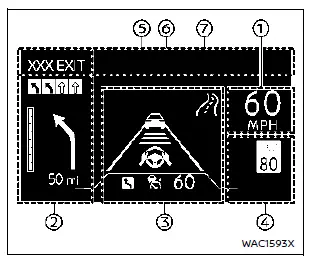
Example
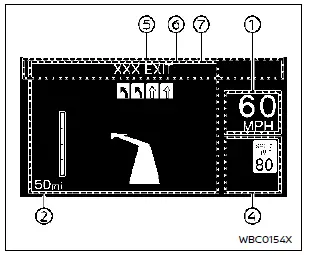
Example
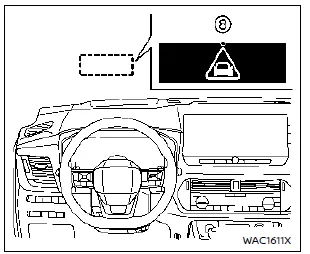
WARNING
- Failure to correctly adjust the brightness or position of the HUD image may reduce visibility through the windshield, which could lead to an accident resulting in serious injury or death.
- Avoid focusing on the Head Up Display (HUD) for extended periods, as this may prevent you from noticing surrounding vehicles, pedestrians, or obstacles, increasing the risk of an accident.
The Head Up Display (HUD) in the Nissan Rogue can show one or more of the following features when equipped:
- Vehicle speed
- Navigation
- Driving Assist
- Traffic Sign
- Audio
- TEL/SMS
- Driver Assistance messages
- Warning messages
NOTE:
- Do not place liquids on or near the projector, as this may cause the system to malfunction.
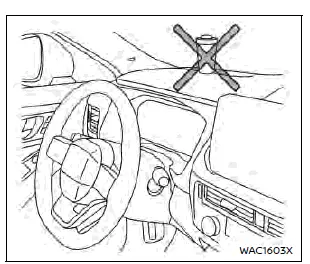
- Avoid touching internal projector components to prevent equipment malfunction.
- Keep sharp objects away from the projector opening to avoid scratching the projector glass.
- Do not place items on the instrument panel that could block the HUD display.
- Use only a dry, soft cloth for cleaning. If needed, lightly dampen the cloth with water and wipe again with a dry soft cloth. Avoid rough materials, alcohol, benzine, thinner, chemical solvents, or paper towels, as they may scratch or discolor the projector lens.
- Do not spray liquids directly onto the projector lens to prevent system malfunction.
NOTE:
- If wearing polarized sunglasses, the HUD image may appear faint or difficult to see. Increase brightness in the vehicle information display or remove the sunglasses for better visibility.
- In certain weather conditions—such as heavy rain, snow, or intense sunlight—the HUD visibility may be reduced.
- If the HUD image looks distorted, have the system inspected by a NISSAN dealer to ensure proper function.
- The Nissan Rogue HUD uses a special windshield for clear projection. If the windshield requires replacement, it is recommended to have the work performed by a NISSAN dealer.
How to use the HUD
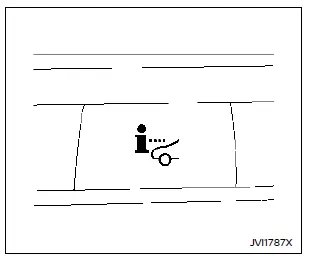
Basic information
To activate the HUD, press the HUD switch once. This immediately turns on the Head Up Display and shows selected driving information for the Nissan Rogue.
To turn the HUD off, press the switch again.
If the HUD is turned off manually, it will remain off even after restarting the vehicle.
The following HUD settings can be customized in the vehicle information display:
- Brightness
- Height
- Rotation
- Contents selection
- Navigation (if so equipped)
- Driving Assist
- Speed Limit Sign
- Audio
- TEL/SMS
- Reset
NOTE:
- Emergency information may still appear on the HUD even if the display is turned off.
- When Driving Assist is activated with the ProPILOT Assist switch on, the HUD will be displayed automatically—even if the HUD switch is turned off.
This product includes the following software:
(1) Panasonic Corporation software or software developed specifically for Panasonic Corporation
(2) Third-party software licensed to Panasonic Corporation
(3) Open-source software
The open-source software (OSS) components include programs governed by various licenses.
For detailed license information, refer to the Panasonic OSS website:
http://car.panasonic.jp/oss/j03llnna
Display brightness
The brightness of the HUD image can be adjusted through the vehicle information display to ensure clear visibility while driving the Nissan Rogue.
The system will also automatically adapt brightness based on surrounding ambient light conditions.
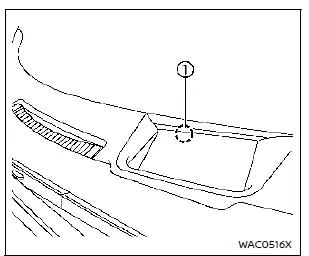
NOTE:
- The HUD uses a built-in brightness sensor 1. If the sensor is blocked, the display will darken and may become hard to see. Ensure the area remains unobstructed.
- Avoid directing strong light at the sensor, as this may cause incorrect operation or system malfunction.
Driver Assistance/Navigation/Traffic Sign/ Audio/TEL/SMS linking
The HUD in the Nissan Rogue will display Driver Assistance and navigation information to help the driver stay aware of changing road and traffic conditions.
The Driver Assistance display will also show warning situations for the following systems, if equipped:
- Automatic Emergency Braking (AEB) with Pedestrian Detection
- Intelligent Forward Collision Warning (I-FCW)
- Lane Departure Warning (LDW)
- Intelligent Lane Intervention (I-LI)
- Hands-free warning (for vehicles with ProPILOT Assist)
- Lane Change Assist indicator (ProPILOT Assist 2.1)
The Navigation System linking display shows helpful guidance for Nissan Rogue drivers, including:
- Intersection names
- Turn direction arrows
- Distance to the next intersection
- Recommended lane indicator
The Traffic Sign Recognition (TSR) linking display will show:
- Speed Limit Sign
The Audio System linking display presents:
- Songs
- Radio stations
The TEL/SMS linking display shows:
- Caller’s name or phone number
The message linking display will show the following item:
- ProPILOT Assist 2.1
Warning message
When the following systems are operating, a warning message will appear on the Head Up Display (HUD) of the Nissan Rogue:
- ProPILOT Assist 2.1
- Automatic Emergency Braking (AEB) with Pedestrian Detection
Other materials:
Kr15ddt. Symptom Diagnosis
Engine Control System
Symptom Table
SYSTEM — BASIC ENGINE CONTROL SYSTEM SYMPTOM Reference page
HARD/NO START/RESTART (EXCP. HA) ENGINE STALL HESITATION/SURGING/FLAT SPOT SPARK KNOCK/DETONATION LACK OF POWER/POOR ACCELERATION HIGH IDLE/LOW IDLE ROUGH IDLE/HUNTING IDLING VIBRATIO ...
Dtc/circuit Diagnosis. U2176-57 Can Comm Err (ccm/st Angle Sensor)
DTC Description
DTC DETECTION LOGIC DTC No.
CONSULT screen items
(Trouble diagnosis content) DTC Detection Condition
U2176-57
CAN comm err (CCM/ST angle sensor)
[Control area network communication error (chassis control module/steering angle sensor)]
Diagnosis condition
-
Sig ...
Basic information
WARNING
Failure to follow the warnings and instructions for proper use of the AEB with Pedestrian Detection system on the Nissan Rogue could result in serious injury or death.
The AEB with Pedestrian Detection system is an assistive feature, not a substitute for the driver's attention or safe dri ...