
Nissan Rogue (T33) 2021-Present Service Manual: Basic Inspection :: Zero Point Reset
Description
Zero point reset is an initializing procedure for occupant detection system sensor that must be performed when replacing or removing and installing passenger seat.
If zero point reset is not performed, the initialization is incomplete and Occupant Detection System does not operate normally. Refer to Work Procedure.
 NOTE:
NOTE:
-
When replacing passenger seat with a NISSAN genuine part, SRS air bag warning lamp turns ON if zero point reset is incomplete.
-
When zero point reset is performed once after removal and installation of passenger seat, CONSULT displays “Already performed� and SRS air bag warning lamp does not ON.
-
When reinstalling passenger seat after removal, the initial value for occupant detection system sensor changes, and Occupant Detection System does not operate normally.
-
Always perform zero point reset after performing the work as per the following.
-
Reinstallation of passenger seat
-
Replacement of passenger seat with a seat that is zero point reset complete.
-
-
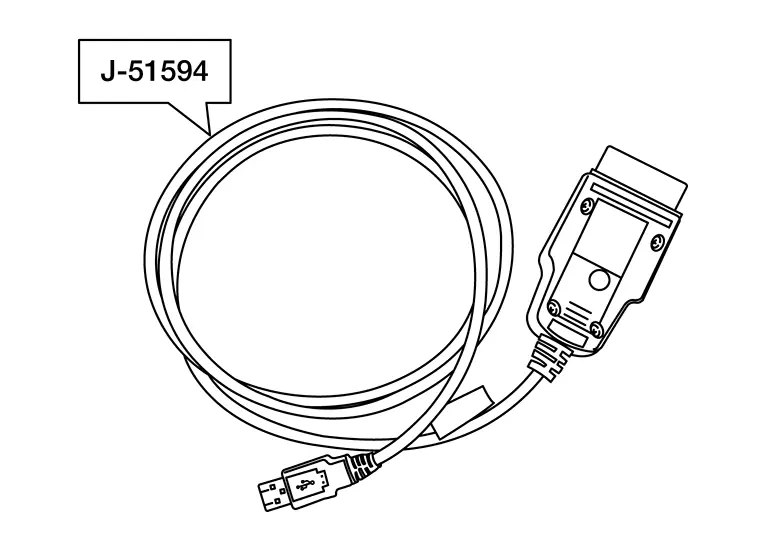
Use Tool NI-51594 along with the Consult PC to perform this process.
Work Procedure
CONFIRMATION OF SETTING
 CONSULT
-
Proceed to “Zero point reset function� screen from “Work support� mode of “OCCUPANT DETECTION�.
-
Check that “Complete� or “Incomplete� is displayed on “Zero point reset status�.
CAUTION:
-
“Complete� is displayed on “Zero point reset current status� if the seat is reinstalled by seat removal and installation, or “Zero point reset� is already performed.
-
“Zero point reset current status� displays “Incomplete� if a new seat is installed. When placing ignition switch ON without performing “Zero point reset�, front passenger air bag OFF indicator turns ON. When “Zero point reset� is performed, front passenger air bag OFF indicator turns OFF.
-
Air bag warning lamp blinks in user mode only.
-
Air bag sensor unit does not record whether or not zero point reset is performed.
Is condition “ALREADY PERFORMED�?
YES>>Print out “Zero point reset current status� screen. Inspection End.
NO>>Check condition as per the following, and perform “Zero point reset� again:
-
Passenger seat is occupied by an object.
-
Excessive vibration is applied while performing “Zero point reset�.
-
Occupant detection system is malfunctioning.
NOTE:
If “Incomplete� is displayed on “Zero point reset current status�, “Zero point reset� is not completed normally. Check the condition as per the following and perform “Zero point reset� again:
-
Passenger seat is occupied by an object.
-
Excessive vibration is applied while performing “Zero point reset�.
-
Occupant detection system is malfunctioning.
PERFORM ZERO POINT RESET
CONSULT
NOTE:
-
Connect a battery maintainer or smart charger set to reflash mode or a similar setting. If the Nissan Ariya vehicles battery voltage drops below 12.0V or rises above 15.5V during the reprogramming, the OCS control unit may be damaged.
-
Be sure to turn OFF all Nissan Ariya vehicle electrical loads. If a vehicle electrical load remains ON, the OCS control unit may be damaged.
-
Be sure to connect the AC Adapter to the CONSULT PC. If the CONSULT PC battery voltage drops during reprogramming, the process will be interrupted and the OCS control unit may be damaged.
-
Turn OFF all external bluetooth devices (e.g., cell phones, printers, etc.) within range of the CONSULT PC and tool NI-51594 during reprogramming, reprogramming may be interrupted and the OCS control unit may be damaged.
-
Turn ON the ignition / EV system (engine OFF / not Ready).
-
Turn ON the hazard warning lamps.
-
Connect the plus VI to the Nissan Ariya vehicle DLC connector and the OCNSULT PC with its USB connector.
-
Start the CONSULT PC and CONSULT-III plus (C-III plus), and then check for air bag related DTCs.
-
If any air bag related DTCs other than B00A0-00 are stored, perform diagnosis and repairs as needed.
-
-
Close C-III plus, but leave ASIST running.
-
Connect tool NI-51594 to the Nissan Ariya vehicle DLC connector and the CONSULT PC USB connector.
-
Make sure tool NI-51594 is securely connected at both ends
-
-
Prepare the Nissan Ariya vehicle for OCS reprogramming as follows:
-
Park the vehicle on a level surface.
-
Keep the front passenger seat empty - place nothing on it.
-
Keep the Nissan Ariya vehicle empty of occupants - including the servicing technician.
-
Place the CONSULT PC outside of the Nissan Ariya vehicle on a suitable table/support. DO NOT set the CONSULT PC on the vehicle.
-
Do not touch the Nissan Ariya vehicle during OCS Reprogramming.
-
Minimize vehicle vibrations.
-
-
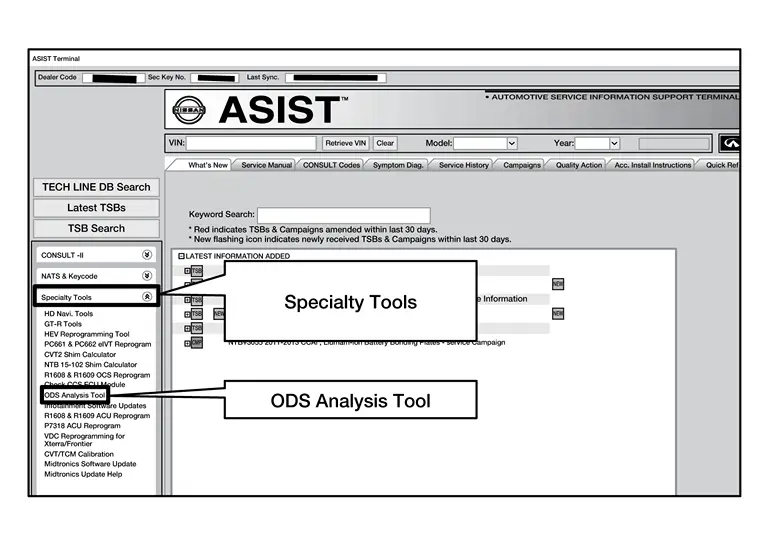
On the left side of ASISTs main menu, select Specialty Tools, and then select ODS Analysis Tool.
-
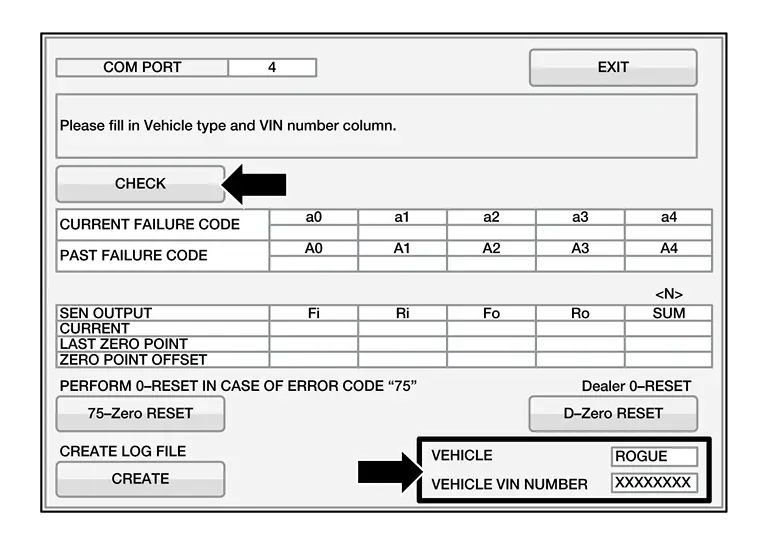
Enter the Nissan Ariya vehicle model and the last eight (8) characters of the VIN in the corresponding spaces, and then select CHECK.
-
Select OK.
-
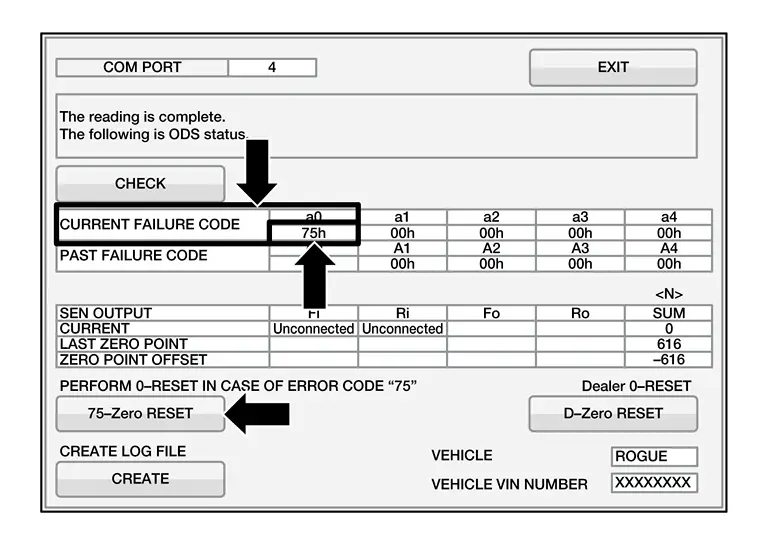
Check for code "75h" to show under CURRENT FAILURE CODE.
-
If code "75h" shows under CURRENT FAILURE CODE, go to step 12.
-
If code "75h" does not shows under CURRENT FAILURE CODE, STOP HERE. This procedure dose not apply. Refer to ASIST and the ESM for further diagnostic assistance.
-
-
Select 75-Zero RESET
-
Select OK.
-
The 75-Zero reset process will run for about 7 seconds.
-
-
When the screen displays "Please turn IGN-OFF, Then IGN-ON again.", turn OFF the ignition, and then turn ON the ignition.
-
After turning ON the ignition, select OK.
-
The 75-Zero reset process will run for about 7 seconds.
-
-
When the screen in step 12 is displayed, the 75-Zero RESET process is complete.
-
Verify code "75h" is NOT displayed under CURRENT FAILURE CODE.
-
-
Select EXIT in the upper right corner.
-
Turn OFF the ignition, and then turn ON the ignition.
-
Disconnect tool NI-51594, and use CONSULT PC to Erase All DTC.
>>
Work End.
Other materials:
Transfer: Ty92a. Service Data and Specifications (sds). Service Data and Specifications (sds)
Service Data and Specifications (sds)
General Specifications
Applied model Axle AWD
Engine KR15DDT
Transaxle CVT
Transfer model
TY92A
Gear ratio
0.404
Number of teeth
Ring gear
42
Drive pinion
17
Oil capacity
Refer to Fluids and Lubricants.
...
Dtc/circuit Diagnosis. Intelligent Key Warning Buzzer
Diagnosis Procedure
CHECK INTELLIGENT KEY WARNING BUZZER POWER SUPPLY CIRCUIT
Ignition switch OFF.
Check signal between Intelligent Key warning buzzer harness connector and ground using oscilloscope.
(+) (–) Condition
Signal
(Reference value)
Intelligent Key warning buzzer
...
Drivetrain Can Communication 1 Circuit
Diagnosis Procedure
CHECK CAN DIAGNOSIS
Check the CAN diagnosis results from CONSULT to see that the drivetrain CAN communication 2 circuit has no malfunction.
Is the drivetrain CAN communication circuit 2 normal?
YES>>
GO TO 2.
NO>>
Check and repair drivetrain CAN communication ...