
Nissan Rogue (T33) 2021-Present Service Manual: Basic Inspection :: Diagnosis and Repair Work Flow
Work Flow
OVERALL SEQUENCE
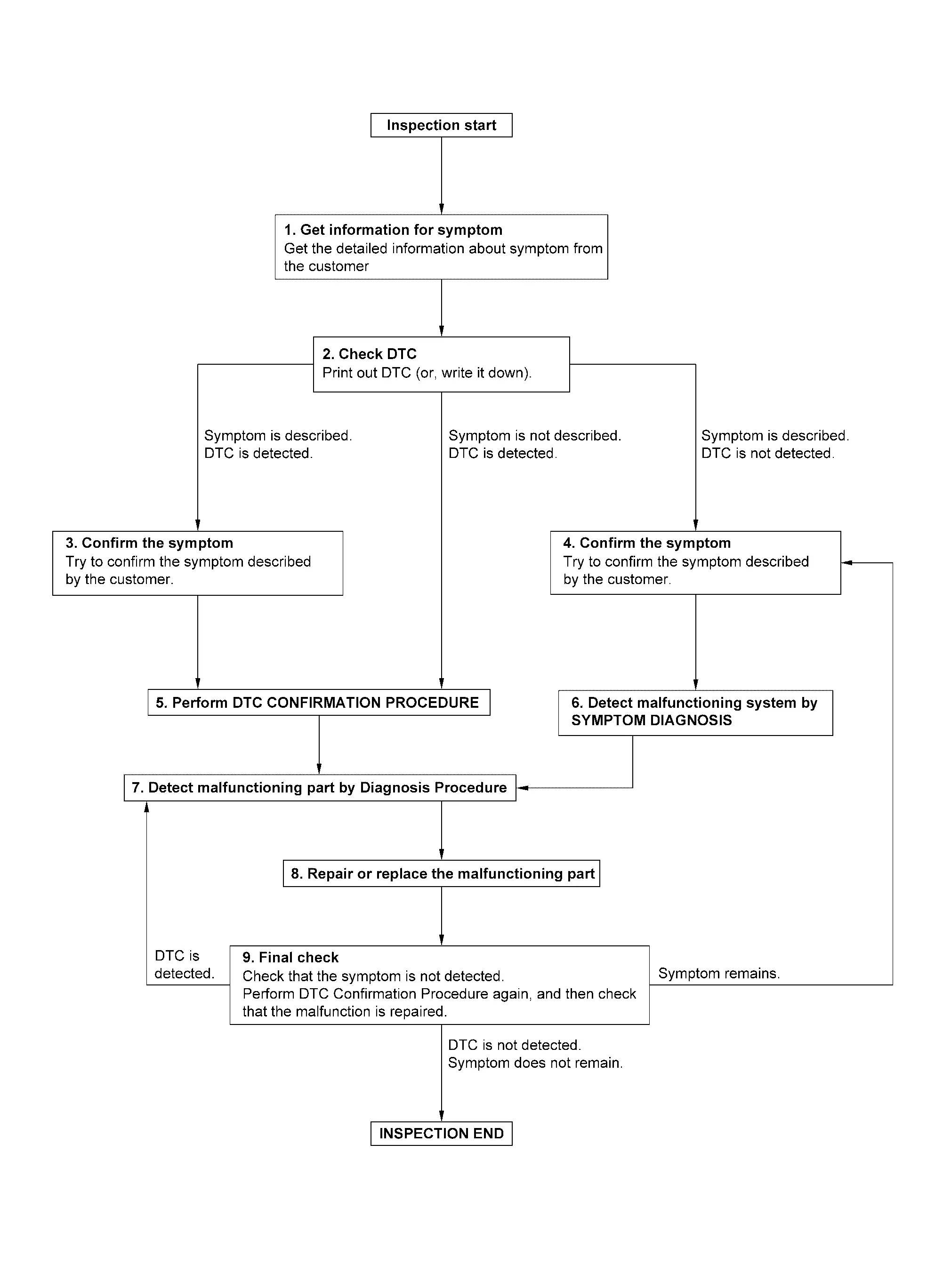
DETAILED FLOW
GET INFORMATION FOR SYMPTOM
-
Get detailed information from the customer about the symptom (the condition and the environment when the incident/malfunction occurs).
-
Check operation condition of the function that is malfunctioning.
>>
GO TO 2.
CHECK DTC
-
Check DTC.
-
Perform the following procedure if DTC is detected.
-
Record DTC (Print them out using CONSULT).
-
Erase DTC.
-
Study the relationship between the cause detected by DTC and the symptom described by the customer.
-
Are any symptoms described and any DTC detected?
Symptom is described, DTC is detected>>GO TO 3.
Symptom is described, DTC is not detected>>GO TO 4.
Symptom is not described, DTC is detected>>GO TO 5.
CONFIRM THE SYMPTOM
Try to confirm the symptom described by the customer.
Verify relation between the symptom and the condition when the symptom is detected.
>>
GO TO 5.
CONFIRM THE SYMPTOM
Try to confirm the symptom described by the customer.
Verify relation between the symptom and the condition when the symptom is detected.
>>
GO TO 6.
PERFORM DTC CONFIRMATION PROCEDURE
Perform DTC CONFIRMATION PROCEDURE for the detected DTC, and then check that DTC is detected again.
Is DTC detected?
YES>>GO TO 7.
NO>>Check according to Intermittent Incident.
DETECT MALFUNCTIONING SYSTEM BY SYMPTOM DIAGNOSIS
Detect malfunctioning system according to SYMPTOM DIAGNOSIS based on the confirmed symptom in step 4, and determine the trouble diagnosis order based on possible causes and symptom.
>>
GO TO 7.
DETECT MALFUNCTIONING PART BY DIAGNOSIS PROCEDURE
Inspect according to Diagnosis Procedure of the system.
Is malfunctioning part detected?
YES>>GO TO 8.
NO>>Check according to Intermittent Incident.
REPAIR OR REPLACE THE MALFUNCTIONING PART
-
Repair or replace the malfunctioning part.
-
Reconnect parts or connectors disconnected during Diagnosis Procedure again after repair and replacement.
-
Check DTC. If DTC is detected, erase it.
>>
GO TO 9.
FINAL CHECK
When DTC is detected in step 2, perform DTC CONFIRMATION PROCEDURE again, and then check that the malfunction is repaired securely.
When symptom is described by the customer, refer to confirmed symptom in step 3 or 4, and check that the symptom is not detected.
Is DTC detected and does symptom remain?
YES-1>>DTC is detected: GO TO 7.
YES-2>>Symptom remains: GO TO 4.
NO>>Before returning the Nissan Ariya vehicle to the customer, always erase DTC.
Other materials:
P0531 A/c Refrigerant Pressure Sensor
DTC Description
DTC DETECTION LOGIC DTC
CONSULT screen terms
(Trouble diagnosis content)
DTC detection condition
P0531
00
REFRIGERANT PRESS SENSOR A
(A/C refrigerant pressure sensor A circuit range/performance
Diagnosis condition
Engine running at idle
Signal (termin ...
Ecu Diagnosis Information. Air Bag Diagnosis Sensor Unit
DTC Index
Self Diagnostic Result DTC Diagnostic item SRS air bag warning lamp Reference
B0001–09
DRIVER AIRBAG MODULE
ON
DTC Description
B0001–11
DRIVER AIRBAG MODULE
ON
DTC Description
B0001–12
DRIVER AIRBAG MODULE
ON
DTC Description
B0001–13 ...
Affichages et témoins de ProPILOT
Modèles avec affichage plein écran
Modèles avec compteurs analogiques et affichage couleur
ProPILOT Assist, ProPILOT Assist 1.1
Les affichages et témoins du système ProPILOT Assist du Nissan Rogue permettent au conducteur de comprendre en un coup d’œil l’état du système, les ...