
Nissan Rogue (T33) 2021-Present Service Manual: B2e08-01 Microphone
DTC Description
DTC DETECTION LOGIC
| DTC No. |
CONSULT screen terms (Trouble diagnosis content) | DTC detection condition | ||
|---|---|---|---|---|
| B2E08–01 |
Microphone (Microphone) |
1 | Diagnosis condition | When ignition switch is ON. |
| Signal (terminal) | Microphone signal | |||
| Threshold | 7.2 V or more | |||
| Diagnosis delay time | 1 second or more | |||
| 2 | Diagnosis condition | When ignition switch is ON. | ||
| Signal (terminal) | Microphone signal | |||
| Threshold | 0.2 V or less | |||
| Diagnosis delay time | 1 second or more | |||
POSSIBLE CAUSE
-
Microphone signal circuit short to power supply
-
Microphone signal circuit short to ground
-
Microphone
FAIL-SAFE
Microphone does not operate
DTC CONFIRMATION PROCEDURE
PERFORM DTC CONFIRMATION PROCEDURE
 With CONSULT
-
Turn ignition switch ON.
-
Turn ignition switch OFF and wait at least 30 seconds.
-
Turn ignition switch ON and wait at least 30 seconds or more.
-
Select “Self Diagnostic Result� mode of “IVC� using CONSULT.
-
Check DTC.
Is DTC B2E08-01 detected?
YES>>Refer to Diagnosis Procedure.
NO-1>>To check malfunction symptom before repair: Refer to Intermittent Incident.
NO-2>>Confirmation after repair: INSPECTION END
Diagnosis Procedure
CHECK MICROPHONE SIGNAL CIRCUIT AND MICROPHONE POWER SUPPLY CIRCUIT CONTINUITY
-
Turn ignition switch OFF.
-
Disconnect TCU connector and microphone connector.
-
Check continuity between TCU connector and microphone connector.
TCU Microphone Continuity Connector Terminal Connector Terminal M35 17 R8 8 Existed 18 3 -
Check the continuity between TCU connector and ground.
TCU Ground Continuity Connector Terminal M35 18 Not existed 17
Is the inspection result normal?
YES>>GO TO 2.
NO>>Repair or replace harness or connectors.
CHECK MICROPHONE POWER SUPPLY VOLTAGE
-
Connect TCU connector and microphone connector.
-
Turn ignition switch ON.
-
Check voltage between TCU connector and ground.
(+) (−) Voltage
(Approx.)TCU Connector Terminal M35 18 Ground 4.72 V
Is the inspection result normal?
YES>>GO TO 3.
NO>>Replace TCU. Refer to Removal & Installation.
CHECK MICROPHONE SIGNAL
Check signal between TCU connector and ground.
| (+) | (−) | Condition | Reference value | |
|---|---|---|---|---|
| TCU | ||||
| Connector | Terminal | |||
| M35 | 17 | Ground | Speak into microphone. |
|
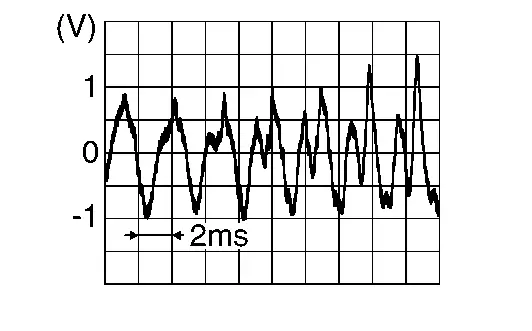
Is the inspection result normal?
YES>>Replace TCU.Refer to Removal & Installation.
NO>>Replace microphone.Refer to Removal and Installation.
Other materials:
P1098 Humidity Temperature Sensor
DTC Description
DTC DETECTION LOGIC DTC
CONSULT screen terms
(Trouble diagnosis content)
DTC detection condition
P1098
00
Humidity temperature sensor
(Humidity temperature sensor Range/Performance)
Diagnosis condition
Engine cold start
Signal (terminal)
�
T ...
Adas Control Unit. Ecu Diagnosis Information. Adas Control Unit 2
Adas Control Unit 2
Without Propilot Assist 2.1
Reference Value
VALUES ON THE DIAGNOSIS TOOLNOTE:
The following table includes information (items)
inapplicable to this Nissan Ariya vehicle. For information (items)
applicable to this vehicle, refer to CONSULT display items.
Monitor item ...
Driver Monitor Camera Control Unit
Reference Value
VALUES ON THE DIAGNOSIS TOOL Monitor item Condition Value/Status
Left eye
Ignition switch ON
When the open / closed state of the driver's right eye is unclear
Invalid
When the driver's right eye is open
Open
When the driver's right eye is closed
Close
...