
Nissan Rogue (T33) 2021-Present Service Manual: B2720-34 Corner Sensor [rl]
DTC Description
DTC DETECTION LOGIC
| DTC | CONSULT screen items (Trouble diagnosis content) | DTC detection condition | ||
|---|---|---|---|---|
| B2720-34 |
CORNER SENSOR [RL] (Corner sensor [rear left]) |
Diagnosis condition | When ignition switch is ON | |
| Signal (terminal) | Rear sonar sensor signal LH outer | |||
| Threshold | An abnormal sensor signal is input from sonar sensor (Pulse signal high side is short) | |||
| Diagnosis delay time | 4 seconds or more | |||
POSSIBLE CAUSE
-
Harness and connector between sonar control unit and rear sonar sensor LH outer
-
Rear sonar sensor LH outer
FAIL-SAFE
Stop the obstacle detection function
CONFIRMATION PROCEDURE
PERFORM DTC CONFIRMATION PROCEDURE
 With CONSULT
-
Turn ignition switch ON.
-
Turn ignition switch OFF and wait at least 30 seconds.
-
Turn ignition switch ON and wait at least 30 seconds or more.
-
Select “Self Diagnostic Result� mode of “SONAR� using CONSULT.
-
Check the DTC.
Is DTC “B2720–34� detected?
YES>>Refer to Diagnosis Procedure.
NO-1>>To check malfunction symptom before repair: Refer to Intermittent Incident.
NO-2>>Confirmation after repair: INSPECTION END
Diagnosis Procedure
CHECK REAR SONAR SENSOR SIGNAL LH OUTER CIRCUIT (OPEN)
-
Turn ignition switch OFF.
-
Disconnect sonar control unit connector and rear sonar sensor LH outer connector.
-
Check continuity between sonar control unit harness connector and rear sonar sensor LH outer connector
Sonar control unit Rear sonar sensor LH outer Continuity Connector Terminal Connector Terminal B20 22 B457 2 Existed
Is the inspection result normal?
YES>>GO TO 2.
NO>>Repair the harness or connector.
CHECK REAR SONAR SENSOR LH OUTER GROUND CIRCUIT
Check continuity between sonar control unit harness connector and rear sonar sensor LH outer harness connector.
| Sonar control unit | Rear sonar sensor LH outer | Continuity | ||
|---|---|---|---|---|
| Connector | Terminal | Connector | Terminal | |
| B20 | 14 | B457 | 3 | Existed |
Is the inspection result normal?
YES>>GO TO 3.
NO>>Repair the harness or connector.
CHECK REAR SONAR SENSOR SIGNAL LH OUTER
-
Connect sonar control unit connector and rear sonar sensor LH outer connector.
-
Turn ignition switch ON.
-
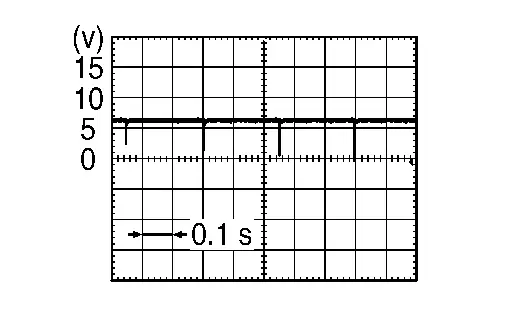
Check the signal between sonar control unit terminals as per the following condition.
+ − Condition Voltage Sonar control unit Connector Terminal Connector Terminal B20 22 B20 14 -
Shift position is in R position.
-
When the sensor is detecting an obstacle
-
Is the inspection result normal?
YES>>Replace the sonar control unit. Refer to Removal and Installation.
NO>>Replace the rear sonar sensor LH outer. Refer to Removal and Installation.
Other materials:
Intelligent Key Interlock Function (with Navigation System)
System Description
SYSTEM DIAGRAMINPUT SIGNAL AND OUTPUT SIGNAL Component Function
BCM
Recognizes the following status and transmits it to driver seat control unit via CAN communication:
Ignition ON signal
Door lock status signal (with Intelligent Key, front door request switch op ...
Removal and Installation. Brake Piping
Front
Exploded View
JAPAN PRODUCTION MODELS WITHOUT ProPILOT Assist 2.1
ABS actuator and electric unit (control unit)
Brake tube
Brake tube bracket
Brake booster
Master cylinder assembly
Bracket
Lock plate
Brake hose
Union bolt
Copper washer
& ...
ProPILOT Assist Systems Overview
Each ProPILOT Assist function on the Nissan Rogue is designed to support the driver in a specific way while driving, adding comfort and helping with routine tasks on the road.
Below is an overview of these ProPILOT Assist features. For complete operating details, refer to the indicated sections of t ...