
Nissan Rogue (T33) 2021-Present Owner’s Manual & User Guide: AEB with Pedestrian Detection system operation
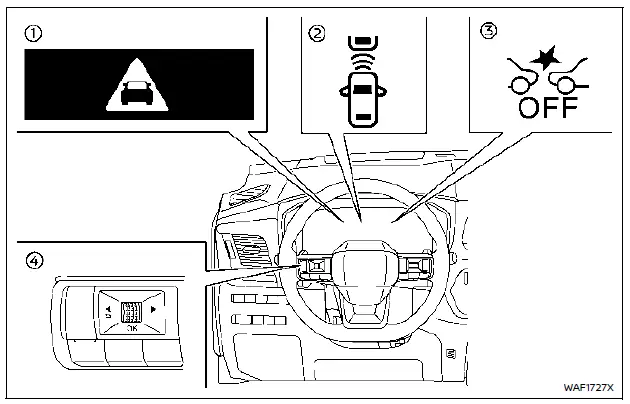
- AEB emergency warning indicator
- Vehicle ahead detection indicator (on the vehicle information display)
- AEB system OFF warning light (on the meter panel)
- Steering-wheel-mounted controls (left side)
The AEB with Pedestrian Detection system on the Nissan Rogue operates when the vehicle is driven above approximately 3 MPH (5 km/h).
For pedestrian and cyclist detection, the AEB with Pedestrian Detection system functions between speeds of 6–50 MPH (10–80 km/h).
When the system detects a potential forward collision risk, the Nissan Rogue will first warn the driver by flashing the yellow vehicle-ahead indicator in the information display and sounding an audible alert. At the same time, the system applies partial braking to help reduce vehicle speed.
If the driver reacts by braking quickly and firmly, and the system still senses a collision risk, the AEB with Pedestrian Detection will automatically increase braking force to help avoid or reduce the severity of the impact.
If the driver does not respond, the system issues a second red flashing warning and another audible alert, followed by stronger partial braking.
If a collision becomes imminent, the Nissan Rogue automatically applies harder emergency braking.
While the AEB with Pedestrian Detection system is operating, you may hear brake-operation sounds. This is normal and indicates that the system is working properly.
NOTE:
The vehicle’s stop lights will illuminate when the AEB with Pedestrian Detection applies braking.
Intersection Assist operates at speeds between 6–16 MPH (10–25 km/h).
The turn signal must be activated for Intersection Assist to detect approaching vehicles. However, a pedestrian can be detected even without using the turn signal.
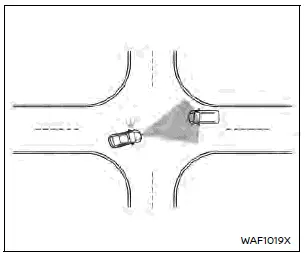
Intersection Assist — approaching vehicle
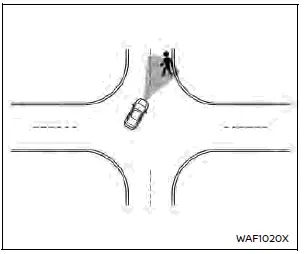
Intersection Assist — pedestrian
NOTE:
- The stop lights illuminate when braking is performed by Intersection Assist.
- When the AEB system detects an obstacle and primes the brakes, you may hear a brief mechanical sound from the front of the Nissan Rogue. This is normal.
Depending on the vehicle speed, distance to the detected object, and overall driving conditions, the system may help the driver avoid a collision or mitigate its severity if avoidance is not possible.
If the driver is steering, accelerating, or braking, the AEB with Pedestrian Detection may activate later than usual or may not activate at all.
The automatic braking stops under the following conditions:
- The steering wheel is turned sharply enough to avoid a collision.
- The accelerator pedal is pressed.
- No vehicle, pedestrian, or cyclist is detected ahead.
If the AEB with Pedestrian Detection system brings the Nissan Rogue to a stop, the vehicle will remain stationary for about 2 seconds before brake pressure is released.
When the driver depresses the brake pedal while the system is applying braking, the pedal may feel different and may produce sound or vibration. This is normal and does not indicate a malfunction. Additional pedal force will increase braking pressure.
Other materials:
Remplacement de la pile de clé intelligente
AVERTISSEMENT
Risque en cas d’ingestion : l’ingestion d’une pile bouton peut entraîner des blessures graves, voire mortelles.
Une pile avalée peut provoquer des brûlures chimiques internes en seulement deux heures.
Conservez toujours les piles neuves et usagées hors de portée des ...
P04f1 Evap System Purge Line
DTC Description
DTC DETECTION LOGIC DTC
CONSULT screen terms
(Trouble diagnosis content)
DTC detection condition
P04F1
00
EVAP system purge line
(EVAP System Purge Line Performance)
Diagnosis condition
During fuel cut after engine warm-up
Signal (terminal)
Mass ai ...
Side Radar (rear Right) (side Radar Rear Rh)
C1e80-44 Control Unit
DTC Description
DTC DETECTION LOGIC DTC No.
CONSULT screen terms
(Trouble diagnosis content) DTC detection condition
C1E80–44
Control unit
(Control unit)
Diagnosis condition
When ignition switch is ON.
Signal (terminal)
-
Threshold
If sid ...