
Nissan Rogue (T33) 2021-Present Owner’s Manual & User Guide: Windshield wiper blades
Cleaning
Basic information
If the windshield of your Nissan Rogue remains unclear after using the washer, or if the wiper blades chatter, wax or debris may be present on the glass or the blades.
Clean the windshield with washer solution or mild detergent. A clean surface will not form water beads during rinsing.
Clean each blade by wiping it with a cloth soaked in washer solution or mild detergent, then rinse with clear water. If the windshield remains unclear afterward, replace the blades.
CAUTION
Worn wiper blades may damage the windshield and reduce visibility.
When a washer nozzle is clogged
If a washer nozzle becomes clogged or malfunctions, it is recommended to have it inspected by a NISSAN dealer. Do not attempt to clear the nozzle using a needle or pin, as this may cause damage.
Replacing
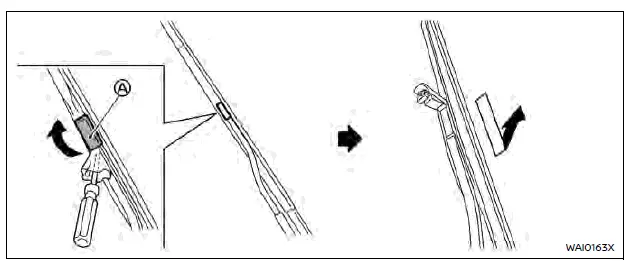
Replace the wiper blades if they are worn.
1. Lift the wiper arm away from the windshield.
2. Open A with a suitable tool, then slide the blade downward to remove it.
3. Install the new blade on the arm until a click is heard.
4. Close A.
CAUTION
- After replacing the wiper blade, return the wiper arm to its original position to avoid damage when opening the hood.
- Make sure the blades fully contact the glass to prevent wind damage to the arm.
Rear window wiper blade
For checking or replacing the rear wiper blade, it is recommended to visit a NISSAN dealer.
Other materials:
Front and rear sonar system
Basic information
The sonar system uses sensors in the front and rear bumpers to warn the driver of nearby obstacles by emitting audible tones. When active, the sonar view appears automatically in the vehicle information display.
WARNING
The sonar system is a convenience feature and not a re ...
Meter/m&a (combination Meter)
B2202-11 Fuel Sender
DTC Description
DTC DETECTION LOGIC DTC No.
CONSULT screen terms
(Trouble diagnosis content) DTC detected condition
B2202-11
Fuel level sensor
(Fuel level sensor)
Diagnosis condition
When ignition switch is ON.
Signal (terminal)
Fuel level sensor si ...
Dtc/circuit Diagnosis. Rear Window Defogger Relay
Component Function Check
CHECK REAR WINDOW DEFOGGER RELAY CONTROL FUNCTION
CONSULT
Ignition switch ON.
Select “Rear defogger� in “Active test� mode of "BCM".
Touch “On�.
Check that the back door window glass is getting warmer.
NOTE:
When glass is hot, never start ...