
Nissan Rogue (T33) 2021-Present Owner’s Manual & User Guide: Windows
Power windows
Basic information
WARNING
- Make sure all passengers keep their hands and other body parts inside the vehicle while it is moving and before you close the windows. Use the window lock switch to help prevent unintended operation of the power windows.
- To help avoid the risk of injury or death due to unintended operation of the vehicle or its systems (including window entrapment or accidental door locking), do not leave children, people who need assistance, or pets unattended in your Nissan Rogue.
In addition, the temperature inside a closed Nissan Rogue on a warm day can quickly rise to dangerous levels and pose a serious risk of injury or death to people and animals.
The power windows operate when the ignition switch is in the ON position, and for a short period after the ignition switch is placed in the OFF position. If the driver’s or front passenger’s door is opened during this time, power window operation is canceled.
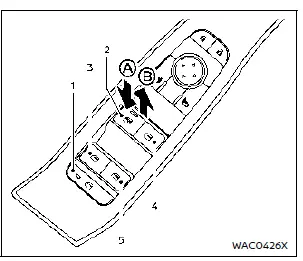
- Window lock button
- Driver side window
- Rear left passenger side window
- Front passenger side window
- Rear right passenger side window
Main power window switch (driver's side)
To open or close a window, push down A or pull up B on the switch and hold it. The main power window switch panel on the Nissan Rogue driver’s door can control all windows in the vehicle.
Locking rear passenger's windows
When the window lock button is pushed (indicator illuminated), the rear passenger windows cannot be operated from the rear door switches. In this state, the rear windows can only be controlled using the driver’s main switch. To restore rear passenger operation, push the window lock button again.
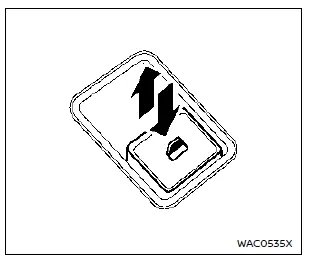
Passenger side power window switch
Each passenger window switch controls its corresponding window. When the driver activates the window lock button, the rear passenger switches are disabled and the rear windows can only be controlled from the driver’s side.
Automatic operation (driver's side)
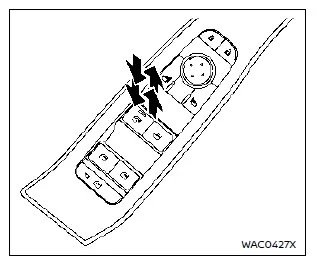
The automatic function allows the driver’s window of the Nissan Rogue to fully open or close without holding the switch.
To fully open the window, press the power window switch down to the second detent and release it. To fully close the window, pull the switch up to the second detent and release it. The switch does not need to be held during automatic operation.
To stop the window while it is opening or closing automatically, move the switch in the opposite direction (up or down).
Auto-reverse function (driver's side)
WARNING
There is a small range just before the fully closed position where objects may not be detected. Make sure all passengers keep their hands and other body parts inside the Nissan Rogue before closing the window.
The auto-reverse function automatically lowers the window if an object is detected while the window is closing using the automatic operation. When the control unit senses an obstruction, the window immediately reverses direction.
Depending on conditions, the auto-reverse function may also activate if an impact or load similar to an obstruction is applied to the window.
Window timer:
The window timer allows the switches to operate for a short time even after the ignition switch is turned to the OFF position. The timer is canceled when the driver’s or front passenger’s door is opened or when the preset time expires.
When power window switch does not operate
If the automatic function of the power windows does not operate correctly, initialize the system using the following procedure.
1. Close the door.
2. Place the ignition switch in the ON position.
3. Pull the power window switch and hold it until the window is fully closed.*1
4. Release the power window switch.
5. Pull the power window switch again and hold it for approximately 5 seconds or more.*2
6. Push the power window switch down and hold it until the window is fully opened.
7. Release the power window switch.
8. Push the power window switch down and hold it for approximately 5 seconds or more.*2
9. Pull the power window switch and hold it until the window is fully closed.*1
10. Use the automatic open/close function to confirm that initialization is complete.
*1: If the window stops before it reaches the fully closed position, release the switch, then pull and hold it again to fully close the window.
*2: After pulling or pushing the power window switch and holding it for approximately 5 seconds or more, the window will move again.
If the window cannot be closed automatically because the auto-reverse function activates due to a malfunction, use the following steps to cancel auto-reverse.
1. Pull the power window switch up until the auto-reverse function activates and the window reverses automatically.
2. Repeat this operation twice.
3. Pull the power window switch and hold it to fully close the window and confirm that cancellation is complete.
WARNING
When the auto-reverse function is canceled, the window will not reverse automatically even if an obstacle is detected. Always confirm that passengers keep their hands and other body parts inside the vehicle before closing the windows.
If the power windows still do not operate properly after performing these steps, have your Nissan Rogue inspected by a NISSAN dealer.
Other materials:
Wireless Charger. Basic Inspection. Diagnosis and Repair Work Flow
Diagnosis and Repair Work Flow
Work Flow
OVERALL SEQUENCEDETAILED FLOWINTERVIEW FOR MALFUNCTION
It is also important to clarify the customer concerns before starting
the inspection. Interview the customer about the concerns carefully and
understand the symptoms fully.
NOTE:
The customers ar ...
Removal and Installation. Sunshade Motor Assembly
Exploded View
Refer to Exploded View.
Removal and Installation
REMOVALCAUTION:
Before removing sunshade motor, check that sunshade is fully opened.
After removing sunshade motor, never attempt to rotate sunshade motor assembly as a single unit.
Remove headlining to make work space. ...
Dtc/circuit Diagnosis. U20c5-87 Can Comm Err (audio Amp.)
DTC Description
DESCRIPTIONCAN (Controller Area Network) is a serial
communication line for real time applications. It is an on-Nissan Ariya
vehicle multiplex communication line with high data communication speed
and excellent error detection ability. Modern Nissan Ariya vehicle is
equipped ...