
Nissan Rogue (T33) 2021-Present Service Manual: Usb Charge Port :: Removal and Installation. Usb Charge Port
Usb Charge Port
Rear Usb Charge Port
Removal and Installation
REMOVAL
Remove console rear finisher. Refer to Removal and Installation.
Press the USB charge port fixing pawl from the back of the console rear finisher to remove the USB charge port.
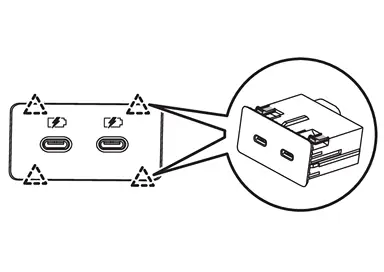
 |
: Pawl |
INSTALLATION
Note the following, and install in the reverse order of removal.
Align the cut outs of USB charge port and console rear finisher.
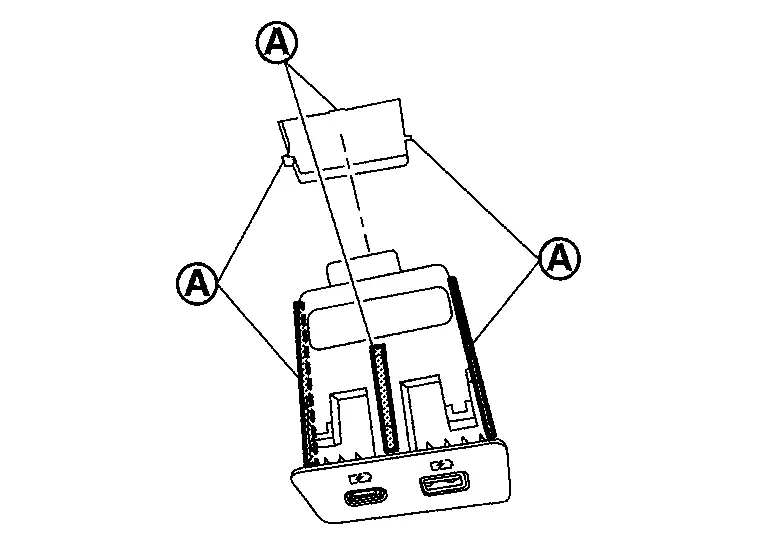
| A | : Cut out |
Other materials:
Tcm
Reference Value
CONSULT DATA MONITOR STANDARD VALUE
In CONSULT, electric shift timing or lock-up timing, i.e. operation
timing of each solenoid valve, is displayed. Therefore, if there is an
obvious difference between the shift timing estimated from a shift shock
(or engine speed variation ...
Power Supply and Ground Circuit
Diagnosis Procedure
CHECK FUSE
Check that the following fuse is not blown:
Signal name Fuse No.
Ignition power supply
40 (10 A)
Is the fuse blown?
YES>>
Replace the blown fuse after repairing the affected circuit.
NO>>
GO TO 2.
CHECK ADAS CONTROL UNIT 2 POWER SUPP ...
Système d'essuie-glace automatique avec détecteur de pluie du Nissan Rogue
Le Nissan Rogue est doté d'une technologie de détection de précipitations intelligente. Ce système d'essuie-glace automatique, assisté par un capteur de pluie optique situé sur la partie supérieure du pare-brise (derrière le rétroviseur intérieur), est capable d'activer les balais sa ...