
Nissan Rogue (T33) 2021-Present Service Manual: System Description :: System (power Door Lock System)
System Description
SYSTEM DIAGRAM
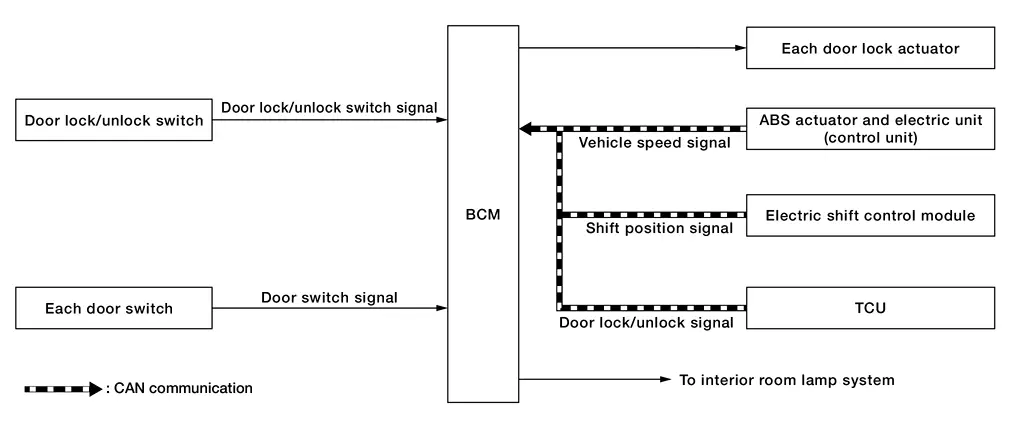
| Component | Function |
|---|---|
| Door lock/unlock switch | Refer to Door Lock/Unlock Switch. |
| Door switch | Refer to Door Lock Assembly. |
| Door lock actuator | Refer to Door Lock Assembly. |
| ABS actuator and electric unit (control unit) | Transmit Nissan Ariya vehicle speed signal to BCM via CAN communication. |
| Electric shift control module | Transmit shift position signal to BCM via CAN communication. |
| BCM |
|
| TCU | Transmit door lock/unlock signal to BCM via CAN communication. |
DOOR LOCK FUNCTION
Door Lock/Unlock Switch
-
Interlocked with the locking operation of door lock/unlock switch, door lock actuator of all doors are locked.
-
Interlocked with the unlocking operation of door lock/unlock switch, door lock actuator of all doors are unlocked.
INTERIOR ROOM LAMP CONTROL FUNCTION
Interior room lamp is controlled according to door lock /unlock state, refer to System Description.
AUTOMATIC DOOR LOCK/UNLOCK FUNCTION (LOCK OPERATION)
The interlock door lock function is the function that locks all doors linked with the vehicle speed.
Vehicle Speed Sensing Auto Door Lock
All doors are locked when the vehicle speed reaches 6 MPH (10 km/h) or more.
BCM outputs the lock signal to all door lock actuators when it detects all doors are closed and the Nissan Ariya vehicle speed received from the ABS actuator and electric unit (control unit) via CAN communication becomes 6 MPH (10 km/h) or more.
AUTOMATIC DOOR LOCK/UNLOCK FUNCTION (UNLOCK OPERATION)
The automatic door lock/unlock function is the function that unlocks all doors linked with the key position or shift position. It has 2 types as per the following items.
IGN OFF Interlock Door Unlock
All doors are unlocked when the ignition position is changed from ON to OFF.
BCM outputs the unlock signal to all door lock actuators when it detects that the ignition position is changed from ignition switch ON to OFF.
P Range Interlock Door Unlock
All doors are unlocked when shifting the selector lever from any position other than the P to P position.
BCM outputs the unlock signal to all door lock actuators when it detects the shift position signal received from electric shift control module via CAN communication is shifted from any position other than the P to P position.
Setting Change of Automatic Door Unlock Function
The unlock operation setting of the automatic door unlock function can be changed by combination meter setting.
REAR DOOR ALERT WARNING
It is a function to prevent mislay of luggage in the rear seat when getting off, by setting the function with the combination meter in advance when getting on.
Operation condition
When all of the following conditions are satisfied.
| Setting | Condition |
|---|---|
| Alert only |
|
| Alert & horn |
|
TELEMATICS LOCK/UNLOCK FUNCTION
-
BCM outputs the lock signal to all door lock actuators when it detects the door lock signal received from TCU via CAN communication.
-
BCM outputs the unlock signal to driver/all door lock actuators (selective unlock function operation) when it detects the door unlock signal received from TCU via CAN communication.
Other materials:
Removal and Installation. Brake Power Backup Unit
Exploded View
1
Brake power backup unit
2
Bracket (lower)
3
Bracket (upper)
Removal & Installation
REMOVALPower switch OFF and disconnect CONSULT from DDL2 diagnosis connector.
Check that room lamps are turned OFF after closing all doors
including back door, and then ...
System Description. Diagnosis System (sonar Control Unit)
CONSULT Function
APPLICATION ITEMSCONSULT can display each diagnostic item using the diagnostic test modes shown as follows: Diagnosis mode Function
Self diagnosis result
The sonar control unit self diagnosis results are displayed.
ECU identification
The sonar control unit part numbe ...
Affichages et témoins de ProPILOT
Modèles avec affichage plein écran
Modèles avec compteurs analogiques et affichage couleur
ProPILOT Assist, ProPILOT Assist 1.1
Les affichages et témoins du système ProPILOT Assist du Nissan Rogue permettent au conducteur de comprendre en un coup d’œil l’état du système, les ...