
Nissan Rogue (T33) 2021-Present Owner’s Manual & User Guide: Storage
Cup holders
Basic information
CAUTION
- Avoid abrupt acceleration or braking while using the cup holder to prevent spills. Hot liquids may cause burns to you or your passengers.
- Only place soft cups in the holder. Hard containers may become hazardous in a sudden stop or accident.
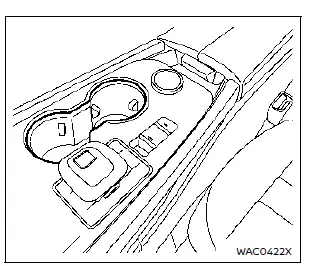
Center console
Front
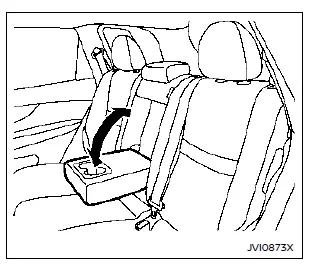
Rear seat
The rear cup holders in the Nissan Rogue are integrated into the fold-down rear armrest, offering convenient access for rear passengers.
Soft bottle holders
CAUTION
- Do not store items other than soft bottles in the bottle holders, as loose objects may become dangerous during sudden braking or an accident.
- Do not place open liquid containers in the bottle holders.
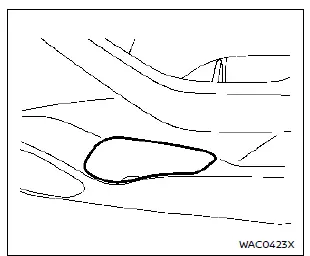
Door (front and rear)
Single luggage board
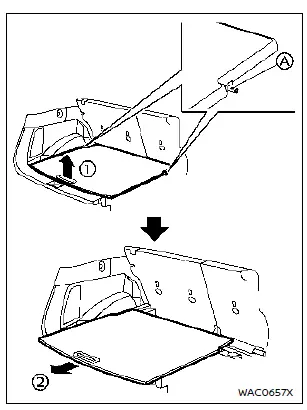
The luggage board in the Nissan Rogue is secured by two retainer pins A.
To remove the board safely and prevent damage, follow these steps:
1. Lift the board slightly upward 1 without pulling it too high.
2. Pull the board rearward 2 to disengage the front retainer pins A.
3. Remove the board from the vehicle.
When reinstalling, ensure the retainer pins A are positioned back into their original mounting points for proper fitment.
Adjustable luggage floor
Basic information
The adjustable luggage boards allow you to configure the cargo area of the Nissan Rogue in multiple ways, depending on your storage needs.
WARNING
Do not place objects heavier than 165 lbs (75 kg) on the load floor while it is in the upper position.
CAUTION
- Do not push the front edge of the luggage board with force, as this may cause tilting and potential injury.
- Avoid handling the board roughly to prevent deformation.
- Do not recline the seatbacks when the luggage board is in the upper position.
- Do not stack cargo higher than the seatbacks. Sudden stops or collisions could cause unsecured items to become hazardous.
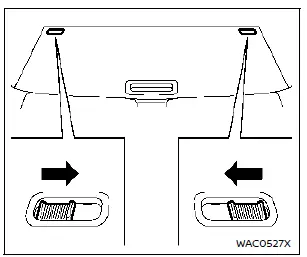
Before adjusting the rear (outer) luggage board, release the locks on both sides as shown.
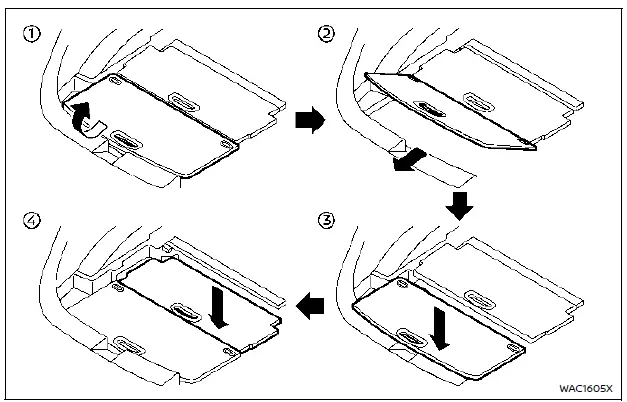
Two-stage mode (if so equipped)
1. Lift the rear board upward 1 to approximately 30°.
2. Pull the board toward the rear 2 and slide it into the lower luggage space 3.
3. Lift the front (inner) board and store it similarly in the lower space 4.
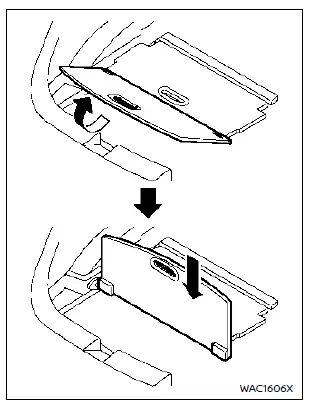
Vertical mode
1. Raise the rear board to 90°.
2. Push downward until it locks into place.
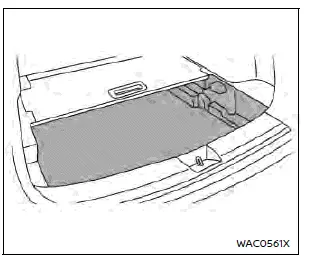
Luggage under space
To access the under-floor storage, remove the rear board.
Glove box
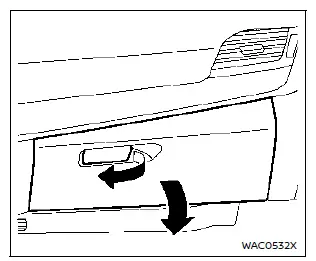
WARNING
Keep the glove box closed while driving to avoid injury in a sudden stop.
Pull the handle to open the glove box. Push the lid firmly to close it until the lock engages.
Console box
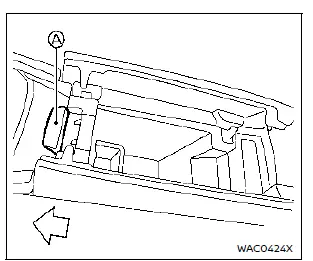
To open the console box lids, press knob A rearward. To close, push each lid down until they latch.
If an object is placed on a lid, that side may not open—remove the obstruction and try again.
Lower console tray
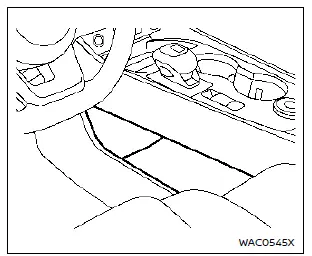
CAUTION
Do not place objects in the lower console tray that could shift suddenly and cause injury during a collision or abrupt braking.
Sunglasses holder

WARNING
Keep the sunglasses holder closed while driving to prevent obstructing your view.
CAUTION
- Use the holder only for sunglasses.
- Avoid leaving sunglasses inside when parked in direct sunlight, as heat may damage them.
Push and release the holder to open it. Store only one pair at a time.
Card holder

Insert a card into the holder as shown.
Coat hooks

The coat hook is located above the rear side window in the Nissan Rogue.
Other materials:
Other supplemental front-impact air bag precautions
WARNING
Do not place any objects on the steering wheel pad or instrument panel. Do not place objects between any occupant and the steering wheel or instrument panel. These may turn into dangerous projectiles if the front air bags deploy.
Do not place sharp-edged objects or heavy items on ...
Fuel Tank Temperature Sensor
Component Inspection
CHECK FUEL TANK TEMPERATURE (FTT) SENSOR
Turn ignition switch OFF.
Disconnect fuel level sensor unit and fuel pump harness connector.
Check the resistance between fuel level sensor unit and fuel pump terminals.
Fuel level sensor unit and fuel pump Condition R ...
System Description. Component Parts
Component Parts Location
With 8" Color Display
No. Component Function
1.
Rear sonar sensor RH inner
Refer to Sonar Sensor.
2.
Rear sonar sensor RH outer
3.
Sonar control unit
Refer to Sonar Control Unit.
4.
Around view monitor control unit
Receives the so ...