
Nissan Rogue (T33) 2021-Present Service Manual: Rear View Monitor :: Basic Inspection. Diagnosis and Repair Work Flow
Diagnosis and Repair Work Flow
Work Flow
OVERALL SEQUENCE
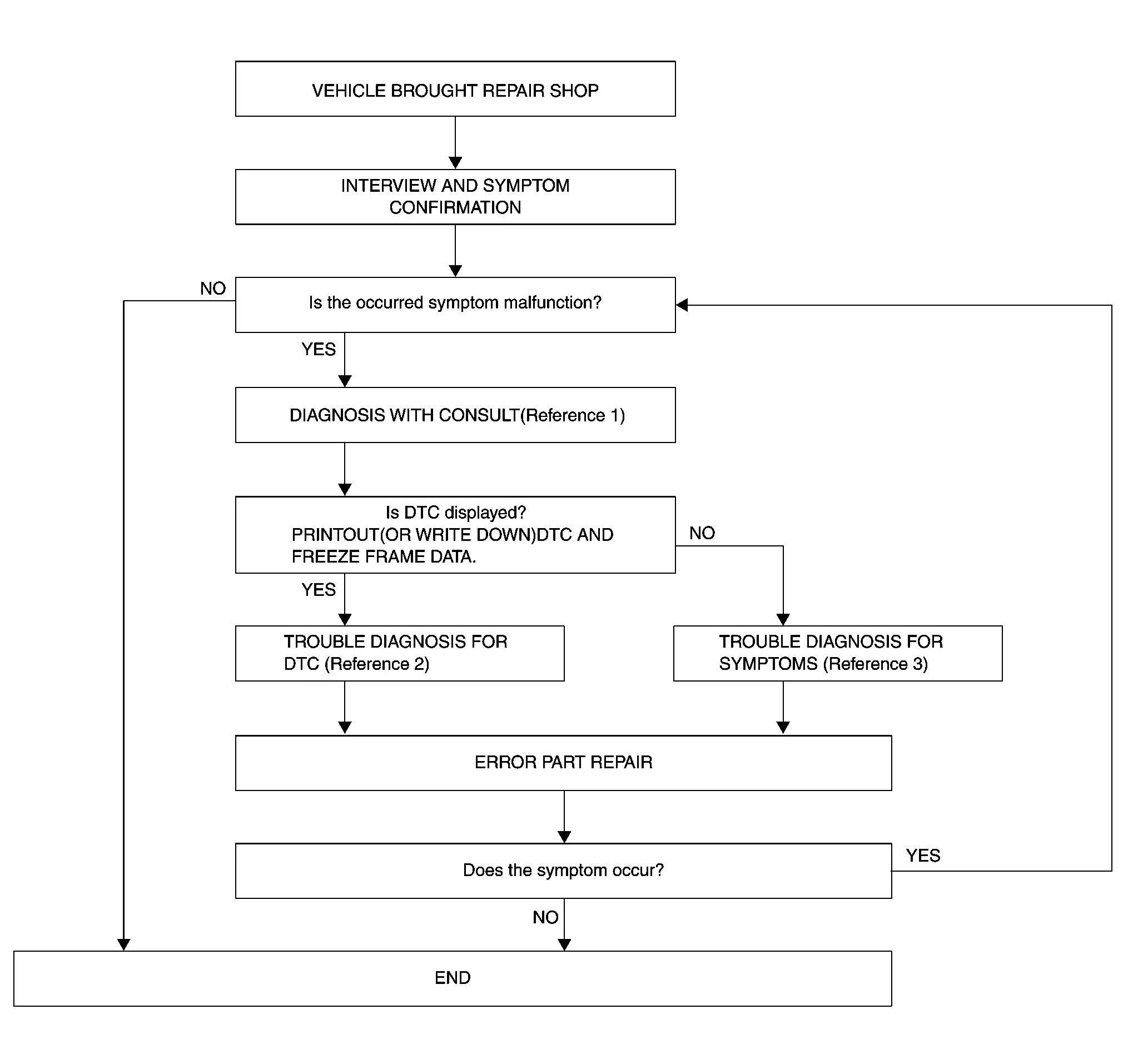
-
Reference 1··· CONSULT Function
-
Reference 2··· DTC Index
-
Reference 3··· Symptom Table
DETAILED FLOW
INTERVIEW AND SYMPTOM CONFIRMATION
Check the malfunction symptoms by performing the following items.
-
Interview the customer to obtain the malfunction information (conditions and environment when the malfunction occurred).
-
Check the symptom.
Is the occurred symptom malfunction?
YES>>GO TO 2.
NO>>INSPECTION END
DIAGNOSIS WITH CONSULT
-
Connect CONSULT and perform a self-diagnosis for “MULTI AV�. Refer to CONSULT Function.
 NOTE:
NOTE:
Skip to step 4 of the diagnosis procedure if “MULTI AV� is not displayed.
-
When DTC is detected, follow the instructions below:
-
Record DTC and Freeze Frame Data.
-
Is DTC displayed?
YES>>GO TO 3.
NO>>GO TO 4.
TROUBLE DIAGNOSIS FOR DTC
-
Check the DTC indicated in the “Self-Diagnosis Results�.
-
Perform the relevant diagnosis referring to the DTC Index. Refer to DTC Index.
>>
GO TO 5.
TROUBLE DIAGNOSIS FOR SYMPTOMS
Perform the relevant diagnosis referring to the diagnosis chart by symptom. Refer to Symptom Table.
>>
GO TO 5.
ERROR PART REPAIR
-
Repair or replace the identified malfunctioning parts.
-
Perform a self-diagnosis for “MULTI AV� with CONSULT.
NOTE:
Erase the stored self-diagnosis results after repairing or replacing the relevant components if any DTC has been indicated in the “Self-Diagnosis Results�.
-
Check that the symptom does not occur.
Does the symptom occur?
YES>>GO TO 1.
NO>>Inspection End.
Other materials:
Dtc/circuit Diagnosis. U214e-87 Can Comm Circuit
Intelligent Key Unit
DTC Description
DESCRIPTIONCAN (Controller Area Network) is a serial
communication line for real time applications. It is an on-Nissan Ariya
vehicle multiplex communication line with high data communication speed
and excellent error detection ability. Modern Nissan Ariya ...
Bouton d'appel d'urgence (SOS) du Nissan Rogue
Assistance et sécurité d'urgence
Informations essentielles sur le système
Les services technologiques NissanConnect équipant le Nissan Rogue offrent une suite complète de solutions de sécurité conçues pour protéger le conducteur et ses passagers en toutes circonstances.
En cas d'incide ...
Type a. Preparation. Preparation
Preparation
Commercial Service Tools
Tool name Description
Variable resistor
Check fuel gauge indication position
Power tool
Loosening screws
...