
Nissan Rogue (T33) 2021-Present Owner’s Manual & User Guide: Rear sunshade
CAUTION
- Do not release the rear sunshade during operation. This could damage the sunshade or cause injury.
- Do not forcefully pull the sunshade. Doing so may elongate the sunshade, leading to improper operation or damage.
- Do not place objects on or near the rear sunshade as this may interfere with proper operation and damage the sunshade.
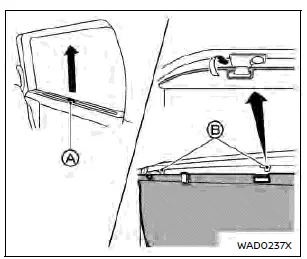
The rear sunshades are installed on the rear seat windows of the Nissan Rogue.
To raise the sunshade, pull the knob A up and hang the sunshade on the hooks B.
To store the sunshade, remove the sunshade from the hooks and lower it.
Assist grips
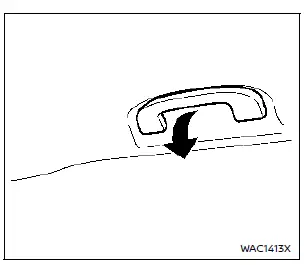
The assist grips are located above the front and rear side windows.
CAUTION
Do not use the assist grip when getting into or out of the vehicle. This may damage the assist grip and cause you to fall.
Other materials:
C1f60-97 Can Comm Circuit
DTC Description
CAN COMMUNICATIONCAN (Controller Area Network) is a serial
communication line for real time applications. It is an on-Nissan Ariya
vehicle multiplex communication line with high data communication speed
and excellent error detection ability. Modern Nissan Ariya vehicle is
eq ...
C10b0-01 Parking Brake Actuator (rh)
DTC Description
DTC DETECTION LOGIC DTC No.
CONSULT screen terms
(Trouble diagnosis content) DTC detection condition
C10B0
01
Parking brake actuator (RH)
[Parking brake actuator (right)]
Diagnosis condition
When parking brake is apply or release
Signal (terminal)
—
...
How to Use This Manual. How to Read Wiring Diagrams
Connector Symbols
Most of connector symbols in wiring diagrams are shown from the terminal side.
Connector symbols shown from the terminal side are enclosed by a single line and followed by the direction mark.
Connector symbols shown from the harness side are enclosed by a double line and ...