
Nissan Rogue (T33) 2021-Present Service Manual: Precaution :: Precautions
Precaution for Supplemental Restraint System (SRS) "AIR BAG" and "SEAT BELT PRE-TENSIONER"
The Supplemental Restraint System such as “AIR BAG� and “SEAT BELT PRE-TENSIONER�, used along with a front seat belt, helps to reduce the risk or severity of injury to the driver and front passenger for certain types of collisions.
Information necessary to service the system safely is included in the “SRS AIR BAG� and “SEAT BELT� sections of this Service Manual.
WARNING:
Always observe the following items for preventing accidental activation:
-
To avoid rendering the SRS inoperative, which could increase the risk of personal injury or death in the event of a collision that would result in air bag inflation, it is recommended that all maintenance and repair be performed by an authorized NISSAN/INFINITI dealer.
-
Improper repair, including incorrect removal and installation of the SRS, can lead to personal injury caused by unintentional activation of the system. For removal of Spiral Cable and Air Bag Module, see “SRS AIR BAG�.
-
Never use electrical test equipment on any circuit related to the SRS unless instructed to in this Service Manual. SRS wiring harnesses can be identified by yellow and/or orange harnesses or harness connectors.
PRECAUTIONS WHEN USING POWER TOOLS (AIR OR ELECTRIC) AND HAMMERS
WARNING:
Always observe the following items for preventing accidental activation:
-
When working near the Air Bag Diagnosis Sensor Unit or other Air Bag System sensors with the ignition/power switch ON or engine running, never use air or electric power tools or strike near the sensor(s) with a hammer. Heavy vibration could activate the sensor(s) and deploy the air bag(s), possibly causing serious injury.
-
When using air or electric power tools or hammers, always switch the ignition/power switch OFF, disconnect the 12V battery or batteries, and wait at least 3 minutes before performing any service.
Precautions for Removing Battery Terminal
-
With the adoption of Auto ACC function, ACC power is automatically supplied by operating the Intelligent Key or remote keyless entry or by opening/closing the driver side door. In addition, ACC power is supplied even after the ignition switch is placed to the OFF position, i.e. ACC power is supplied for a certain fixed time.
-
When disconnecting the 12V battery terminal, turn off the ACC power before disconnecting the 12V battery terminal, observing “How to disconnect 12V battery terminal� described below.
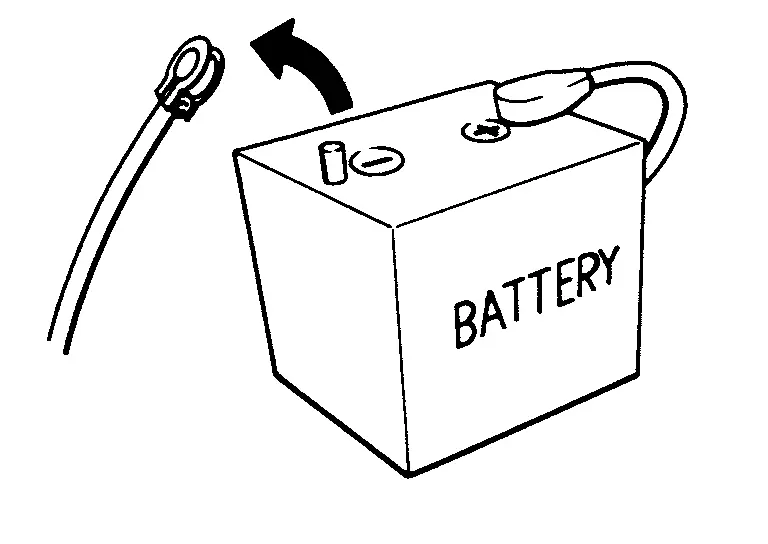
 NOTE:
NOTE:
Some ECUs operate for a certain fixed time even after ignition switch is placed OFF and ignition power supply is stopped. If the battery terminal is disconnected before ECU stops, accidental DTC detection or ECU data damage may occur.
-
For Nissan Ariya vehicles with the 2-batteries, be sure to connect the main battery and the sub battery before placing ON the ignition switch.
NOTE:
If the ignition switch is placed ON with any one of the terminals of main battery and sub battery disconnected, then DTC may be detected.
-
After installing the 12V battery, always check "Self Diagnosis Result" of all ECUs and erase DTC.
NOTE:
The removal of 12V battery may cause a DTC detection error.
HOW TO DISCONNECT 12V BATTERY TERMINAL
Disconnect 12V battery terminal according to instruction described below.
-
Open the hood.
-
Place ignition switch in the ON position.
-
Place ignition switch to the OFF position with the driver side door opened.
-
Get out of the Nissan Ariya vehicle and close the driver side door.
-
Wait at least 3 minutes.
CAUTION:
While waiting, never operate the Nissan Ariya vehicle such as locking, opening, and closing doors. Violation of this caution results in the activation of ACC power supply according to the Auto ACC function.
-
Remove 12V battery terminal.
CAUTION:
After installing 12V battery, always check self-diagnosis results of all ECUs and erase DTC.
Service
-
Disconnect battery negative terminal in advance.
-
Disconnect air bag system line in advance.
-
Never tamper with or force air bag lid open, as this may adversely affect air bag performance.
-
Be careful not to scratch pad and other parts.
-
When removing or disassembling any part, be careful not to damage or deform it. Protect parts, that may get in the way with a shop cloth.
-
When removing parts with a screwdriver or other tool, cover the tool surface with vinyl tape to protect parts.
-
Keep removed parts protected with a shop cloth.
-
If a clip is deformed or damaged, replace it.
-
If an unreusable part is removed, replace it with a new one.
-
Tighten bolts and nuts firmly to the specified torque.
-
After reassembly is complete, check that each part functions correctly.
-
Remove stains via the following procedure.
Water-soluble stains:
Dip a soft cloth in warm water, and then squeeze it tightly. After wiping off the stain, wipe with a soft dry cloth.
Oil stain:
Dissolve a synthetic detergent in warm water (density of 2 to 3%), dip the cloth, then wipe off the stain with the cloth. Next, dip the cloth in fresh water and squeeze it tightly. Then wipe off the detergent completely. Then wipe the area with a soft dry cloth.
-
Never use any organic solvent, such as thinner or benzine.
Other materials:
Fusibles
Compartiment moteur
Informations de base
AVERTISSEMENT
N’utilisez jamais un fusible dont l’ampérage est supérieur ou inférieur à la valeur indiquée sur le couvercle de la boîte à fusibles. L’utilisation d’un fusible inadapté peut endommager le circuit électrique, les unit ...
Dtc/circuit Diagnosis. Brake Warning Lamp
Component Function Check
CHECK BRAKE WARNING LAMP FUNCTION (1)
Check that brake warning lamp turns ON for several second after Ignition switch is turned ON.
Is the inspection result normal?
YES>>
GO TO 2.
NO>>
Refer to Diagnosis Procedure.
CHECK BRAKE WARNING LAMP FUNCTION (2)
...
Air cleaner
To remove the filter on the Nissan Rogue, release the lock pins 1 and pull the unit upward 2.
The viscous paper filter element (if equipped) is not designed to be cleaned and reused. The dry paper type element may be cleaned and reused when its condition allows. Replace the filter according ...