
Nissan Rogue (T33) 2021-Present Service Manual: Periodic Maintenance :: Rear Disc Brake
Brake Pad
Inspection and Adjustment
INSPECTION
Check brake pad wear thickness from an inspection hole on cylinder body. Check using a scale if necessary.
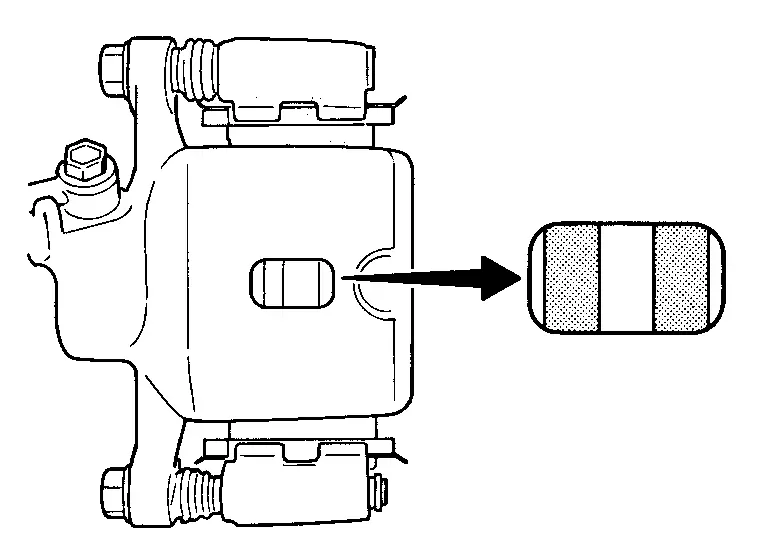
| Wear thickness | : Refer to Rear Disc Brake. |
ADJUSTMENT
Burnish contact surfaces between disc rotor and brake pads according to the following procedure after refinishing or replacing brake pads, or if a soft pedal occurs at very low mileage.
CAUTION:
-
Be careful of vehicle speed because the brake does not operate firmly/securely until pads and disc rotor are securely fitted.
-
Only perform this procedure under safe road and traffic conditions. Use extreme caution.
Drive vehicle on straight, flat road.
Depress brake pedal with the power to stop vehicle within 3 to 5 seconds until the Nissan Ariya vehicle stops.
Drive without depressing brake for a few minutes to cool the brake.
Repeat steps 1 to 3 until pad and disc rotor are securely fitted.
Disc Rotor
Inspection and Adjustment
INSPECTION
Appearance
Check surface of disc rotor for uneven wear, cracks, and serious damage. Replace it if necessary.
-
For 2WD, refer to Removal and Installation.
-
For AWD, refer to Removal and Installation.
Runout
Fix the disc rotor to the wheel hub and bearing assembly with wheel nuts (2 points at least).
Check the wheel bearing axial end play.
-
For 2WD, refer to Inspection.
-
For AWD, refer to Inspection.
Inspect the runout with a dial indicator to measure at 10 mm (0.39 in) inside the disc edge.
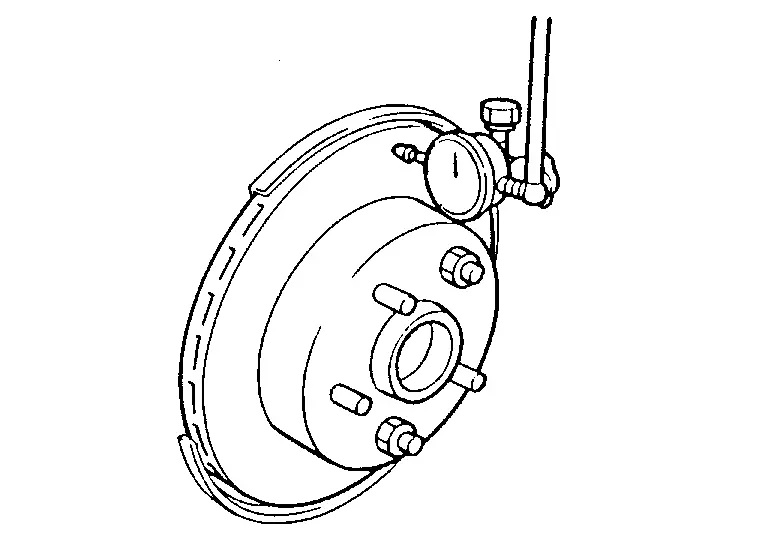
| Runout (with it attached to the Nissan Ariya vehicle) | : Refer to Rear Disc Brake. |
Find the installation position that has a minimum runout by shifting the disc rotor-to-wheel hub and bearing assembly installation position by one hole at a time if the runout exceeds the limit value.
Refinish the disc rotor if the runout is outside the limit even after performing the above operation.
CAUTION:
-
Check in advance that the thickness of the disc rotor is wear thickness + 0.3 mm (0.012 in) or more.
-
If the thickness is less than wear thickness + 0.3 mm (0.012 in), replace the disc rotor.
-
For 2WD, refer to Removal and Installation.
-
For AWD, refer to Removal and Installation.
-
| Wear thickness | : Refer to Rear Disc Brake. |
Thickness
Check the thickness of the disc rotor using a micrometer. Replace the disc rotor if the thickness is below the wear limit.
-
For 2WD, refer to Removal and Installation.
-
For AWD, refer to Removal and Installation.
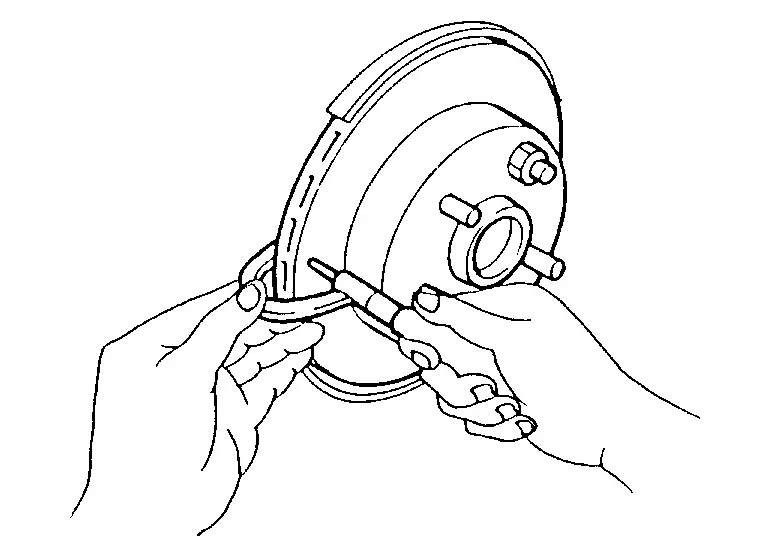
| Wear thickness | : Refer to Rear Disc Brake. |
ADJUSTMENT
Burnish contact surfaces between disc rotors and brake pads according to the following procedure after refinishing or replacing disc rotor, or if a soft pedal occurs at very low mileage.
CAUTION:
-
Be careful of vehicle speed because the brake does not operate firmly/securely until pad and disc rotor are securely fitted.
-
Only perform this procedure under safe road and traffic conditions. Use extreme caution.
Drive vehicle on straight, flat road.
Depress brake pedal with the power to stop vehicle within 3 to 5 seconds until the Nissan Ariya vehicle stops.
Drive without depressing brake for a few minutes to cool the brake.
Repeat steps 1 to 3 until pad and disc rotor are securely fitted.
Other materials:
C1f59-04 Eps Circuit
Without Propilot Assist 2.1
DTC Description
DTC DETECTION LOGIC DTC
CONSULT screen terms
(Trouble diagnosis content) DTC detection condition
C1F59
04
EPS control unit
(Electric power steering control unit)
Diagnosis condition
When engine is running
Signal (termi ...
U2a8c-88 Ethernet Circuit
DTC Description
DTC DETECTION LOGIC DTC No. CONSULT screen terms DTC detected condition
U2A8C-88
Ethernet circuit
Diagnosis condition
When ignition switch is ON.
Signal (terminal)
—
Threshold
Lost ethernet communication with AV control unit
Diagnosis delay time ...
2wd. Preparation. Preparation
Preparation
Special Service Tool
Tool number
(TechMate No.)
Tool name Description
KV40104000
( – )
Hub lock nut wrench
a: 85 mm (3.35 in)
b: 65 mm (2.56 in)
Removing and Installing wheel hub lock nut.
KV40107300
( – )
Boot band crimping tool
Installing bo ...