
Nissan Rogue (T33) 2021-Present Service Manual: Manual Air Conditioning :: Basic Inspection
Diagnosis and Repair Work Flow
Work Flow
OVERALL SEQUENCE
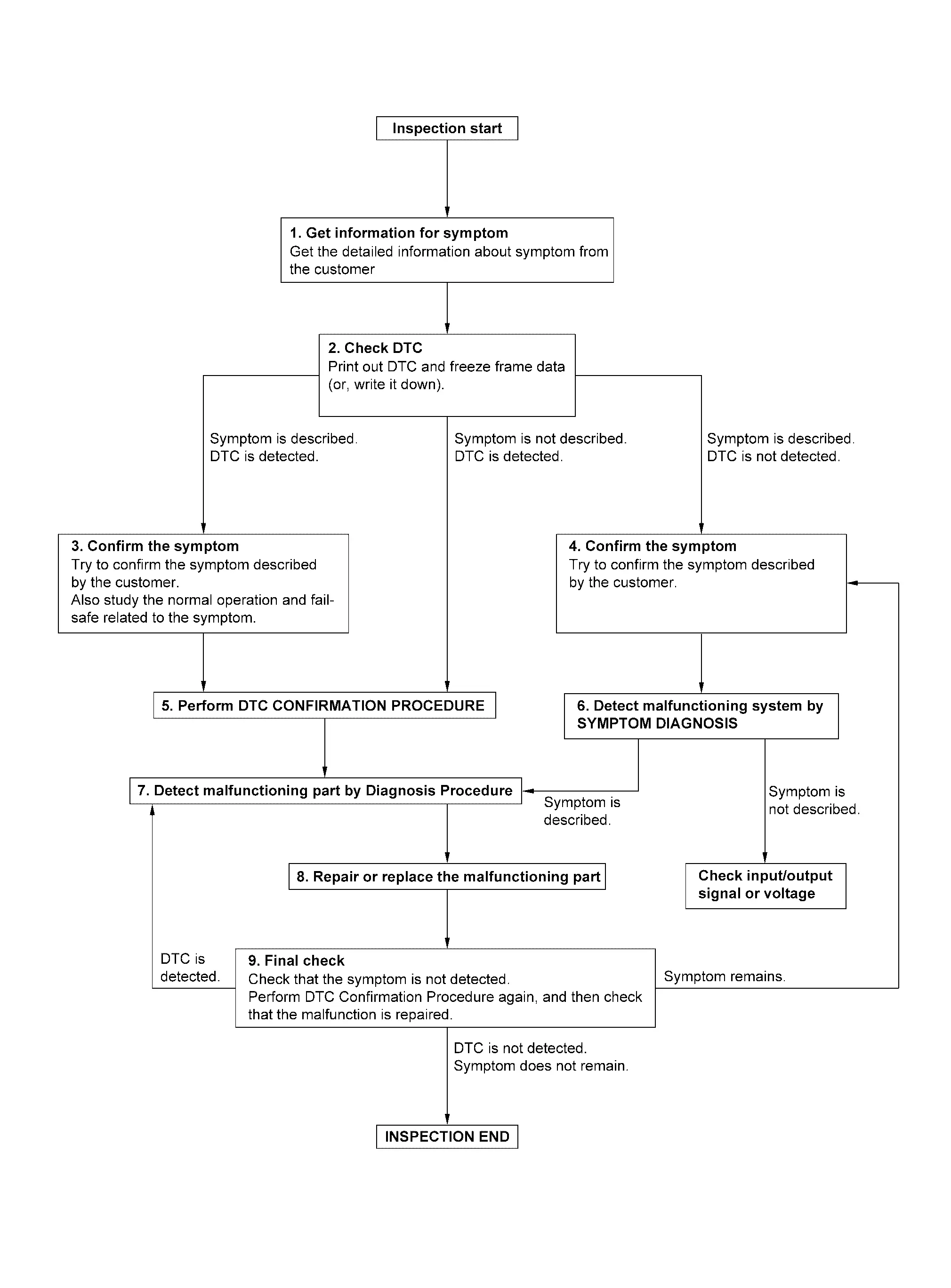
DETAILED FLOW
GET INFORMATION FOR SYMPTOM
-
Get detailed information from the customer about the symptom (the condition and the environment when the incident/malfunction occurs).
-
Check operation condition of the function that is malfunctioning.
>>
GO TO 2.
CHECK DTC
 CONSULT
-
Check DTC.
-
Perform the following procedure if DTC is detected:
-
Record DTC and freeze frame data (print them out).
-
Erase DTC.
-
Study the relationship between the cause detected by DTC and the symptom described by the customer.
-
Are any symptoms described and any DTC detected?
Symptom is described, DTC is detected>>GO TO 3.
Symptom is described, DTC is not detected>>GO TO 4.
Symptom is not described, DTC is detected>>GO TO 5.
CONFIRM THE SYMPTOM
Try to confirm the symptom described by the customer.
Also study the normal operation and fail-safe related to the symptom.
Verify relation between the symptom and the condition when the symptom is detected.
>>
GO TO 5.
CONFIRM THE SYMPTOM
Try to confirm the symptom described by the customer.
Verify relation between the symptom and the condition when the symptom is detected.
>>
GO TO 6.
PERFORM DTC CONFIRMATION PROCEDURE
CONSULT
Perform DTC CONFIRMATION PROCEDURE for the detected DTC, and then check that DTC is detected again. At this time, always connect CONSULT to the Nissan Ariya vehicle, and check "Self diagnosis result" in real time.
If two or more DTCs are detected, refer to DTC INSPECTION PRIORITY CHART, and determine trouble diagnosis order.
 NOTE:
NOTE:
-
Freeze frame data is useful if the DTC is not detected.
-
Perform Component Function Check if DTC CONFIRMATION PROCEDURE is not included on Service Manual. This simplified check procedure is an effective alternative though DTC cannot be detected during this check.
If the result of Component Function Check is NG, it is the same as the detection of DTC by DTC CONFIRMATION PROCEDURE.
Is DTC detected?
YES>>GO TO 7.
NO>>Refer to Intermittent Incident.
DETECT MALFUNCTIONING SYSTEM BY SYMPTOM DIAGNOSIS
CONSULT
Detect malfunctioning system according to SYMPTOM DIAGNOSIS based on the confirmed symptom in step 4, and determine the trouble diagnosis order based on possible causes and symptom.
Is the symptom described?
YES>>GO TO 7.
NO>>Monitor input data from related sensors or check voltage of related module terminals.
DETECT MALFUNCTIONING PART BY DIAGNOSIS PROCEDURE
Inspect according to Diagnosis Procedure of the system.
Is malfunctioning part detected?
YES>>GO TO 8.
NO>>Refer to Intermittent Incident.
REPAIR OR REPLACE THE MALFUNCTIONING PART
CONSULT
-
Repair or replace the malfunctioning part.
-
Reconnect parts or connectors disconnected during Diagnosis Procedure again after repair and replacement.
-
Check DTC. If DTC is detected, erase it.
>>
GO TO 9.
FINAL CHECK
CONSULT
When DTC is detected in step 2, perform DTC CONFIRMATION PROCEDURE again, and then check that the malfunction is repaired securely.
When symptom is described by the customer, refer to confirmed symptom in step 3 or 4, and check that the symptom is not detected.
Is DTC detected and does symptom remain?
YES-1>>DTC is detected: GO TO 7.
YES-2>>Symptom remains: GO TO 4.
NO>>Before returning the Nissan Ariya vehicle to the customer, always erase DTC.
Operation Inspection
Work Procedure
DESCRIPTION
The purpose of the operation inspection is to check that the individual system operates normally.
| Check condition | : Engine running at normal operating temperature. |
OPERATION INSPECTION
CHECK FAN SPEED
-
Start engine.
-
Operate fan control dial and check that fan speed changes.
-
Check operation for all fan speeds.
Is the inspection result normal?
YES>>GO TO 2.
NO>>GO TO 8.
CHECK AIR OUTLET
-
Operate fan control dial to set the fan speed to maximum speed.
-
Operate VENT, B/L, FOOT, D/F and DEF switch.
-
Check that air outlets change according to each indicated air outlet by placing a hand in front of the outlets.
Is the inspection result normal?
YES>>GO TO 3.
NO>>GO TO 8.
CHECK AIR INLET
-
Press intake switch to set the air inlet to recirculation. The intake switch indicator turns ON.
-
Listen to intake sound and confirm air inlets change.
-
Press intake switch again to set the air inlet to fresh air intake. The intake switch indicator turns OFF.
-
Listen to intake sound and confirm air inlets change.
Is the inspection result normal?
YES>>GO TO 4.
NO>>GO TO 8.
CHECK A/C COMPRESSOR
-
Press A/C switch. The A/C switch indicator turns ON.
-
Check visually and by sound that the A/C compressor operates.
-
Press A/C switch again. The A/C switch indicator turns OFF.
-
Check that A/C compressor stops.
Is the inspection result normal?
YES>>GO TO 5.
NO>>GO TO 8.
CHECK DISCHARGE AIR TEMPERATURE
-
Operate temperature control dial.
-
Check that discharge air temperature changes.
Is the inspection result normal?
YES>>GO TO 6.
NO>>GO TO 8.
CHECK WITH TEMPERATURE SETTING LOWERED
-
Operate A/C compressor.
-
Operate temperature control dial to lower the set to full cold.
-
Check that cool air blows from the air outlets.
Is the inspection result normal?
YES>>GO TO 7.
NO>>GO TO 8.
CHECK TEMPERATURE INCREASE
-
Warm up engine to the normal operating temperature.
-
Operate temperature control dial to raise the set to full hot.
-
Check that warm air blows from the air outlets.
Is the inspection result normal?
YES>>Inspection End.
NO>>GO TO 8.
CHECK SELF DIAGNOSIS
CONSULT
-
Select "Self diagnosis result" mode of "HVAC".
-
Check that any DTC is detected.
Is any DTC detected?
YES>>Refer to DTC Index, and perform the appropriate diagnosis.
NO>>GO TO 9.
CHECK FAIL-SAFE ACTIVATION
Check that symptom is applied to the fail-safe activation. Refer to Fail-safe.
>>
Refer to Symptom Table, and perform the appropriate diagnosis.
Additional Service When Replacing A/c Amp.
Description
After replaced A/C amp. it is necessary to perform control unit configuration with CONSULT. For details, refer to Work Procedure.
AFTER REPLACEMENT
CAUTION:
-
When replacing A/C amp. write vehicle specification with CONSULT vehicle configuration.
-
Never perform Nissan Ariya vehicle configuration other than performing with new A/C amp. or the control function may not operate normally.
Work Procedure
REPLACE A/C AMP.
Replace A/C amp. Refer to Removal and Installation.
>>
GO TO 2.
WRITING Nissan Ariya Vehicle SPECIFICATION
Perform configuration (HVAC). Refer to Description.
>>
Work End.
Configuration (hvac)
Description
Vehicle specification needs to be written with CONSULT because it is not written after replacing the A/C amp.
The configuration requires network connection. CONSULT connects to network and then it downloads the configuration data from the server. Then CONSULT writes the Nissan Ariya vehicle specification to the A/C amp.
Refer to Work Procedure.
NOTE:
For details the network connection and operation, refer to “CONSULT Operation Manual�.
The configuration no need to “save� configuration data from the A/C amp. The configuration data is always generated freshly at the server and then downloaded to the CONSULT.
CAUTION:
-
Complete the procedure of “Configuration� in order.
-
If incorrect “Configuration�, incidents might occur.
Work Procedure
WRITING VEHICLE SPECIFICATION
CONSULT
Perform writing Nissan Ariya vehicle specification to A/C amp. following "Automatic Configuration" procedure of "Configuration" according to CONSULT Operation Manual.
NOTE:
-
Log in the network according to CONSULT guidance.
-
For details the network connection and operation, refer to “CONSULT Operation Manual�.
>>
Work End.
System Setting
Target Evaporator Temp Upper Limit
DESCRIPTION
Set the target evaporator temperature upper limit.
HOW TO SET
CONSULT
Select “Target evaporator temperature upper limit setting� in “Work support� mode of “HVAC�.
| Work support items | Display |
|---|---|
| Target evaporator temperature upper limit setting | Initial Setting |
| Low | |
| Middle | |
| High |
Foot Position Setting Trimmer
DESCRIPTION
In FOOT mode, the air blowing to DEF can change ON/OFF.
HOW TO SET
CONSULT
Select “Blower setting� in “Work support� mode of “HVAC�.
| Work support items | Display | Defroster door position | |
|---|---|---|---|
| Auto control | Manual control | ||
| Blower setting | Mode1 (initial status) | OPEN | CLOSE |
| Mode2 | OPEN | OPEN | |
| Mode3 | CLOSE | OPEN | |
| Mode4 | CLOSE | CLOSE | |
NOTE:
When the battery cable is disconnected from the negative terminal or when the battery voltage becomes 10V or less, the setting of the discharge air mix ratio in FOOT mode may be cancelled.
Other materials:
Active Noise Control Unit
Reference Value
VALUES ON THE DIAGNOSIS TOOL Monitor Item Condition Value/Status
Active sound control operating condition
Active sound control system is not operating.
Off
Active sound control system is operating.
On
Active noise control operating condition
Active noise c ...
B2601-42 Memory Failure for Firmware Over the Air
DTC Description
DTC DETECTION LOGIC DTC No. CONSULT screen terms DTC detected condition
B2601-42
Memory failure for firmware over the air
Diagnosis condition
When ignition switch is ON.
Signal (terminal)
—
Threshold
Errors are detected in the memory for software auto ...
Adas Control Unit. Ecu Diagnosis Information. Adas Control Unit 2
Adas Control Unit 2
Without Propilot Assist 2.1
Reference Value
VALUES ON THE DIAGNOSIS TOOLNOTE:
The following table includes information (items)
inapplicable to this Nissan Ariya vehicle. For information (items)
applicable to this vehicle, refer to CONSULT display items.
Monitor item ...