
Nissan Rogue (T33) 2021-Present Owner’s Manual & User Guide: Lane Change Assist
Basic information
Lane Change Assist is a feature of ProPILOT Assist 2.1 on the Nissan Rogue. Read the entire ProPILOT Assist section before using this system, including how to operate it and how to interpret the display.
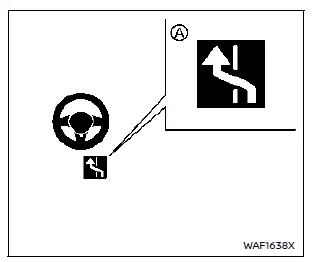
When ProPILOT Assist is active and the status indicator A is illuminated in blue, Lane Change Assist helps the driver perform a lane change when the turn signal is activated. The driver must keep their hands on the steering wheel before and during the maneuver and ensure that it is safe to change lanes.
The Lane Change Assist status indicator will illuminate under the following conditions:
- When the ProPILOT Assist 2.1 display is blue (hands-off mode available).
- When driving at speeds above approximately 37 MPH (60 km/h).
- When driving on a road with at least two lanes in the same direction.
- When the target lane (right, left, or both) is marked with dotted white lane lines.
- When driving on a straight road or one with a gentle curve.
- When the speed limit is 45 MPH (70 km/h) or higher.
- When either "Activate by turn signal" or "Passing Assist" is enabled.
Lane Change Assist may cancel or may not be available under the following conditions:
- When driving on a road with new freeway curves or interchanges that are not yet reflected in the navigation map data.
- When "Lane Change Assist" is disabled in the settings menu of the vehicle information display (even if the Lane Change Assist status indicator illuminates in blue).
- When another vehicle is detected in the target lane.
- When lane markers are no longer detected.
- When the vehicle speed is below approximately 37 MPH (60 km/h).
- When the driver’s hands are not detected on the steering wheel.
- When the ICC system/ProPILOT Assist is canceled.
- When an object such as a shield or barrier is detected close to the lane marker in the direction of the target lane.
How to enable/disable Lane Change Assist:
Vehicle information display
Settings → Driver Assistance → Lane Change Assist → Activate by turn signal → ON/OFF
WARNING
Failure to follow the warnings and instructions for the proper use of Lane Change Assist could result in serious injury or death.
- Lane Change Assist only helps the driver with the lane change maneuver. The system does not steer the Nissan Rogue to avoid a collision. Always keep your hands on the steering wheel and ensure that it is safe before moving to another lane.
NOTE:
The driver’s steering input always has priority. If the driver’s hands are not detected, the system will warn the driver to place their hands back on the steering wheel.
If hands are not detected in a timely manner, the Lane Change Assist feature may not be canceled as expected.
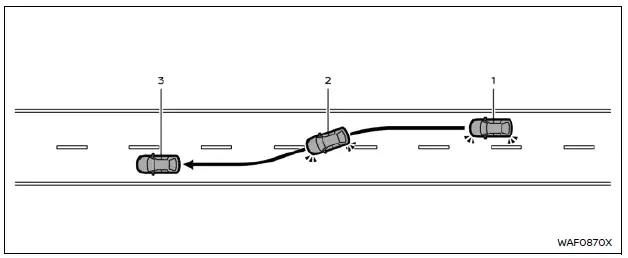
System operation
Before starting a lane change, always make sure that the target lane is clear and that it is safe to move into that lane.
1. Hold the steering wheel and activate the turn signal in the direction of the intended lane change.
2. The Lane Change Assist display appears and flashes green, and the system begins assisting the vehicle by applying steering control to move toward the target lane.
3. When the lane change is completed, the turn signal cancels automatically*1 and Steering Assist resumes normal operation.
*1 If the turn signal lever was fully moved up or down to activate the signal, it may not cancel automatically even if the lane change is completed or stopped.
The Lane Change Assist operation will stop (the Lane Change Assist display turns off) under any of the following conditions:
- When the turn signal is operated in the opposite direction.
- When the steering wheel is manually operated by the driver.
- When a vehicle is detected in the target lane.
- When lane markers are no longer detected.
- When the vehicle speed drops below approximately 37 MPH (60 km/h).
- When the driver’s hands are not detected on the steering wheel.
- When the ICC system/ProPILOT Assist is canceled.
- When the lane markers in both lanes are not dotted white lines.
- When a shield or barrier is found near the lane marker in the direction of the target lane.
- When Lane Change Assist operation is stopped while still within the original lane, the system will control the steering wheel to return the Nissan Rogue to the center of the lane.
Other materials:
Dtc/circuit Diagnosis. U1321-55 Configuration
DTC Description
DTC DETECTION LOGIC DTC No.
CONSULT screen terms
(Trouble diagnosis content) DTC detection condition
U1321
55
Configuration data error
(Configuration data error)
Diagnosis condition
When ignition switch is ON.
Signal (terminal)
—
Threshold
When ...
P052a Intake Valve Timing Control
DTC Description
DTC DETECTION LOGIC DTC
CONSULT screen terms
(Trouble diagnosis content) DTC detection condition
P052A
00
CAMSHAFT POSITION TIMING B1
(Cold start “A� camshaft position timing over-advanced bank 1)
Diagnosis condition
Cold condition
Signal (terminal)
...
Extérieur avant
Cette vue avant du Nissan Rogue présente les éléments de carrosserie, d’éclairage et d’aide à la conduite visibles depuis l’avant du véhicule. Les équipements marqués d’un astérisque peuvent dépendre de la finition.
Capot : accès au compartiment moteur et aux points de con ...