
Nissan Rogue (T33) 2021-Present Service Manual: Kr15ddt :: Precaution. Precautions
Precautions
Precaution for Supplemental Restraint System (SRS) "AIR BAG" and "SEAT BELT PRE-TENSIONER"
The Supplemental Restraint System such as “AIR BAG� and “SEAT BELT PRE-TENSIONER�, used along with a front seat belt, helps to reduce the risk or severity of injury to the driver and front passenger for certain types of collisions.
Information necessary to service the system safely is included in the “SRS AIR BAG� and “SEAT BELT� sections of this Service Manual.
WARNING:
Always observe the following items for preventing accidental activation:
-
To avoid rendering the SRS inoperative, which could increase the risk of personal injury or death in the event of a collision that would result in air bag inflation, it is recommended that all maintenance and repair be performed by an authorized NISSAN/INFINITI dealer.
-
Improper repair, including incorrect removal and installation of the SRS, can lead to personal injury caused by unintentional activation of the system. For removal of Spiral Cable and Air Bag Module, see “SRS AIR BAG�.
-
Never use electrical test equipment on any circuit related to the SRS unless instructed to in this Service Manual. SRS wiring harnesses can be identified by yellow and/or orange harnesses or harness connectors.
PRECAUTIONS WHEN USING POWER TOOLS (AIR OR ELECTRIC) AND HAMMERS
WARNING:
Always observe the following items for preventing accidental activation:
-
When working near the Air Bag Diagnosis Sensor Unit or other Air Bag System sensors with the ignition/power switch ON or engine running, never use air or electric power tools or strike near the sensor(s) with a hammer. Heavy vibration could activate the sensor(s) and deploy the air bag(s), possibly causing serious injury.
-
When using air or electric power tools or hammers, always switch the ignition/power switch OFF, disconnect the 12V battery or batteries, and wait at least 3 minutes before performing any service.
Precautions for Work
-
When removing or disassembling each component, be careful not to damage or deform it. If a component may be subject to interference, be sure to protect it with a shop cloth.
-
When removing (disengaging) components with a screwdriver or similar tool, be sure to wrap the component with a shop cloth or vinyl tape to protect it.
-
Protect the removed parts with a shop cloth and prevent them from being dropped.
-
Replace a deformed or damaged clip.
-
If a part is specified as a non-reusable part, always replace it with a new one.
-
Be sure to tighten bolts and nuts securely to the specified torque.
-
After installation is complete, be sure to check that each part works properly.
-
Follow the steps below to clean components:
-
Water soluble dirt:
-
Dip a soft cloth into lukewarm water, wring the water out of the cloth and wipe the dirty area.
-
Then rub with a soft, dry cloth.
-
-
Oily dirt:
-
Dip a soft cloth into lukewarm water with mild detergent (concentration: within 2 to 3%) and wipe the dirty area.
-
Then dip a cloth into fresh water, wring the water out of the cloth and wipe the detergent off.
-
Then rub with a soft, dry cloth.
-
-
Do not use organic solvent such as thinner, benzene, alcohol or gasoline.
-
For genuine leather seats, use a genuine leather seat cleaner.
-
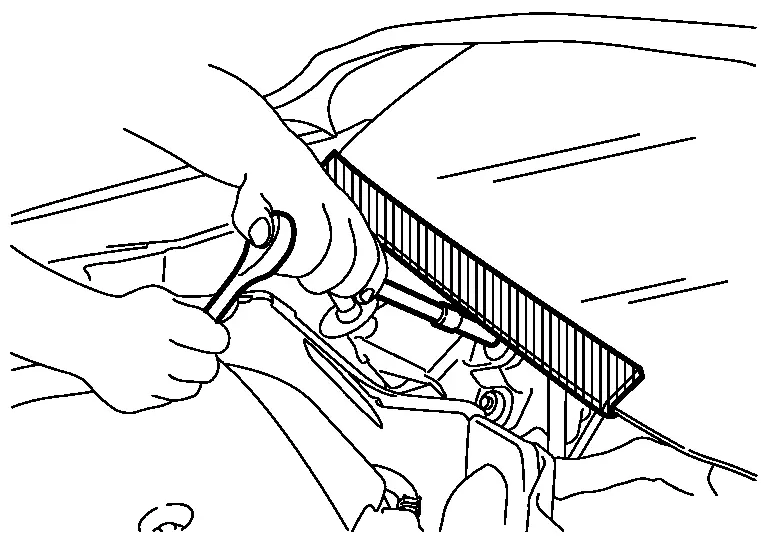
Precaution for Procedure without Cowl Top Cover
When performing the procedure after removing cowl top cover, cover the lower end of windshield with urethane, etc to prevent damage to windshield.
Precautions for Removing Battery Terminal
-
With the adoption of Auto ACC function, ACC power is automatically supplied by operating the Intelligent Key or remote keyless entry or by opening/closing the driver side door. In addition, ACC power is supplied even after the ignition switch is in the OFF position, i.e. ACC power is supplied for a certain fixed time.
-
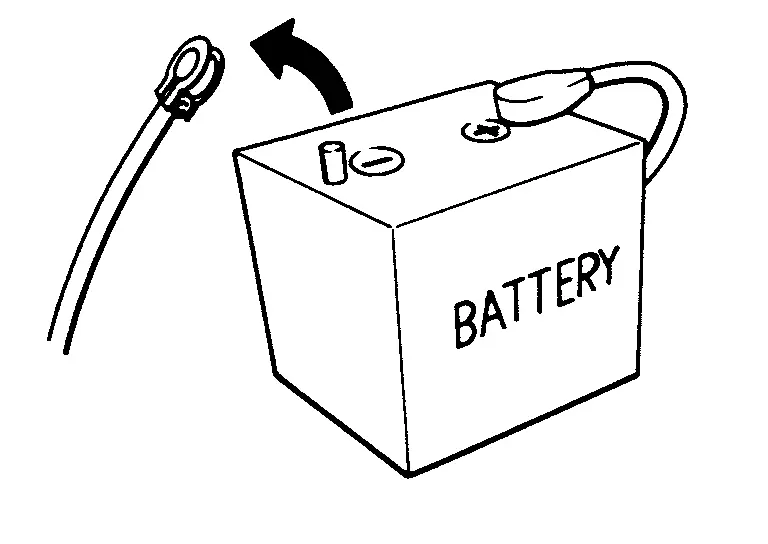
When disconnecting the 12V battery terminal, place the ignition switch in the OFF position before disconnecting the 12V battery terminal, observing “How to disconnect 12V battery terminal� described below.
 NOTE:
NOTE:
Some ECUs operate for a certain fixed time even after ignition switch is in the OFF position and ignition power supply is stopped. If the battery terminal is disconnected before ECU stops, accidental DTC detection or ECU data damage may occur.
-
For Nissan Ariya vehicles with the 2-batteries, be sure to connect the main battery and the sub battery before placing the ignition switch in the ON position.
NOTE:
If the ignition switch is in the ON position with any one of the terminals of main battery and sub battery disconnected, then DTC may be detected.
-
After installing the 12V battery, always check "Self Diagnosis Result" of all ECUs and erase DTC.
NOTE:
The removal of 12V battery may cause a DTC detection error.
HOW TO DISCONNECT 12V BATTERY TERMINAL
Disconnect 12V battery terminal according to instruction described below.
-
Open the hood.
-
Place the ignition switch in the ON position.
-
Place the ignition switch in the OFF position with the driver side door opened.
-
Get out of the Nissan Ariya vehicle and close the driver side door.
-
Wait at least 3 minutes.
CAUTION:
While waiting, never operate the Nissan Ariya vehicle such as locking, opening, and closing doors. Violation of this caution results in the activation of ACC power supply according to the Auto ACC function.
-
Remove 12V battery terminal.
CAUTION:
After installing 12V battery, always check self-diagnosis results of all ECUs and erase DTC.
Precautions For Refrigerant System Service
GENERAL REFRIGERANT PRECAUTION
WARNING:
-
Never breathe A/C refrigerant and lubricant vapor or mist. Exposure may irritate eyes, nose and throat. Remove HFO-1234yf (R-1234yf) from the A/C system, using certified service equipment meeting requirements of SAE NI-2843 [HFO-1234yf (R-1234yf) Recovery/Recycling/Recharging Equipment for Flammable Refrigerants for Mobile Air Conditioning Systems] Ventilate work area before resuming service if accidental system discharge occurs. Additional health and safety information may be obtained from refrigerant and lubricant manufacturers.
-
Never release refrigerant into the air. Use approved recovery/recycling recharging equipment to capture the refrigerant each time an air conditioning system is discharged.
-
Wear always eye and hand protection (goggles and gloves) when working with any refrigerant or air conditioning system.
-
Never place the refrigerant containers and recovery/recycling equipment in a place where the temperature exceeds 40°C (104°F).
-
Never heat a refrigerant container with an open flame; Place the bottom of the container in a warm pail of water if container warming is required.
-
Never intentionally drop, puncture, or incinerate refrigerant containers.
-
Keep refrigerant away from open flames: poisonous gas is produced if refrigerant burns.
-
Refrigerant displaces oxygen, therefore be certain to work in well ventilated areas to prevent suffocation.
-
Never pressure test or leakage test HFO-1234yf (R-1234yf) service equipment and/or Nissan Ariya vehicle air conditioning systems with compressed air during repair. Some mixtures of air and HFO-1234yf (R-1234yf) have been shown to be combustible at elevated pressures. These mixtures, if ignited, may cause injury or property damage. Additional health and safety information may be obtained from refrigerant manufacturers.
WORKING WITH HFO-1234yf (R-1234YF)
CAUTION:
-
CFC-12 (R-12) or HFC-134a (R-134a) refrigerant and HFO-1234yf (R-1234yf) refrigerant are not compatible. Compressor malfunction is likely to occur if the refrigerants are mixed, refer to “CONTAMINATED REFRIGERANT� below. To determine the purity of HFO-1234yf (R-1234yf) in the Nissan Ariya vehicle and recovery tank, use Refrigerant recovery/recycling recharging equipment and Refrigerant Identifier.
-
Use only specified lubricant for the HFO-1234yf (R-1234yf) A/C system and HFO-1234yf (R-1234yf) components. If a compressor oil that does not meet the specifications is used, it will be worn and damaged due to poor lubrication, and the cooling and dehumidifying functions will be significantly reduced.
-
The specified HFO-1234yf (R-1234yf) lubricant rapidly absorbs moisture from the atmosphere. The following handling precautions must be observed:
-
Cap (seal) immediately the component to minimize the entry of moisture from the atmosphere when removing refrigerant components from a Nissan Ariya vehicle.
-
Never remove the caps (unseal) until just before connecting the components when installing refrigerant components to a Nissan Ariya vehicle. Connect all refrigerant loop components as quickly as possible to minimize the entry of moisture into system.
-
Use only the specified lubricant from a sealed container. Reseal immediately containers of lubricant. Lubricant becomes moisture saturated and should not be used without proper sealing.
-
Never allow lubricant to come in contact with styrene foam parts. Damage may result.
-
CONTAMINATED REFRIGERANT
Take appropriate steps shown below if a refrigerant other than pure HFO-1234yf (R-1234yf) is identified in a Nissan Ariya vehicle:
-
Explain to the customer that environmental regulations prohibit the release of contaminated refrigerant into the atmosphere.
-
Explain that recovery of the contaminated refrigerant could damage service equipment and refrigerant supply.
-
Suggest the customer return the Nissan Ariya vehicle to the location of previous service where the contamination may have occurred.
-
In case of repairing, recover the refrigerant using only dedicated equipment and containers. Never recover contaminated refrigerant into the existing service equipment. Contact a local refrigerant product retailer for available service if the facility does not have dedicated recovery equipment. This refrigerant must be disposed of in accordance with all federal and local regulations. In addition, replacement of all refrigerant system components on the Nissan Ariya vehicle is recommended.
-
The air conditioner warranty is void if the vehicle is within the warranty period. Please contact Nissan Customer Affairs for further assistance.
REFRIGERANT CONNECTION
WARNING:
Check that all refrigerant is discharged into the recycling equipment and the pressure in the system is less than atmospheric pressure. Then gradually loosen the discharge side hose fitting and remove it.
CAUTION:
Observe the following when replacing or cleaning refrigerant cycle components.
-
Store it in the same way at it is when mounted on the car when the compressor is removed. Failure to do so will cause lubricant to enter the low-pressure chamber.
-
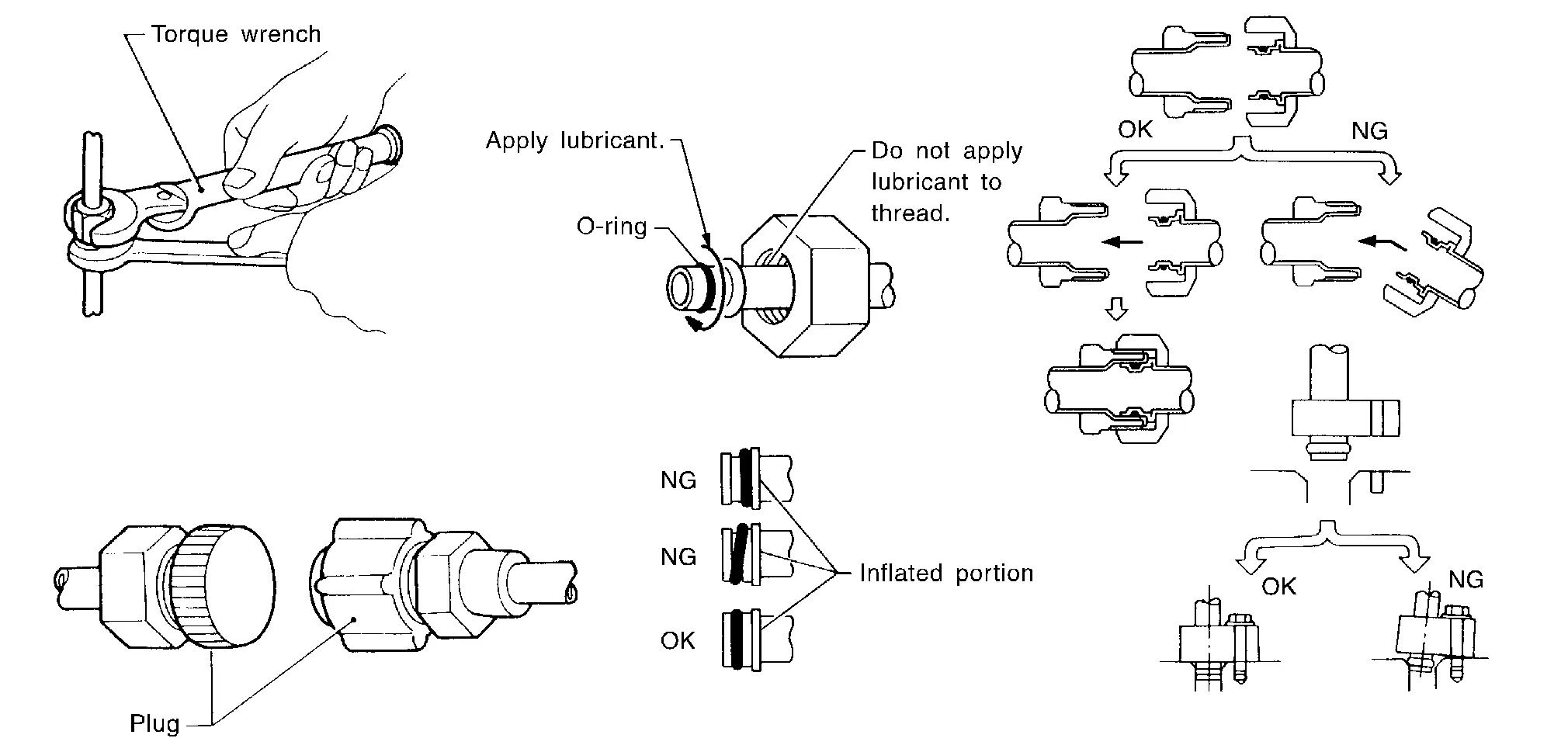
Use always a torque wrench and a back-up wrench when connecting tubes.
-
Plug immediately all openings to prevent entry of dust and moisture after disconnecting tubes.
-
Connect the pipes at the final stage of the operation when installing an air conditioner in the Nissan Ariya vehicle. Never remove the seal caps of pipes and other components until just before required for connection.
-
Allow components stored in cool areas to warm to working area temperature before removing seal caps. This prevents condensation from forming inside A/C components.
-
Remove thoroughly moisture from the refrigeration system before charging the refrigerant.
-
Replace always used O-rings.
-
Apply lubricant to circle of the O-rings shown in illustration when connecting tube. Be careful not to apply lubricant to threaded portion.
-
O-ring must be closely attached to the groove portion of tube.
-
Be careful not to damage O-ring and tube when replacing the O-ring.
-
Connect tube until a click can be heard. Then tighten the nut or bolt by hand. Check that the O-ring is installed to tube correctly.
-
Perform leakage test and make sure that there is no leakage from connections after connecting line. Disconnect that line and replace the O-ring when the refrigerant leaking point is found. Then tighten connections of seal seat to the specified torque.
A/C COMPRESSOR
CAUTION:
-
Plug all openings to prevent moisture and foreign matter from entering.
-
Store it in the same way at it is when mounted on the car when the A/C compressor is removed.
-
Follow “Maintenance of Lubricant Quantity in Compressor� exactly when replacing or repairing A/C compressor. Refer to Description.
-
Keep friction surfaces between clutch and pulley clean. Wipe it off by using a clean waste cloth moistened with thinner if the surface is contaminated with lubricant.
-
Turn the compressor shaft by hand more than five turns in both directions after A/C compressor service operation. This distributes equally lubricant inside the A/C compressor. Let the engine idle and operate the A/C compressor for one hour after the A/C compressor is installed.
-
Apply voltage to the new one and check for normal operation after replacing the A/C compressor magnet clutch.
Service Equipment
RECOVERY/RECYCLING RECHARGING EQUIPMENT
Be certain to follow the manufacturer’s instructions for machine operation and machine maintenance. Never introduce any refrigerant other than that specified into the machine.
ELECTRICAL LEAK DETECTOR
Be certain to follow the manufacturer’s instructions for tester operation and tester maintenance.
VACUUM PUMP
The lubricant contained inside the vacuum pump is not compatible with the specified lubricant for HFO-1234yf (R-1234yf) A/C systems. The vent side of the vacuum pump is exposed to atmospheric pressure. So the vacuum pump lubricant may migrate out of the pump into the service hose. This is possible when the pump is switched OFF after evacuation (vacuuming) and hose is connected to it.
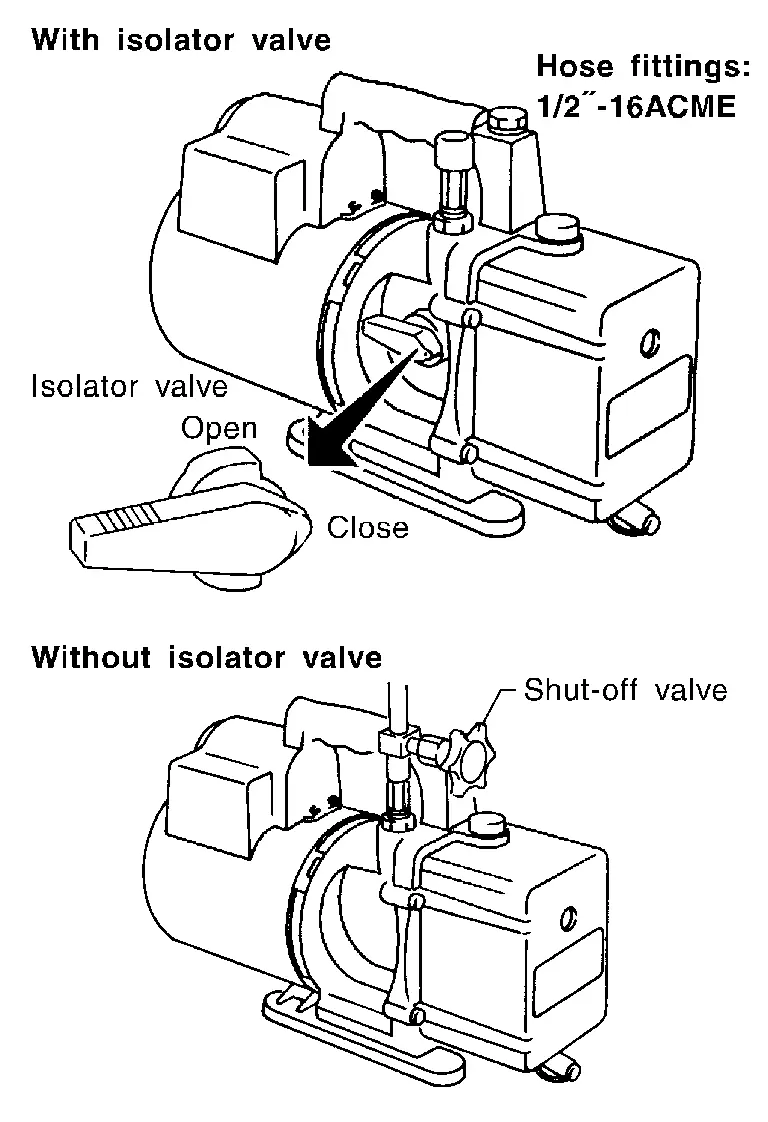
To prevent this migration, use a manual valve placed near the hose-to-pump connection, as per the following.
-
Vacuum pumps usually have a manual isolator valve as part of the pump. Close this valve to isolate the service hose from the pump.
-
Use a hose equipped with a manual shut-off valve near the pump end for pumps without an isolator. Close the valve to isolate the hose from the pump.
-
Disconnect the hose from the pump if the hose has an automatic shut-off valve. As long as the hose is connected, the valve is open and lubricating oil may migrate.
Some one-way valves open when vacuum is applied and close under no vacuum condition. Such valves may restrict the pump’s ability to pull a deep vacuum and are not recommended.
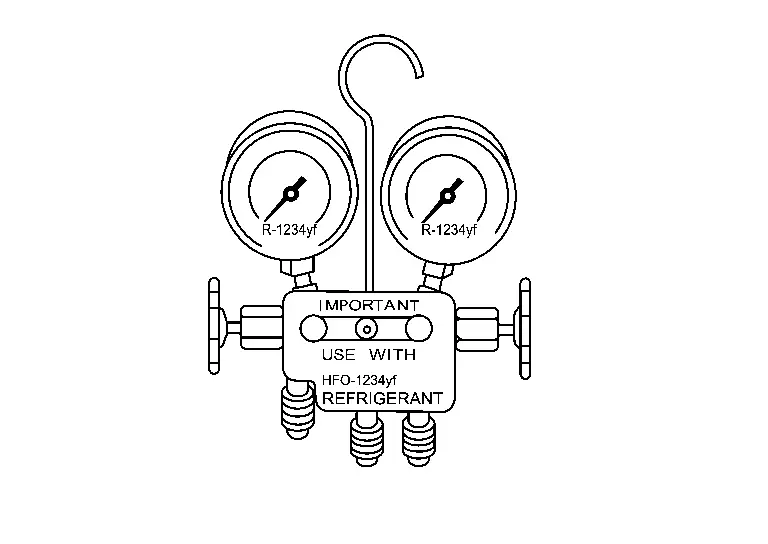
MANIFOLD GAUGE SET
Be certain that the gauge face indicates HFO-1234yf or R-1234yf. Be sure the gauge set has threaded connections for HFO-1234yf (R-1234yf) service hoses. Confirm the set has been used only with refrigerant HFO-1234yf (R-1234yf) and specified lubricants.
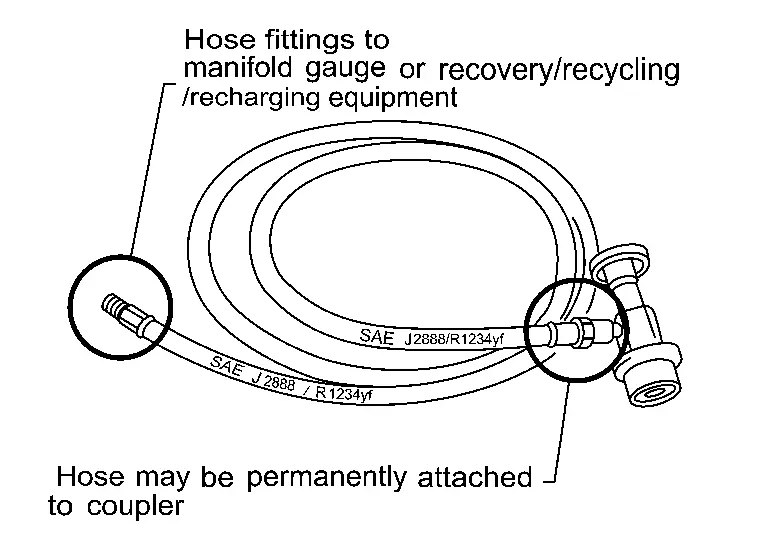
SERVICE HOSES
All hoses must equip positive shut-off devices (either manual or automatic) near the end of the hoses opposite to the manifold gauge.
SERVICE COUPLERS
Never attempt to connect HFO-1234yf (R-1234yf) service couplers to the CFC-12 (R-12) and HFC-134a (R-134a) A/C system. The HFO-1234yf (R-1234yf) couplers do not properly connect to the CFC-12 (R-12) and HFC-134a (R-134a) system. However, if an improper connection is attempted, discharging and contamination may occur.
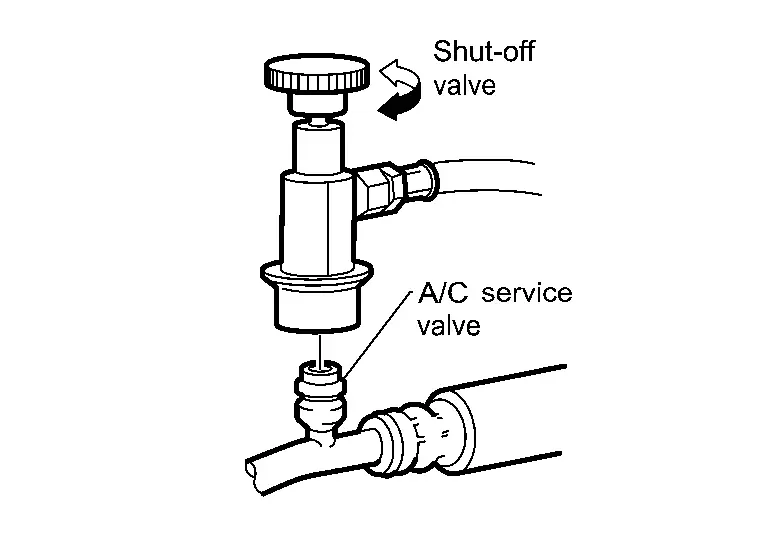
| Shut-off valve rotation | A/C service valve |
|---|---|
| Clockwise | Open |
| Counterclockwise | Close |
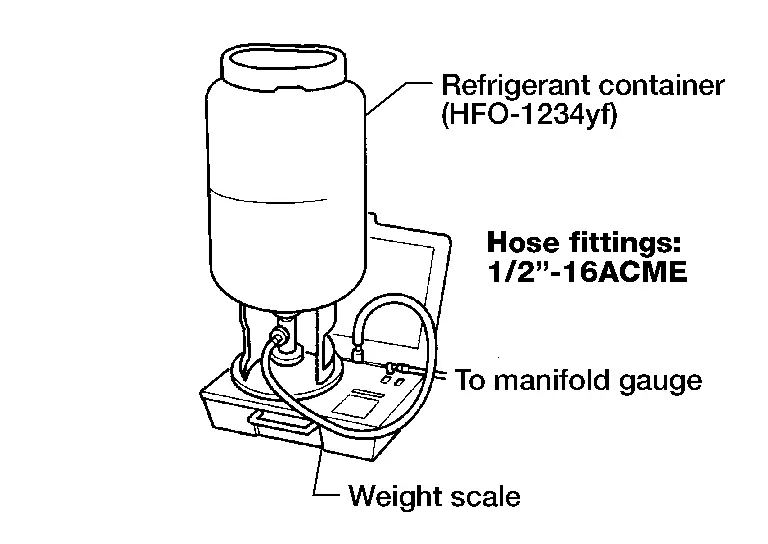
REFRIGERANT WEIGHT SCALE
Verify that no refrigerant other than HFO-1234yf (R-1234yf) and specified lubricants have been used with the scale. The hose fitting must be 1/2″-16 ACME if the scale controls refrigerant flow electronically.
CHARGING CYLINDER
Using a charging cylinder is not recommended. Refrigerant may be vented into air from cylinder’s top valve when filling the cylinder with refrigerant. Also, the accuracy of the cylinder is generally less than that of an electronic scale or of quality recycle/recharge equipment.
Other materials:
Uniform tire quality grading
DOT (Department Of Transportation) Quality Grades: all passenger car tires, including those fitted to the Nissan Rogue, must conform to federal safety requirements in addition to these grades.
Where applicable, quality grades are found on the tire sidewall between the tread shoulder and the maximum ...
Rear Door Alert
The Rear Door Alert system helps remind the driver to check the rear seat(s) before leaving the Nissan Rogue. Under certain conditions, the system indicates that an object or passenger may still be in the rear seat.
The Rear Door Alert system is initially disabled.
The driver can enable the system ...
C10af-01 Pressure Sensor
DTC Description
DTC DETECTION LOGIC DTC No.
CONSULT screen terms
(Trouble diagnosis content) DTC detection condition
C10AF
01
Pressure sensor
(Pressure sensor)
Diagnosis condition
During driving below 15 km/h (9.4 MPH) (no braking)
When the power supply voltage is nor ...