
Nissan Rogue (T33) 2021-Present Service Manual: Intelligent Around View Monitor :: Removal and Installation
Around View Monitor Control Unit
Removal and Installation
REMOVAL
CAUTION:
Perform the “ADDITIONAL SERVICE WHEN REPLACING AROUND VIEW MONITOR CONTROL UNIT� before replacing around view monitor control unit. Refer to Description.
Remove the center console assembly. Refer to Removal and Installation.
Remove the around view monitor control unit mounting bolt  and nuts
  .
.
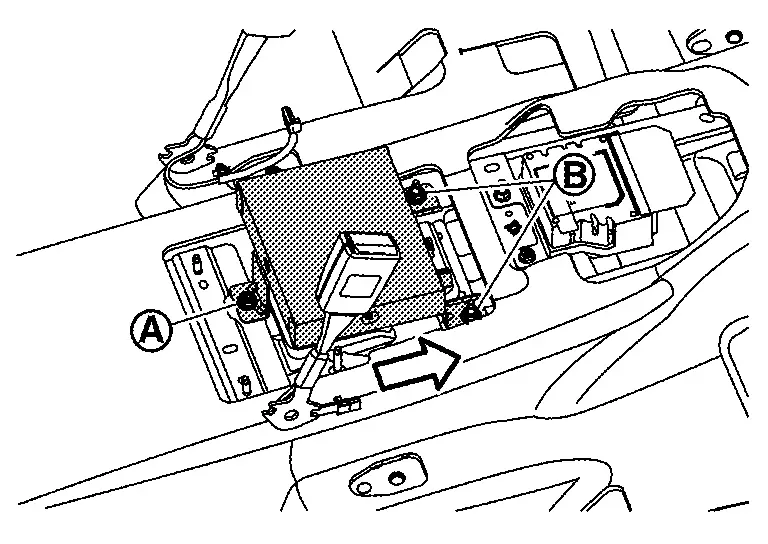
 |
: Nissan Ariya Vehicle front |
Disconnect the connectors to remove the around view monitor control unit from the Nissan Ariya vehicle.
INSTALLATION
Installation is the reverse order of removal.
CAUTION:
Perform the “ADDITIONAL SERVICE WHEN REPLACING AROUND VIEW MONITOR CONTROL UNIT� after replacing around view monitor control unit. Refer to Description.
Front Camera
Removal and Installation
REMOVAL
Remove the distance sensor bracket assembly. Refer to Removal and Installation.
Remove the front camera mounting screws , then remove the front camera.
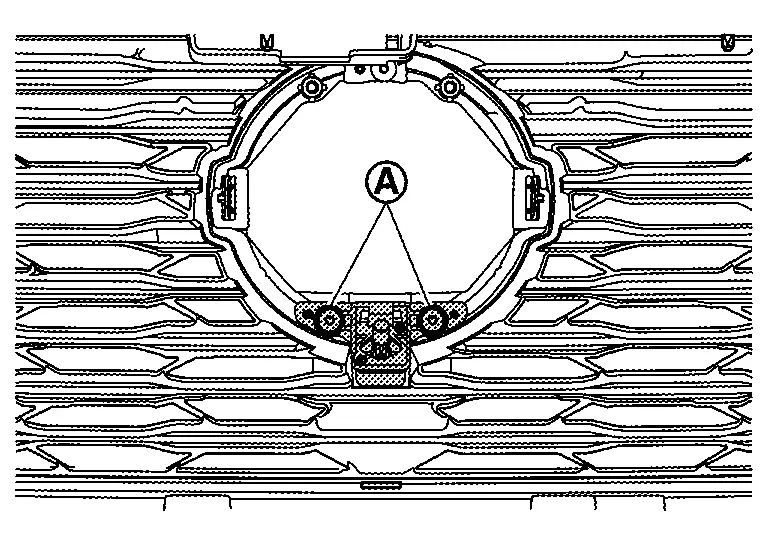
INSTALLATION
Installation in the reverse order of removal.
Perform camera image calibration. Refer to Work Procedure (WITHOUT ProPILOT Assist 2.1) or Work Procedure (WITH ProPILOT Assist 2.1).
CAUTION:
Perform the calibration and perform the writing to the around view monitor control unit when removing and replacing each camera, removing the camera mounting parts (front grille, door mirror, etc.) and replacing the around view monitor control unit.
Rear Camera
Removal and Installation
REMOVAL
Remove the back door inner finisher. Refer to Removal and Installation.
Remove the rear camera mounting bolts , And then push the pawls in the direction of the arrow in the figure to remove the rear camera.
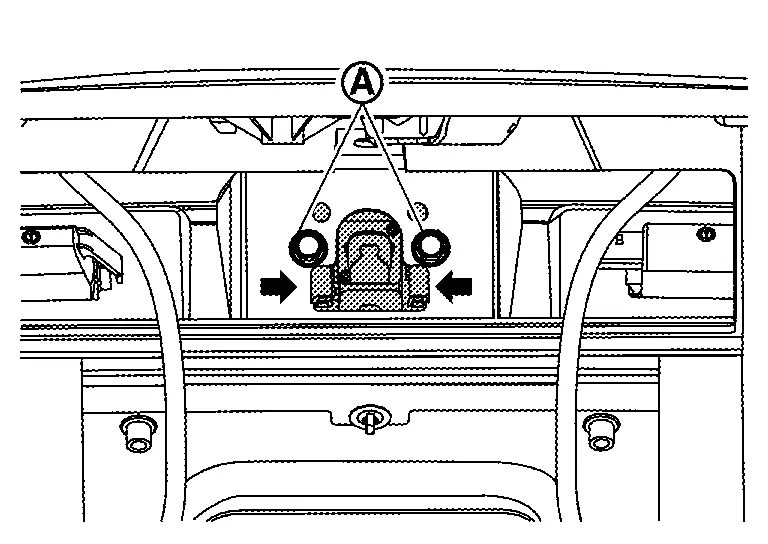
INSTALLATION
Installation is in the reverse order of removal.
Perform camera image calibration. Refer to Work Procedure (WITHOUT ProPILOT Assist 2.1) or Work Procedure (WITH ProPILOT Assist 2.1).
CAUTION:
Perform the calibration and perform the writing to the around view monitor control unit when removing and replacing each camera, removing the camera mounting parts (front grille, door mirror, etc.) and replacing the around view monitor control unit.
Side Camera
Removal and Installation
REMOVAL
-
Remove the door mirror finisher. Refer to Disassembly and Assembly.
-
Remove the side camera mounting screw
, And then remove the side camera.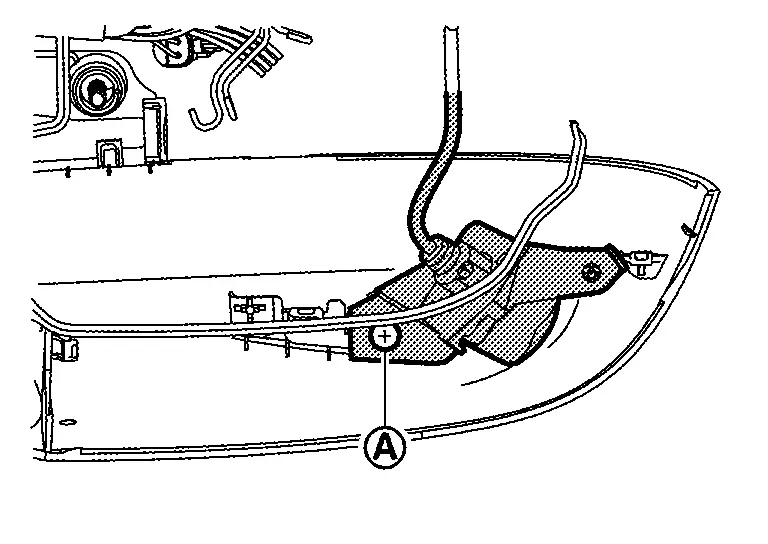
INSTALLATION
Installation is in the reverse order of removal.
Perform camera image calibration. Refer to Work Procedure (WITHOUT ProPILOT Assist 2.1) or Work Procedure (WITH ProPILOT Assist 2.1).
CAUTION:
Perform the calibration and perform the writing to the around view monitor control unit when removing and replacing each camera, removing the camera mounting parts (front grille, door mirror, etc.) and replacing the around view monitor control unit.
Other materials:
Front Wheel Hub and Knuckle
Exploded View
Steering knuckle
Splash guard
Hub bolt
Wheel hub and bearing assembly
Disc rotor
Wheel hub lock nut
A.
: Comply with the installation procedure when tightening. Refer to Removal and Installation.
: N·m (kg-m, ft-lb)
: Always replace ...
Removal and Installation. Electrically-Driven Intelligent Brake Unit
Exploded View
Reservoir cap
Oil strainer
Electrically-driven intelligent brake unit
Clevis
Gasket
: N·m (kg-m, ft-lb)
: Always replace after every disassembly.
Removal & Installation
REMOVALCAUTION:
While electrically-driven ...
Diagnosis System (tcm)
Diagnosis Description
1 Trip Detection Diagnosis and 2 Trip Detection Diagnosis
NOTE:
“Start the engine and turn OFF the ignition switch after warm-up.� This is defined as 1 trip.
1 TRIP DETECTION DIAGNOSISWhen initial
malfunction is detected, TCM memorizes DTC. In these diagnoses, some ...