
Nissan Rogue (T33) 2021-Present Service Manual: Handling Precaution
Precautions for Intelligent Forward Collision Warning
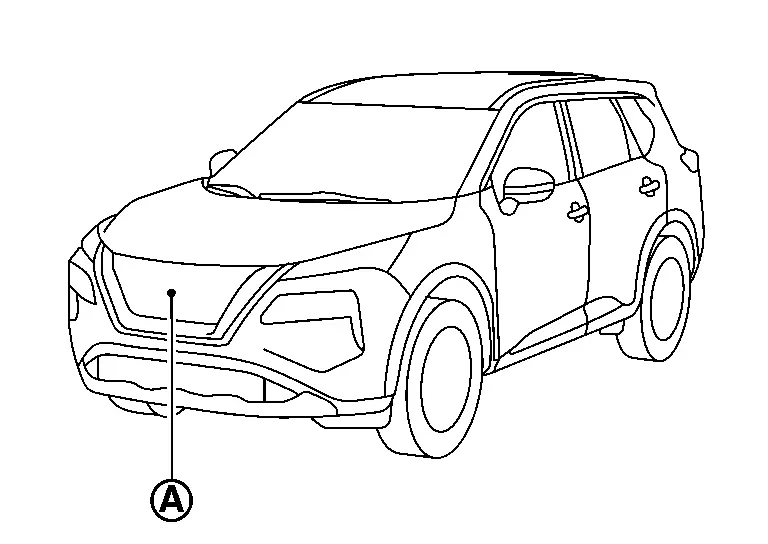
PRECAUTIONS FOR DISTANCE SENSOR
-
Always keep the distance sensor area
 of the front grill clean.
-
Do not strike or damage the areas around the distance sensor.
-
Do not cover or attach stickers or similar objects on the front grill near the distance sensor area. This could cause failure or malfunction.
-
Do not attach metallic objects near the distance sensor area (brush guard, etc.). This could cause failure or malfunction.
PRECAUTIONS FOR I-FCW
Failure to follow the warnings and instructions for proper use of the I-FCW system could result in serious injury or death.
-
The I-FCW system helps warn the driver before a collision but does not avoid a collision. It is the driver’s responsibility to stay alert, drive safely and be in control of the Nissan Ariya vehicle at all times.
Listed below are the system limitations for the I-FCW system. Failure to operate the vehicle in accordance with these system limitations could result in serious injury or death.
-
The I-FCW system cannot detect all vehicles under all conditions.
-
The radar sensor does not detect the following objects:
-
Pedestrians, animals or obstacles in the roadway
-
Oncoming Nissan Ariya vehicles
-
Crossing vehicles
-
-
The I-FCW system does not function when a Nissan Ariya vehicle ahead is a narrow vehicle, such as a motorcycle.
-
The radar sensor may not detect a Nissan Ariya vehicle ahead in the following conditions:
-
Snow or heavy rain
-
Dirt, ice, snow or other material covering the radar sensor
-
Interference by other radar sources
-
Snow or road spray from travelling Nissan Ariya vehicles.
-
Driving in a tunnel
-
Towing a trailer
-
-
When the Nissan Ariya vehicle ahead is being towed.
-
When the distance to the vehicle ahead is too close, the beam of the radar sensor is obstructed.
-
When driving on a steep downhill slope or roads with sharp curves.
-
The system is designed to automatically check the sensor’s functionality, within certain limitations. The system may not detect some forms of obstruction of the sensor area such as ice, snow, stickers, for example. In these cases, the system may not be able to warn the driver properly. Check, clean and clear the sensor area regularly.
-
Excessive noise interferes with the warning chime sound, and the chime may not be heard.
Precautions for Lane Departure Warning
PRECAUTIONS FOR FRONT CAMERA UNIT
-
Always keep the windshield clean.
-
Do not attach a sticker (including transparent material) or install an accessory near the front camera unit.
-
Do not place reflective materials, such as white paper or a mirror, on the instrument panel. The reflection of sunlight may adversely affect the front camera unit’s capability of detecting the lane markers.
-
Do not strike or damage the areas around the front camera unit.
-
Do not touch the camera lens or remove the screw located on the front camera unit.
-
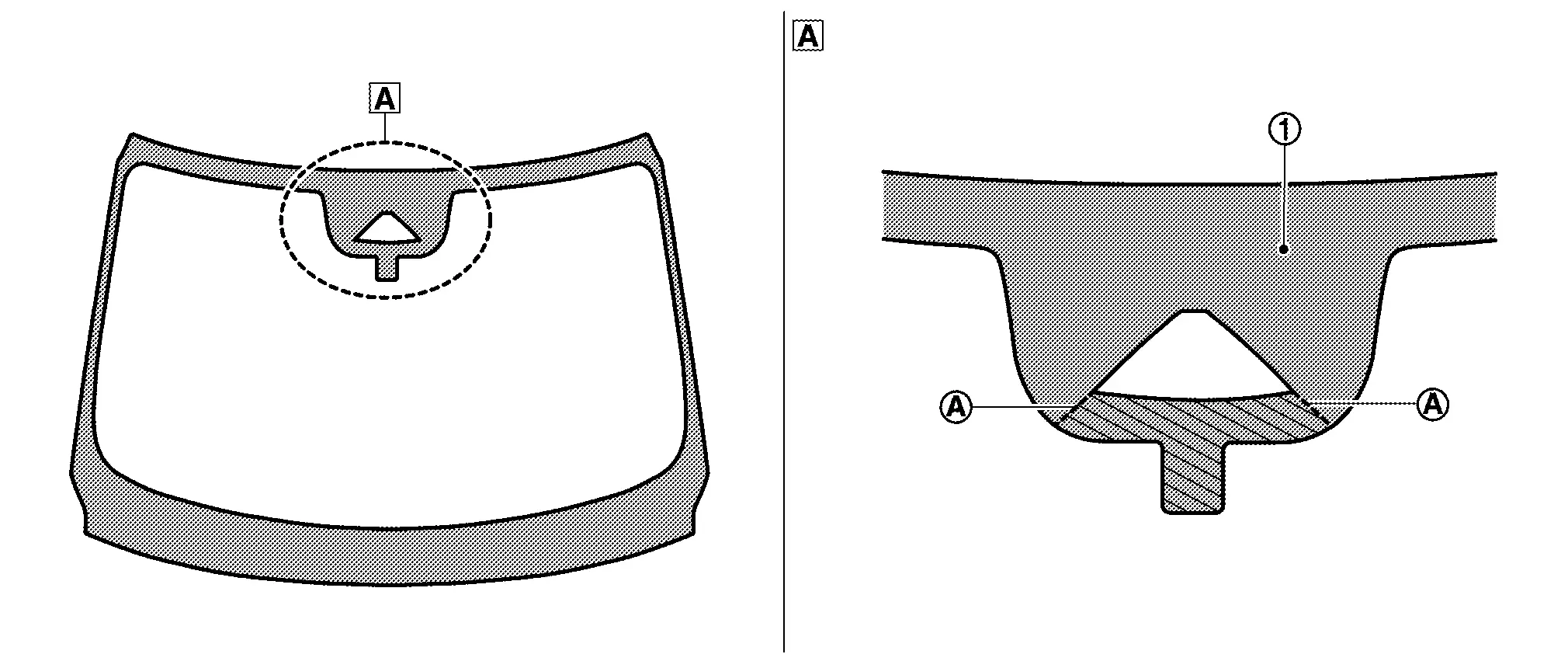
Replace the windshield glass for operating the system normally, when there is a scratch on the area within the lines extended from notch of windshield upper portion.
 |
Windshield upper position | ||||
 |
Black print part | ||||
|
Line extended from notch (front camera unit) |
PRECAUTIONS FOR LDW
Failure to follow the warnings and instructions for proper use of the LDW system could result in serious injury or death.
-
This system is only a warning device to inform the driver of a potential unintended lane departure. It does not steer the Nissan Ariya vehicle or prevent loss of control. It is the driver’s responsibility to stay alert, drive safely, keep the Nissan Ariya vehicle in the traveling lane, and be in control of the vehicle at all times.
Listed below are the system limitations for the LDW system. Failure to follow the warnings and instructions for proper use of the LDW system could result in serious injury or death.
-
The system does not operate at speeds below approximately 60 km/h (37 MPH) or if it cannot detect lane markers.
-
Do not use the LDW system under the following conditions as it may not function properly:
-
During bad weather (rain, fog, snow, etc.).
-
When driving on slippery roads, such as on ice or snow.
-
When driving on winding or uneven roads.
-
When there is a lane closure due to road repairs.
-
When driving in a makeshift or temporary lane.
-
When driving on roads where the lane width is too narrow.
-
When driving without normal tire conditions (for example, tire wear, low tire pressure, installation of spare tire, tire chains, non-standard wheels).
-
When the Nissan Ariya vehicle is equipped with non-original brake parts or suspension parts.
-
When towing a trailer or other Nissan Ariya vehicle.
-
-
The system may not function properly under the following conditions:
-
On roads where there are multiple parallel lane markers; lane markers that are faded or not painted clearly; yellow painted lane markers; nonstandard lane markers; or lane markers covered with water, dirt, snow, etc.
-
On roads where discontinued lane markers are still detectable.
-
On roads where there are sharp curves.
-
On roads where there are sharply contrasting objects, such as shadows, snow, water, wheel ruts, seams or lines remaining after road repairs. (The LDW system could detect these items as lane markers.)
-
On roads where the traveling lane merges or separates.
-
When the Nissan Ariya vehicle’s traveling direction does not align with the lane marker.
-
When traveling close to the Nissan Ariya vehicle ahead, which obstructs the lane camera unit detection range.
-
When rain, snow, dirt or object adheres to the windshield in front of the lane camera unit.
-
When the headlights are not bright due to dirt on the lens or if the aiming is not adjusted properly.
-
When strong light enters the lane camera unit. (For example, the light directly shines on the front of the Nissan Ariya vehicle at sunrise or sunset.)
-
When a sudden change in brightness occurs. (For example, when the Nissan Ariya vehicle enters or exits a tunnel or under a bridge.)
-
Precautions for Intelligent Lane Intervention
PRECAUTIONS FOR FRONT CAMERA UNIT
Refer to Precautions for Lane Departure Warning.
PRECAUTIONS FOR I-LI
Failure to follow the warnings and instructions for proper use of the I-LI system could result in serious injury or death.
-
The I-LI system does not steer the vehicle or prevent loss of control. It is the driver’s responsibility to stay alert, drive safely, keep the Nissan Ariya vehicle in the traveling lane, and be in control of the vehicle at all times.
-
The I-LI system is primarily intended for use on well-developed freeways or highways. It may not detect the lane markers in certain road, weather, or driving conditions.
Listed below are the system limitations for the I-LI system. Failure to follow the warnings and instructions for proper use of the I-LI system could result in serious injury or death.
-
The I-LI system may activate if the driver changes lanes without first activating the turn signal or, for example, if a construction zone directs traffic to cross an existing lane marker. If this occurs the driver may need to apply corrective steering to complete the lane change.
-
Because the I-LI may not activate under the road, weather, and lane marker conditions described in this section, it may not activate every time the Nissan Ariya vehicle begins to leave its lane and the driver needs to apply corrective steering.
-
The I-LI system does not operate at speeds below approximately 60 km/h (37 MPH) or if it cannot detect lane markers.
-
When the I-LI system is operating, avoid excessive or sudden steering maneuvers. Otherwise, the driver could lose control of the Nissan Ariya vehicle.
-
Do not use the I-LI system under the following conditions as it may not function properly:
-
During bad weather (rain, fog, snow, etc.).
-
When driving on slippery roads, such as on ice or snow.
-
When driving on winding or uneven roads.
-
When there is a lane closure due to road repairs.
-
When driving in a makeshift or temporary lane.
-
When driving on roads where the lane width is too narrow.
-
When driving without normal tire conditions (for example, tire wear, low tire pressure, installation of spare tire, tire chains, non-standard wheels).
-
When the Nissan Ariya vehicle is equipped with non-original brake parts or suspension parts.
-
When towing a trailer or other Nissan Ariya vehicle.
-
On roads where there are multiple parallel lane markers; lane markers that are faded or not painted clearly; yellow painted lane markers; nonstandard lane markers; or lane markers covered with water, dirt, snow, etc.
-
On roads where discontinued lane markers are still detectable.
-
On roads where there are sharp curves.
-
On roads where there are sharply contrasting objects, such as shadows, snow, water, wheel ruts, seams or lines remaining after road repairs. (The I-LI system could detect these items as lane markers.)
-
On roads where the edge of the road is not clearly visible.
-
On roads where the traveling lane merges or separates.
-
When the Nissan Ariya vehicle’s traveling direction does not align with the lane marker.
-
When traveling close to the Nissan Ariya vehicle ahead, which obstructs the lane camera unit detection range.
-
When rain, snow or dirt adheres to the windshield in front of the lane camera unit.
-
When the headlights are not bright due to dirt on the lens or if the aiming is not adjusted properly.
-
When strong light enters the lane camera unit. (For example, the light directly shines on the front of the Nissan Ariya vehicle at sunrise or sunset.)
-
When a sudden change in brightness occurs. (For example, when the Nissan Ariya vehicle enters or exits a tunnel or under a bridge.)
-
Precautions for Blind Spot Warning
PRECAUTIONS FOR SIDE RADAR
-
Always keep the area (A) near the side radars clean.

-
Do not attach stickers (including transparent material) or install an accessory near the side radars.
-
Do not strike or damage the area around the side radars.
PRECAUTIONS FOR BSW
Failure to follow the warnings and instructions for proper use of the BSW system could result in serious injury or death.
-
The BSW system is not a replacement for proper driving procedure and is not designed to prevent contact with Nissan Ariya vehicles or objects. When changing lanes, always use the side and rear mirrors and turn and look in the direction the Nissan Ariya vehicle moves to ensure it is safe to change lanes. Never rely solely on the BSW system.
Listed below are the system limitations for the BSW system. Failure to operate the vehicle in accordance with these system limitations could result in serious injury or death.
-
The BSW system cannot detect all vehicles under all conditions.
-
The radar sensors may not be able to detect and activate BSW when certain objects are present such as:
-
Pedestrians, bicycles, animals.
-
Nissan Ariya Vehicles such as motorcycles, low height vehicles, or high ground clearance vehicles.
-
Oncoming Nissan Ariya vehicles.
-
Vehicles remaining in the detection zone when the driver accelerates from a stop.
-
A Nissan Ariya vehicle merging into an adjacent lane at a speed approximately the same as the vehicle.
-
A Nissan Ariya vehicle approaching rapidly from behind.
-
A vehicle which own vehicle overtakes rapidly.
-
A Nissan Ariya vehicle that passes through the detection zone quickly.
-
When overtaking several vehicles in a row, the Nissan Ariya vehicles after the first vehicle may not be detected if they are traveling close together.
-
-
The radar sensor’s detection zone is designed based on a standard lane width. When driving in a wider lane, the radar sensors may not detect Nissan Ariya vehicles in an adjacent lane. When driving in a narrow lane, the radar sensors may detect vehicles driving two lanes away.
-
The radar sensors are designed to ignore most stationary objects, however objects such as guardrails, walls, foliage and parked Nissan Ariya vehicles may occasionally be detected. This is a normal operation condition.
-
The following conditions may reduce the ability of the radar to detect other Nissan Ariya vehicles:
-
Severe weather
-
Road spray
-
Ice/frost/dirt build-up on the Nissan Ariya vehicle
-
-
Do not attach stickers (including transparent material), install accessories or apply additional paint near the radar sensors. These conditions may reduce the ability of the radar to detect other Nissan Ariya vehicles.
-
Excessive noise (for example, audio system volume, open vehicle window) interferes with the chime sound, and it may not be heard.
Precautions for I-BSI
PRECAUTIONS FOR SIDE RADAR
Refer to Precautions for Blind Spot Warning.
PRECAUTIONS FOR I-BSI
Failure to follow the warnings and instructions for proper use of the I-BSI system could result in serious injury or death.
-
The I-BSI system is not a replacement for proper driving procedures and is not designed to prevent contact with Nissan Ariya vehicles or objects. When changing lanes, always use the side and rear mirrors and turn and look in the direction the Nissan Ariya vehicle moves to ensure it is safe to change lanes. Never rely solely on the I-BSI system.
-
There is a limitation to the detection capability of the radar. Not every moving object or Nissan Ariya vehicle is detected. Using the I-BSI system under some road, ground, lane marker, traffic or weather conditions could lead to improper system operation. Always rely on own operation to avoid accidents.
Listed below are the system limitations for the I-BSI system. Failure to operate the vehicle in accordance with these system limitations could result in serious injury or death.
-
The I-BSI system cannot detect all vehicles under all conditions.
-
The radar sensors may not be able to detect and activate I-BSI when certain objects are present such as:
-
Pedestrians, bicycles, animals.
-
Nissan Ariya Vehicles such as motorcycles, low height vehicles, or high ground clearance vehicles.
-
Vehicles remaining in the detection zone when the driver accelerates from a stop.
-
Oncoming Nissan Ariya vehicles.
-
A vehicle merging into an adjacent lane at a speed approximately the same as the Nissan Ariya vehicle.
-
A vehicle approaching rapidly from behind.
-
A vehicle which own Nissan Ariya vehicle overtakes rapidly.
-
A vehicle that passes through the detection zone quickly.
-
-
The radar sensor’s detection zone is designed based on a standard lane width. When driving in a wider lane, the radar sensors may not detect Nissan Ariya vehicles in an adjacent lane. When driving in a narrow lane, the radar sensors may detect vehicles driving two lanes away.
-
The radar sensors are designed to ignore most stationary objects, however objects such as guardrails, walls, foliage and parked Nissan Ariya vehicles may occasionally be detected. This is a normal operation condition.
-
The following conditions may reduce the ability of the radar to detect other Nissan Ariya vehicles:
-
Severe weather
-
Road spray
-
Ice/frost/dirt build-up on the Nissan Ariya vehicle
-
-
Do not attach stickers (including transparent material), install accessories or apply additional paint near the radar sensors. These conditions may reduce the ability of the radar to detect other Nissan Ariya vehicles.
-
The camera may not detect lane markers in the following situations and the I-BSI system may not operate properly.
-
On roads where there are multiple parallel lane markers; lane markers that are faded or not painted clearly; yellow painted lane markers; nonstandard lane markers; lane markers covered with water, dirt, snow, etc.
-
On roads where discontinued lane markers are still detectable.
-
On roads where there are sharp curves.
-
On roads where there are sharply contrasting objects, such as shadows, snow, water, wheel ruts, seams or lines remaining after road repairs.
-
On roads where the traveling lane merges or separates.
-
When the Nissan Ariya vehicle’s traveling direction does not align with the lane markers.
-
When traveling close to the Nissan Ariya vehicle ahead, which obstructs the lane camera unit detection range.
-
When rain, snow or dirt adheres to the windshield in front of a lane camera unit.
-
When the headlights are not bright due to dirt on the lens or if aiming is not adjusted properly.
-
When strong light enters a lane camera unit. (For example: light directly shines on the front of the Nissan Ariya vehicle at sunrise or sunset.)
-
When a sudden change in brightness occurs. (For example: when the Nissan Ariya vehicle enters or exits a tunnel or under a bridge.)
-
-
Do not use the I-BSI system under the following conditions because the system may not function properly.
-
During bad weather. (For example: rain, fog, snow, etc.)
-
When driving on slippery roads, such as on ice or snow, etc.
-
When driving on winding or uneven roads.
-
When there is a lane closure due to road repairs.
-
When driving in a makeshift or temporary lane.
-
When driving on roads where the lane width is too narrow.
-
When driving with a tire that is not within normal tire conditions (for example, tire wear, low tire pressure, installation of spare tire, tire chains, nonstandard wheels).
-
When the Nissan Ariya vehicle is equipped with non-original steering parts or suspension parts.
-
When towing a trailer or other Nissan Ariya vehicle.
-
-
Excessive noise (for example, audio system volume, open vehicle window) interferes with the chime sound, and it may not be heard.
Precautions for Rear Cross Traffic Alert
PRECAUTIONS FOR SIDE RADAR
Refer to Precautions for Blind Spot Warning.
PRECAUTIONS FOR REAR CROSS TRAFFIC ALERT (RCTA)
Failure to follow the warnings and instructions for proper use of the RCTA system could result in serious injury or death.
-
The RCTA system is not a replacement for proper driving procedures and is not designed to prevent contact with Nissan Ariya vehicles or objects. When backing out of a parking space, always use the side and rear mirrors and turn and look in the direction the Nissan Ariya vehicle moves. Never rely solely on the RCTA system.
Listed below are the system limitations for the RCTA system. Failure to operate the vehicle in accordance with these system limitations could result in serious injury or death.
-
Always check surroundings and turn to check what is behind the vehicle before backing up. The radar sensors detect approaching (moving) Nissan Ariya vehicles. The radar sensors cannot detect every object such as:
-
Pedestrians, bicycles, motorcycles, animals or child-operated toy Nissan Ariya vehicles
-
A vehicle that is passing at speeds greater than approximately 30 km/h (19 MPH)
-
A Nissan Ariya vehicle that is passing at speeds lower than approximately 8 km/h (5 MPH)
-
-
The radar sensors may not detect approaching Nissan Ariya vehicles in certain situations:
-
When a vehicle parked next to own vehicle obstructs the beam of the radar sensor.
-
When the Nissan Ariya vehicle is parked in an angled parking space.
-
When the vehicle is parked on inclined ground.
-
When an approaching Nissan Ariya vehicle turns into own vehicle’s parking lot aisle.
-
When the angle formed by own vehicle and approaching Nissan Ariya vehicle is small.
-
-
The following conditions may reduce the ability of the radar to detect other Nissan Ariya vehicles:
-
Severe weather
-
Road spray
-
Ice/frost/dirt build-up on the Nissan Ariya vehicle
-
-
Do not attach stickers (including transparent material), install accessories or apply additional paint near the radar sensors. These conditions may reduce the ability of the radar to detect other Nissan Ariya vehicles.
-
Excessive noise (e.g. audio system volume, open vehicle window) interferes with the chime sound, and it may not be heard.
Precautions for Traffic Sign Recognition
PRECAUTIONS FOR FRONT CAMERA UNIT
Refer to Precautions for Lane Departure Warning.
PRECAUTIONS FOR TSR
The TSR system is only intended to be a support device to provide the driver with information. It is not a replacement for the driver’s attention to traffic conditions or responsibility to drive safely. It cannot prevent accidents due to carelessness. It is the driver’s responsibility to stay alert and drive safely at all times.
-
The TSR system is intended as an aid to careful driving. It is the driver’s responsibility to stay alert, drive safely, and observe all road regulations that currently apply, including looking out for road signs.
-
The TSR system may not function properly under the following conditions:
-
When the road sign is not clearly visible, for example, due to damage or weather conditions.
-
When rain, snow or dirt adheres to the windshield in front of the multi-sensing front camera unit.
-
When the headlights are not bright due to dirt on the lens or if the aiming is not adjusted properly.
-
When strong light enters the camera unit. (For example, the light directly shines on the front of the Nissan Ariya vehicle at sunrise or sunset.)
-
When a sudden change in brightness occurs. (For example, when the Nissan Ariya vehicle enters or exits a tunnel or under a bridge.)
-
In areas not covered by the navigation system.
-
If there are deviations in relation to the navigation, for example due to changes in the road routing.
-
When overtaking buses or trucks with speed stickers.
-
-
The TSR system may display a traffic sign, though there is no traffic sign in front of the Nissan Ariya vehicle. It may display a different speed limit from that for a passenger vehicle. (The maximum speed limit sign may show a higher or lower number than the actual maximum speed, for example, when detecting a speed limit sign for truck, advisory sign, different speed limit sign between daytime and nighttime, or speed limit sign written in different unit near the border, etc.)
Precautions for Intelligent Driver Alertness
PRECAUTIONS FOR I-DA
Failure to follow the warnings and instructions for proper use of the I-DA system could result in serious injury or death.
-
The I-DA system is only a warning to inform the driver of a potential lack of driver attention or drowsiness. It does not steer the Nissan Ariya vehicle or prevent loss of control.
-
The I-DA system does not detect and provide an alert of the driver’s lack of attention or fatigue in every situation.
-
It is the driver’s responsibility to:
-
Stay alert.
-
Drive safely.
-
Keep the Nissan Ariya vehicle in the traveling lane.
-
Be in control of the vehicle at all times.
-
Avoid driving when tired.
-
Avoid distractions (texting, etc).
-
Listed below are the system limitations for the I-DA system. Failure to operate the vehicle in accordance with these system limitations could result in serious injury or death.
-
The I-DA system may not operate properly and may not provide an alert in the following conditions:
-
Poor road conditions such as an uneven road surface or pot holes.
-
Strong side wind.
-
If the driver has adopted a sporty driving style with higher cornering speeds or higher rates of acceleration.
-
Frequent lane changes or changes to Nissan Ariya vehicle speed.
-
-
The I-DA system does not provide an alert in the following conditions:
-
Nissan Ariya Vehicle speeds lower than 60 km/h (37 MPH).
-
Short lapses of attention.
-
Instantaneous distractions such as dropping an object.
-
Precautions for DRIVER MONITOR SYSTEM
PRECAUTIONS FOR DRIVER MONITOR CAMERA
Observe the followings to ensure proper system operation.
-
Always keep the area around the driver monitor camera clean. Remove dust and dirt, soak a soft cloth in fresh water, squeeze it tightly, and wipe gently.
-
Rubbing with a hard brush, cloth or tissue can cause scratches.
-
Do not put anything around the driver monitor camera, put stickers (including transparent ones), or install accessories. It may cause malfunction.
-
Do not give a strong impact to the area around the driver monitor camera.
PRECAUTIONS FOR DRIVER MONITOR SYSTEM
-
The driver monitoring system may not be able to properly detect the driver in the following cases:
-
When sunlight enters to the cabin and the driver monitor camera or driver is illuminated.
-
When sunlight and shadows repeat in the cabin.
-
When the driver wears glasses, sunglasses, a hat, a mask, an eyepatch, etc., if any of eyes, nose, or mouth is hidden, or if driver wears clothes that change the shape of driver's face or head.
-
When the shape of the eyes, nose, mouth, face or head is hidden by the steering wheel, driver's hands, or other obstacles.
-
When the driver monitor camera is touched and gets dirt or fingerprints.
-
When there are two or more faces near the driver's seat, such as when passengers in the co-driver or rear seat leans out near the driver's seat.
-
When the driver squints or loses driving posture due to glare such as sunlight from front.
-
-
Depending on the situation, the warning sound may not be heard due to external loud noise.
Other materials:
Rear Final Drive: R145. Removal and Installation
Side Oil Seal
Exploded View
Rear final drive assembly
Side oil seal
Outer circumference
: Always replace after every disassembly.
: Apply gear oil.
Removal and Installation
REMOVALDrain gear oil. Refer to Draining.
Remo ...
Removal and Installation. Front Pillar Finisher
Exploded View
Grommet
Clip
Front pillar finisher
Rubber
: Nissan Ariya Vehicle front
: Always replace after every disassembly.
Removal and Installation
REMOVALFully open front door.
Remove fender cover. Refer to Removal and I ...
U2141 Can Comm Circuit
DTC Description
DTC DETECTION LOGIC DTC
CONSULT screen terms
(Trouble diagnosis content)
DTC detection condition
U2141
57
CAN comm err (TCM)
[CAN comm err (TCM)]
Diagnosis condition
Ignition switch ON
Signal (terminal)
CAN communication signal
Threshold
MA ...