
Nissan Rogue (T33) 2021-Present Service Manual: Entry Assist Function
System Description
SYSTEM DIAGRAM
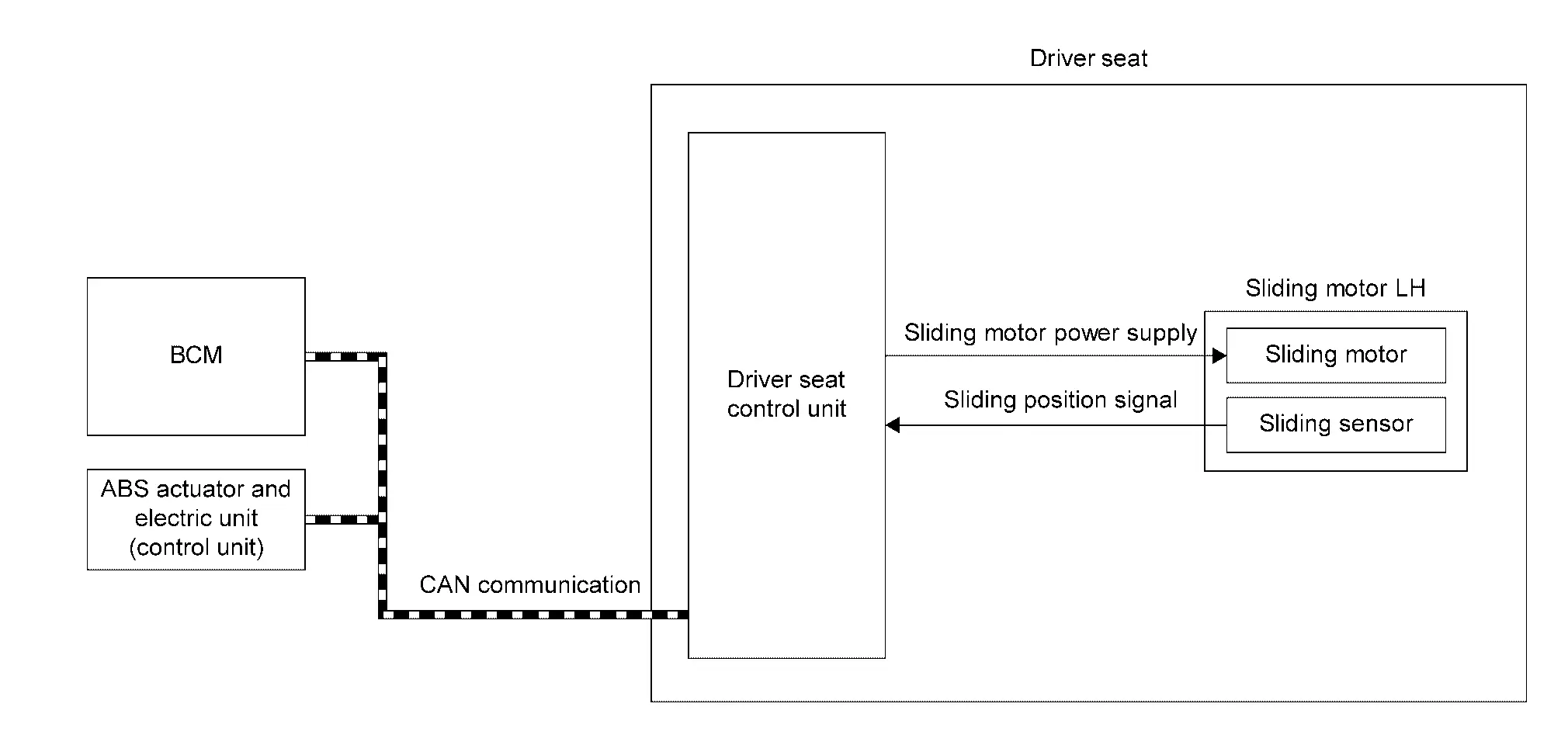
Several types of signals are transmitted from the following units to the driver seat control unit via CAN communication.
| Component | Signal |
|---|---|
| ABS actuator and electric unit (control unit) | Nissan Ariya Vehicle speed signal |
| BCM |
|
| Component | Function | |
|---|---|---|
| Sliding motor LH | Sliding motor |
|
| Sliding sensor |
|
|
| BCM |
Recognizes the following status and transmits it to driver seat control unit via CAN communication:
|
|
| ABS actuator and electric unit (control unit) | ABS actuator and electric unit (control unit) transmits the Nissan Ariya vehicle speed signal to driver seat control unit via CAN communication. | |
| Driver seat control unit | Refer to Driver Seat Control Unit. | |
DESCRIPTION
-
This function allows the driver side seat to return from the exiting position to the position before the exiting function is operated when the ignition switch is operated from OFF to ON when the driver enters the Nissan Ariya vehicle.
-
If the ignition switch is operated with any Intelligent Key other than that used before the exiting function is operated, the driver side seat will return to the driver position registered for that Intelligent Key.
 NOTE:
NOTE:
-
This function is set to ON before delivery (initial setting).
-
Further information for the system setting procedure. Refer to Description.
Operation Condition
-
Ignition switch ON.
-
Driver seat will return from the exiting position to entry position.
Operation Procedure
Satisfy all of the following items. The entry assist function is not performed if these items are not satisfied:
| Item | Status |
|---|---|
| Seat | The Nissan Ariya vehicle is not moved after performing the exit assist function. |
|
Switch inputs
|
OFF (Not operated) |
| Nissan Ariya Vehicle speed | 0 MPH (0 km/h) |
| CONSULT | Not connected |
Detail Flow
| Order | Input | Output | Control unit condition |
|---|---|---|---|
| 1 | Ignition switch | — | Driver seat control unit receives the signals of ignition ON signal from BCM via CAN communication. |
| 2 | — |
Motors (Sliding) |
Driver seat control unit operates the sliding motor LH when the operating conditions are satisfied. |
| 3 |
Sensors (Sliding) |
— | Sliding sensor monitors the operating positions of seat, and then stops the operation of sliding motor LH when seat reaches the recorded positions. |
Other materials:
Explanation of scheduled maintenance items
Basic information
The following descriptions are provided
to give you a better understanding of the
scheduled maintenance items that
should be regularly checked or replaced on the Nissan Rogue.
The maintenance schedule indicates at
which mileage/time intervals each item
requires service.
In addi ...
Periodic Maintenance
Periodic Maintenance
The following tables show the normal maintenance schedule. Depending
upon weather and atmospheric conditions, varying road surfaces,
individual driving habits and Nissan Ariya vehicle usage, additional or
more frequent maintenance may be required.Periodic maintenance beyo ...
Symptom Diagnosis. The Braking Force of Parking Brake Is High
Description
The parking brake breaking force is too high.
Diagnosis Procedure
PERFORM THE SELF DIAGNOSIS RESULT
CONSULT
Select "Self diagnosis result" mode of "ABS".
Is any DTC detected?
YES>>
Check the DTC. Refer to DTC Index.
NO>>
GO TO 2.
CHECK REAR DISC BRAKE SYSTEM (1)
...