
Nissan Rogue (T33) 2021-Present Service Manual: Ecu Diagnosis Information :: Intelligent Key Unit
Reference Value
VALUES ON THE DIAGNOSIS TOOL
 NOTE:
NOTE:
The following table includes information (items) inapplicable to this Nissan Ariya vehicle. For information (items) applicable to this vehicle, refer to CONSULT display items.
| Monitor Item | Condition | Value/Status |
|---|---|---|
| Intelligent Key unit blank status | Intelligent Key unit is registered | Off |
| Intelligent Key unit is not registered (blank status) | On | |
| Intelligent Key unit power supply status | Intelligent Key unit power supply normally | Off |
|
Intelligent Key unit power supply malfunction
Less than 6 V or more than 16 V |
On | |
| KEY ID1 | Which pressing the door request switch carrying the Intelligent Key #1 | On |
| Other than above | Off | |
| KEY ID2 | Which pressing the door request switch carrying the Intelligent Key #2 | On |
| Other than above | Off | |
| KEY ID3 | Which pressing the door request switch carrying the Intelligent Key #3 | On |
| Other than above | Off | |
| KEY ID4 | Which pressing the door request switch carrying the Intelligent Key #4 | On |
| Other than above | Off | |
| Battery voltage | Ignition switch ON | 10 – 16 V |
| Ignition ON (IPDM E/R) | Other than ignition switch ON | Off |
| Ignition switch ON | On | |
| Nissan Ariya Vehicle speed (ABS) | While driving | Equivalent to speedometer reading |
| Nissan Ariya Vehicle speed (meter) | While driving | Equivalent to speedometer reading |
| Total distance | While driving | Indicates total Nissan Ariya vehicle distance |
| Keyfob button1 | Other than below | Off |
|
On | |
| Keyfob button2 | Other than below | Off |
|
On | |
| Keyfob button3 | Other than below | Off |
|
On | |
| Keyfob button4 | Other than below | Off |
| PANIC button is pressed | On | |
| Keyfob button5 | Other than below | Off |
| PANIC button is pressed | On | |
| Back door/trunk opener switch | When back door opener switch circuit is malfunction | Malf |
| When back door opener switch is not pressed | Off | |
| When back door opener switch is pressed | On | |
| Key ID (last) | When any keyfob button is pressed | 1,2,3,4 |
| Keyfob#1 cabin area | Other than below | Off |
| When Intelligent Key #1 is in cabin area, press the door request switch carrying other Keyfob | On | |
| Keyfob#1 undefined area | When Intelligent Key #1 is detected by multiple inside/ outside key antenna | Off |
| When Intelligent Key #1 is out of range of the defined Intelligent Key unit area | On | |
| Keyfob#1 rear bumper area | Other than below | Off |
| When press the back door opener switch carrying Intelligent Key #1 | On | |
| Keyfob#2 cabin area | Other than below | Off |
| When Intelligent Key #2 is in cabin area, press the door request switch carrying other Keyfob | On | |
| Keyfob#2 undefined area | When Intelligent Key #2 is detected by multiple inside/ outside key antenna | Off |
| When Intelligent Key #2 is out of range of the defined Intelligent Key unit area | On | |
| Keyfob#2 rear bumper area | Other than below | Off |
| When press the back door opener switch carrying Intelligent Key #2 | On | |
| Keyfob#3 cabin area | Other than below | Off |
| When Intelligent Key #3 is in cabin area, press the door request switch carrying other Keyfob | On | |
| Keyfob#3 undefined area | When Intelligent Key #3 is detected by multiple inside/ outside key antenna | Off |
| When Intelligent Key #3 is out of range of the defined Intelligent Key unit area | On | |
| Keyfob#3 rear bumper area | Other than below | Off |
| When press the back door opener switch carrying Intelligent Key #3 | On | |
| Keyfob#4 cabin area | Other than below | Off |
| When Intelligent Key #4 is in cabin area, press the door request switch carrying other Keyfob | On | |
| Keyfob#4 undefined area | When Intelligent Key #4 is detected by multiple inside/ outside key antenna | Off |
| When Intelligent Key #4 is out of range of the defined Intelligent Key unit area | On | |
| Keyfob#4 rear bumper area | Other than below | Off |
| When press the back door opener switch carrying Intelligent Key #4 | On | |
| Keyfob operation | Keyfob button is not pressed | Off |
| UNLOCK button is pressed | Unlock | |
| LOCK button is pressed | Lock | |
| Automatic back door button is pressed | TR/BD | |
| PANIC button is pressed | Panic | |
|
This item is displayed, but cannot be monitored |
ASD (RH) | |
|
This item is displayed, but cannot be monitored |
ASD (LH) | |
|
This item is displayed, but cannot be monitored |
Light | |
| Remote engine start button is pressed | Eng start | |
|
This item is displayed, but cannot be monitored |
Roof | |
| Push switch | Push-button ignition switch (push-switch) is pressed | Off |
| Push-button ignition switch (push-switch) is not pressed | On | |
| Request switch (Front right) | When front door request switch RH is not pressed | Off |
| When front door request switch RH is pressed | On | |
| Request switch (Front left) | When front door request switch LH is not pressed | Off |
| When front door request switch LH is pressed | On | |
| Registration Key ID status | Intelligent Key is not registered | Off |
| Intelligent Key is registered | On | |
| Keyfob#1 outside area (LH) | When Intelligent Key #1 is out of range of outside key antenna (rear door LH) | Off |
| When Intelligent Key #1 is in range of outside key antenna (rear door LH) | On | |
| Keyfob#1 outside area (RH) | When Intelligent Key #1 is out of range of outside key antenna (rear door RH) | Off |
| When Intelligent Key #1 is in range of outside key antenna (rear door RH) | On | |
| Keyfob#2 outside area (LH) | When Intelligent Key #2 is out of range of outside key antenna (rear door LH) | Off |
| When Intelligent Key #2 is in range of outside key antenna (rear door LH) | On | |
| Keyfob#2 outside area (RH) | When Intelligent Key #2 is out of range of outside key antenna (rear door RH) | Off |
| When Intelligent Key #2 is in range of outside key antenna (rear door RH) | On | |
| Keyfob#3 outside area (LH) | When Intelligent Key #3 is out of range of outside key antenna (rear door LH) | Off |
| When Intelligent Key #3 is in range of outside key antenna (rear door LH) | On | |
| Keyfob#3 outside area (RH) | When Intelligent Key #3 is out of range of outside key antenna (rear door RH) | Off |
| When Intelligent Key #3 is in range of outside key antenna (rear door RH) | On | |
| Keyfob#4 outside area (LH) | When Intelligent Key #4 is out of range of outside key antenna (rear door LH) | Off |
| When Intelligent Key #4 is in range of outside key antenna (rear door LH) | On | |
| Keyfob#4 outside area (RH) | When Intelligent Key #4 is out of range of outside key antenna (rear door RH) | Off |
| When Intelligent Key #4 is in range of outside key antenna (rear door RH) | On | |
| Keyfob#1 battery low | Intelligent Key unit detects low battery in Intelligent Key #1 | 0 – 6 |
| Keyfob#2 battery low | Intelligent Key unit detects low battery in Intelligent Key #2 | 0 – 6 |
| Keyfob#3 battery low | Intelligent Key unit detects low battery in Intelligent Key #3 | 0 – 6 |
| Keyfob#4 battery low | Intelligent Key unit detects low battery in Intelligent Key #4 | 0 – 6 |
| Battery voltage (IPDM E/R) | Ignition switch ON | 10 – 18 V |
| Nissan Ariya Vehicle condition | Intelligent Key unit status is low power consumption mode (sleep mode) | Sleep |
| Intelligent Key unit status is low power consumption mode (normal mode) | Wake up | |
| Power supply position is "OFF" | OFF | |
| Power supply position is "ACC" | ACC | |
| Power supply position is "IGN ON" | IGN ON | |
| Power supply position is "Cranking" | Cranking | |
| Power supply position is "Running" | Running | |
| While the engine stop/start status | stop/start | |
| While the engine stalled status | Stalled | |
| Steering lock unit power output |
This item is displayed, but cannot be monitored |
Off |
*: This item is monitored only for vehicle with request switch models
TERMINAL LAYOUT

PHYSICAL VALUES
NOTE:
Waveform reference
|
Terminal No. (Wire color) | Description | Condition |
Value (Approx.) | |||
|---|---|---|---|---|---|---|
| Signal name | Input/ Output | |||||
| (+) | (-) | |||||
|
1 (LA/P) |
Ground | Battery power supply | Input | — | Battery voltage | |
|
3 (LA/G) |
Ground | Intelligent Key warning buzzer | Output | Intelligent Key warning buzzer |
Sounding
The pulse cycle changes depending on buzzer sounds. |
|
| Not sounding | 0 V | |||||
|
4* (LA/LG) |
Ground | Door request switch (front door LH) | Input | Door request switch (front door LH) | ON (pressed) | 0 V |
| OFF (not pressed) | 12 V | |||||
|
5 (P) |
Ground | Back door request switch | Input | Back door request switch | ON (pressed) | 0 V |
| OFF (not pressed) | 12 V | |||||
|
6 (LA/L) |
Ground | CAN-High | Input/ Output | — | — | |
|
7 (LA/P) |
Ground | CAN-Low | Input/ Output | — | — | |
|
9 (BG) |
Ground | Push-button ignition switch | Input | Push-button ignition switch | Pressed | 0 V |
| Not pressed | 12 V | |||||
|
10 (L) |
Ground | Push-button ignition switch illumination power supply | Output | Push-button ignition switch illumination | OFF | 0 V |
| ON |
|
|||||
|
11* (P) |
Ground | Door request switch (front door RH) | Input | Door request switch (front door RH) | ON (pressed) | 0 V |
| OFF (not pressed) | 12 V | |||||
|
19 (V) |
Ground | NATS antenna amp. |
Input/Output |
Intelligent Key battery is removed and brake pedal is depressed | When a registered Intelligent Key backside is contacted to push-button ignition switch | 0 V |
| Other than above |
|
|||||
| Inside key antenna | Output | Press push-button ignition switch | When Intelligent Key is in the passenger compartment |
|
||
| When Intelligent Key is not in the passenger compartment |
|
|||||
|
20 (G) |
Ground | NATS antenna amp. | Input/Output | Intelligent Key battery is removed and brake pedal is depressed | When a registered Intelligent Key backside is contacted to push-button ignition switch | 0 V |
| Other than above |
|
|||||
| Inside key antenna | Output | Press push-button ignition switch | When Intelligent Key is in the passenger compartment |
|
||
| When Intelligent Key is not in the passenger compartment |
|
|||||
|
29 (B) |
Ground | Ground | — | — | 0 V | |
|
31 (LA/LG) |
Ground | Outside key antenna (rear door RH) | Output | When the door request switch (front door RH or rear door RH) is operated with ignition switch ON | When Intelligent Key is in the antenna detection area |
|
| When Intelligent Key is not in the antenna detection area |
|
|||||
|
32 (LA/L) |
Ground | Outside key antenna (rear door RH) | Output | When the door request switch (front door RH or rear door RH) is operated with ignition switch ON | When Intelligent Key is in the antenna detection area |
|
| When Intelligent Key is not in the antenna detection area |
|
|||||
|
33 (LA/P) |
Ground | Inside key antenna (Japan production) | Output | Press push-button ignition switch | When Intelligent Key is in the passenger compartment |
|
| When Intelligent Key is not in the passenger compartment |
|
|||||
|
33 (LA/GR) |
Ground | Inside key antenna (USA production) | Output | Press push-button ignition switch | When Intelligent Key is in the passenger compartment |
|
| When Intelligent Key is not in the passenger compartment |
|
|||||
|
34 (LA/Y) |
Ground | Inside key antenna | Output | Press push-button ignition switch | When Intelligent Key is in the passenger compartment |
|
| When Intelligent Key is not in the passenger compartment |
|
|||||
|
35 (LA/V) |
Ground | Outside key antenna (rear door LH) | Output | When the door request switch (front door LH or rear door LH) is operated with ignition switch ON | When Intelligent Key is in the antenna detection area |
|
| When Intelligent Key is not in the antenna detection area |
|
|||||
|
36 (LA/SB) |
Ground | Outside key antenna (rear door LH) | Output | When the door request switch (front door LH or rear door LH) is operated with ignition switch ON | When Intelligent Key is in the antenna detection area |
|
| When Intelligent Key is not in the antenna detection area |
|
|||||
|
37 (LA/BR) |
Ground | Outside key antenna (rear bumper) | Output | When the back door request switch is operated with ignition switch ON | When Intelligent Key is in the antenna detection area |
|
| When Intelligent Key is not in the antenna detection area |
|
|||||
|
38 (LA/G) |
Ground | Outside key antenna (rear bumper) | Output | When the back door request switch is operated with ignition switch ON | When Intelligent Key is in the antenna detection area |
|
| When Intelligent Key is not in the antenna detection area |
|
|||||
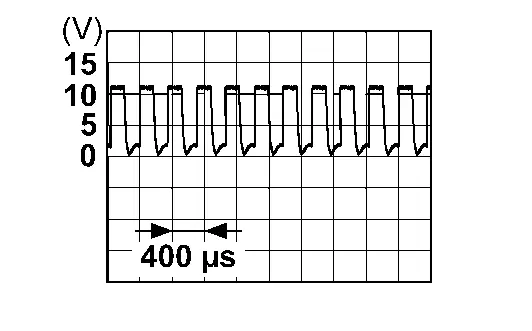
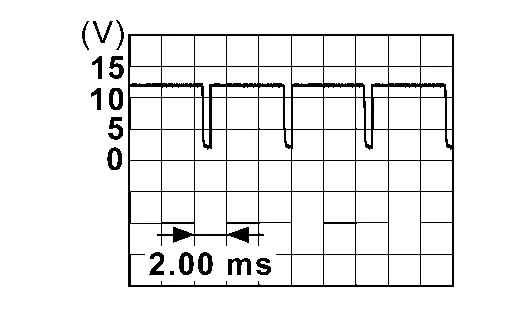
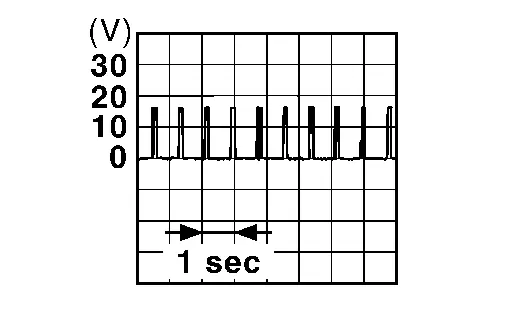
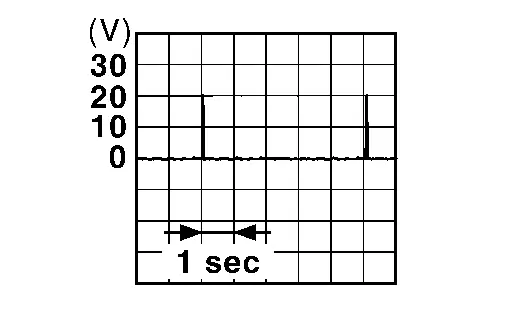
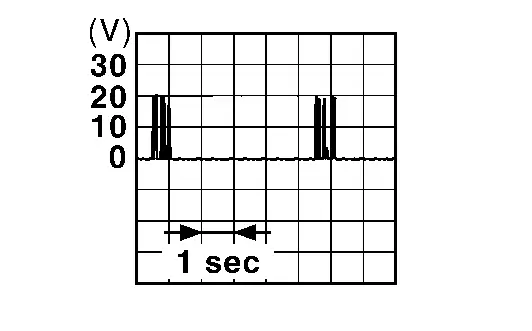
*: With request switch models
Fail-safe
Refer to Fail-safe.
DTC Inspection Priority Chart
If some DTCs are displayed at the same time, perform inspections one by one based on the following priority chart.
| Priority | DTC |
|---|---|
| 1 |
|
| 2 |
|
| 3 |
|
| 4 |
|
| 5 |
|
| 6 |
|
DTC Index
NOTE:
The details of time display are as follows.
-
CRNT: A malfunction is detected now.
-
PAST: A malfunction was detected in the past.
| CONSULT display | Fail-safe | Intelligent Key system malfunction displays | Reference page |
|---|---|---|---|
|
No DTC is detected. Further testing may be required. |
— | — | — |
| B2001-45: Intelligent Key unit | — | — | DTC Description |
| B2002-43: Intelligent Key unit | — | — | DTC Description |
| B2010-1C: Battery voltage | — | — | DTC Description |
| B2033-4A: DONGLE NG | — | — | DTC Description |
| B203D-14: Inside antenna | — | — | DTC Description |
| B203E-14: Outside antenna | — | — | DTC Description |
| B203F-14: Outside antenna | — | — | DTC Description |
| B2040-14: Outside antenna | — | — | DTC Description |
| B2042-4A: Electric shift authentication fail | × | — | DTC Description |
| B2043-4A: Electric shift ID discord | × | — | DTC Description |
| B2044-4A: Electric shift ID registration fail | × | — | DTC Description |
| B2045-4A: Electric shift ID discord | × | — | DTC Description |
| B2047-87: Electric shift communication fail | × | — | DTC Description |
| B2046-42: EEPROM | — | — | DTC Description |
| B2046-46: EEPROM | — | — | DTC Description |
| B2070-68: Key registration | — | — | DTC Description |
| B2081-23: Request SW (FL) | — | — | DTC Description |
| B2083-23: Request SW (FR) | — | — | DTC Description |
| B2086-23: Request SW (BD/TR) | — | — | DTC Description |
| B2090-14: NATS antenna amp. | — | — | DTC Description |
| CONSULT display | Fail-safe | Intelligent Key system malfunction displays | Reference page |
|---|---|---|---|
| U2140-87: CAN comm err (ECM) | — | — | DTC Description |
| U2148-87: CAN comm err (brake control unit) | — | — | DTC Description |
| U214E-87: CAN comm err (combination meter) | — | — | DTC Description |
| U214F-86: CAN comm err (BCM) | — | — | DTC Description |
| U2152-86: CAN comm err (ADAS control unit) | — | — | DTC Description |
| U215B-86: CAN comm err (IPDM E/R) | — | — | DTC Description |
Other materials:
Fuel Pump
Component Inspection
CHECK FUEL PUMP
Turn ignition switch OFF.
Disconnect “fuel level sensor unit and fuel pump” harness connector.
Check the resistance between “fuel level sensor unit and fuel pump” terminals as follows.
Fuel level sensor unit and fuel pump Condition Res ...
Brake Warning Lamp
Component Function Check
CHECK BRAKE WARNING LAMP FUNCTION (1)
Check that brake warning lamp in combination meter turns ON for
approximately 1 second after ignition switch is ON (before engine
start).
Is the inspection result normal?
YES>>
GO TO 2.
NO>>
Refer to Diagnosis Pr ...
Led Headlamp. Basic Inspection
Diagnosis and Repair Work Flow
Work Flow
OVERALL SEQUENCEDETAILED FLOWGET INFORMATION FOR SYMPTOM
Get detailed information from the customer about the symptom (the
condition and the environment when the incident/malfunction occurs).
Check operation condition of the function that is mal ...