
Nissan Rogue (T33) 2021-Present Owner’s Manual & User Guide: Driver Monitor
Basic information
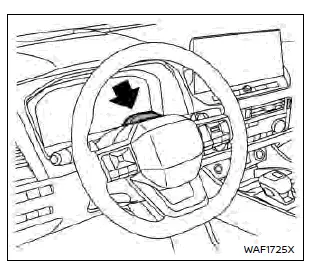
On ProPILOT Assist 2.1 equipped Nissan Rogue models, the system monitors the driver’s attention to the road ahead with a driver-facing camera located on the steering column. The system observes head position and direction, eye opening, and eye direction. If the system determines that the driver is not looking ahead, a series of warnings will be displayed to draw the driver’s attention back to the road.
NOTE:
The driver monitor is active in all driving modes on the Nissan Rogue, not only when ProPILOT Assist 2.1 is engaged.

If the driver’s face is below the camera’s detection range A, the driver monitor may not function correctly. Adjust your seating position or steering column height so that the camera can clearly detect your entire face.
License information
The driver monitoring system includes software that uses open source software (OSS). License information can be found at the website below.
http://www.embedded-carmultimedia.jp/RTOS/License/oss/DMS_0401/
Other materials:
C1f04-48 Feb Ope Count Limit
Without Propilot Assist 2.1
DTC Description
DTC DETECTION LOGIC DTC
CONSULT screen terms
(Trouble diagnosis content) DTC detection condition
C1F04
48
FEB OPE COUNT LIMIT
(Forward Emergency Braking operation count limit)
Diagnosis condition
When engine is running
...
U0284 Active Grille Shutter
DTC Description
DTC DETECTION LOGICWhen ECM cannot receive the engine communication signal from active grille shutter. DTC No.
CONSULT screen terms
(Trouble diagnosis content) DTC detecting condition
U0284
00
LOST COMM (A/GRLL SHTTR MDL A)
(Lost communication with active grille air s ...
Seat belts with pretensioners (front and
rear outboard seats)
WARNING
The pretensioners cannot be
reused after activation. They must
be replaced together with the
retractor and buckle as a complete
unit in your Nissan Rogue.
If the vehicle becomes involved in
a collision but a pretensioner is
not activated, be sure to have the
pretensioner system ins ...