
Nissan Rogue (T33) 2021-Present Service Manual: C1f03-62 Operation Sw Circ
Without Propilot Assist 2.1
DTC Description
DTC DETECTION LOGIC
| DTC |
CONSULT screen terms (Trouble diagnosis content) | DTC detection condition | ||
|---|---|---|---|---|
| C1F03 | 62 |
OPERATION SW CIRC (Operation switch circuit) |
Diagnosis condition |
|
| Signal (terminal) | — | |||
| Threshold | An ON/OFF state judgment of the ProPILOT Assist 1.1 differs between ECM and ADAS control unit 2 | |||
| Diagnosis delay time | 2 seconds or more | |||
POSSIBLE CAUSE
-
ProPILOT Assist steering switch circuit
-
ProPILOT Assist steering switch
-
ECM
FAIL-SAFE
The following systems are canceled.
-
Vehicle-to-vehicle distance control mode
-
Conventional (fixed speed) cruise control mode
-
Steering wheel assistance function
CONFIRMATION PROCEDURE
CHECK DTC PRIORITY
If DTC “C1F03-62� is displayed with Network-DTC, first diagnose the Network-DTC.
Is applicable DTC detected?
YES>>Perform diagnosis of applicable. Refer to DTC Index.
NO>>GO TO 2 .
PERFORM DTC CONFIRMATION PROCEDURE
-
Start the engine.
-
Wait for approximately 5 minutes after turning the ProPILOT Assist MAIN switch ON.
-
Perform “All DTC Reading� with CONSULT.
-
Check if the “C1F03-62� is detected as the current malfunction in “Self Diagnostic Result� of “ICC/ADAS 2�.
Is “C1F03-62� detected as the current malfunction?
YES>>Refer to DTC Diagnosis Procedure.
NO-1>>To check malfunction symptom before repair: Refer to Intermittent Incident.
NO-2>>Confirmation after repair: INSPECTION END
DTC Diagnosis Procedure
CHECK DTC PRIORITY
If DTC “C1F03-62� is displayed with Network-DTC, first diagnose the Network-DTC.
Is applicable DTC detected?
YES>>Perform diagnosis of applicable. Refer to DTC Index.
NO>>GO TO 2 .
CHECK ProPILOT Assist STEERING SWITCH
-
Turn the ignition switch OFF.
-
Disconnect the ProPILOT Assist steering switch connector.
-
Check the ProPILOT Assist steering switch. Refer to Component Inspection.
Is the inspection result normal?
YES>>GO TO 3.
NO>>Replace the ProPILOT Assist steering switch.
CHECK HARNESS BETWEEN SPIRAL CABLE AND ECM
-
Disconnect the ECM connector.
-
Check for continuity between the spiral cable harness connector and ECM harness connector.
Spiral cable ECM Continuity Connector Terminal Connector Terminal M30 8 E16 142 Existed 1 143 -
Check for continuity between spiral cable harness connector and ground.
Spiral cable Ground Continuity Connector Terminal M30 8 Not existed 1
Is the inspection result normal?
YES>>GO TO 4.
NO>>Repair the harnesses or connectors.
CHECK SPIRAL CABLE
Check for continuity between spiral cable terminals.
| Spiral cable | Continuity | |
| Terminal | ||
| 21 | 8 | Existed |
| 36 | 1 | |
Is the inspection result normal?
YES>>GO TO 5.
NO>>Replace the spiral cable.
PERFORM SELF-DIAGNOSIS OF ECM
-
Connect the connectors of ProPILOT Assist steering switch and ECM connector.
-
Turn the ignition switch ON.
-
Perform “All DTC Reading�.
-
Check if any DTC is detected in “Self Diagnostic Result� of “ENGINE�.
Is any DTC detected?
YES>>Perform self-diagnosis on the detected DTC and repair or replace the malfunctioning parts. Refer to DTC Index.
NO>>Replace the ADAS control unit 2. Refer to Removal and Installation.
Component Inspection
CHECK ProPILOT Assist STEERING SWITCH
Check resistance between ProPILOT Assist steering switch terminals.
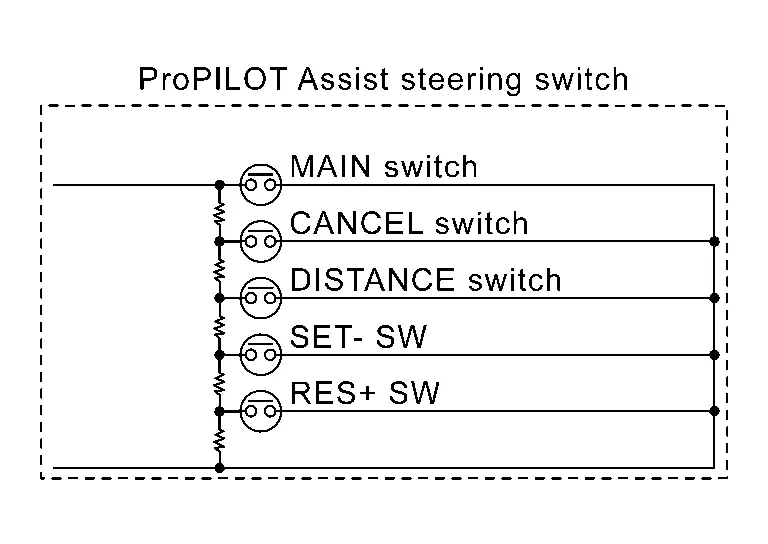
| Terminal | Switch operation | Resistance [Ω] | |
|---|---|---|---|
| 21 | 36 | When pressing ProPILOT Assist MAIN switch | Approx. 0 |
| When pressing CANCEL switch | Approx. 309 | ||
| When pressing DISTANCE switch | Approx. 741 | ||
| When pressing SET- switch | Approx. 1406 | ||
| When pressing RES+ switch | Approx. 2586 | ||
| When all switches are not pressed | Approx. 5456 | ||
Is the inspection result normal?
YES>>INSPECTION END
NO>>Replace the ProPILOT Assist steering switch.
With Propilot Assist 2.1
DTC Description
DTC DETECTION LOGIC
| DTC |
CONSULT screen terms (Trouble diagnosis content) | DTC detection condition | ||
|---|---|---|---|---|
| C1F03 | 62 | OPERATION SW CIRCUIT | Diagnosis condition |
|
| Signal (terminal) | Steering switch signal | |||
| Threshold | An ON/OFF state judgment of the ProPILOT Assist 2.1 differs between BCM and ADAS control unit 2 | |||
| Diagnosis delay time | 2 seconds or more | |||
POSSIBLE CAUSE
-
ProPILOT Assist steering switch circuit
-
ProPILOT Assist steering switch
-
BCM
FAIL-SAFE
The following systems are canceled.
-
Vehicle speed & vehicle-to-vehicle control function
-
Lane keep function*1
-
Lane keep function*2
-
Lane change support function
-
Overtaking support function
-
Route driving support function
-
FEB
-
RAB
-
PFCW
-
LDP
-
Blind Spot Intervention
-
TSR
*1: ProPILOT Assist 2.1 display is green
*2: ProPILOT Assist 2.1 display is blue
CONFIRMATION PROCEDURE
CHECK DTC PRIORITY
If DTC “C1F03-62� is displayed with Network-DTC, first diagnose the Network-DTC.
Is applicable DTC detected?
YES>>Perform diagnosis of applicable. Refer to DTC Index.
NO>>GO TO 2 .
PERFORM DTC CONFIRMATION PROCEDURE
-
Start the engine.
-
Wait for approximately 2 seconds after turning the ProPILOT Assist MAIN switch ON.
-
Perform “All DTC Reading� with CONSULT.
-
Check if the “C1F03-62� is detected as the current malfunction in “Self Diagnostic Result� of “ICC/ADAS 2�.
Is “C1F03-62� detected as the current malfunction?
YES>>Refer to DTC Diagnosis Procedure.
NO-1 >>To check malfunction symptom before repair: Refer to Intermittent Incident.
NO-2 >>Confirmation after repair: INSPECTION END
DTC Diagnosis Procedure
CHECK DTC PRIORITY
If DTC “C1F03-62� is displayed with Network-DTC, first diagnose the Network-DTC.
Is applicable DTC detected?
YES>>Perform diagnosis of applicable. Refer to DTC Index.
NO>>GO TO 2 .
CHECK ProPILOT ASSIST STEERING SWITCH
-
Disconnect the ProPILOT Assist steering switch connector.
-
Check the ProPILOT Assist steering switch. Refer to Component Inspection.
Is the inspection result normal?
YES>>GO TO 3.
NO>>Replace the ProPILOT Assist steering switch.
CHECK HARNESS BETWEEN SPIRAL CABLE AND ECM
-
Disconnect the ECM connector.
-
Check for continuity between the spiral cable harness connector and ECM harness connector.
Spiral cable ECM Continuity Connector Terminal Connector Terminal M30 1 E21 143 Existed 8 142 -
Check for continuity between spiral cable harness connector and ground.
Spiral cable Ground Continuity Connector Terminal M30 1 Not existed 8
Is the inspection result normal?
YES>>GO TO 4.
NO>>Repair the harnesses or connectors.
CHECK SPIRAL CABLE
Check for continuity between spiral cable terminals.
| Spiral cable | Continuity | |
| Terminal | ||
| 21 | 8 | Existed |
| 36 | 1 | |
Is the inspection result normal?
YES>>GO TO 5.
NO>>Replace the spiral cable.
PERFORM SELF-DIAGNOSIS OF ECM
Check if any DTC is detected in “Self Diagnostic Result� of “ECM".
Is any DTC detected?
YES>>Perform self-diagnosis on the detected DTC and repair or replace the malfunctioning parts. Refer to DTC Index.
NO>>Replace the ADAS control unit 2. Refer to Removal and Installation.
Component Inspection
CHECK ProPILOT ASSIST STEERING SWITCH
Check resistance between ProPILOT Assist steering switch terminals.
| Terminal | Switch operation | Resistance [Ω] | |
|---|---|---|---|
| 21 | 36 | When pressing ProPILOT Assist MAIN switch | Approx. 0 |
| When pressing lane change support switch | Approx. 100 | ||
| When pressing CANCEL switch | Approx. 237 | ||
| When pressing DISTANCE switch | Approx. 428 | ||
| When pressing SET- switch | Approx. 729 | ||
| When pressing RES+ switch | Approx. 1319 | ||
| When all switches are not pressed | Approx. 3529 | ||
Is the inspection result normal?
YES>>INSPECTION END
NO>>Replace the ProPILOT Assist steering switch.
Other materials:
Preparation
Special Service Tools
The actual shapes of TechMate tools may differ from those of special service tools illustrated here.
Tool number
(TechMate No.)
Tool name Description
(NI-39570)
Chassis ear
Locates the noise
(NI-50397)
Squeak and Rattle Kit
Repairs the cause o ...
Dtc/circuit Diagnosis. B2428-46 Automatic Back Door Control Unit
DTC Description
DTC DETECTION LOGIC DTC No.
CONSULT screen items
(Trouble diagnosis content) DTC Detection Condition
B2428-46
Automatic back door control unit
(Automatic back door control unit)
Diagnosis condition
All times
Signal (terminal)
—
Threshold
Automatic ...
U2454-87 Can Comm Circuit
Without Propilot Assist 2.1
DTC Description
CAN COMMUNICATIONCAN (Controller Area Network) is a
serial communication line for real time applications. It is an on-Nissan
Ariya vehicle multiplex communication line with high data communication
speed and excellent error detection ability. Mode ...