
Nissan Rogue (T33) 2021-Present Service Manual: Basic Inspection :: Diagnosis and Repair Work Flow
Work Flow
OVERALL SEQUENCE
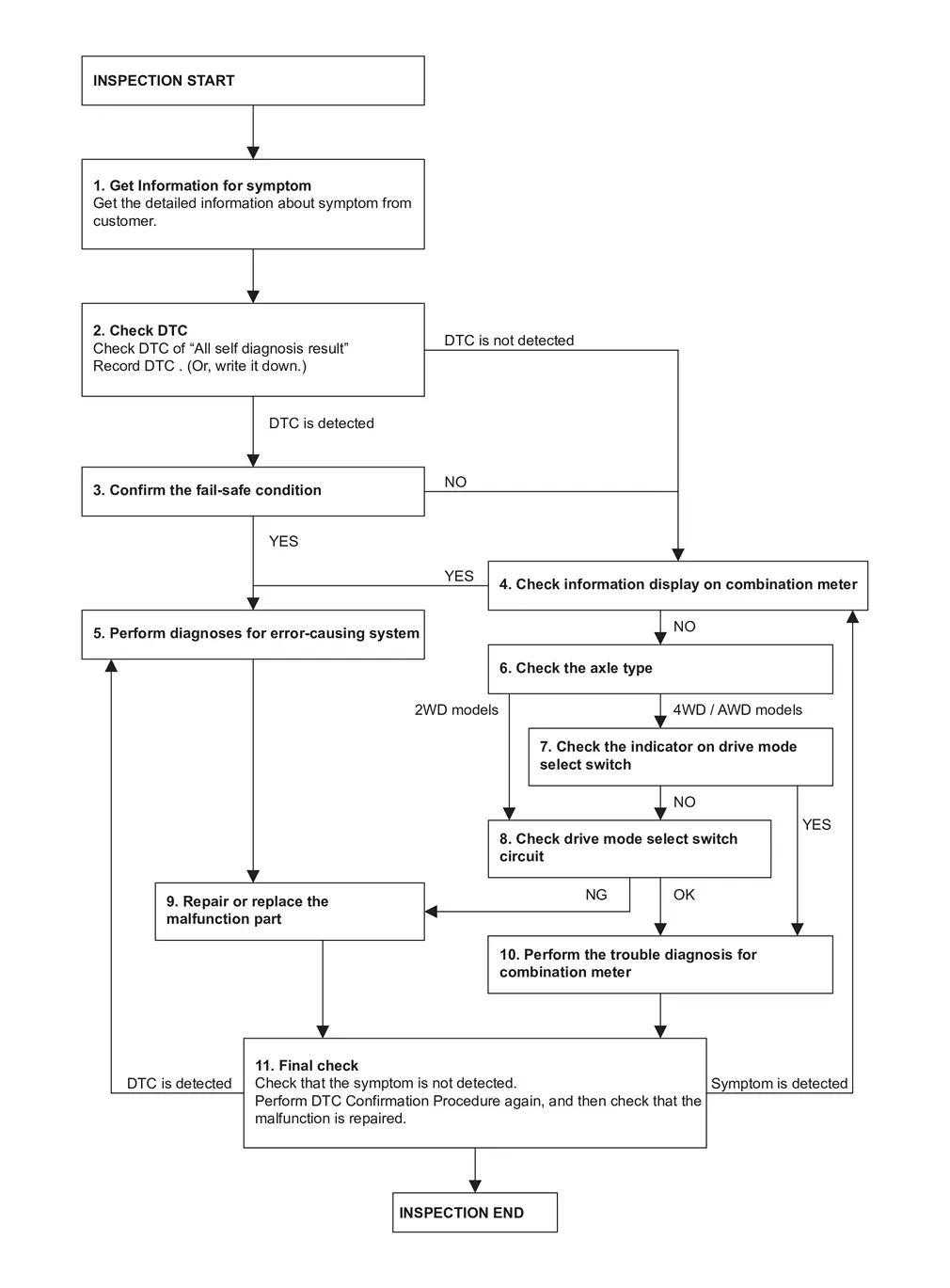
DETAILED FLOW
GET INFORMATION FOR SYMPTOM
-
Get the detailed information about symptom from customer.
-
Check the drive mode indicator on the meter appeared.
-
Check the Drive mode indicator on the meter changed when operates the drive mode select switch.
>>
GO TO 2.
CHECK THE DTC
 With CONSULT
-
Check DTC of “All self diagnosis result�.
-
Perform the following procedure if DTC is displayed.
-
Record DTC and freeze frame data. (Or, write it down.)
-
Are any DTCs detected?
YES>>GO TO 3.
NO>>GO TO 4.
CONFIRM THE FAIL-SAFE CONDITION
Confirm the fail-safe condition of detected DTC. Refer to Fail-safe.
Are there any DTCs that causes drive mode selector function is suspended?
YES>>GO TO 5.
NO>>GO TO 4.
CHECK INFORMATION DISPLAY ON COMBINATION METER
-
Ignition switch OFF and wait at least 10 seconds.
-
Ignition switch ON.
-
Check that STANDARD is displayed on the information display screen of the combination meter. (2WD models)
-
Check that AUTO is displayed on the information display screen of the combination meter. (AWD models)
-
Check that the view of information display change when switching up and down the drive mode select switch. (2WD models)
-
Check that the view of information display change when switching left and right the drive mode select switch. (AWD models)
Is the inspection result normal?
YES>>GO TO 5.
NO>>GO TO 6.
PERFORM DIAGNOSES FOR ERROR-CAUSING SYSTEM
With CONSULT
Perform the trouble diagnosis of components that DTC indicated.
>>
GO TO 9.
CHECK THE AXLE TYPE
Check the axle type.
2WD models>>
GO TO 8.
AWD models>>GO TO 7.
CHECK THE INDICATOR ON DRIVE MODE SELECT SWITCH (AWD MODELS)
-
Ignition switch OFF and wait at least 10 seconds.
-
Ignition switch ON.
-
Check the indicator of AUTO on drive mode select switch indicator.
-
Check the illuminated position changes according to the operation when switching the drive mode select switch.
Is the inspection result normal?
YES>>GO TO 10.
NO>>GO TO 8.
CHECK DRIVE MODE SELECT SWITCH CIRCUIT
Check drive mode select switch circuit. Refer to Diagnosis Procedure.
Is the inspection result normal?
YES>>GO TO 10.
NO>>GO TO 9.
REPAIR OR REPLACE THE MALFUNCTION PART
Repair or replace the malfunctioning part.
>>
GO TO 11.
CHECK COMBINATION METER
Check the COMBINATION METER.
-
Full TFT meter: Refer to On Board Diagnosis Function.
-
7 inch information display: Refer to On Board Diagnosis Function.
>>
GO TO 11.
FINAL CHECK
-
Check that the symptom is not detected.
-
Perform DTC Confirmation Procedure again, and then check that the malfunction is repaired.
Is DTC detected and/or does symptom remain?
YES (DTC is detected)>>GO TO 5.
YES (Symptom remains)>>GO TO 4.
NO>>INSPECTION END
Other materials:
Automatic Brake Hold. Basic Inspection. Diagnosis and Repair Work Flow
Diagnosis and Repair Work Flow
Work Flow
DETAILED FLOWINTERVIEW FROM THE CUSTOMER
Clarify customer complaints before inspection. First of all, perform
an interview utilizing Diagnostic Work Sheet and reproduce the symptom
as well as fully understand it. Ask customer about his/her complaints
...
Adas Control Unit. Ecu Diagnosis Information. Adas Control Unit 2
Adas Control Unit 2
Without Propilot Assist 2.1
Reference Value
VALUES ON THE DIAGNOSIS TOOLNOTE:
The following table includes information (items)
inapplicable to this Nissan Ariya vehicle. For information (items)
applicable to this vehicle, refer to CONSULT display items.
Monitor item ...
Dtc/circuit Diagnosis. B2090-14 Nats Antenna Amp.
DTC Description
DTC DETECTION LOGIC DTC No.
CONSULT screen items
(Trouble diagnosis content) DTC detecting condition
B2090–14
NATS antenna amp.
(Nissan anti-theft system antenna amplifier)
Diagnosis condition
Work supports ‟Inside/outside antenna diagnosis�: activated
S ...