
Nissan Rogue (T33) 2021-Present Service Manual: Basic Inspection :: Diagnosis and Repair Work Flow
Work Flow
OVERALL SEQUENCE
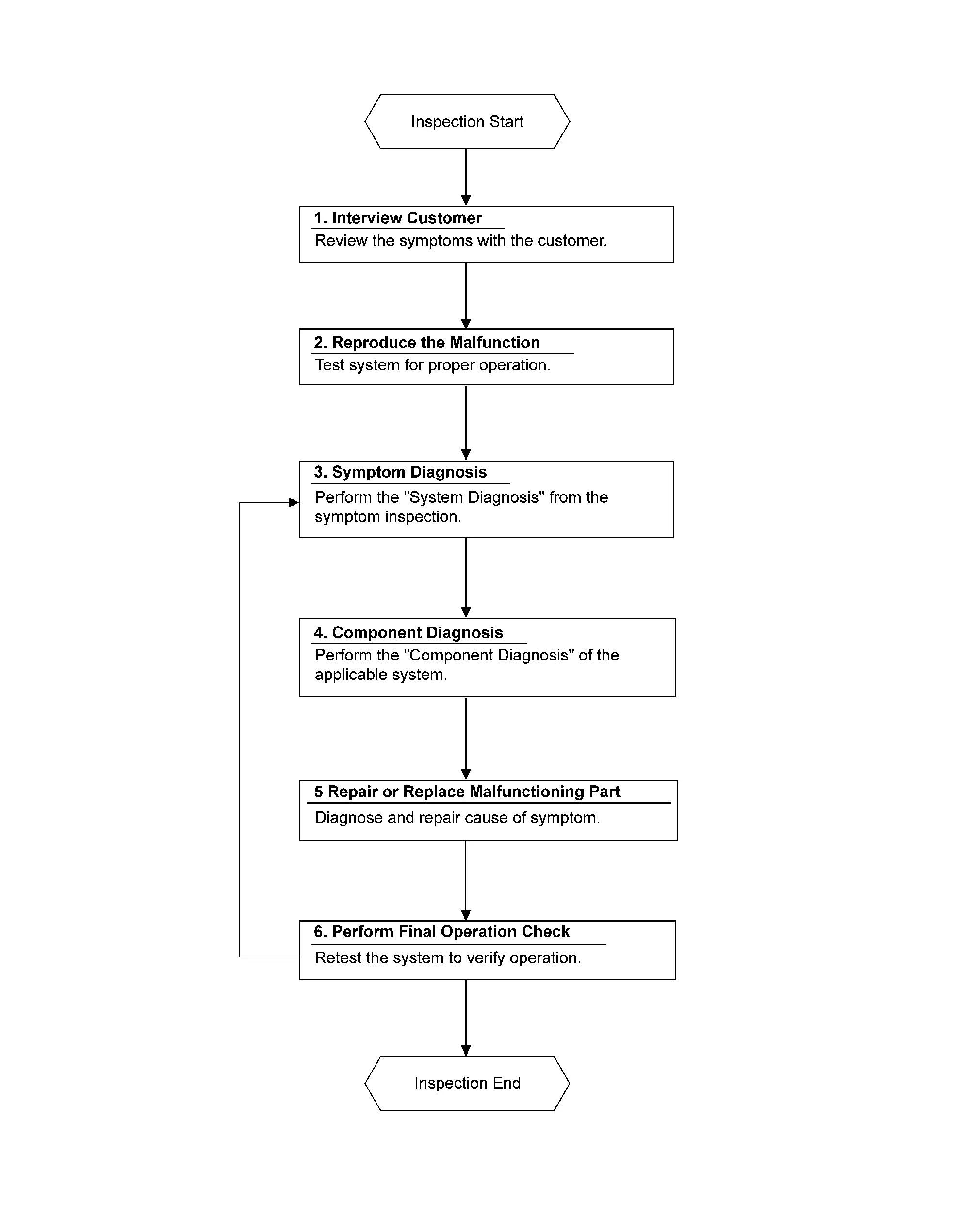
DETAILED FLOW
INTERVIEW CUSTOMER
Interview the customer to obtain as much information as possible about the conditions and environment under which the malfunction occurred.
>>
GO TO 2.
REPRODUCE THE MALFUNCTION INFORMATION
Reproduce the malfunction on the Nissan Ariya vehicle that the customer describes.
Inspect the relation of the symptoms and the condition when the symptoms occur.
>>
GO TO 3.
SYMPTOM DIAGNOSIS
Use Symptom diagnosis from the symptom inspection result in step 2 and then identify where to start performing the diagnosis based on possible causes and symptoms.
>>
GO TO 4.
COMPONENT DIAGNOSIS
Perform the diagnosis with Component diagnosis of the applicable system.
>>
GO TO 5.
REPAIR OR REPLACE THE MALFUNCTIONING PARTS
Repair or replace the specified malfunctioning parts.
>>
GO TO 6.
PERFORM FINAL OPERATION CHECK
Check that malfunctions are not reproduced when obtaining the malfunction information from the customer, referring to the symptom inspection result in step 2.
Are the malfunctions corrected?
YES>>Inspection End.
No>>GO TO 3
Other materials:
P155f Generator Voltage
DTC Description
DTC DETECTION LOGIC DTC
CONSULT screen terms
(Trouble diagnosis content) DTC detection condition
P155F
00
GENERATOR VOLTAGE
(GENERATOR VOLTAGE)
Diagnosis condition
Ignition switch ON
Signal (terminal)
ECM power supply
Threshold
Battery voltage me ...
Activation/désactivation du système de freinage d'urgence automatique avec
détection des piétons
Témoin d'avertissement de désactivation du système (tableau de bord)
Écran d'informations du véhicule
Commandes au volant (côté gauche)
Pour activer ou désactiver le système de freinage d'urgence automatique avec détection des piétons du Nissan Rogue, procédez comme suit ...
On Board Diagnostic (obd) System
Diagnosis Description
This system is an on board diagnostic system that records exhaust
emission-related diagnostic information and detects a
sensors/actuator-related malfunction. A malfunction is indicated by the
malfunction indicator lamp (MIL) and stored in ECU memory as a DTC. The
diagn ...