
Nissan Rogue (T33) 2021-Present Owner’s Manual & User Guide: Automatic air conditioner (models without rear control)
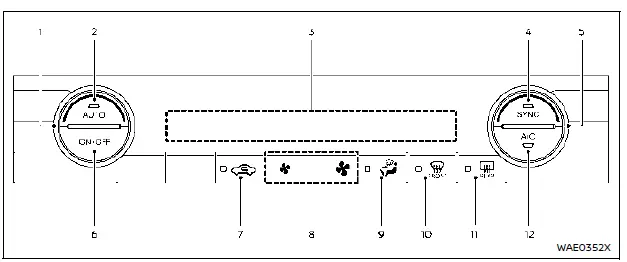
Models with heated steering wheel
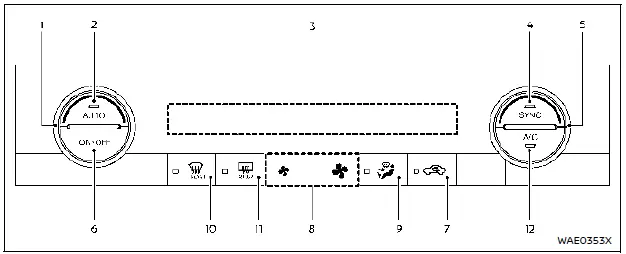
Models without heated steering wheel
Basic information
- Temperature control dial (driver's side)
- AUTO button
- Display screen
- SYNC button
- Temperature control dial (passenger's side)
- ON·OFF button
 Air recirculation button
 Fan speed buttons
 Air flow button
 Front defroster button
 Rear window defroster button
- A/C button
Automatic operation
Cooling and/or dehumidified heating (AUTO):
This all-season mode maintains the set temperature automatically. Fan speed and air distribution are adjusted without driver input.
1. Press AUTO (indicator ON).
2. Rotate the temperature dial on either side to the desired value.
- Driver and passenger temperatures can be set individually if SYNC is OFF.
A light mist from the vents in hot, humid weather is normal due to rapid cooling.
Heating (A/C OFF):
Used when heating only is required, without engaging the air conditioner.
1. Press AUTO (indicator ON).
2. Press A/C to switch it OFF (indicator OFF).
3. Set the desired temperature using the corresponding dial.
- Independent temperature settings available when SYNC is OFF.
- Fan speed and airflow remain automatic.
NOTE:
- Do not set the temperature below outside air temperature—system performance may be affected.
- Avoid this mode if windows begin to fog up.
Dehumidified defrosting or defogging:
1. Press  (indicator ON).
2. Set the desired temperature.
- For quickest ice removal, press
 to set fan speed to MAX.
 - Return to AUTO after clearing the windshield.
- When
 is pressed, the A/C activates automatically if the outside temperature is above freezing, and recirculation switches OFF to improve defogging.
Other materials:
Idle Air Volume Learning
Description
Idle Air Volume Learning is a function of ECM to learn the idle air
volume that keeps engine idle speed within the specific range. It must
be performed under the following conditions:
Each time electric throttle control actuator or ECM is replaced.
Idle speed or ignition tim ...
U0101 Can Comm Circuit
DTC Description
DESCRIPTIONCAN (Controller Area Network) is a serial
communication line for real time application. It is an on-Nissan Ariya
vehicle multiplex communication line with high data communication speed
and excellent error detection ability. Many electronic control units are
equipp ...
Input Speed Sensor
Exploded View
1.
O-ring
2.
Input speed sensor
3.
Transaxle assembly
: N·m (kg-m, in-lb) : Always replace after every disassembly. : Apply petroleum jelly.
Removal and Installation
REMOVAL Never Reuse These Parts Part Code For additional information:
Seal-O-ring
31051 ...