
Nissan Rogue (T33) 2021-Present Service Manual: Anc (active Noise Control Unit)
B1a01-11 Front Door Speaker Lh
DTC Description
DTC DETECTION LOGIC
| DTC No. |
CONSULT screen terms (Trouble diagnosis content) | DTC detection condition | |
|---|---|---|---|
| B1A01-11 |
FL-DOOR woofer OUT (Front left door woofer) |
Diagnosis condition | When ignition switch is ON |
| Signal (terminal) | Sound signal (between active noise control unit and front door speaker LH) | ||
| Threshold | Short to ground circuit | ||
| Diagnosis delay time | 30 seconds or more | ||
POSSIBLE CAUSE
-
Front door speaker LH circuit is malfunction
-
Front door speaker LH
FAIL-SAFE
No sound from front door speaker LH.
CONFIRMATION PROCEDURE
PERFORM DTC CONFIRMATION PROCEDURE
 With CONSULT
-
Turn ignition switch ON.
-
Turn ignition switch OFF and wait for 4 minutes.
-
Turn ignition switch ON and wait at least 1 minute or more.
-
Select “Self Diagnostic Result” mode of “ANC” using CONSULT.
-
Check DTC.
Is DTC B1A01-11 detected?
YES>>Proceed to Diagnosis Procedure.
NO-1>>To check malfunction symptom before repair: Refer to Intermittent Incident.
NO-2>>Confirmation after repair: INSPECTION END
Diagnosis Procedure
CHECK SOUND SIGNAL CIRCUITS FOR SHORT TO GROUND
-
Turn ignition switch OFF.
-
Disconnect active noise control unit harness connector, front door speaker LH harness connector and front speaker LH harness connector.
-
Check the continuity between front door speaker LH harness connector and ground.
Front door speaker LH Ground Continuity Connector Terminal D7 1 Not existed
Is the inspection result normal?
YES>>Replace front door speaker LH. Refer to Removal and Installation.
NO>>Repair or replace harness or connectors.
B1a01-12 Front Door Speaker Lh
DTC Description
DTC DETECTION LOGIC
| DTC No. |
CONSULT screen terms (Trouble diagnosis content) | DTC detection condition | |
|---|---|---|---|
| B1A01-12 |
FL-DOOR woofer OUT (Front left door woofer) |
Diagnosis condition | When ignition switch is ON |
| Signal (terminal) | Sound signal (between active noise control unit and front door speaker LH ) | ||
| Threshold | Short to power supply circuit | ||
| Diagnosis delay time | 30 seconds or more | ||
POSSIBLE CAUSE
-
Front door speaker LH circuit malfunction
-
Front door speaker LH
FAIL-SAFE
No sound from front door speaker LH.
CONFIRMATION PROCEDURE
PERFORM DTC CONFIRMATION PROCEDURE
With CONSULT
-
Turn ignition switch ON.
-
Turn ignition switch OFF and wait for 4 minutes.
-
Turn ignition switch ON and wait at least 1 minute or more.
-
Select “Self Diagnostic Result” mode of “ANC” using CONSULT.
-
Check DTC.
Is DTC B1A01-12 detected?
YES>>Proceed to Diagnosis Procedure.
NO-1>>To check malfunction symptom before repair: Refer to Intermittent Incident.
NO-2>>Confirmation after repair: INSPECTION END
Diagnosis Procedure
CHECK SOUND SIGNAL CIRCUIT FOR SHORT TO POWER SUPPLY
-
Turn ignition switch OFF.
-
Disconnect active noise control unit harness connector, front door speaker LH harness connector and front speaker LH harness connector.
-
Turn ignition switch ON.
-
Check the voltage between front door speaker LH harness connector and ground.
(+) (-) Voltage Front door speaker LH Connector Terminal D7 1 Ground 0 V 2
Is the inspection result normal?
YES>>Replace front door speaker LH. Refer to Removal and Installation.
NO>>Repair or replace harness or connectors.
B1a01-13 Front Door Speaker Lh
DTC Description
DTC DETECTION LOGIC
| DTC No. |
CONSULT screen terms (Trouble diagnosis content) | DTC detection condition | |
|---|---|---|---|
| B1A01-13 |
FL-DOOR woofer OUT (Front left door woofer) |
Diagnosis condition | When ignition switch is ON |
| Signal (terminal) | Sound signal (between active noise control unit and front door speaker LH) | ||
| Threshold | Open circuit | ||
| Diagnosis delay time | 30 seconds or more | ||
POSSIBLE CAUSE
-
Front door speaker LH circuit malfunction
-
Front door speaker LH
FAIL-SAFE
No sound from front door speaker LH.
CONFIRMATION PROCEDURE
PERFORM DTC CONFIRMATION PROCEDURE
With CONSULT
-
Turn ignition switch ON.
-
Turn ignition switch OFF and wait for 4 minutes.
-
Turn ignition switch ON and wait at least 1 minute or more.
-
Select “Self Diagnostic Result” mode of “ANC” using CONSULT.
-
Check DTC.
Is DTC B1A01-13 detected?
YES>>Proceed to Diagnosis Procedure.
NO-1>>To check malfunction symptom before repair: Refer to Intermittent Incident.
NO-2>>Confirmation after repair: INSPECTION END
Diagnosis Procedure
CHECK SOUND SIGNAL CIRCUITS FOR OPEN
-
Turn ignition switch OFF.
-
Disconnect active noise control unit harness connector, front door speaker LH harness connector and front speaker LH harness connector.
-
Check the continuity between active noise control unit harness connector and front door speaker LH harness connector.
Active noise control unit Front door speaker LH Continuity Connector Terminal Connector Terminal B94 26 D7 1 Existed 31 2
Is the inspection result normal?
YES>>Replace front door speaker LH. Refer to Removal and Installation.
NO>>Repair or replace harness or connectors.
B1a01-1a Front Door Speaker Lh
DTC Description
DTC DETECTION LOGIC
| DTC No. |
CONSULT screen terms (Trouble diagnosis content) | DTC detection condition | |
|---|---|---|---|
| B1A01-1A |
FL-DOOR woofer OUT (Front left door woofer) |
Diagnosis condition | When ignition switch is ON |
| Signal (terminal) | Sound signal (between active noise control unit and front door speaker LH) | ||
| Threshold | Short circuit | ||
| Diagnosis delay time | 30 seconds or more | ||
POSSIBLE CAUSE
-
Front door speaker LH circuit malfunction
-
Front door speaker LH
FAIL-SAFE
No sound from front door speaker LH.
CONFIRMATION PROCEDURE
PERFORM DTC CONFIRMATION PROCEDURE
With CONSULT
-
Turn ignition switch ON.
-
Turn ignition switch OFF and wait for 4 minutes.
-
Turn ignition switch ON and wait at least 1 minute or more.
-
Select “Self Diagnostic Result” mode of “ANC” using CONSULT.
-
Check DTC.
Is DTC B1A01-1A detected?
YES>>Proceed to Diagnosis Procedure.
NO-1>>To check malfunction symptom before repair: Refer to Intermittent Incident.
NO-2>>Confirmation after repair: INSPECTION END
Diagnosis Procedure
CHECK SOUND SIGNAL CIRCUITS FOR SHORT
-
Turn ignition switch OFF.
-
Disconnect active noise control unit harness connector, front door speaker LH harness connector and front speaker LH harness connector.
-
Check the continuity between the terminals of front door speaker LH connector.
Front door speaker LH Continuity Connector Terminal D7 1 2 Not existed
Is the inspection result normal?
YES>>Replace front door speaker LH. Refer to Removal and Installation.
NO>>Repair or replace harness or connectors.
B1a05-11 Front Door Speaker Rh
DTC Description
DTC DETECTION LOGIC
| DTC No. |
CONSULT screen terms (Trouble diagnosis content) | DTC detection condition | |
|---|---|---|---|
| B1A05-11 |
FR-DOOR woofer OUT (Front right door woofer) |
Diagnosis condition | When ignition switch is ON |
| Signal (terminal) | Sound signal (between active noise control unit and front door speaker RH) | ||
| Threshold | Short to ground circuit | ||
| Diagnosis delay time | 30 seconds or more | ||
POSSIBLE CAUSE
-
Front door speaker RH circuit malfunction
-
Front door speaker RH
FAIL-SAFE
No sound from front door speaker RH.
CONFIRMATION PROCEDURE
PERFORM DTC CONFIRMATION PROCEDURE
With CONSULT
-
Turn ignition switch ON.
-
Turn ignition switch OFF and wait for 4 minutes.
-
Turn ignition switch ON and wait at least 1 minute or more.
-
Select “Self Diagnostic Result” mode of “ANC” using CONSULT.
-
Check DTC.
Is DTC B1A05-11 detected?
YES>>Proceed to Diagnosis Procedure.
NO-1>>To check malfunction symptom before repair: Refer to Intermittent Incident.
NO-2>>Confirmation after repair: INSPECTION END
Diagnosis Procedure
CHECK SOUND SIGNAL CIRCUITS FOR SHORT TO GROUND
-
Turn ignition switch OFF.
-
Disconnect active noise control unit harness connector, front door speaker RH harness connector and front speaker RH harness connector.
-
Check the continuity between front door speaker RH harness connector and ground.
Front door speaker RH Ground Continuity Connector Terminal D104 1 Not existed
Is the inspection result normal?
YES>>Replace front door speaker RH. Refer to Removal and Installation.
NO>>Repair or replace harness or connectors.
B1a05-12 Front Door Speaker Rh
DTC Description
DTC DETECTION LOGIC
| DTC No. |
CONSULT screen terms (Trouble diagnosis content) | DTC detection condition | |
|---|---|---|---|
| B1A05-12 |
FR-DOOR woofer OUT (Front right door woofer) |
Diagnosis condition | When ignition switch is ON |
| Signal (terminal) | Sound signal (between active noise control unit and front door speaker RH ) | ||
| Threshold | Short to power supply circuit | ||
| Diagnosis delay time | 30 seconds or more | ||
POSSIBLE CAUSE
-
Front door speaker RH circuit malfunction
-
Front door speaker RH
FAIL-SAFE
No sound from front door speaker RH.
CONFIRMATION PROCEDURE
PERFORM DTC CONFIRMATION PROCEDURE
With CONSULT
-
Turn ignition switch ON.
-
Turn ignition switch OFF and wait for 4 minutes.
-
Turn ignition switch ON and wait at least 1 minute or more.
-
Select “Self Diagnostic Result” mode of “ANC” using CONSULT.
-
Check DTC.
Is DTC B1A05-12 detected?
YES>>Proceed to Diagnosis Procedure.
NO-1>>To check malfunction symptom before repair: Refer to Intermittent Incident.
NO-2>>Confirmation after repair: INSPECTION END
Diagnosis Procedure
CHECK SOUND SIGNAL CIRCUIT FOR SHORT TO POWER SUPPLY
-
Turn ignition switch OFF.
-
Disconnect active noise control unit harness connector, front door speaker RH harness connector and front speaker RH harness connector.
-
Turn ignition switch ON.
-
Check the voltage between front door speaker RH harness connector and ground.
(+) (-) Voltage Front door speaker RH Connector Terminal D104 1 Ground 0 V 2
Is the inspection result normal?
YES>>Replace front door speaker RH. Refer to Removal and Installation.
NO>>Repair or replace harness or connectors.
B1a05-13 Front Door Speaker Rh
DTC Description
DTC DETECTION LOGIC
| DTC No. |
CONSULT screen terms (Trouble diagnosis content) | DTC detection condition | |
|---|---|---|---|
| B1A05-13 |
FR-DOOR woofer OUT (Front right door woofer) |
Diagnosis condition | When ignition switch is ON |
| Signal (terminal) | Sound signal (between active noise control unit and front door speaker RH) | ||
| Threshold | Open circuit | ||
| Diagnosis delay time | 30 seconds or more | ||
POSSIBLE CAUSE
-
Front door speaker RH circuit malfunction
-
Front door speaker RH
FAIL-SAFE
No sound from front door speaker RH.
CONFIRMATION PROCEDURE
PERFORM DTC CONFIRMATION PROCEDURE
With CONSULT
-
Turn ignition switch ON.
-
Turn ignition switch OFF and wait for 4 minutes.
-
Turn ignition switch ON and wait at least 1 minute or more.
-
Select “Self Diagnostic Result” mode of “ANC” using CONSULT.
-
Check DTC.
Is DTC B1A05-13 detected?
YES>>Proceed to Diagnosis Procedure.
NO-1>>To check malfunction symptom before repair: Refer to Intermittent Incident.
NO-2>>Confirmation after repair: INSPECTION END
Diagnosis Procedure
CHECK SOUND SIGNAL CIRCUITS FOR OPEN
-
Turn ignition switch OFF.
-
Disconnect active noise control unit harness connector, front door speaker RH harness connector and front speaker RH harness connector.
-
Check the continuity between active noise control unit harness connector and front door speaker RH harness connector.
Active noise control unit Front door speaker RH Continuity Connector Terminal Connector Terminal B94 27 D104 1 Existed 32 2
Is the inspection result normal?
YES>>Replace front door speaker RH. Refer to Removal and Installation.
NO>>Repair or replace harness or connectors.
B1a05-1a Front Door Speaker Rh
DTC Description
DTC DETECTION LOGIC
| DTC No. |
CONSULT screen terms (Trouble diagnosis content) | DTC detection condition | |
|---|---|---|---|
| B1A05-1A |
FR-DOOR woofer OUT (Front right door woofer) |
Diagnosis condition | When ignition switch is ON |
| Signal (terminal) | Sound signal (between active noise control unit and front door speaker RH) | ||
| Threshold | Short circuit | ||
| Diagnosis delay time | 30 seconds or more | ||
POSSIBLE CAUSE
-
Front door speaker RH circuit malfunction
-
Front door speaker RH
FAIL-SAFE
No sound from front door speaker RH.
CONFIRMATION PROCEDURE
PERFORM DTC CONFIRMATION PROCEDURE
With CONSULT
-
Turn ignition switch ON.
-
Turn ignition switch OFF and wait for 4 minutes.
-
Turn ignition switch ON and wait at least 1 minute or more.
-
Select “Self Diagnostic Result” mode of “ANC” using CONSULT.
-
Check DTC.
Is DTC B1A05-1A detected?
YES>>Proceed to Diagnosis Procedure.
NO-1>>To check malfunction symptom before repair: Refer to Intermittent Incident.
NO-2>>Confirmation after repair: INSPECTION END
Diagnosis Procedure
CHECK SOUND SIGNAL CIRCUITS FOR SHORT
-
Turn ignition switch OFF.
-
Disconnect active noise control unit harness connector, front door speaker RH harness connector and front speaker RH harness connector.
-
Check the continuity between the terminals of front door speaker RH connector.
Front door speaker RH Continuity Connector Terminal D104 1 2 Not existed
Is the inspection result normal?
YES>>Replace front door speaker RH. Refer to Removal and Installation.
NO>>Repair or replace harness or connectors.
B1a0a-13 Front Speaker Lh
DTC Description
DTC DETECTION LOGIC
| DTC No. |
CONSULT screen terms (Trouble diagnosis content) | DTC detection condition | |
|---|---|---|---|
| B1A0A-13 |
Front instrument left squawker out (Front instrument left squawker) |
Diagnosis condition | When ignition switch is ON |
| Signal (terminal) | Sound signal (between active noise control unit and front speaker LH) | ||
| Threshold | Open circuit | ||
| Diagnosis delay time | 30 seconds or more | ||
POSSIBLE CAUSE
-
Front speaker LH circuit is malfunction
-
Front speaker LH
FAIL-SAFE
No sound from front speaker LH
CONFIRMATION PROCEDURE
PERFORM DTC CONFIRMATION PROCEDURE
With CONSULT
-
Turn ignition switch ON.
-
Turn ignition switch OFF and wait for 4 minutes.
-
Turn ignition switch ON and wait at least 1 minute or more.
-
Select “Self Diagnostic Result” mode of “ANC” using CONSULT.
-
Check DTC.
Is DTC B1A0A-13 detected?
YES>>Proceed to Diagnosis Procedure.
NO-1>>To check malfunction symptom before repair: Refer to Intermittent Incident.
NO-2>>Confirmation after repair: INSPECTION END
Diagnosis Procedure
CHECK SOUND SIGNAL CIRCUITS FOR OPEN
-
Turn ignition switch OFF.
-
Disconnect active noise control unit harness connector, front door speaker LH harness connector and front speaker LH harness connector.
-
Check the continuity between active noise control unit harness connector and front speaker LH harness connector.
Active noise control unit Front speaker LH Continuity Connector Terminal Connector Terminal B94 26 M1 1 Existed 31 2
Is the inspection result normal?
YES>>Replace front speaker LH. Refer to Removal and Installation.
NO>>Repair or replace harness or connectors.
B1a12-13 Front Speaker Rh
DTC Description
DTC DETECTION LOGIC
| DTC No. |
CONSULT screen terms (Trouble diagnosis content) | DTC detection condition | |
|---|---|---|---|
| B1A12-13 |
Front instrument right squawker out (Front instrument right squawker) |
Diagnosis condition | When ignition switch is ON |
| Signal (terminal) | Sound signal (between active noise control unit and front speaker RH) | ||
| Threshold | Open circuit | ||
| Diagnosis delay time | 30 seconds or more | ||
POSSIBLE CAUSE
-
Front speaker RH circuit is malfunction
-
Front speaker RH
FAIL-SAFE
No sound from front speaker RH.
CONFIRMATION PROCEDURE
PERFORM DTC CONFIRMATION PROCEDURE
With CONSULT
-
Turn ignition switch ON.
-
Turn ignition switch OFF and wait for 4 minutes.
-
Turn ignition switch ON and wait at least 1 minute or more.
-
Select “Self Diagnostic Result” mode of “ANC” using CONSULT.
-
Check DTC.
Is DTC B1A12-13 detected?
YES>>Proceed to Diagnosis Procedure.
NO-1>>To check malfunction symptom before repair: Refer to Intermittent Incident.
NO-2>>Confirmation after repair: INSPECTION END
Diagnosis Procedure
CHECK SOUND SIGNAL CIRCUITS FOR OPEN
-
Turn ignition switch OFF.
-
Disconnect active noise control unit harness connector, front door speaker RH harness connector and front speaker RH harness connector.
-
Check the continuity between active noise control unit harness connector and front speaker RH harness connector.
Active noise control unit Front speaker RH Continuity Connector Terminal Connector Terminal B94 27 M87 1 Existed 32 2
Is the inspection result normal?
YES>>Replace front speaker RH. Refer to Removal and Installation.
NO>>Repair or replace harness or connectors.
B1a69-11 Subwoofer Lh
DTC Description
DTC DETECTION LOGIC
| DTC No. |
CONSULT screen terms (Trouble diagnosis content) | DTC detection condition | |
|---|---|---|---|
| B1A69-11 |
Rear luggage left woofer out (Rear luggage left woofer) |
Diagnosis condition | When ignition switch is ON |
| Signal (terminal) | Sound signal subwoofer1 (between active noise control unit and subwoofer) | ||
| Threshold | Short to ground circuit | ||
| Diagnosis delay time | 30 seconds or more | ||
POSSIBLE CAUSE
-
Sound signal subwoofer1 circuit is malfunction
-
Subwoofer
FAIL-SAFE
No sound from subwoofer LH.
CONFIRMATION PROCEDURE
PERFORM DTC CONFIRMATION PROCEDURE
With CONSULT
-
Turn ignition switch ON.
-
Turn ignition switch OFF and wait for 4 minutes.
-
Turn ignition switch ON and wait at least 1 minute or more.
-
Select “Self Diagnostic Result” mode of “ANC” using CONSULT.
-
Check DTC.
Is DTC B1A69-11 detected?
YES>>Proceed to Diagnosis Procedure.
NO-1>>To check malfunction symptom before repair: Refer to Intermittent Incident.
NO-2>>Confirmation after repair: INSPECTION END
Diagnosis Procedure
CHECK SOUND SIGNAL CIRCUITS FOR SHORT TO GROUND
-
Turn ignition switch OFF.
-
Disconnect active noise control unit harness connector and subwoofer harness connector.
-
Check the continuity between subwoofer harness connector and ground.
Subwoofer Ground Continuity Connector Terminal B66 2 Not existed
Is the inspection result normal?
YES>>Replace subwoofer. Refer to Removal and Installation.
NO>>Repair or replace harness or connectors.
B1a69-12 Subwoofer Lh
DTC Description
DTC DETECTION LOGIC
| DTC No. |
CONSULT screen terms (Trouble diagnosis content) | DTC detection condition | |
|---|---|---|---|
| B1A69-12 |
Rear luggage left woofer out (Rear luggage left woofer) |
Diagnosis condition | When ignition switch is ON |
| Signal (terminal) | Sound signal subwoofer1 (between active noise control unit and subwoofer) | ||
| Threshold | Short to power supply circuit | ||
| Diagnosis delay time | 30 seconds or more | ||
POSSIBLE CAUSE
-
Sound signal subwoofer1 circuit is malfunction
-
Subwoofer
FAIL-SAFE
No sound from subwoofer LH.
CONFIRMATION PROCEDURE
PERFORM DTC CONFIRMATION PROCEDURE
With CONSULT
-
Turn ignition switch ON.
-
Turn ignition switch OFF and wait for 4 minutes.
-
Turn ignition switch ON and wait at least 1 minute or more.
-
Select “Self Diagnostic Result” mode of “ANC” using CONSULT.
-
Check DTC.
Is DTC B1A69-12 detected?
YES>>Proceed to Diagnosis Procedure.
NO-1>>To check malfunction symptom before repair: Refer to Intermittent Incident.
NO-2>>Confirmation after repair: INSPECTION END
Diagnosis Procedure
CHECK SOUND SIGNAL CIRCUIT FOR SHORT TO POWER SUPPLY
-
Turn ignition switch OFF.
-
Disconnect active noise control unit harness connector and subwoofer harness connector.
-
Turn ignition switch ON.
-
Check the voltage between subwoofer harness connector and ground.
(+) (-) Voltage Subwoofer Connector Terminal B66 1 Ground 0 V 2
Is the inspection result normal?
YES>>Replace subwoofer. Refer to Removal and Installation.
NO>>Repair or replace harness or connectors.
B1a69-13 Subwoofer Lh
DTC Description
DTC DETECTION LOGIC
| DTC No. |
CONSULT screen terms (Trouble diagnosis content) | DTC detection condition | |
|---|---|---|---|
| B1A69-13 |
Rear luggage left woofer out (Rear luggage left woofer) |
Diagnosis condition | When ignition switch is ON |
| Signal (terminal) | Sound signal subwoofer1 (between active noise control unit and subwoofer) | ||
| Threshold | Open circuit | ||
| Diagnosis delay time | 30 seconds or more | ||
POSSIBLE CAUSE
-
Sound signal subwoofer1 circuit is malfunction
-
Subwoofer
FAIL-SAFE
No sound from subwoofer.
CONFIRMATION PROCEDURE
PERFORM DTC CONFIRMATION PROCEDURE
With CONSULT
-
Turn ignition switch ON.
-
Turn ignition switch OFF and wait for 4 minutes.
-
Turn ignition switch ON and wait at least 1 minute or more.
-
Select “Self Diagnostic Result” mode of “ANC” using CONSULT.
-
Check DTC.
Is DTC B1A69-13 detected?
YES>>Proceed to Diagnosis Procedure.
NO-1>>To check malfunction symptom before repair: Refer to Intermittent Incident.
NO-2>>Confirmation after repair: INSPECTION END
Diagnosis Procedure
CHECK SOUND SIGNAL CIRCUITS FOR OPEN
-
Turn ignition switch OFF.
-
Disconnect active noise control unit harness connector and subwoofer harness connector.
-
Check the continuity between active noise control unit harness connector and subwoofer harness connector.
Active noise control unit Subwoofer Continuity Connector Terminal Connector Terminal B94 34 B66 1 Existed 33 2
Is the inspection result normal?
YES>>Replace subwoofer . Refer to Removal and Installation.
NO>>Repair or replace harness or connectors.
B1a69-1a Subwoofer Lh
DTC Description
DTC DETECTION LOGIC
| DTC No. |
CONSULT screen terms (Trouble diagnosis content) | DTC detection condition | |
|---|---|---|---|
| B1A69-1A |
Rear luggage left woofer out (Rear luggage left woofer) |
Diagnosis condition | When ignition switch is ON |
| Signal (terminal) | Sound signal subwoofer1 (between active noise control unit and subwoofer) | ||
| Threshold | Short circuit | ||
| Diagnosis delay time | 30 seconds or more | ||
POSSIBLE CAUSE
-
Sound signal subwoofer1 circuit is malfunction
-
Subwoofer
FAIL-SAFE
No sound from subwoofer LH.
CONFIRMATION PROCEDURE
PERFORM DTC CONFIRMATION PROCEDURE
With CONSULT
-
Turn ignition switch ON.
-
Turn ignition switch OFF and wait for 4 minutes.
-
Turn ignition switch ON and wait at least 1 minute or more.
-
Select “Self Diagnostic Result” mode of “ANC” using CONSULT.
-
Check DTC.
Is DTC B1A69-1A detected?
YES>>Proceed to Diagnosis Procedure.
NO-1>>To check malfunction symptom before repair: Refer to Intermittent Incident.
NO-2>>Confirmation after repair: INSPECTION END
Diagnosis Procedure
CHECK SOUND SIGNAL CIRCUITS FOR SHORT
-
Turn ignition switch OFF.
-
Disconnect active noise control unit harness connector and subwoofer harness connector.
-
Check the continuity between the terminals of subwoofer connector.
Subwoofer Continuity Connector Terminal B66 2 1 Not existed
Is the inspection result normal?
YES>>Replace subwoofer. Refer to Removal and Installation .
NO>>Repair or replace harness or connectors.
B1a71-11 Subwoofer Rh
DTC Description
DTC DETECTION LOGIC
| DTC No. |
CONSULT screen terms (Trouble diagnosis content) | DTC detection condition | |
|---|---|---|---|
| B1A71-11 |
Rear luggage right woofer out (Rear luggage right woofer) |
Diagnosis condition | When ignition switch is ON |
| Signal (terminal) | Sound signal subwoofer2 (between active noise control unit and subwoofer) | ||
| Threshold | Short to ground circuit | ||
| Diagnosis delay time | 30 seconds or more | ||
POSSIBLE CAUSE
-
Sound signal subwoofer2 circuit is malfunction
-
Subwoofer
FAIL-SAFE
No sound from subwoofer RH.
CONFIRMATION PROCEDURE
PERFORM DTC CONFIRMATION PROCEDURE
With CONSULT
-
Turn ignition switch ON.
-
Turn ignition switch OFF and wait for 4 minutes.
-
Turn ignition switch ON and wait at least 1 minute or more.
-
Select “Self Diagnostic Result” mode of “ANC” using CONSULT.
-
Check DTC.
Is DTC B1A71-11 detected?
YES>>Proceed to Diagnosis Procedure.
NO-1>>To check malfunction symptom before repair: Refer to Intermittent Incident.
NO-2>>Confirmation after repair: INSPECTION END
Diagnosis Procedure
CHECK SOUND SIGNAL CIRCUITS FOR SHORT TO GROUND
-
Turn ignition switch OFF.
-
Disconnect active noise control unit harness connector and subwoofer harness connector.
-
Check the continuity between subwoofer harness connector and ground.
Subwoofer Ground Continuity Connector Terminal B66 4 Not existed
Is the inspection result normal?
YES>>Replace subwoofer. Refer to Removal and Installation.
NO>>Repair or replace harness or connectors.
B1a71-12 Subwoofer Rh
DTC Description
DTC DETECTION LOGIC
| DTC No. |
CONSULT screen terms (Trouble diagnosis content) | DTC detection condition | |
|---|---|---|---|
| B1A71-12 |
Rear luggage right woofer out (Rear luggage right woofer) |
Diagnosis condition | When ignition switch is ON |
| Signal (terminal) | Sound signal subwoofer2 (between active noise control unit and subwoofer) | ||
| Threshold | Short to power supply circuit | ||
| Diagnosis delay time | 30 seconds or more | ||
POSSIBLE CAUSE
-
Sound signal subwoofer2 circuit is malfunction
-
Subwoofer
FAIL-SAFE
No sound from subwoofer RH.
CONFIRMATION PROCEDURE
PERFORM DTC CONFIRMATION PROCEDURE
With CONSULT
-
Turn ignition switch ON.
-
Turn ignition switch OFF and wait for 4 minutes.
-
Turn ignition switch ON and wait at least 1 minute or more.
-
Select “Self Diagnostic Result” mode of “ANC” using CONSULT.
-
Check DTC.
Is DTC B1A71-12 detected?
YES>>Proceed to Diagnosis Procedure.
NO-1>>To check malfunction symptom before repair: Refer to Intermittent Incident.
NO-2>>Confirmation after repair: INSPECTION END
Diagnosis Procedure
CHECK SOUND SIGNAL CIRCUIT FOR SHORT TO POWER SUPPLY
-
Turn ignition switch OFF.
-
Disconnect active noise control unit harness connector and subwoofer harness connector.
-
Turn ignition switch ON.
-
Check the voltage between subwoofer harness connector and ground.
(+) (-) Voltage Subwoofer Connector Terminal B66 4 Ground 0 V 3
Is the inspection result normal?
YES>>Replace subwoofer. Refer to Removal and Installation.
NO>>Repair or replace harness or connectors.
B1a71-13 Subwoofer Rh
DTC Description
DTC DETECTION LOGIC
| DTC No. |
CONSULT screen terms (Trouble diagnosis content) | DTC detection condition | |
|---|---|---|---|
| B1A71-13 |
Rear luggage right woofer out (Rear luggage right woofer) |
Diagnosis condition | When ignition switch is ON |
| Signal (terminal) | Sound signal subwoofer2 (between active noise control unit and subwoofer) | ||
| Threshold | Open circuit | ||
| Diagnosis delay time | 30 seconds or more | ||
POSSIBLE CAUSE
-
Sound signal subwoofer2 circuit is malfunction
-
Subwoofer
FAIL-SAFE
No sound from subwoofer.
CONFIRMATION PROCEDURE
PERFORM DTC CONFIRMATION PROCEDURE
With CONSULT
-
Turn ignition switch ON.
-
Turn ignition switch OFF and wait for 4 minutes.
-
Turn ignition switch ON and wait at least 1 minute or more.
-
Select “Self Diagnostic Result” mode of “ANC” using CONSULT.
-
Check DTC.
Is DTC B1A71-13 detected?
YES>>Proceed to Diagnosis Procedure.
NO-1>>To check malfunction symptom before repair: Refer to Intermittent Incident.
NO-2>>Confirmation after repair: INSPECTION END
Diagnosis Procedure
CHECK SOUND SIGNAL CIRCUITS FOR OPEN
-
Turn ignition switch OFF.
-
Disconnect active noise control unit harness connector and subwoofer harness connector.
-
Check the continuity between active noise control unit harness connector and subwoofer harness connector.
Active noise control unit Subwoofer Continuity Connector Terminal Connector Terminal B94 28 B66 4 Existed 35 3
Is the inspection result normal?
YES>>Replace subwoofer. Refer to Removal and Installation.
NO>>Repair or replace harness or connectors.
B1a71-1a Subwoofer Rh
DTC Description
DTC DETECTION LOGIC
| DTC No. |
CONSULT screen terms (Trouble diagnosis content) | DTC detection condition | |
|---|---|---|---|
| B1A71-1A |
Rear luggage right woofer out (Rear luggage right woofer) |
Diagnosis condition | When ignition switch is ON |
| Signal (terminal) | Sound signal subwoofer2 (between active noise control unit and subwoofer) | ||
| Threshold | Short circuit | ||
| Diagnosis delay time | 30 seconds or more | ||
POSSIBLE CAUSE
-
Sound signal subwoofer2 circuit is malfunction
-
Subwoofer
FAIL-SAFE
No sound from subwoofer RH.
CONFIRMATION PROCEDURE
PERFORM DTC CONFIRMATION PROCEDURE
With CONSULT
-
Turn ignition switch ON.
-
Turn ignition switch OFF and wait for 4 minutes.
-
Turn ignition switch ON and wait at least 1 minute or more.
-
Select “Self Diagnostic Result” mode of “ANC” using CONSULT.
-
Check DTC.
Is DTC B1A71-1A detected?
YES>>Proceed to Diagnosis Procedure.
NO-1>>To check malfunction symptom before repair: Refer to Intermittent Incident.
NO-2>>Confirmation after repair: INSPECTION END
Diagnosis Procedure
CHECK SOUND SIGNAL CIRCUITS FOR SHORT
-
Turn ignition switch OFF.
-
Disconnect active noise control unit harness connector and subwoofer harness connector.
-
Check the continuity between the terminals of subwoofer connector.
Subwoofer Continuity Connector Terminal B66 4 3 Not existed
Is the inspection result normal?
YES>>Replace subwoofer. Refer to Removal and Installation .
NO>>Repair or replace harness or connectors.
B1f00-49 Anc Unit
DTC Description
DTC DETECTION LOGIC
| DTC No. |
CONSULT screen terms (Trouble diagnosis content) | DTC detection condition | |
|---|---|---|---|
| B1F00–49 |
ANC UNIT (Active noise control unit) |
Diagnosis condition | When ignition switch is ON |
| Signal (terminal) | — | ||
| Threshold | Active noise control unit malfunction | ||
| Diagnosis delay time | 30 seconds or more | ||
POSSIBLE CAUSE
Active noise control unit
FAIL-SAFE
Amplifier function is stopped.
CONFIRMATION PROCEDURE
PERFORM DTC CONFIRMATION PROCEDURE
With CONSULT
-
Turn ignition switch ON.
-
Turn ignition switch OFF and wait for 4 minutes.
-
Turn ignition switch ON and wait at least 1 minute or more.
-
Select “Self Diagnostic Result” mode of “ANC” using CONSULT.
-
Check DTC.
Is DTC B1F00–49 detected?
YES>>Proceed to Diagnosis Procedure.
NO-1>>To check malfunction symptom before repair: Refer to Intermittent Incident.
NO-2>>Confirmation after repair: INSPECTION END
Diagnosis Procedure
PERFORM DTC CONFIRMATION PROCEDURE AGAIN
-
Turn ignition switch ON.
-
Erase DTC.
-
Perform DTC confirmation procedure again. Refer to DTC Description.
Is DTC B1F00-49 detected again?
YES>>Replace active noise control unit. Refer to Removal and Installation.
NO>>INSPECTION END
B1f01-62 Engine Speed Signal
DTC Description
DTC DETECTION LOGIC
| DTC No. |
CONSULT screen terms (Trouble diagnosis content) | DTC detection condition | |
|---|---|---|---|
| B1F01-62 |
ENG SPEED SIG ERROR (Engine speed signal error) |
Diagnosis condition | When ignition switch is ON. |
| Signal (terminal) | Engine speed signal | ||
| Threshold | – | ||
| Diagnosis delay time | 30 seconds or more | ||
POSSIBLE CAUSE
-
Harness or connectors (Engine speed signal circuit)
-
Active noise control unit
-
ECM
FAIL-SAFE
Active noise cancellation and active sound enhancement are deactivated
CONFIRMATION PROCEDURE
PERFORM DTC CONFIRMATION PROCEDURE
CONSULT
-
Turn ignition switch ON.
-
Turn ignition switch OFF and wait for 4 minutes.
-
Turn ignition switch ON and wait at least 1 minute or more.
-
Select “Self Diagnostic Result” mode of “ANC” using CONSULT.
-
Check DTC.
Is DTC B1F01–62 detected?
YES>>Proceed to Diagnosis Procedure.
NO-1>>To check malfunction symptom before repair: Refer to Intermittent Incident.
NO-2>>Confirmation after repair: INSPECTION END
Diagnosis Procedure
CHECK SELF-DIAGNOSTIC RESULT OF ECM
CONSULT
Check “Self Diagnostic Result” of “ENGINE” using CONSULT.
Are any DTCs displayed?
YES>>Perform trouble diagnosis for detected DTC. Refer to DTC Index.
NO>>GO TO 2
CHECK HARNESS CONTINUITY BETWEEN ACTIVE NOISE CONTROL UNIT AND ECM
-
Turn ignition switch OFF.
-
Disconnect active noise control unit harness connector and ECM harness connector.
-
Check the continuity between active noise control unit harness connector and ECM harness connector.
Active noise control unit ECM Continuity Connector Terminal Connector Terminal B92 6 E21 134 Existed
Is inspection result normal?
YES>>GO TO 3.
NO>>Repair or replace harness or connectors.
CHECK HARNESS CONTINUITY BETWEEN ACTIVE NOISE CONTROL UNIT AND GROUND
Check the continuity between active noise control unit harness connector and ground.
| Active noise control unit | Ground | Continuity | |
| Connector | Terminal | ||
| B92 | 6 | Not existed | |
Is inspection result normal?
YES>>GO TO 4.
NO>>Repair or replace harness or connectors.
CHECK VOLTAGE BETWEEN ACTIVE NOISE CONTROL UNIT AND GROUND
Check the voltage between active noise control unit harness connector and ground.
| (+) | (−) |
Voltage (Approx.) | |
|---|---|---|---|
| Active noise control unit | |||
| Connector | Terminal | ||
| B92 | 6 | Ground | 0 V |
Is inspection result normal?
YES>>Replace active noise control unit. Refer to Removal and Installation.
NO>>Repair or replace harness or connectors.
B1f05-29 Can Signal Error
DTC Description
DTC DETECTION LOGIC
| DTC No. |
CONSULT screen terms (Trouble diagnosis content) | DTC detection condition | |
|---|---|---|---|
| B1F05-29 |
CAN SIG ERROR/DIAG (CAN signal error/Diagnosis) |
Diagnosis condition | When ignition switch is ON. |
| Signal (terminal) | CAN communication signal | ||
| Threshold | Data error | ||
| Diagnosis delay time | 30 seconds or more | ||
POSSIBLE CAUSE
-
ECM
-
Combination meter
-
Chassis control module
FAIL-SAFE
Active noise cancellation and active sound enhancement are deactivated
CONFIRMATION PROCEDURE
PERFORM DTC CONFIRMATION PROCEDURE
With CONSULT
-
Turn ignition switch ON.
-
Turn ignition switch OFF and wait for 4 minutes.
-
Turn ignition switch ON and wait at least 1 minute or more.
-
Select “Self Diagnostic Result” mode of “ANC” using CONSULT.
-
Check DTC.
Is DTC B1F05-29 detected?
YES>>Proceed to Diagnosis Procedure.
NO-1>>To check malfunction symptom before repair: Refer to Intermittent Incident.
NO-2>>Confirmation after repair: INSPECTION END
Diagnosis Procedure
PERFORM ALL DTC READING
CONSULT
-
Perform “All DTC Reading”.
-
Check diagnosis results.
Are any DTCs detected?
YES>>Perform diagnosis procedure corresponding to DTC indicated.
NO>>INSPECTION END
B1f06-29 Can Signal Error
DTC Description
DTC DETECTION LOGIC
| DTC No. |
CONSULT screen terms (Trouble diagnosis content) | DTC detection condition | |
|---|---|---|---|
| B1F06-29 |
CAN SIG ERROR/ASC (CAN signal error/Active noise cancellation) |
Diagnosis condition | When ignition switch is ON. |
| Signal (terminal) | CAN communication signal | ||
| Threshold | Data error | ||
| Diagnosis delay time | 30 seconds or more | ||
POSSIBLE CAUSE
-
ECM
-
Combination meter
-
Chassis control module
FAIL-SAFE
Active sound enhancement function is stopped.
CONFIRMATION PROCEDURE
PERFORM DTC CONFIRMATION PROCEDURE
With CONSULT
-
Turn ignition switch ON.
-
Turn ignition switch OFF and wait for 4 minutes.
-
Turn ignition switch ON and wait at least 1 minute or more.
-
Select “Self Diagnostic Result” mode of “ANC” using CONSULT.
-
Check DTC.
Is DTC B1F06-29 detected?
YES>>Proceed to Diagnosis Procedure.
NO-1>>To check malfunction symptom before repair: Refer to Intermittent Incident.
NO-2>>Confirmation after repair: INSPECTION END
Diagnosis Procedure
PERFORM ALL DTC READING
CONSULT
-
Perform “All DTC Reading”.
-
Check diagnosis results.
Are any DTCs detected?
YES>>Perform diagnosis procedure corresponding to DTC indicated.
NO>>INSPECTION END
B1f07-29 Can Signal Error
DTC Description
DTC DETECTION LOGIC
| DTC No. |
CONSULT screen terms (Trouble diagnosis content) | DTC detection condition | |
|---|---|---|---|
| B1F07-29 |
CAN signal error/Mode switching (CAN signal error/mode switching) |
Signal (terminal) | When ignition switch is ON |
| Threshold | CAN communication signal | ||
| Diagnosis delay time | Data error | ||
| Signal (terminal) | 30 second or more | ||
POSSIBLE CAUSE
-
ECM
-
Combination meter
FAIL-SAFE
Active sound enhancement function is stopped.
CONFIRMATION PROCEDURE
PERFORM DTC CONFIRMATION PROCEDURE
With CONSULT
-
Turn ignition switch ON.
-
Turn ignition switch OFF and wait for 4 minutes.
-
Turn ignition switch ON and wait at least 1 minute or more.
-
Select “Self Diagnostic Result” mode of “ANC” using CONSULT.
-
Check DTC.
Is DTC B1F07-29 detected?
YES>>Proceed to Diagnosis Procedure.
NO-1>>To check malfunction symptom before repair: Refer to Intermittent Incident.
NO-2>>Confirmation after repair: INSPECTION END
Diagnosis Procedure
PERFORM ALL DTC READING
CONSULT
-
Perform “All DTC Reading”.
-
Check diagnosis results.
Are any DTCs detected?
YES>>Perform diagnosis procedure corresponding to DTC indicated.
NO>>INSPECTION END
B1f0a-16 Anc Mic1/control Unit
DTC Description
DTC DETECTION LOGIC
| DTC No. |
CONSULT screen terms (Trouble diagnosis content) | DTC detection condition | |
|---|---|---|---|
| B1F0A-16 |
ANC MIC1/CONTROL UNIT (Active noise control microphone front LH circuit abnormality) |
Diagnosis condition | When ignition switch is ON. |
| Signal (terminal) | Active noise control microphone (front LH) | ||
| Threshold | – | ||
| Diagnosis delay time | 30 seconds or more | ||
POSSIBLE CAUSE
-
Harness or connectors [active noise control microphone (front LH) circuit]
-
Active noise control microphone (front LH)
-
Active noise control unit
FAIL-SAFE
Active noise cancellation function is deactivated
CONFIRMATION PROCEDURE
PERFORM DTC CONFIRMATION PROCEDURE
CONSULT
-
Turn ignition switch ON.
-
Turn ignition switch OFF and wait for 4 minutes.
-
Turn ignition switch ON and wait at least 1 minute or more.
-
Select “Self Diagnostic Result” mode of “ANC” using CONSULT.
-
Check DTC.
Is DTC B1F0A-16 detected?
YES>>Proceed to Diagnosis Procedure.
NO-1>>To check malfunction symptom before repair: Refer to Intermittent Incident.
NO-2>>Confirmation after repair: INSPECTION END
Diagnosis Procedure
CHECK FRONT MICROPHONE LH
-
Turn ignition switch OFF.
-
Disconnect active noise control microphone (front LH) harness connector.
-
Turn ignition switch ON.
-
Select “Self Diagnostic Result” mode of “ANC” using CONSULT.
-
Check DTC.
Is DTC B1F0A-16 detected?
YES>>Repair or replace harness or connectors.
NO>>Replace active noise control microphone (front LH). Refer to Removal and Installation.
B1f0b-13 Anc Mic1
DTC Description
DTC DETECTION LOGIC
| DTC No. |
CONSULT screen terms (Trouble diagnosis content) | DTC detection condition | |
|---|---|---|---|
| B1F0B-13 |
ANC MIC 1 INPUT (Active noise cancellation microphone 1 input) |
Diagnosis condition | When ignition switch is ON. |
| Signal (terminal) | Active noise control microphone LH signal | ||
| Threshold | Open circuit | ||
| Diagnosis delay time | 30 seconds or more | ||
POSSIBLE CAUSE
-
Harness or connectors [active noise control microphone (front LH) circuit is open]
-
Active noise control microphone (front LH)
-
Active noise control unit
FAIL-SAFE
Active noise cancellation function is deactivated
CONFIRMATION PROCEDURE
PERFORM DTC CONFIRMATION PROCEDURE
With CONSULT
-
Turn ignition switch ON.
-
Turn ignition switch OFF and wait for 4 minutes.
-
Turn ignition switch ON and wait at least 1 minute or more.
-
Select “Self Diagnostic Result” mode of “ANC” using CONSULT.
-
Check DTC.
Is DTC B1F0B-13 detected?
YES>>Proceed to Diagnosis Procedure.
NO-1>>To check malfunction symptom before repair: Refer to Intermittent Incident.
NO-2>>Confirmation after repair: INSPECTION END
Diagnosis Procedure
CHECK ACTIVE NOISE CONTROL MICROPHONE (FRONT LH) CIRCUITS FOR OPEN
-
Turn ignition switch OFF.
-
Disconnect active noise control unit harness connector and active noise control microphone (front LH) harness connector.
-
Check continuity between active noise control unit harness connector and active noise control microphone (front LH) harness connector.
Active noise control unit Active noise control microphone (front LH) Continuity Connector Terminal Connector Terminal B92 1 R24 1 Existed 13 2
Is the inspection result normal?
YES>>GO TO 2.
NO>>Repair or replace harness or connectors.
CHECK ACTIVE NOISE CONTROL MICROPHONE (FRONT LH) SIGNAL
-
Turn ignition switch OFF.
-
Connect active noise control unit harness connector and active noise control microphone (front LH) harness connector.
-
Turn ignition switch ON.
-
Check signal between active noise control unit harness connector terminals.
Active noise control unit Condition Reference value Connector (+) (−) Terminal B92 1 13 Input interior sound 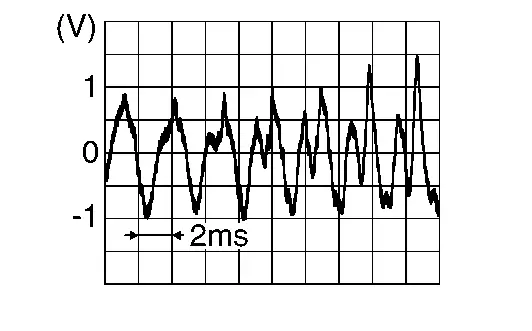
Is the inspection result normal?
YES>>Replace active noise control unit. Refer to Removal and Installation.
NO>>Replace active noise control microphone (front LH). Refer to Removal and Installation.
B1f0c-2b Anc Mic1
DTC Description
DTC DETECTION LOGIC
| DTC No. |
CONSULT screen terms (Trouble diagnosis content) | DTC detection condition | |
|---|---|---|---|
| B1F0C-2B |
ANC MIC1 (Active noise control microphone front LH circuit short) |
Diagnosis condition | When ignition switch is ON. |
| Signal (terminal) | Active noise control microphone (front LH) | ||
| Threshold | Short circuit | ||
| Diagnosis delay time | 30 seconds or more | ||
POSSIBLE CAUSE
-
Harness or connectors [active noise control microphone (front LH) circuit is short]
-
Active noise control microphone (front LH)
-
Active noise control unit
FAIL-SAFE
Active noise cancellation function is deactivated
CONFIRMATION PROCEDURE
PERFORM DTC CONFIRMATION PROCEDURE
CONSULT
-
Turn ignition switch ON.
-
Turn ignition switch OFF and wait for 4 minutes.
-
Turn ignition switch ON and wait at least 1 minute or more.
-
Select “Self Diagnostic Result” mode of “ANC” using CONSULT.
-
Check DTC.
Is DTC B1F0C-2B detected?
YES>>Proceed to Diagnosis Procedure.
NO-1>>To check malfunction symptom before repair: Refer to Intermittent Incident.
NO-2>>Confirmation after repair: INSPECTION END
Diagnosis Procedure
CHECK ACTIVE NOISE CONTROL MICROPHONE (FRONT LH) CIRCUITS FOR SHORT
-
Turn ignition switch OFF.
-
Disconnect active noise control unit harness connector and active noise control microphone (front LH) harness connector.
-
Check continuity between active noise control unit harness connector terminals.
Active noise control unit Continuity Connector Terminal B92 1 13 Not existed
Is the inspection result normal?
YES>>GO TO 2.
NO>>Repair or replace harness or connectors.
CHECK ACTIVE NOISE CONTROL MICROPHONE (FRONT LH) SIGNAL
-
Turn ignition switch OFF.
-
Connect active noise control unit harness connector and active noise control microphone (front LH) harness connector.
-
Turn ignition switch ON.
-
Check the signal between active noise control unit harness connector terminals.
Active noise control unit Condition Reference value Connector (+) (−) Terminal B92 1 13 Input interior sound
Is the inspection result normal?
YES>>Replace active noise control unit. Refer to Removal and Installation.
NO>>Replace active noise control microphone (front LH). Refer to Removal and Installation.
B1f0f-16 Anc Mic2/control Unit
DTC Description
DTC DETECTION LOGIC
| DTC No. |
CONSULT screen terms (Trouble diagnosis content) | DTC detection condition | |
|---|---|---|---|
| B1F0F-16 |
ANC MIC2/CONTROL UNIT (Active noise control microphone front RH circuit abnormality) |
Diagnosis condition | When ignition switch is ON. |
| Signal (terminal) | Active noise control microphone RH signal | ||
| Threshold | – | ||
| Diagnosis delay time | 30 seconds or more | ||
POSSIBLE CAUSE
-
Harness or connectors [active noise control microphone (front RH) circuit]
-
Active noise control microphone (front RH)
-
Active noise control unit
FAIL-SAFE
Active noise cancellation function is deactivated
CONFIRMATION PROCEDURE
PERFORM DTC CONFIRMATION PROCEDURE
CONSULT
-
Turn ignition switch ON.
-
Turn ignition switch OFF and wait for 4 minutes.
-
Turn ignition switch ON and wait at least 1 minute or more.
-
Select “Self Diagnostic Result” mode of “ANC” using CONSULT.
-
Check DTC.
Is DTC B1F0F-16 detected?
YES>>Proceed to Diagnosis Procedure.
NO-1>>To check malfunction symptom before repair: Refer to Intermittent Incident.
NO-2>>Confirmation after repair: INSPECTION END
Diagnosis Procedure
CHECK FRONT MICROPHONE RH
-
Turn ignition switch OFF.
-
Disconnect active noise control microphone (front RH) harness connector.
-
Turn ignition switch ON.
-
Select “Self Diagnostic Result” mode of “ANC” using CONSULT.
-
Check DTC.
Is DTC B1F0F-16 detected?
YES>>Repair or replace harness or connectors.
NO>>Replace active noise control microphone (front RH). Refer to Removal and Installation.
B1f10-13 Anc Mic2
DTC Description
DTC DETECTION LOGIC
| DTC No. |
CONSULT screen terms (Trouble diagnosis content) | DTC detection condition | |
|---|---|---|---|
| B1F10–13 |
ANC MIC 2 INPUT (Active noise cancellation microphone 2 input) |
Diagnosis condition | When ignition switch is ON. |
| Signal (terminal) | Active noise control microphone RH signal | ||
| Threshold | Open circuit | ||
| Diagnosis delay time | 30 seconds or more | ||
POSSIBLE CAUSE
-
Harness or connectors [active noise control microphone (front RH) circuit is open]
-
Active noise control microphone (front RH)
-
Active noise control unit
FAIL-SAFE
Active noise cancellation function is deactivated
CONFIRMATION PROCEDURE
PERFORM DTC CONFIRMATION PROCEDURE
With CONSULT
-
Turn ignition switch ON.
-
Turn ignition switch OFF and wait for 4 minutes.
-
Turn ignition switch ON and wait at least 1 minute or more.
-
Select “Self Diagnostic Result” mode of “ANC” using CONSULT.
-
Check DTC.
Is DTC B1F10-13 detected?
YES>>Proceed to Diagnosis Procedure.
NO-1>>To check malfunction symptom before repair: Refer to Intermittent Incident.
NO-2>>Confirmation after repair: INSPECTION END
Diagnosis Procedure
CHECK ACTIVE NOISE CONTROL MICROPHONE (FRONT RH) CIRCUITS FOR OPEN
-
Turn ignition switch OFF.
-
Disconnect active noise control unit harness connector and active noise control microphone (front RH) harness connector.
-
Check continuity between active noise control unit harness connector and active noise control microphone (front RH) harness connector.
Active noise control unit Active noise control microphone (front RH) Continuity Connector Terminal Connector Terminal B92 2 R25 1 Existed 14 2
Is the inspection result normal?
YES>>GO TO 2.
NO>>Repair or replace harness or connectors.
CHECK ACTIVE NOISE CONTROL MICROPHONE (FRONT RH) SIGNAL
-
Turn ignition switch OFF.
-
Connect active noise control unit harness connector and active noise control microphone (front RH) harness connector.
-
Turn ignition switch ON.
-
Check signal between active noise control unit harness connector terminals.
Active noise control unit Condition Reference value Connector (+) (−) Terminal B92 2 14 Input interior sound
Is the inspection result normal?
YES>>Replace active noise control unit. Refer to Removal and Installation.
NO>>Replace active noise control microphone (front RH). Refer to Removal and Installation.
B1f11-2b Anc Mic2
DTC Description
DTC DETECTION LOGIC
| DTC No. |
CONSULT screen terms (Trouble diagnosis content) | DTC detection condition | |
|---|---|---|---|
| B1F11-2B |
ANC MIC2 (Active noise control microphone front LH circuit short) |
Diagnosis condition | When ignition switch is ON. |
| Signal (terminal) | Active noise control microphone (front RH) | ||
| Threshold | Short circuit | ||
| Diagnosis delay time | 30 seconds or more | ||
POSSIBLE CAUSE
-
Harness or connectors [active noise control microphone (front RH) circuit is short]
-
Active noise control microphone (front RH)
-
Active noise control unit
FAIL-SAFE
Active noise cancellation function is deactivated
CONFIRMATION PROCEDURE
PERFORM DTC CONFIRMATION PROCEDURE
CONSULT
-
Turn ignition switch ON.
-
Turn ignition switch OFF and wait for 4 minutes.
-
Turn ignition switch ON and wait at least 1 minute or more.
-
Select “Self Diagnostic Result” mode of “ANC” using CONSULT.
-
Check DTC.
Is DTC B1F11-2B detected?
YES>>Proceed to Diagnosis Procedure.
NO-1>>To check malfunction symptom before repair: Refer to Intermittent Incident.
NO-2>>Confirmation after repair: INSPECTION END
Diagnosis Procedure
CHECK ACTIVE NOISE CONTROL MICROPHONE (FRONT RH) CIRCUITS FOR SHORT
-
Turn ignition switch OFF.
-
Disconnect active noise control unit harness connector and active noise control microphone (front RH) harness connector.
-
Check continuity between active noise control unit harness connector terminals.
Active noise control unit Continuity Connector Terminal B92 2 14 Not existed
Is the inspection result normal?
YES>>GO TO 2.
NO>>Repair or replace harness or connectors.
CHECK ACTIVE NOISE CONTROL MICROPHONE (FRONT RH) SIGNAL
-
Turn ignition switch OFF.
-
Connect active noise control unit harness connector and active noise control microphone (front RH) harness connector.
-
Turn ignition switch ON.
-
Check the signal between active noise control unit harness connector terminals.
Active noise control unit Condition Reference value Connector (+) (−) Terminal B92 2 14 Input interior sound
Is the inspection result normal?
YES>>Replace active noise control unit. Refer to Removal and Installation.
NO>>Replace active noise control microphone (front RH). Refer to Removal and Installation.
B1f14-16 Anc Mic3/control Unit
DTC Description
DTC DETECTION LOGIC
| DTC No. |
CONSULT screen terms (Trouble diagnosis content) | DTC detection condition | |
|---|---|---|---|
| B1F14-16 |
ANC MIC3/CONTROL UNIT (Active noise control microphone rear circuit abnormality) |
Diagnosis condition | When ignition switch is ON. |
| Signal (terminal) | Active noise control microphone rear signal | ||
| Threshold | – | ||
| Diagnosis delay time | 30 seconds or more | ||
POSSIBLE CAUSE
-
Harness or connectors [active noise control microphone (rear) circuit]
-
Active noise control microphone (rear)
-
Active noise control unit
FAIL-SAFE
Active noise cancellation function is deactivated
CONFIRMATION PROCEDURE
PERFORM DTC CONFIRMATION PROCEDURE
CONSULT
-
Turn ignition switch ON.
-
Turn ignition switch OFF and wait for 4 minutes.
-
Turn ignition switch ON and wait at least 1 minute or more.
-
Select “Self Diagnostic Result” mode of “ANC” using CONSULT.
-
Check DTC.
Is DTC B1F14-16 detected?
YES>>Proceed to Diagnosis Procedure.
NO-1>>To check malfunction symptom before repair: Refer to Intermittent Incident.
NO-2>>Confirmation after repair: INSPECTION END
Diagnosis Procedure
CHECK REAR MICROPHONE
-
Turn ignition switch OFF.
-
Disconnect active noise control unit harness connector.
-
Turn ignition switch ON.
-
Select “Self Diagnostic Result” mode of “ANC” using CONSULT.
-
Check DTC.
Is DTC B1F14-16 detected?
YES>>Repair or replace harness or connectors.
NO>>Replace active noise control microphone (rear). Refer to Removal and Installation.
B1f15-13 Anc Mic3
DTC Description
DTC DETECTION LOGIC
| DTC No. |
CONSULT screen terms (Trouble diagnosis content) | DTC detection condition | ||
|---|---|---|---|---|
| B1F15-13 |
ANC MIC 3 INPUT (Active noise cancellation microphone rear circuit open) |
Diagnosis condition | When ignition switch is ON. | |
| Signal (terminal) | Active noise control microphone rear signal | |||
| Threshold | Open circuit | |||
| Diagnosis delay time | 30 seconds or more | |||
POSSIBLE CAUSE
-
Harness or connectors [active noise control microphone (rear) circuit is open]
-
Active noise control microphone (rear)
-
Active noise control unit
FAIL-SAFE
Active noise cancellation function is deactivated
CONFIRMATION PROCEDURE
PERFORM DTC CONFIRMATION PROCEDURE
CONSULT
-
Turn ignition switch ON.
-
Turn ignition switch OFF and wait for 4 minutes.
-
Turn ignition switch ON and wait at least 1 minute or more.
-
Select “Self Diagnostic Result” mode of “ANC” using CONSULT.
-
Check DTC.
Is DTC B1F15-13 detected?
YES>>Proceed to Diagnosis Procedure.
NO-1>>To check malfunction symptom before repair: Refer to Intermittent Incident.
NO-2>>Confirmation after repair: INSPECTION END
Diagnosis Procedure
CHECK ACTIVE NOISE CONTROL MICROPHONE (REAR) CIRCUITS FOR OPEN
-
Turn ignition switch OFF.
-
Disconnect active noise control unit harness connector and active noise control microphone (rear) harness connector.
-
Check continuity between active noise control unit harness connector and active noise control microphone (rear) harness connector.
Active noise control unit Active noise control microphone (rear) Continuity Connector Terminal Connector Terminal B92 3 R26 1 Existed 15 2
Is the inspection result normal?
YES>>GO TO 2.
NO>>Repair or replace harness or connectors.
CHECK ACTIVE NOISE CONTROL MICROPHONE (REAR) SIGNAL
-
Turn ignition switch OFF.
-
Connect active noise control unit harness connector and active noise control microphone (rear) harness connector.
-
Turn ignition switch ON.
-
Check signal between active noise control unit harness connector terminals.
Active noise control unit Condition Reference value Connector (+) (−) Terminal B92 3 15 Input interior sound
Is the inspection result normal?
YES>>Replace active noise control unit. Refer to Removal and Installation.
NO>>Replace active noise control microphone (rear). Refer to Removal and Installation.
B1f16-2b Anc Mic3
DTC Description
DTC DETECTION LOGIC
| DTC No. |
CONSULT screen terms (Trouble diagnosis content) | DTC detection condition | |
|---|---|---|---|
| B1F16-2B |
ANC MIC3 (Active noise control microphone rear circuit short) |
Diagnosis condition | When ignition switch is ON. |
| Signal (terminal) | Active noise control microphone (rear) | ||
| Threshold | Short circuit | ||
| Diagnosis delay time | 30 seconds or more | ||
POSSIBLE CAUSE
-
Harness or connectors [active noise control microphone (rear) circuit is short]
-
Active noise control microphone (rear)
-
Active noise control unit
FAIL-SAFE
Active noise cancellation function is deactivated
CONFIRMATION PROCEDURE
PERFORM DTC CONFIRMATION PROCEDURE
CONSULT
-
Turn ignition switch ON.
-
Turn ignition switch OFF and wait for 4 minutes.
-
Turn ignition switch ON and wait at least 1 minute or more.
-
Select “Self Diagnostic Result” mode of “ANC” using CONSULT.
-
Check DTC.
Is DTC B1F16-2B detected?
YES>>Proceed to Diagnosis Procedure.
NO-1>>To check malfunction symptom before repair: Refer to Intermittent Incident.
NO-2>>Confirmation after repair: INSPECTION END
Diagnosis Procedure
CHECK ACTIVE NOISE CONTROL MICROPHONE (REAR) CIRCUITS FOR SHORT
-
Turn ignition switch OFF.
-
Disconnect active noise control unit harness connector and active noise control microphone (rear) harness connector.
-
Check continuity between active noise control unit harness connector terminals.
Active noise control unit Continuity Connector Terminal B92 3 15 Not existed
Is the inspection result normal?
YES>>GO TO 2.
NO>>Repair or replace harness or connectors.
CHECK ACTIVE NOISE CONTROL MICROPHONE (REAR) SIGNAL
-
Turn ignition switch OFF.
-
Connect active noise control unit harness connector and active noise control microphone (rear) harness connector.
-
Turn ignition switch ON.
-
Check the signal between active noise control unit harness connector terminals.
Active noise control unit Condition Reference value Connector (+) (−) Terminal B92 3 15 Input interior sound
Is the inspection result normal?
YES>>Replace active noise control unit. Refer to Removal and Installation.
NO>>Replace active noise control microphone (rear). Refer to Removal and Installation.
B1f20-29 Can Signal Error
DTC Description
DTC DETECTION LOGIC
| DTC No. |
CONSULT screen terms (Trouble diagnosis content) | DTC detection condition | |
|---|---|---|---|
| B1F20-29 |
CAN signal error/ASE (CAN SIG ERROR/Active noise cancellation) |
Diagnosis condition | When ignition switch is ON. |
| Signal (terminal) | CAN communication signal | ||
| Threshold | Data error | ||
| Diagnosis delay time | 30 seconds or more | ||
POSSIBLE CAUSE
-
Combination meter
-
Active noise control unit
FAIL-SAFE
Active sound enhancement function is stopped.
CONFIRMATION PROCEDURE
PERFORM DTC CONFIRMATION PROCEDURE
With CONSULT
-
Turn ignition switch ON.
-
Turn ignition switch OFF and wait for 4 minutes.
-
Turn ignition switch ON and wait at least 1 minute or more.
-
Select “Self Diagnostic Result” mode of “ANC” using CONSULT.
-
Check DTC.
Is DTC B1F20-29 detected?
YES>>Proceed to Diagnosis Procedure.
NO-1>>To check malfunction symptom before repair: Refer to Intermittent Incident.
NO-2>>Confirmation after repair: INSPECTION END
Diagnosis Procedure
CHECK SELF-DIAGNOSTIC RESULT OF COMBINATION METER
With CONSULT
-
Turn ignition switch ON.
-
Erase DTC.
-
Check “Self Diagnostic Result” of “METER/M&A” using CONSULT.
Is any DTC detected?
YES>>Perform trouble diagnosis for detected DTC. Refer to DTC Index.
NO>>GO TO 2.
CHECK INTERMITTENT INCIDENT
Check the intermittent incident. Refer to Intermittent Incident.
>>
GO TO 3.
PERFORM DTC CONFIRMATION PROCEDURE AGAIN
With CONSULT
Perform DTC confirmation procedure again. Refer to DTC Description.
Is DTC B1F20-29 detected again?
YES>>Replace active noise control unit. Refer to Removal and Installation.
NO>>INSPECTION END
B1f21-29 Can Signal Error
DTC Description
DTC DETECTION LOGIC
| DTC No. |
CONSULT screen terms (Trouble diagnosis content) | DTC detection condition | |
|---|---|---|---|
| B1F21-29 |
CAN signal error/ANC (CAN signal error/Active noise cancellation) |
Diagnosis condition | When ignition switch is ON. |
| Signal (terminal) | CAN communication signal | ||
| Threshold | Data error | ||
| Diagnosis delay time | 1 second or less | ||
POSSIBLE CAUSE
-
Combination meter
-
Active noise control unit
FAIL-SAFE
Active noise cancellation and active sound enhancement are deactivated
CONFIRMATION PROCEDURE
PERFORM DTC CONFIRMATION PROCEDURE
With CONSULT
-
Turn ignition switch ON.
-
Turn ignition switch OFF and wait for 4 minutes.
-
Turn ignition switch ON and wait at least 1 minute or more.
-
Select “Self Diagnostic Result” mode of “ANC” using CONSULT.
-
Check DTC.
Is DTC B1F21-29 detected?
YES>>Proceed to Diagnosis Procedure.
NO-1>>To check malfunction symptom before repair: Refer to Intermittent Incident.
NO-2>>Confirmation after repair: INSPECTION END
Diagnosis Procedure
CHECK SELF-DIAGNOSTIC RESULT OF BCM
With CONSULT
-
Turn ignition switch ON.
-
Erase DTC.
-
Check “Self Diagnostic Result” of “METER/M&A” using CONSULT.
Is any DTC detected?
YES>>Perform trouble diagnosis for detected DTC. Refer to DTC Index.
NO>>GO TO 2.
CHECK INTERMITTENT INCIDENT
Check the intermittent incident. Refer to Intermittent Incident.
>>
GO TO 3.
PERFORM DTC CONFIRMATION PROCEDURE AGAIN
With CONSULT
Perform DTC confirmation procedure again. Refer to DTC Description.
Is DTC B1F21-29 detected again?
YES>>Replace active noise control unit. Refer to Removal and Installation.
NO>>INSPECTION END
B1f24-29 Can Signal Error
DTC Description
DTC DETECTION LOGIC
| DTC No. |
CONSULT screen terms (Trouble diagnosis content) | DTC detection condition | |
|---|---|---|---|
| B1F24-29 |
CAN SIG ERROR/ASC (CAN signal error/Active sound enhancement) |
Diagnosis condition | When ignition switch is ON. |
| Signal (terminal) | CAN communication signal | ||
| Threshold | Data error | ||
| Diagnosis delay time | 1 second or less | ||
POSSIBLE CAUSE
-
ABS actuator and electric unit (control unit)
-
Active noise control unit
FAIL-SAFE
Active sound enhancement function is deactivated
CONFIRMATION PROCEDURE
PERFORM DTC CONFIRMATION PROCEDURE
With CONSULT
-
Turn ignition switch ON.
-
Turn ignition switch OFF and wait for 4 minutes.
-
Turn ignition switch ON and wait at least 1 minute or more.
-
Select “Self Diagnostic Result” mode of “ANC.” using CONSULT.
-
Check DTC.
Is DTC B1F24-29 detected?
YES>>Proceed to Diagnosis Procedure.
NO-1>>To check malfunction symptom before repair: Refer to Intermittent Incident.
NO-2>>Confirmation after repair: INSPECTION END
Diagnosis Procedure
CHECK SELF-DIAGNOSTIC RESULT OF ABS ACTUATOR AND ELECTRIC UNIT (CONTROL UNIT)
With CONSULT
-
Turn ignition switch ON.
-
Erase DTC.
-
Check “Self Diagnostic Result” of “ABS” using CONSULT.
Is any DTC detected?
YES>>Perform trouble diagnosis for detected DTC. Refer to DTC Index.
NO>>GO TO 2.
CHECK INTERMITTENT INCIDENT
Check the intermittent incident. Refer to Intermittent Incident.
>>
GO TO 3.
PERFORM DTC CONFIRMATION PROCEDURE AGAIN
With CONSULT
Perform DTC confirmation procedure again. Refer to DTC Description.
Is DTC B1F24-29 detected again?
YES>>Replace active noise control unit. Refer to Removal and Installation.
NO>>INSPECTION END
B1f26-29 Can Signal Error
DTC Description
DTC DETECTION LOGIC
| DTC No. |
CONSULT screen terms (Trouble diagnosis content) | DTC detection condition | |
|---|---|---|---|
| B1F26-29 |
CAN signal error (TCU) (CAN signal error for mode switching) |
Diagnosis condition | When ignition switch is ON. |
| Signal (terminal) | CAN communication signal | ||
| Threshold | Data error | ||
| Diagnosis delay time | 2 seconds or more | ||
POSSIBLE CAUSE
-
TCM
-
Active noise control unit
FAIL-SAFE
Active noise cancellation and active sound enhancement are fixed to a standard mode.
CONFIRMATION PROCEDURE
PERFORM DTC CONFIRMATION PROCEDURE
With CONSULT
-
Turn ignition switch ON.
-
Turn ignition switch OFF and wait for 4 minutes.
-
Turn ignition switch ON and wait at least 1 minute or more.
-
Select “Self Diagnostic Result” mode of “ANC” using CONSULT.
-
Check DTC.
Is DTC B1F26-29 detected?
YES>>Proceed to Diagnosis Procedure.
NO-1>>To check malfunction symptom before repair: Refer to Intermittent Incident.
NO-2>>Confirmation after repair: INSPECTION END
Diagnosis Procedure
CHECK SELF-DIAGNOSTIC RESULT OF TCM
CONSULT
-
Turn ignition switch ON.
-
Erase DTC.
-
Check “Self Diagnostic Result” of “TRANSMISSION” using CONSULT.
Is any DTC detected?
YES>>Perform trouble diagnosis for detected DTC. Refer to DTC Index.
NO>>GO TO 2.
CHECK INTERMITTENT INCIDENT
Check the intermittent incident. Refer to Intermittent Incident.
>>
GO TO 3.
PERFORM DTC CONFIRMATION PROCEDURE AGAIN
With CONSULT
Perform DTC confirmation procedure again. Refer to DTC Description.
Is DTC B1F26-29 detected again?
YES>>Replace active noise control unit. Refer to Removal and Installation.
NO>>INSPECTION END
U2140-87 Can Comm Circuit
DTC Description
DTC DETECTION LOGIC
| DTC No. |
CONSULT screen terms (Trouble diagnosis content) | DTC detection condition | |
|---|---|---|---|
| U2140–87 |
CAN comm err (ECM) [Controller area network communication error (ECM)] |
Diagnosis condition | When ignition switch is ON |
| Signal (terminal) | CAN communication signal | ||
| Threshold | Communication error | ||
| Diagnosis delay time | 2 seconds or more | ||
POSSIBLE CAUSE
CAN communication system (ECM)
FAIL-SAFE
The system using the CAN communication signal from control unit which cannot communicate does not function.
CONFIRMATION PROCEDURE
PERFORM DTC CONFIRMATION PROCEDURE
With CONSULT
-
Turn ignition switch ON.
-
Turn ignition switch OFF and wait for 4 minutes.
-
Turn ignition switch ON and wait at least 1 minute or more.
-
Select “Self Diagnostic Result” mode of “ANC” using CONSULT.
-
Check DTC.
Is DTC “U2140-87” detected?
YES>>Proceed to Diagnosis Procedure.
NO-1>>To check malfunction symptom before repair: Refer to Intermittent Incident.
NO-2>>Confirmation after repair: INSPECTION END
Diagnosis Procedure
PERFORM DTC CONFIRMATION PROCEDURE AGAIN
With CONSULT
-
Turn ignition switch ON.
-
Erase DTC.
-
Perform DTC confirmation procedure again. Refer to DTC Description.
Is DTC U2140-87 detected again?
YES>>Perform the trouble diagnosis for CAN communication system. Refer to Trouble Diagnosis Flow Chart.
NO>>INSPECTION END
U2141-87 Can Comm Circuit
DTC Description
DTC DETECTION LOGIC
| DTC No. |
CONSULT screen terms (Trouble diagnosis content) | DTC detection condition | |
|---|---|---|---|
| U2141–87 |
CAN comm err (TCM) [Controller area network communication error (TCM)] |
Diagnosis condition | When ignition switch is ON |
| Signal (terminal) | CAN communication signal | ||
| Threshold | Communication error | ||
| Diagnosis delay time | 2 seconds or more | ||
POSSIBLE CAUSE
CAN communication system (TCM)
FAIL-SAFE
The system using the CAN communication signal from control unit which cannot communicate does not function.
CONFIRMATION PROCEDURE
PERFORM DTC CONFIRMATION PROCEDURE
With CONSULT
-
Turn ignition switch ON.
-
Turn ignition switch OFF and wait at least 4 minutes or more.
-
Turn ignition switch ON and wait at least 1 minute or more.
-
Select “Self Diagnostic Result” mode of “ANC” using CONSULT.
-
Check DTC.
Is DTC “U2141-87” detected?
YES>>Proceed to Diagnosis Procedure.
NO-1>>To check malfunction symptom before repair: Refer to Intermittent Incident.
NO-2>>Confirmation after repair: INSPECTION END
Diagnosis Procedure
PERFORM DTC CONFIRMATION PROCEDURE AGAIN
With CONSULT
-
Turn ignition switch ON.
-
Erase DTC.
-
Perform DTC confirmation procedure again. Refer to DTC Description.
Is DTC U2141-87 detected again?
YES>>Perform the trouble diagnosis for CAN communication system. Refer to Trouble Diagnosis Flow Chart.
NO>>INSPECTION END
U2148-87 Can Comm Circuit
DTC Description
DTC DETECTION LOGIC
| DTC No. |
CONSULT screen terms (Trouble diagnosis content) | DTC detection condition | |
|---|---|---|---|
| U2148–87 |
CAN comm err (brake control unit) [Controller area network communication error (brake control unit)] |
Diagnosis condition | When ignition switch is ON |
| Signal (terminal) | CAN communication signal | ||
| Threshold | Communication error | ||
| Diagnosis delay time | 2 seconds or more | ||
POSSIBLE CAUSE
CAN communication system (brake control unit)
FAIL-SAFE
The system using the CAN communication signal from control unit which cannot communicate does not function.
CONFIRMATION PROCEDURE
PERFORM DTC CONFIRMATION PROCEDURE
With CONSULT
-
Turn ignition switch ON.
-
Turn ignition switch OFF and wait at least 4 minutes or more.
-
Turn ignition switch ON and wait at least 1 minute or more.
-
Select “Self Diagnostic Result” mode of “ANC” using CONSULT.
-
Check DTC.
Is DTC “U2148–87” detected?
YES>>Proceed to Diagnosis Procedure.
NO-1>>To check malfunction symptom before repair: Refer to Intermittent Incident
NO-2>>Confirmation after repair: INSPECTION END
Diagnosis Procedure
PERFORM DTC CONFIRMATION PROCEDURE AGAIN
With CONSULT
-
Turn ignition switch ON.
-
Erase DTC.
-
Perform DTC confirmation procedure again. Refer to DTC Description.
Is DTC U2148-87 detected again?
YES>>Perform the trouble diagnosis for CAN communication system. Refer to Trouble Diagnosis Flow Chart.
NO>>INSPECTION END
U214e-87 Can Comm Circuit
DTC Description
DTC DETECTION LOGIC
| DTC No. |
CONSULT screen terms (Trouble diagnosis content) | DTC detection condition | |
|---|---|---|---|
| U214E–87 |
CAN comm err (combination meter) [Controller area network communication error (combination meter)] |
Diagnosis condition | When ignition switch is ON |
| Signal (terminal) | CAN communication signal | ||
| Threshold | Communication error | ||
| Diagnosis delay time | 2 seconds or more | ||
POSSIBLE CAUSE
CAN communication system (combination meter)
FAIL-SAFE
The system using the CAN communication signal from control unit which cannot communicate does not function.
CONFIRMATION PROCEDURE
PERFORM DTC CONFIRMATION PROCEDURE
With CONSULT
-
Turn ignition switch ON.
-
Turn ignition switch OFF and wait for 4 minutes.
-
Turn ignition switch ON and wait at least 1 minute or more.
-
Select “Self Diagnostic Result” mode of “ANC” using CONSULT.
-
Check DTC.
Is DTC “U214E-87” detected?
YES>>Proceed to Diagnosis Procedure.
NO-1>>To check malfunction symptom before repair: Refer to Intermittent Incident.
NO-2>>Confirmation after repair: INSPECTION END
Diagnosis Procedure
PERFORM DTC CONFIRMATION PROCEDURE AGAIN
With CONSULT
-
Turn ignition switch ON.
-
Erase DTC.
-
Perform DTC confirmation procedure again. Refer to DTC Description.
Is DTC U214E-87 detected again?
YES>>Perform the trouble diagnosis for CAN communication system. Refer to Trouble Diagnosis Flow Chart.
NO>>INSPECTION END
U214f-87 Can Comm Circuit
DTC Description
DTC DETECTION LOGIC
| DTC No. |
CONSULT screen terms (Trouble diagnosis content) | DTC detection condition | |
|---|---|---|---|
| U214F–87 |
CAN comm err (BCM) [Controller area network communication error (BCM)] |
Diagnosis condition | When ignition switch is ON |
| Signal (terminal) | CAN communication signal | ||
| Threshold | Communication error | ||
| Diagnosis delay time | 2 seconds or more | ||
POSSIBLE CAUSE
CAN communication system (BCM)
FAIL-SAFE
The system using the CAN communication signal from control unit which cannot communicate does not function.
CONFIRMATION PROCEDURE
PERFORM DTC CONFIRMATION PROCEDURE
With CONSULT
-
Turn ignition switch ON.
-
Turn ignition switch OFF and wait for 4 minutes.
-
Turn ignition switch ON and wait at least 1 minute or more.
-
Select “Self Diagnostic Result” mode of “ANC” using CONSULT.
-
Check DTC.
Is DTC “U214F-87” detected?
YES>>Proceed to Diagnosis Procedure.
NO-1>>To check malfunction symptom before repair: Refer to Intermittent Incident.
NO-2>>Confirmation after repair: INSPECTION END
Diagnosis Procedure
PERFORM DTC CONFIRMATION PROCEDURE AGAIN
With CONSULT
-
Turn ignition switch ON.
-
Erase DTC.
-
Perform DTC confirmation procedure again. Refer to DTC Description.
Is DTC U214F-87 detected again?
YES>>Perform the trouble diagnosis for CAN communication system. Refer to Trouble Diagnosis Flow Chart.
NO>>INSPECTION END
U2154-87 Can Comm Circuit
DTC Description
DTC DETECTION LOGIC
| DTC No. |
CONSULT screen terms (Trouble diagnosis content) | DTC detection condition | |
|---|---|---|---|
| U2154–87 |
CAN comm err (MIU) [Controller area network communication error (MIU)] |
Diagnosis condition | When ignition switch is ON |
| Signal (terminal) | CAN communication signal | ||
| Threshold | Communication error | ||
| Diagnosis delay time | 2 seconds or more | ||
POSSIBLE CAUSE
CAN communication system (AV control unit)
FAIL-SAFE
The system using the CAN communication signal from control unit which cannot communicate does not function.
CONFIRMATION PROCEDURE
PERFORM DTC CONFIRMATION PROCEDURE
With CONSULT
-
Turn ignition switch ON.
-
Turn ignition switch OFF and wait for 4 minutes.
-
Turn ignition switch ON and wait at least 1 minute or more.
-
Select “Self Diagnostic Result” mode of “ANC” using CONSULT.
-
Check DTC.
Is DTC “U2154-87” detected?
YES>>Proceed to Diagnosis Procedure.
NO-1>>To check malfunction symptom before repair: Refer to Intermittent Incident.
NO-2>>Confirmation after repair: INSPECTION END
Diagnosis Procedure
PERFORM DTC CONFIRMATION PROCEDURE AGAIN
With CONSULT
-
Turn ignition switch ON.
-
Erase DTC.
-
Perform DTC confirmation procedure again. Refer to DTC Description.
Is DTC U2154-87 detected again?
YES>>Perform the trouble diagnosis for CAN communication system. Refer to Trouble Diagnosis Flow Chart.
NO>>INSPECTION END
U2176-87 Can Comm Circuit
DTC Description
DTC DETECTION LOGIC
| DTC No. |
CONSULT screen terms (Trouble diagnosis content) | DTC detection condition | |
|---|---|---|---|
| U2176–87 |
CAN comm err (CCM) [Controller area network communication error (chassis control module)] |
Diagnosis condition | When ignition switch is ON |
| Signal (terminal) | CAN communication signal | ||
| Threshold | Communication error | ||
| Diagnosis delay time | 2 seconds or more | ||
POSSIBLE CAUSE
CAN communication system (chassis control module)
FAIL-SAFE
The system using the CAN communication signal from control unit which cannot communicate does not function.
CONFIRMATION PROCEDURE
PERFORM DTC CONFIRMATION PROCEDURE
With CONSULT
-
Turn ignition switch ON.
-
Turn ignition switch OFF and wait for 4 minutes.
-
Turn ignition switch ON and wait at least 1 minute or more.
-
Select “Self Diagnostic Result” mode of “ANC” using CONSULT.
-
Check DTC.
Is DTC “U2176-87” detected?
YES>>Proceed to Diagnosis Procedure.
NO-1>>To check malfunction symptom before repair: Refer to Intermittent Incident.
NO-2>>Confirmation after repair: INSPECTION END
Diagnosis Procedure
PERFORM DTC CONFIRMATION PROCEDURE AGAIN
With CONSULT
-
Turn ignition switch ON.
-
Erase DTC.
-
Perform DTC confirmation procedure again. Refer to DTC Description.
Is DTC U2176-87 detected again?
YES>>Perform the trouble diagnosis for CAN communication system. Refer to Trouble Diagnosis Flow Chart.
NO>>INSPECTION END
Other materials:
Feux
Informations de base
Spot de lecture avant
Éclairage de miroir de courtoisie (si équipé)
Plafonnier (si équipé)
Clignotant latéral (si équipé)
Éclairage individuel arrière (si équipé)
Phare – feu de route
Phare – feu de croisement
Feu de stationnement avant / ...
System Description. System
System Description
An Electrically-driven Intelligent Brake Unit is a booster system
that generates assist force by using an internal motor to operate a
piston inside the master cylinder part.
Control module is integrated with Electrically-driven Intelligent Brake Unit.
The amount ...
P050a Cold Start Control
DTC Description
DESCRIPTIONECM controls ignition timing and engine idle speed when engine is started with pre-warming up condition.This control promotes the activation of three way catalyst by heating the catalyst and reduces emissions.DTC DETECTION LOGIC DTC
CONSULT screen terms
(Trouble diag ...