
Nissan Rogue (T33) 2021-Present Service Manual: Adas Control Unit :: Removal and Installation. Adas Control Unit 2
Adas Control Unit 2
Removal and Installation
With ProPILOT Assist 1.1
REMOVAL
CAUTION:
Be sure to perform “ADDITIONAL SERVICE WHEN REPLACING ADAS CONTROL UNIT 2� when replacing ADAS control unit 2. Refer to Work Procedure.
Remove center console assembly. Refer to Removal and Installation.
Remove around view monitor control unit. Refer to Removal and Installation.
Remove ADAS control unit 2 nuts (A) .
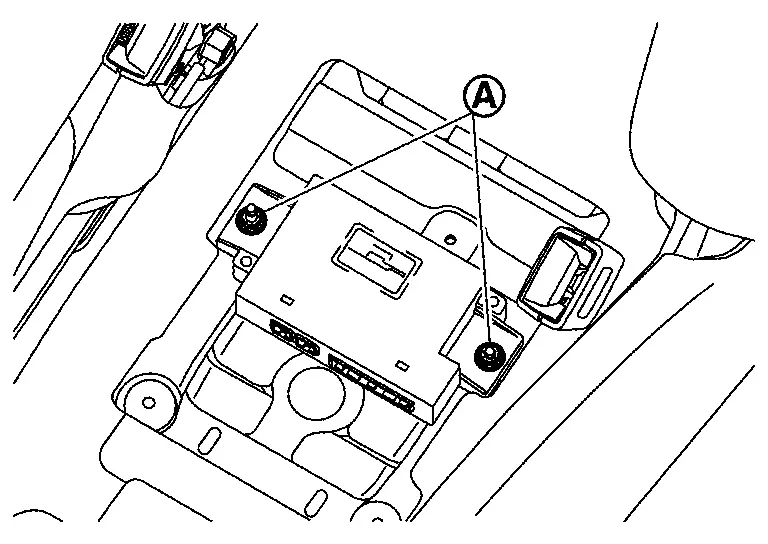
 NOTE:
NOTE:
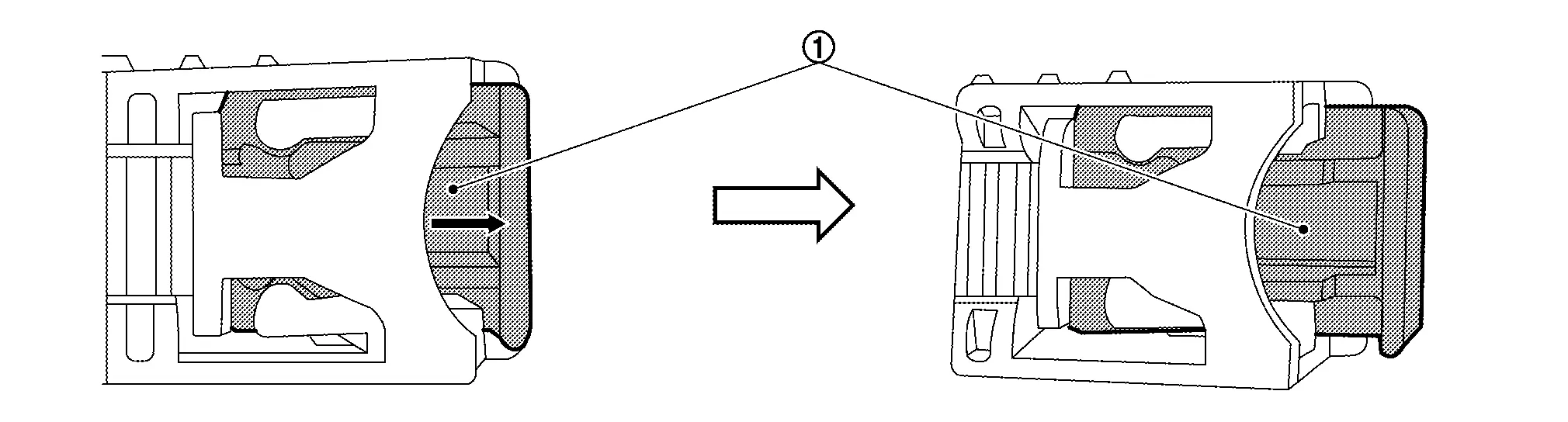
The harness connector is difficult to remove unless removing the ADAS control unit 2 first (The connector lock is located on the lower side).
Release the lock (1) as shown by the arrow in the figure and disconnect the harness connector from the ADAS control unit 2.
INSTALLATION
Note the following, and install in the reverse order of removal.
-
Tighten the ADAS control unit 2 nuts to the specified torque.
| Nuts (A) | : 8 N·m (0.82 kg-m, 71 in-lb) |
CAUTION:
Be sure to perform “ADDITIONAL SERVICE WHEN REPLACING ADAS CONTROL UNIT 2� when replacing ADAS control unit 2. Refer to Work Procedure.
With ProPILOT Assist 2.1
REMOVAL
CAUTION:
Be sure to perform “ADDITIONAL SERVICE WHEN REPLACING ADAS CONTROL UNIT 2� when replacing ADAS control unit 2. Refer to Work Procedure.
Remove the fusible link box (12V sub battery) (lithium ion battery) and fusible link box bracket. Refer to Removal and Installation.
Release the lock (1) as shown and disconnect the harness connectors from the ADAS control unit 2.
Remove nuts and remove the ADAS control unit 2.
INSTALLATION
Installation is in the reverse order of removal.
-
Tighten the ADAS control unit 2 nuts to the specified torque.
Nuts : 8 N·m (0.82 kg-m, 71 in-lb)
CAUTION:
Be sure to perform “ADDITIONAL SERVICE WHEN REPLACING ADAS CONTROL UNIT 2� when replacing ADAS control unit 2. Refer to Work Procedure.
Other materials:
Dtc/circuit Diagnosis. Rear Window Defogger Relay
Component Function Check
CHECK REAR WINDOW DEFOGGER RELAY CONTROL FUNCTION
CONSULT
Ignition switch ON.
Select “Rear defogger� in “Active test� mode of "BCM".
Touch “On�.
Check that the back door window glass is getting warmer.
NOTE:
When glass is hot, never start ...
Trip computer
Basic information
The trip computer switches are located on the left side of the steering wheel, allowing easy access while driving the Nissan Rogue.
Scroll dial – used to move through menu items and select functions within the vehicle information display; it supports up/down navigation and pu ...
Removal and Installation. Fillet Molding
Exploded View
1.
Front fillet molding
2.
Rear fillet molding front
3.
Rear fillet molding rear
4.
Grommet
—
—
—
—
: Clip
: Pawl
: Nissan Ariya Vehicle front
Front Fillet Molding
Removal and Installation
REMOVALRemove front fille ...