
Nissan Rogue (T33) 2021-Present Owner’s Manual & User Guide: Active noise cancellation (if so equipped)/Active sound enhancement
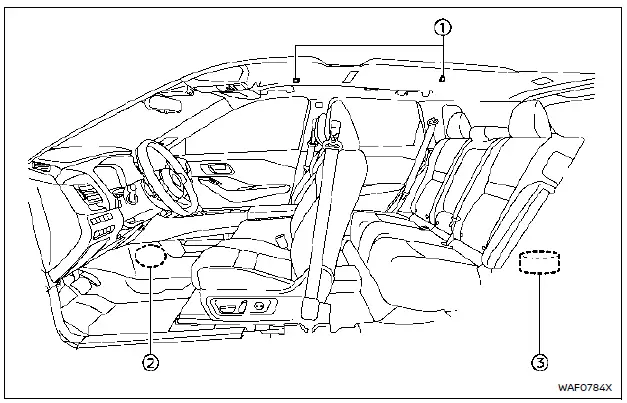
NOTE:
To ensure proper operation of the active noise cancellation and active sound enhancement systems:
- Do not cover the speakers or woofer.
- Do not cover the microphones.
- Do not modify or replace speakers, the woofer, or audio-related components such as the amplifier.
- Do not add sound-deadening materials or perform any modifications near the microphones, speakers, or woofer.
Active noise cancellation
The active noise cancellation system uses microphones 1 inside the cabin to detect low-frequency engine booming sounds. The system then generates counteracting, muted engine noise through the speakers 2 and woofer 3 to reduce the perceived engine booming inside the vehicle.
If the microphones 1 or their surrounding area are tapped or struck, abnormal sounds may be emitted from the speakers. This is normal when the system is disturbed.
Active sound enhancement
The active sound enhancement system creates additional engine sound through the speakers 2 and woofer 3, adjusting its tone according to engine speed and the selected driving mode. This enhances the overall sound quality and driving experience.
Other materials:
Head Up Display (HUD)
Basic information
Example
Example
WARNING
Failure to correctly adjust the brightness or position of the HUD image may reduce visibility through the windshield, which could lead to an accident resulting in serious injury or death.
Avoid focusing on the Head Up Display (HUD) for extended per ...
Basic information
Example
The vehicle information display 1, featured in the Nissan Rogue, is positioned as shown above and provides a wide range of warnings and operational details. Depending on the configuration of your Nissan Rogue, the system may also present the following information:
Tachometer
Sp ...
P155f Generator Voltage
DTC Description
DTC DETECTION LOGIC DTC
CONSULT screen terms
(Trouble diagnosis content) DTC detection condition
P155F
00
GENERATOR VOLTAGE
(GENERATOR VOLTAGE)
Diagnosis condition
Ignition switch ON
Signal (terminal)
ECM power supply
Threshold
Battery voltage me ...