
Nissan Rogue (T33) 2021-Present Service Manual: Accessory Relay
Diagnosis Procedure
CHECK ACCESSORY RELAY POWER SUPPLY
-
Disconnect accessory relay connector.
-
Check voltage between accessory relay harness connector and ground.
(+) (–) Voltage
(Approx.)Accessory relay Connector Terminal J-5 2 Ground Battery voltage 3
Is the inspection result normal?
YES>>GO TO 2.
NO>>Repair or replace harness or connectors.
CHECK ACCESSORY RELAY
Check accessory relay. Refer to Component Inspection.
Is the inspection result normal?
YES>>GO TO 3.
NO>>Replace accessory relay.
CHECK ACCESSORY RELAY CONTROL SIGNAL CIRCUIT
-
Disconnect BCM connector.
-
Check continuity between BCM harness connector and accessory relay harness connector.
With type A meter BCM Accessory relay Continuity Connector Terminal Connector Terminal M51 30 J-5 1 Yes With type B meter BCM Accessory relay Continuity Connector Terminal Connector Terminal M18 34 J-5 1 Yes -
Check continuity between BCM harness connector and ground.
With type A meter BCM — Continuity Connector Terminal M51 30 Ground No With type B meter BCM — Continuity Connector Terminal M18 34 Ground No
Is the inspection result normal?
YES>>Replace BCM. Refer to Removal and Installation.
NO>>Repair or replace harness or connectors.
Component Inspection
CHECK ACCESSORY RELAY
-
Ignition switch OFF.
-
Disconnect accessory relay connector.
-
Check continuity between accessory relay terminals.
| Accessory relay | Condition | Continuity | |
|---|---|---|---|
| Terminals | |||
 |
 |
12 V direct current supply between terminals  and and  . . |
Yes |
| No current supply | No | ||
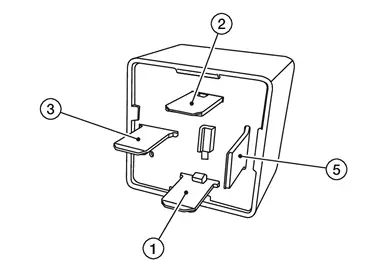
Is the inspection result normal?
YES>>Inspection End.
NO>>Replace accessory relay.
Other materials:
Power Supply and Ground Circuit
Diagnosis Procedure
CHECK CHASSIS CONTROL MODULE ACCESSORY POWER SUPPLY
Ignition switch OFF.
Disconnect the chassis control module harness connector.
Check the voltage between chassis control module harness connector and ground.
+ — Voltage
Chassis control module
Connecto ...
Extérieur arrière
Cette section récapitule les équipements situés à l’arrière du Nissan Rogue : visibilité, éclairage, accès au coffre et capteurs. Vérifiez régulièrement la propreté des caméras et capteurs pour des performances optimales.
Dégivrage de lunette arrière : améliore la visibilit ...
Basic Inspection. Diagnosis and Repair Work Flow
Work Flow
DETAILED FLOWINTERVIEW FROM THE CUSTOMER
Clarify customer complaints before inspection. First of all, perform
an interview utilizing reproduce symptoms as well as fully understand
it. Ask customer about his/her complaints carefully. Check symptoms by
driving Nissan Ariya vehicle wi ...