
Nissan Rogue (T33) 2021-Present Service Manual: With Vdc :: Removal and Installation
Abs Actuator and Electric Unit (control Unit)
Exploded View
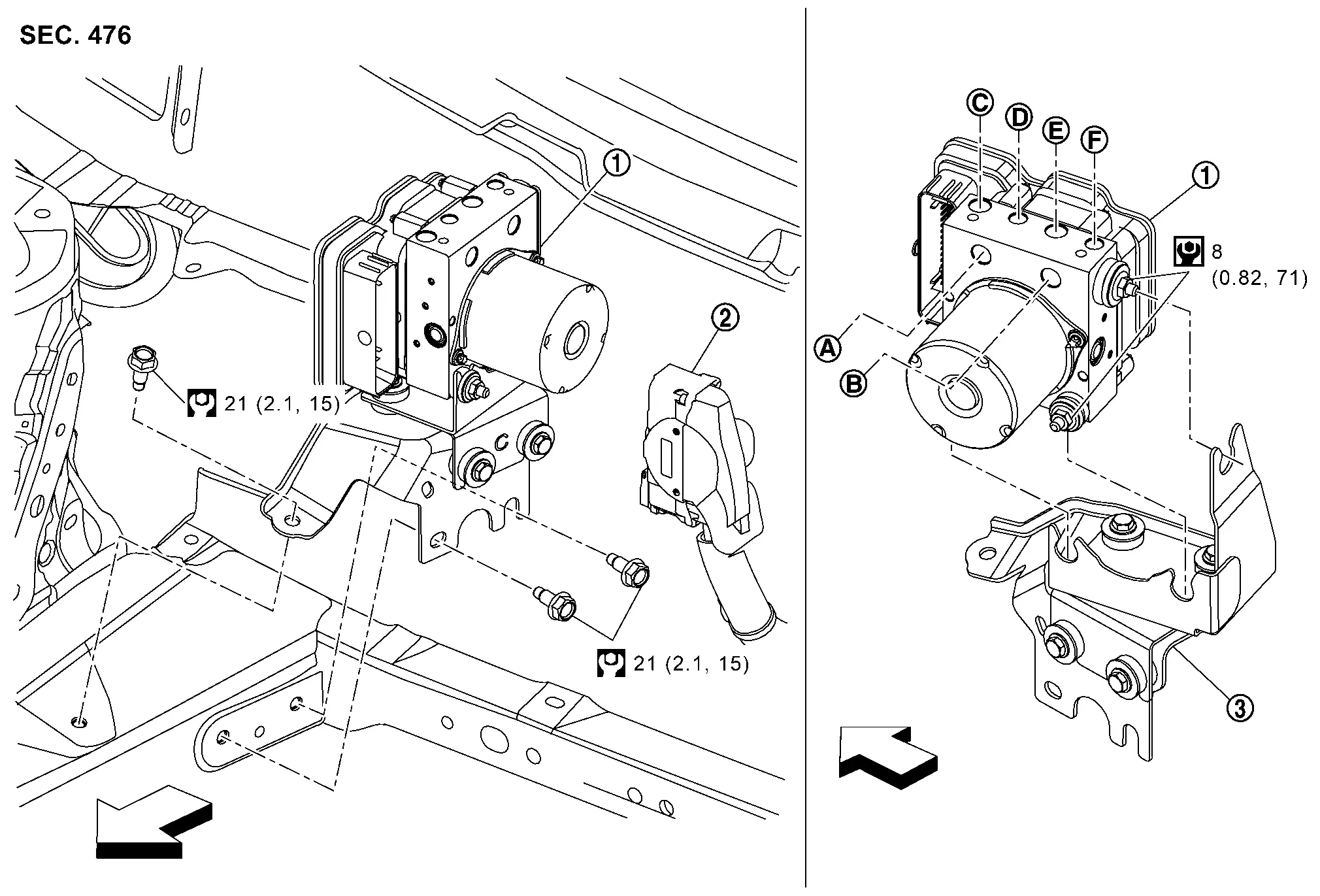
 |
ABS actuator and electric unit (control unit) |  |
ABS actuator and electric unit (control unit) harness connector |  |
Bracket |
 |
To master cylinder secondary side |  |
To master cylinder primary side |  |
To rear RH caliper |
 |
To front LH caliper |  |
To front RH caliper |  |
To rear LH caliper |
 |
: Nissan Ariya Vehicle front | ||||
 |
: N·m (kg-m, ft-lb) | ||||
 |
: N·m (kg-m, in-lb) |
Removal and Installation
REMOVAL
 NOTE:
NOTE:
Do not swap ABS actuator and electric unit (control unit) between Nissan Ariya vehicles for any reason.
Disconnect the battery cable from negative terminal. Refer to Removal and Installation
Drain brake fluid. Refer to Draining.
Remove the engine cover (if so equipped). Refer to Removal and Installation.
Remove the cowl top extension. Refer to Removal and Installation.
Remove High-pressure pipe mounting bolt (A) and low-pressure pipe fix clip (B).
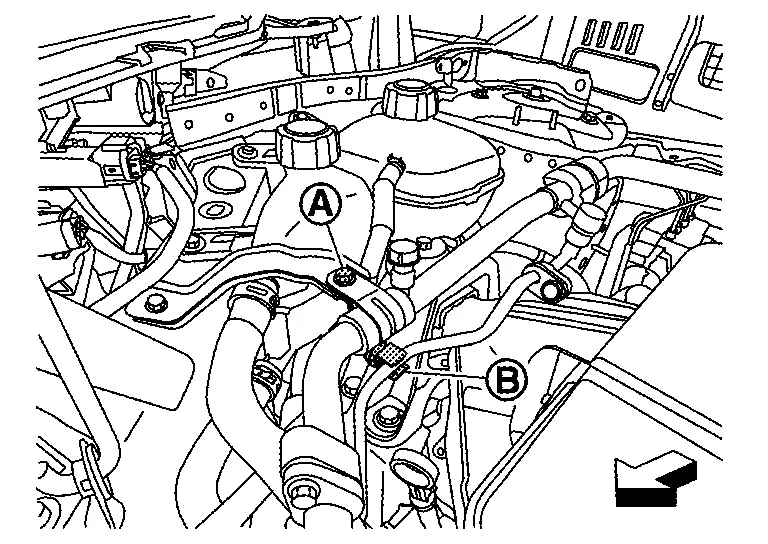
 |
: Nissan Ariya Vehicle front |
Remove heat insulator (1).
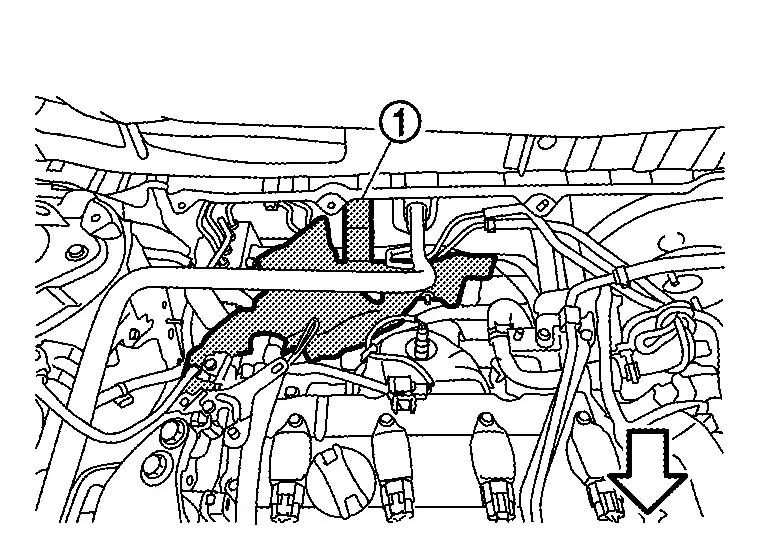
|
: Nissan Ariya Vehicle front |
Disconnect ABS actuator and electric unit (control unit) harness connector (1), follow the procedure below.
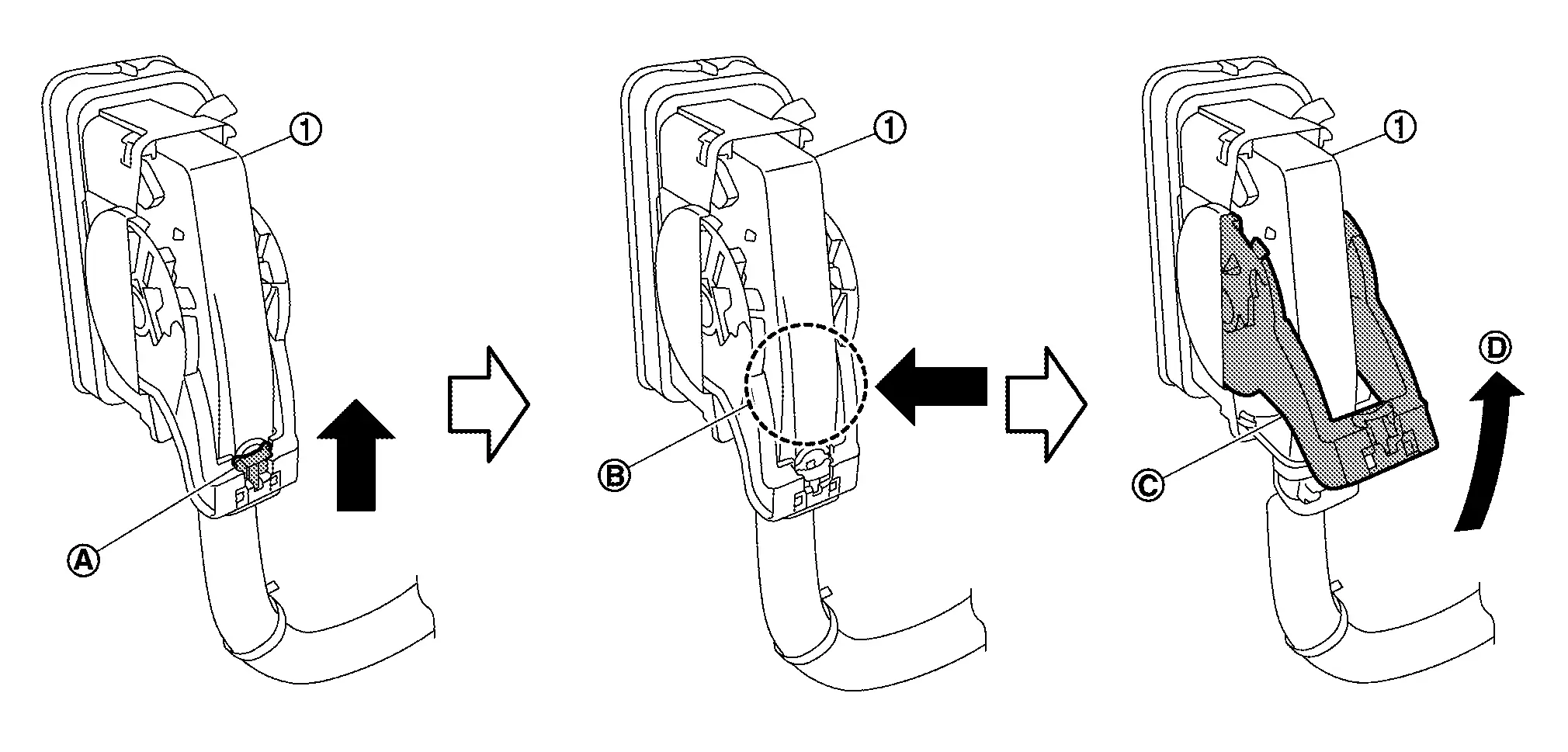
Loosen flare nut of brake tube using a flare nut wrench.
Remove front brake piping from the clip.
Remove the bolt at the ABS actuator and electric unit (control unit) bracket upper side, then remove the ABS actuator and electric unit as a set with bracket.
CAUTION:
-
Never remove and never install ABS actuator and electric unit (control unit) by holding harness connector.
-
Be careful not to drop ABS actuator and electric unit (control unit) and apply excessive impact to it.
Remove harness clip from bracket.
Remove bracket from ABS actuator and electric unit (control unit).
INSTALLATION
NOTE:
Do not swap ABS actuator and electric unit (control unit) between Nissan Ariya vehicles for any reason.
Installation is in the reverse order of removal.
-
When replacing ABS actuator and electric unit (control unit), remove the inlet hole protector for brake tube just before performing.
-
When installing brake tube, tighten to the specified torque using a flare nut torque wrench so that flare nut and brake tube are not damaged. Refer to Exploded View orExploded View .
-
Never remove and install actuator by holding actuator harness.
-
Bleed air from brake piping after installation. Refer to Bleeding Brake System.
-
Never apply excessive impact to actuator, such as by dropping it.
-
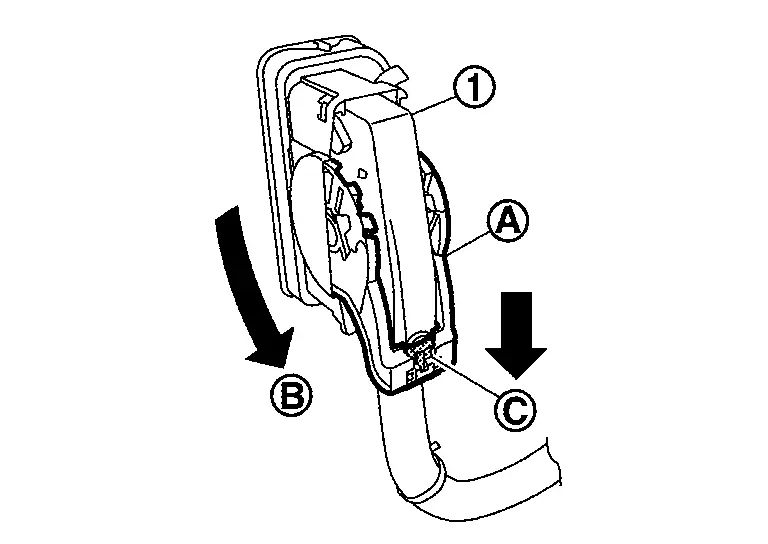
After installing the ABS actuator and electric unit (control unit) harness connector (1), move the lever (A) in the direction (B) and down the pawl (C) to secure the locking.
-
When replacing the ABS actuator and electric unit (control unit), be sure to perform the configuration. Refer to Work Procedure.
Wheel Sensor
Front Wheel Sensor
Exploded View
|
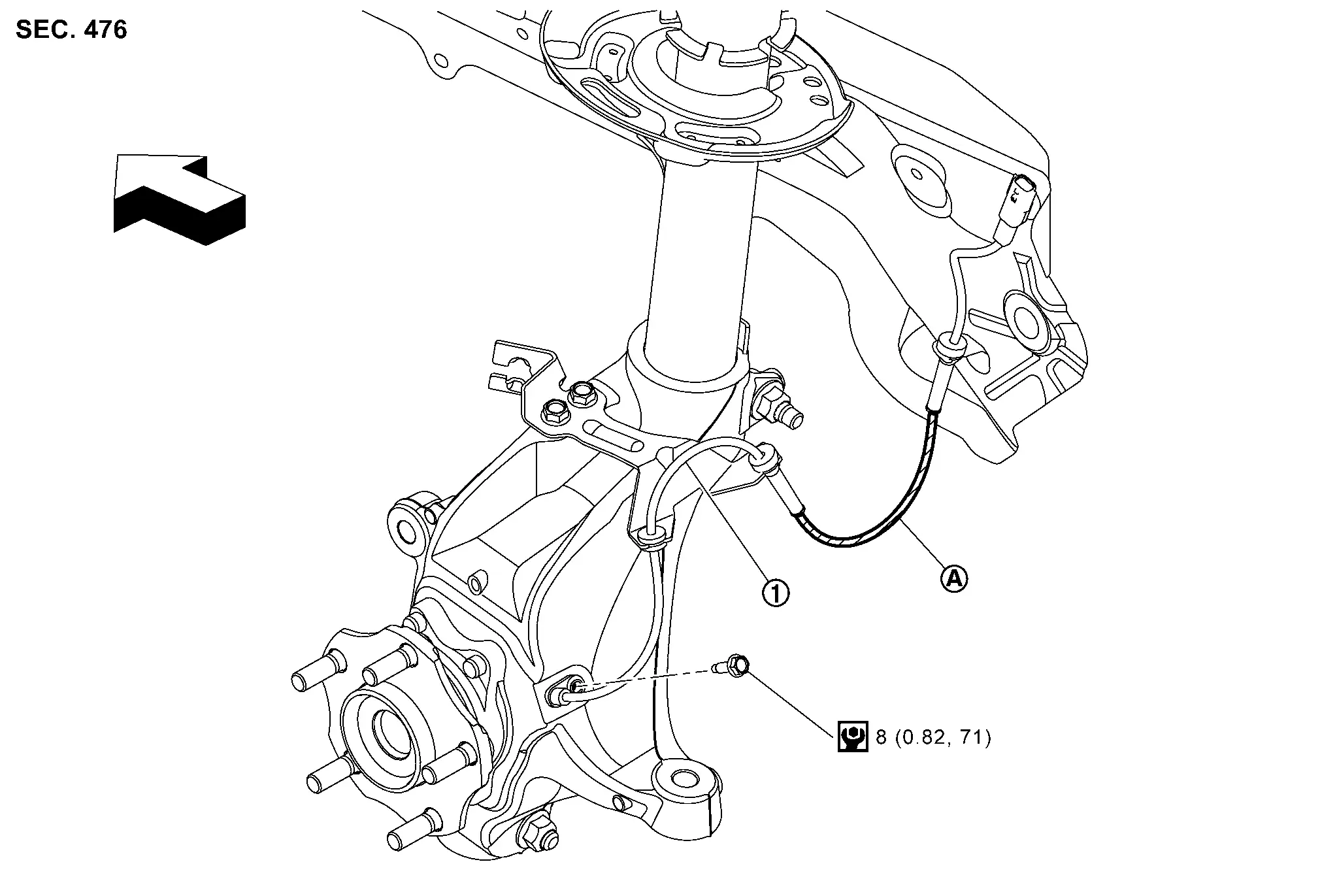
Front LH wheel sensor | ||
|
Identification line | ||
|
: Nissan Ariya Vehicle front | ||
|
: N·m (kg-m, in-lb) | ||
NOTE:
Front RH wheel sensor is symmetrically opposite of LH.
Removal and Installation
REMOVAL
Remove tires. Refer to Removal and Installation.
Remove front wheel sensor from steering knuckle.
CAUTION:
Never rotate and never pull front wheel sensor as much as possible, when pulling out.
Remove front wheel sensor harness from the Nissan Ariya vehicle.
CAUTION:
Never twist or pull front wheel sensor harness, when removing.
INSTALLATION
Note the following, and install in the reverse order of the removal.
-
Check that there is no foreign material like iron powder or damage on inner surface of front wheel sensor mounting hole of steering knuckle and sensor rotor. Install after cleaning when there are foreign material like iron powder, or replace when there is a malfunction.
-
Never twist front wheel sensor harness when installing front wheel sensor. Check that grommet
is fully inserted to bracket . Check that front wheel sensor harness is not twisted after installation.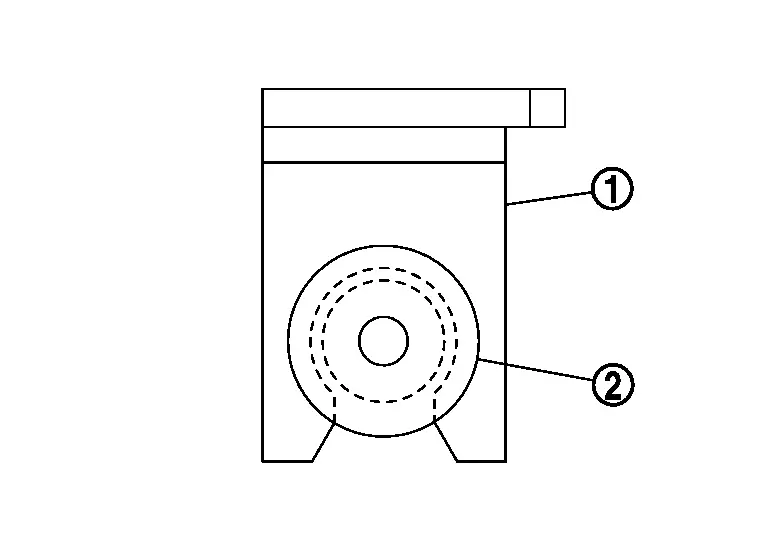
CAUTION:
Check that front wheel sensor identification line faces toward the Nissan Ariya vehicle front.
Rear Wheel Sensor
Exploded View

|
Rear wheel sensor | |
Axle housing |
|
: Nissan Ariya Vehicle front | ||
|
: N·m (kg-m, ft-lb) | ||
|
: N·m (kg-m, in-lb) | ||
NOTE:
-
Rear RH wheel sensor is symmetrically opposite of LH.
-
The parking brake actuator harness and the rear wheel sensor are a single unit.
Removal and Installation
REMOVAL
Place the ignition switch in the ON position.
CAUTION:
Do not start the engine.
Release the parking brake.
CAUTION:
If the brake cannot be released, release it manually. Refer to Diagnosis Procedure.
Place the ignition switch in the OFF position.
Disconnect the 12V battery negative terminal. Refer to Exploded View.
Remove the rear wheel and tire. Refer to Removal and Installation.
Disconnect the harness connectors from the rear brake caliper, parking brake actuator harness, and the rear wheel sensor harness.
CAUTION:
Never twist and never pull rear wheel sensor harness when removing.
Remove the parking brake actuator harness and rear wheel sensor mounting bolts.
Remove the rear wheel sensor.
CAUTION:
Never rotate or pull rear wheel sensor as much as possible when pulling out.
NOTE:
The parking brake actuator harness and the rear wheel sensor are a single unit.
INSTALLATION
Installation is in the reverse order of removal.
-
Check that there is no foreign material like iron powder or damage on the inner surface of the rear wheel sensor mounting hole. Install after cleaning when there is foreign material like iron powder, or replace when there is a malfunction.
-
Check the lines on the rear wheel sensor harness. Never twist the rear wheel sensor harness when installing the rear wheel sensor. Check that the grommet
is fully inserted to the bracket . Check that the rear wheel sensor harness is not twisted after installation.
Steering Angle Sensor
Removal and Installation
REMOVAL
Remove spiral cable assembly. Refer to Removal and Installation.
Remove steering angle sensor from spiral cable.
INSTALLATION
Note the following, and install in the reverse order of removal.
-
Perform steering angle sensor neutral position adjustment when steering angle sensor is removed and installed, or replaced. Refer to Work Procedure.
Other materials:
Transfer: Ty92a. Service Data and Specifications (sds). Service Data and Specifications (sds)
Service Data and Specifications (sds)
General Specifications
Applied model Axle AWD
Engine KR15DDT
Transaxle CVT
Transfer model
TY92A
Gear ratio
0.404
Number of teeth
Ring gear
42
Drive pinion
17
Oil capacity
Refer to Fluids and Lubricants.
...
Fuel Injector Relay
Component Inspection
CHECK FUEL INJECTOR RELAY
Turn ignition switch OFF.
Remove fuel injector relay. Refer to Component Parts Location.
Check the continuity between fuel injector relay terminals as per the following conditions.
Fuel injector relay Condition Continuity
+ −
...
Propilot Assist 2.1. Ecu Diagnosis Information
Adas Control Unit 2
List of ECU Reference
ECU Reference
ADAS control unit 2
Reference Value
Fail-safe (ADAS Control Unit)
DTC Inspection Priority Chart
DTC Index
Distance Sensor
List of ECU Reference
ECU Reference
Distance sensor
Reference Value
Fail-safe ...