
Nissan Rogue (T33) 2021-Present Owner’s Manual & User Guide: Warning & Indicator Lights
Warning/indicator lights (red)
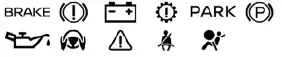
Warning/indicator lights (yellow)
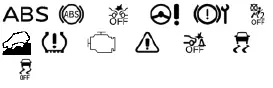
Warning/indicator lights (other)
 (white)
 (green)


Checking lights
With all doors closed, apply the parking brake, fasten the seat belts, and place the ignition switch in the ON position without starting the engine. On the Nissan Rogue, the following lights (if so equipped) will illuminate as part of the standard system check:
 ,
,
 ,
,
 or
or
 ,
,
 ,
,
 ,
,

The following lights (if so equipped) will illuminate briefly and then turn off as part of the normal Nissan Rogue startup procedure:
 ,
,
 ,
,
 ,
,
 ,
,
 or
or
 ,
,
 ,
,
 or
or
 (red),
 (yellow),
 ,
,
 .
.
If any light fails to illuminate or behaves differently than described, this may indicate a burned-out bulb or a system malfunction. It is recommended to have the Nissan Rogue inspected by a NISSAN dealer.
Other materials:
Fonctionnement du système MOD
(modèles sans vue en 3D)
Le système de détection d’objets en mouvement (MOD) du Nissan Rogue s’active automatiquement dans les conditions suivantes, afin d’assister le conducteur lors des manœuvres à basse vitesse :
Lorsque le levier de changement de vitesses est placé sur la position R (marche arrière).
...
Meter Speaker Signal Circuit
Diagnosis Procedure
CHECK METER SPEAKER CIRCUIT FOR OPEN
Ignition switch OFF.
Disconnect combination meter harness connector and meter speaker harness connector.
Check the continuity between combination meter harness connector and meter speaker harness connector.
Combination meter ...
Intelligent Around View Monitor. Removal and Installation
Around View Monitor Control Unit
Removal and Installation
REMOVALCAUTION:
Perform the “ADDITIONAL SERVICE WHEN REPLACING AROUND VIEW
MONITOR CONTROL UNIT� before replacing around view monitor control
unit. Refer to Description.
Remove the center console assembly. Refer to Removal and Ins ...