
Nissan Rogue (T33) 2021-Present Owner’s Manual & User Guide: Vehicle Dynamic Control (VDC) system
Basic information
The Vehicle Dynamic Control (VDC) system in the Nissan Rogue uses multiple sensors to monitor driver inputs and vehicle movement. Under certain conditions, the VDC system assists by performing the following functions:
- Adjusts brake pressure to reduce wheel slip on a slipping drive wheel and directs power to a non-slipping wheel on the same axle.
- Controls brake pressure and engine output to reduce wheel slip based on vehicle speed (traction control function).
- Controls brake pressure at individual wheels and manages engine output to help
the driver maintain control in conditions such as:
- understeer (the vehicle does not follow the intended steering path)
- oversteer (the vehicle begins to spin due to traction loss or road conditions)
The VDC system can help the driver maintain control of the Nissan Rogue, but it cannot prevent loss of control in every driving situation. Always drive carefully and adjust speed to road conditions.
When the VDC system on the Nissan Rogue activates, the slip indicator light
 flashes on the instrument panel. When this happens, keep the following in mind:
- The road surface may be slippery, or the system may be taking corrective action to help keep the Nissan Rogue on the intended steering path.
- You may feel pulsation in the brake pedal and hear noise or vibration from under the hood. This is normal and indicates that the VDC system is functioning correctly.
- Adjust your speed and driving behavior to match road conditions.
If a malfunction occurs in the system, the slip indicator light
 will illuminate steadily on the instrument panel. In this case, the VDC system turns off automatically.
You can turn the VDC system off using the Nissan Rogue vehicle information display. When the VDC system is turned off, the VDC OFF indicator
 illuminates. Even with VDC off, the system still works to reduce wheel slip by transferring power between drive wheels on the same axle. If this occurs, the slip indicator light
 will flash. All other VDC functions remain off, so the slip indicator light
 will not flash for those features.
The VDC system automatically resets to ON when the ignition switch is turned OFF and then back ON.
will not flash for those features.
The VDC system automatically resets to ON when the ignition switch is turned OFF and then back ON.
The computer includes a self-diagnostic function that tests the system each time the engine starts and the Nissan Rogue moves slowly forward or backward.
During this self-test, you may hear a “clunk� noise or feel brake pedal pulsation. This is normal and not a malfunction.
WARNING
- The VDC system enhances stability, but it cannot prevent accidents caused by abrupt
steering at high speeds or careless or dangerous driving.
Reduce speed, especially when cornering or driving on slippery roads, and always drive with caution.
- Do not modify the suspension. Using non-NISSAN recommended parts or driving with
deteriorated components such as shocks, struts, springs, stabilizer bars, bushings,
or wheels can impair VDC performance. If this happens, the slip indicator light
 may illuminate.
 - Using brake components such as pads, rotors or calipers that are not NISSAN
recommended — or allowing them to deteriorate excessively — may prevent the VDC
system from operating properly, causing the slip indicator light
 to illuminate.
 - If engine control components are not NISSAN recommended or become severely
deteriorated, the slip indicator light
 may illuminate.
 - On extremely inclined surfaces or heavily banked corners, the VDC system may not
function properly and the slip indicator light
 may illuminate.
Do not drive on such surfaces.
- When driving on unstable surfaces such as turntables, ferries, elevators or ramps, the
slip indicator light
 may illuminate. This is not a malfunction. Restart the engine once the Nissan Rogue is on a stable surface.
 - If wheels or tires other than NISSAN recommended ones are used, VDC performance
may be affected and the slip indicator light
 may illuminate.
 - The VDC system is not a substitute for winter tires or tire chains on snowy roads.
How to turn off the VDC system
The Nissan Rogue is designed to be driven with the Vehicle Dynamic Control (VDC) system ON during normal conditions, as this improves stability and traction.
However, when the vehicle becomes stuck in deep snow or mud, the VDC system may limit engine output to reduce wheel spin. In these situations, even pressing the accelerator fully may not increase engine speed. If you need maximum power to free the Nissan Rogue, turning the VDC system off can help.
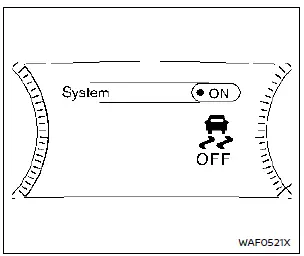
Example
To turn off the VDC system, follow these steps using the vehicle information display:
1. Press the
 button on the steering wheel until “Settings� appears, then press the jog dial.
2. Use the scroll dial to choose “VDC Setting,� then press it.
3. Select “System� and press the scroll dial. The
 indicator light will illuminate to show VDC is off.
To turn the VDC system back on, reactivate “VDC Setting� in the display or simply restart the Nissan Rogue’s engine.
Brake Force Distribution
While braking during cornering, the system distributes braking force to each individual wheel based on the turn radius, improving control and stability.
WARNING
- The VDC system helps maintain stability, but it cannot prevent accidents caused by abrupt steering at high speeds or careless driving.
Always reduce speed on slippery surfaces and drive cautiously.
- Do not modify suspension components. Using non-NISSAN shocks, struts, springs, stabilizer bars, bushings, or wheels — or driving with worn parts — may affect VDC function. This can cause the
 light to flash or the
 and
and
 indicators to illuminate.
 - If brake pads, rotors, or calipers are not NISSAN recommended — or severely worn — the VDC system may malfunction and the
 and
and
 warning lights may illuminate.
 - If engine control components are not NISSAN recommended or are deteriorated, both the
 and
and
 indicators may illuminate.
 - On steeply banked corners, the VDC system may not function correctly and the
 light may flash or both the
 and
and
 indicators may illuminate. Avoid driving on such surfaces.
 - When driving on unstable surfaces — such as ferries, turntables, elevators or ramps — the
 indicator may flash or both the
 and
and
 lights may illuminate. This is not a malfunction. Restart the engine on stable ground.
 - Using wheels or tires not recommended for the Nissan Rogue may impair VDC performance, causing the
 light to flash or both the
 and
and
 indicators to illuminate.
 - The VDC system is not a substitute for winter tires or chains when driving on snow.
Other materials:
Idle Air Volume Learning
Description
Idle Air Volume Learning is a function of ECM to learn the idle air
volume that keeps engine idle speed within the specific range. It must
be performed under the following conditions:
Each time electric throttle control actuator or ECM is replaced.
Idle speed or ignition tim ...
Fuel Tank Temperature Sensor
Component Inspection
CHECK FUEL TANK TEMPERATURE (FTT) SENSOR
Turn ignition switch OFF.
Disconnect fuel level sensor unit and fuel pump harness connector.
Check the resistance between fuel level sensor unit and fuel pump terminals.
Fuel level sensor unit and fuel pump Condition R ...
Symptom Diagnosis. Front Passenger Side Power Window Does Not Operate
When Both Power Window Main Switch and Front Power Window Switch (passenger Side) Are Operated
Diagnosis Procedure
CHECK FRONT POWER WINDOW SWITCH (PASSENGER SIDE) POWER SUPPLY AND GROUND CIRCUIT
Check front power window switch (passenger side) power supply and ground circuit.
Refer to Diagnosis ...