
Nissan Rogue (T33) 2021-Present Owner’s Manual & User Guide: Towing your vehicle
Basic information
When towing your vehicle, always follow local towing laws and regulations. Using incorrect equipment or improper towing procedures can damage your vehicle. Professional service operators typically know the proper towing methods. To prevent accidental damage, NISSAN recommends having your vehicle towed by a qualified service operator.
WARNING
- Never ride inside a vehicle that is being towed.
- Never get underneath the vehicle after it has been lifted by a tow truck.
CAUTION
- Ensure the transmission, axles, steering, and powertrain are operational before towing. If not, use dollies or a flatbed truck.
- Always attach safety chains before towing.
NOTE:
If the vehicle battery is completely drained, the transmission cannot be shifted manually. Charge the battery or supply external power following the jump-starting procedure.
Push the park button to shift into P (Park) before attempting to select another gear.
Towing recommended by NISSAN
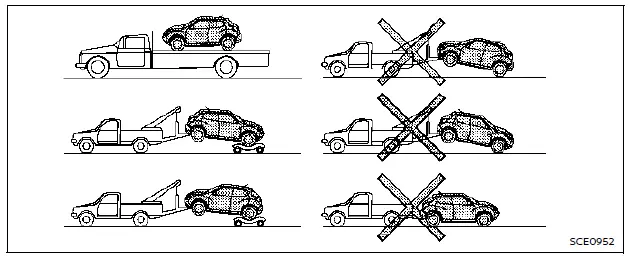
All-Wheel Drive (AWD) models
NISSAN recommends using towing dollies or placing the vehicle on a flatbed truck, as shown.
CAUTION
Never tow an AWD model equipped with a CVT with any wheels on the ground. Doing so will cause severe damage to the transmission and transfer case.
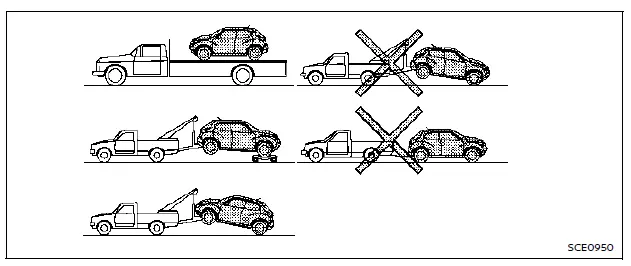
Two-Wheel Drive (2WD) models
NISSAN recommends that the Nissan Rogue be towed with the driving (front) wheels lifted off the ground, or transported on a flatbed truck as shown in the illustration.
NOTE:
If the electronic parking brake of the Nissan Rogue is released, the rear wheels may stay on the ground during towing. If the brake is not released, towing dollies should be used.
CAUTION
Never tow CVT-equipped vehicles like the Nissan Rogue with the front wheels or all wheels on the ground. This can cause serious transmission damage. If rear wheels must be lifted, always use towing dollies for the front axle.
Vehicle recovery (freeing a stuck vehicle)
Basic information
WARNING
To avoid vehicle damage, personal injury or worse when recovering a stuck Nissan Rogue:
- Contact a professional towing service if you are unsure about the correct recovery procedure.
- Attach recovery chains or straps only to the main structural areas of the Nissan Rogue.
- Do not use tie-down points to free a stuck vehicle.
- Use only proper recovery equipment and follow the manufacturer's instructions.
- Always pull straight forward — never at an angle.
- Ensure the recovery strap does not contact any part of the Nissan Rogue except the attachment point.
If the Nissan Rogue becomes stuck in sand, mud or snow, use a recovery strap or another tool designed for freeing vehicles.
Always follow the safety instructions supplied with the recovery device.
Rocking a stuck vehicle
WARNING
- Stand clear of the vehicle during recovery.
- Avoid spinning the wheels at high speed, as this may cause tire failure or component damage.
If the Nissan Rogue is stuck in mud, snow or sand, you can attempt the following rocking procedure:
1. Turn off the Vehicle Dynamic Control (VDC) system.
2. Ensure there are no obstacles in front of or behind the vehicle.
3. Turn the steering wheel from side to side to clear the area around the front tires.
4. Gently rock the vehicle forward and backward:
- Shift between R (Reverse) and D (Drive).
- Apply only light throttle to maintain momentum.
- Fully release the accelerator before shifting.
- Do not exceed 35 MPH (55 km/h) wheel speed.
5. If the Nissan Rogue cannot be freed after several attempts, contact a professional towing service.
Other materials:
Basic Inspection. System Initialization
Description
If any of the following operations are performed, the initialization
is necessary for normal operation of power window system. Refer to Work
Procedure.
When front power window motor (driver side) replaced.
Power supply to the front power window motor (driver side) is not cut ...
Flasher
CONSULT Function (BCM - FLASHER)
DATA MONITORNOTE:
The following table includes information (items)
inapplicable to this Nissan Ariya vehicle. For information (items)
applicable to this vehicle, refer to CONSULT display items.
Monitor item
[Unit] Description
Hazard switch
[Off/On]
...
Informations de base sur le système Intelligent Key du Nissan Rogue
AVERTISSEMENT RELATIF AUX ONDES RADIO
Impact sur les équipements médicaux : Les signaux et ondes radio émis par le système de votre Nissan Rogue peuvent interférer avec le bon fonctionnement des équipements médicaux électriques. Avant d'utiliser la clé intelligente, toute personne po ...