
Nissan Rogue (T33) 2021-Present Service Manual: Telematics System :: Basic Inspection
Diagnosis and Repair Work Flow
Work Flow
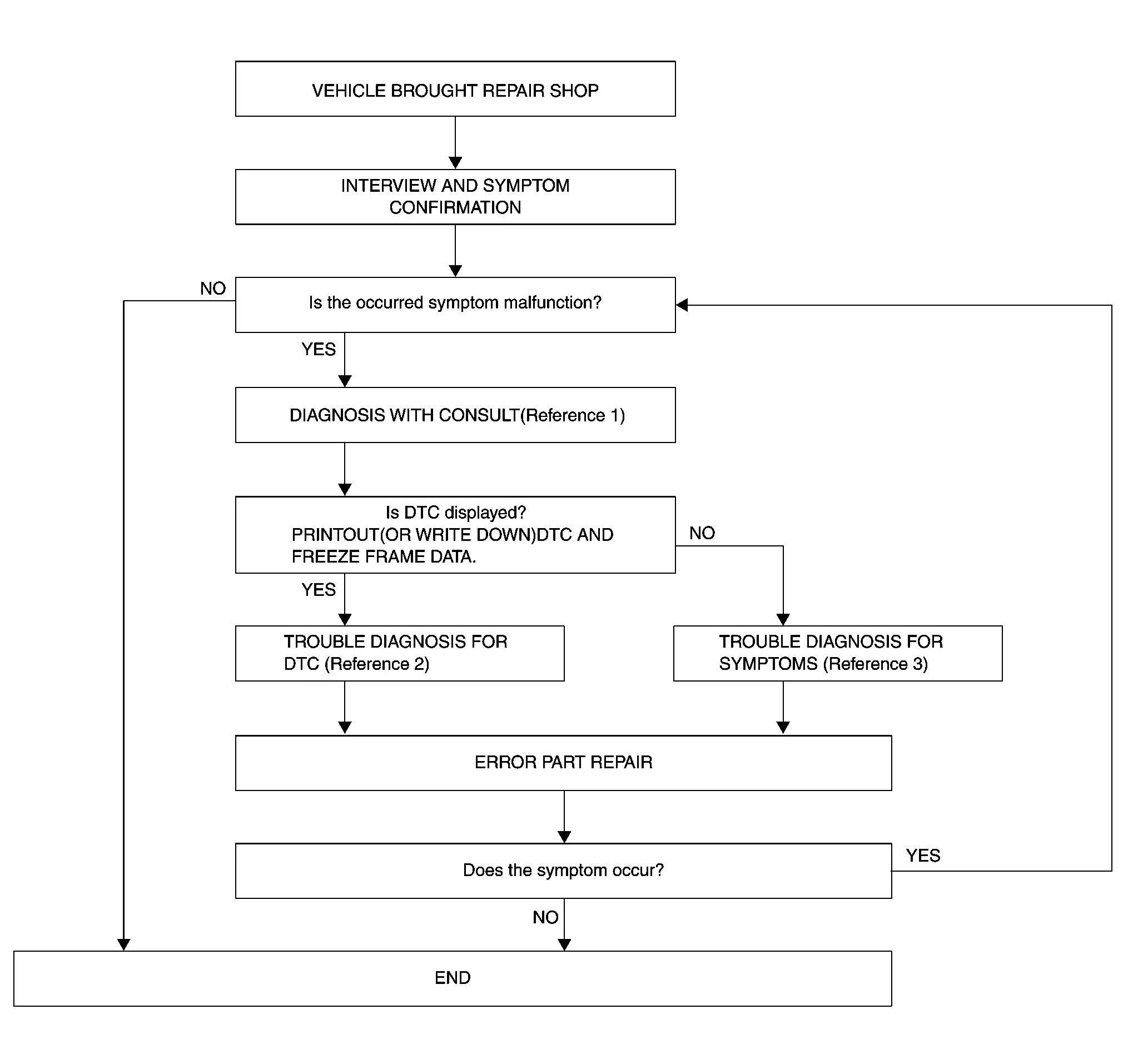
OVERALL SEQUENCE
-
Reference 1··· Refer to Consult Function
. -
Reference 2··· Refer to DTC Index
. -
Reference 3··· Refer to Symptom Table
.
DETAILED FLOW
INTERVIEW AND SYMPTOM CONFIRMATION
Check the malfunction symptoms by performing the following items.
-
Interview the customer to obtain the malfunction information (conditions and environment when the malfunction occurred).
-
Check the symptom.
Is the occurred symptom malfunction?
YES>>GO TO 2.
NO>>INSPECTION END
DIAGNOSIS WITH CONSULT
 With CONSULT
-
Connect CONSULT and perform a self-diagnosis for “IVC”. Refer to Consult Function.
-
When DTC is detected, follow the instructions below:
-
Record DTC and Freeze Frame Data.
-
Are any DTCs displayed?
YES>>GO TO 3.
NO>>GO TO 4.
TROUBLE DIAGNOSIS FOR DTC
-
Check the DTC indicated in the self-diagnosis results.
-
Perform the relevant diagnosis referring to the DTC Index. Refer to DTC Index.
>>
GO TO 4.
PERFORM SYMPTOM DIAGNOSIS
Perform the relevant diagnosis referring to the diagnosis chart by symptom. Refer to Symptom Table.
>>
GO TO 5.
ERROR PART REPAIR
With CONSULT
-
Repair or replace the identified malfunctioning parts.
-
Perform a self-diagnosis for “IVC” with CONSULT.
-
Check that the symptom does not occur.
Does the symptom occur?
YES>>GO TO 1.
NO>>INSPECTION END
Additional Service When Replacing Tcu
Description
When TCU is replaced, TCU activation operation and configuration are required. Refer to Work Procedure.
Preparation before activation operation
-
Subscribe to telematics service.
-
Preregister user ID and password (can be performed from owner homepage).
-
Since VIN data is not included in the TCU after replacement, it is required to write VIN data with CONSULT.
Work Procedure
READING OF VIN DATA
WITH CONSULT
-
Turn ignition switch ON and wait at least 5 seconds.
-
Select “SAVE VIN DATA” of “Work support” item using CONSULT.
-
Touch “Start” on “SAVE VIN DATA” screen to save the VIN data stored in replaced TCU in CONSULT.
 NOTE:
NOTE:
If it cannot be saved, writing operation must be performed manually.
>>
GO TO 2.
TCU REPLACEMENT
Replace TCU. Refer to Removal & Installation.
>>
GO TO 3.
PERFORM TCU CONFIGURATION
WITH CONSULT
Perform configuration (TCU). Refer to Description.
Can VIN data be saved to CONSULT at 1st step?
YES>>GO TO 4.
NO>>GO TO 5
AUTOMATIC WRITING OF VIN DATA TO TCU
WITH CONSULT
-
Turn ignition switch ON and wait at least 5 seconds.
-
Select “WRITE VIN (SAVED DATA)” of “Work support” item using CONSULT..
-
Touch “Start” at “WRITE VIN (SAVED DATA)” screen to write the VIN data saved in CONSULT into new TCU.
>>
GO TO 6.
MANUAL WRITING OF VIN DATA TO TCU
WITH CONSULT
-
Turn ignition switch ON and wait at least 5 seconds.
-
Select “WRITE VIN (MANUAL INPUT)” of “Work support” item using CONSULT.
-
Touch “Start” at “WRITE VIN (MANUAL INPUT)” screen to write the VIN data into new TCU.
>>
GO TO 6.
TCU ACTIVATION
Perform TCU activation. Refer to Work Procedure.
>>
GO TO 7.
CHECK NETWORK INITIAL SETTINGS
CONSULT Work Support
Select “Work Support” of “MULTI AV” and perform “Network initial settings”.
>>
INSPECTION END
Additional Service When Using Telematics System for the First Time/re-Subscripti
Description
When the driver uses telematics system for the first time/re-subscription, TCU activation operation is required. Refer to Work Procedure.
PREPARATION FOR ACTIVATION
-
Subscribe to telematics service.
-
Pre-register user ID and password (can be performed from owner home page).
Work Procedure
TCU ACTIVATION (1)
With CONSULT
-
Connect CONSULT to Nissan Ariya vehicle.
-
Check that “IVC” is displayed on the CONSULT screen.
Is the inspection result normal?
YES>>GO TO 2.
NO>>After disconnecting battery terminal, let it stand for 1 second or more. Reconnect the battery terminal to perform “1.TCU ACTIVATION (1)” again. Refer to Precautions for Removing Battery Terminal.
TCU ACTIVATION (2)
CONSULT work support
-
Turn ignition switch ON and wait at least 5 seconds or more.
-
Touch “IVC” on the CONSULT screen.
-
After performing System Call of CONSULT, touch the “Work support” tab.
-
On the work support screen of CONSULT, select “TCU ACTIVATE SETTING” and touch “Start.”
-
On the TCU ACTIVATE SETTING screen, touch “Start” to set to “ON”. Touch “End.”
-
Exit from CONSULT.
-
Turn ignition switch OFF and wait at least 10 seconds.
-
Wait (at least 10 seconds) until the power switch indicator turns OFF to shut down TCU.
>>
GO TO 3.
COMMUNICATION TEST (1)
NOTE:
If communicated with the NissanConnect Services Response Centerr with TCU turned ON before establishing the connections of the network line, TCU cannot perform communications. In this case, “The connection to the center failed.” is shown on the display, and the communication function of TCU is deactivated.
To restore the communication function, turn OFF the TCU battery power and turn it ON again (after disconnecting battery negative terminal, reconnect it) to reset the shutdown condition of TCU communication function. The communication function recovers 20 seconds after turning ON the power again.
-
Perform TCU communication test by Nissan Ariya vehicle operation.
-
Turn ignition switch ON.
-
Wait 2 minutes or more until the TCU completes the initial communication.
-
Check the radio wave status with the telematics icon.
Telematics icon
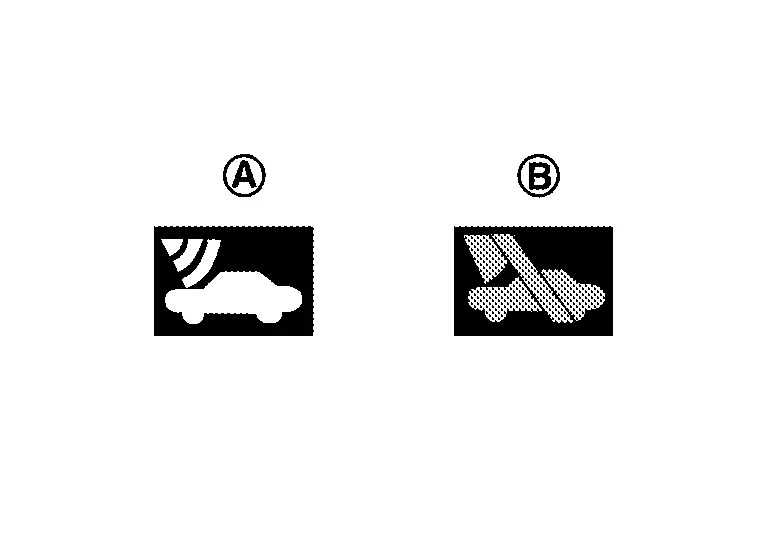

Radio wave state (Service Area) 
Radio wave state (Out of Service Area)
Does the radio wave status show Service Area?
YES>>GO TO 4.
NO>>TCU activation error or Nissan Ariya vehicle is in an out of service area. Move vehicle to a service area.
NO DISPLAY>>Refer to Symptom Table.
COMMUNICATION TEST (2)
Select "InTouch Services" and check if communication is possible for each item.
Is the connection status normal?
YES>>Set the user ID and password by Nissan Ariya vehicle operation.
NO>>If not connected, repeat cold start operation. GO TO 2.
Additional Service After Automatic Report
Work Procedure
Description
When the automatic report function of the TCU is activated, the TCU locks the automatic report function after the automatic report. Therefore, it is necessary to release the lock on the TCU after the automatic report function of the TCU is activated.
Work Procedure
AUTOMATIC REPORT PREVENTION RELEASE
CONSULT Work support
-
Turn ignition switch ON.
-
Select "Automatic report prevention release" to unlock the automatic report prevention.
>>
WORK END
Configuration (tcu)
Description
Vehicle specification needs to be written with CONSULT because it is not written after replacing the TCU.
The configuration requires network connection. CONSULT connects to network and then it downloads the configuration data from the server. Then CONSULT writes the Nissan Ariya vehicle specification to the TCU.
Refer to Work Procedure.
NOTE:
For details the network connection and operation, refer to “CONSULT Operation Manual”.
The configuration no need to “save” configuration data from the TCU. The configuration data is always generated freshly at the server and then downloaded to the CONSULT.
CAUTION:
-
Complete the procedure of “Configuration” in order.
-
If incorrect “Configuration”, incidents might occur.
Work Procedure
WRITING VEHICLE SPECIFICATION
With CONSULT
Perform writing Nissan Ariya vehicle specification to TCU following "Automatic Configuration" procedure of "Configuration" according to CONSULT Operation Manual.
NOTE:
-
Log in the network according to CONSULT guidance.
-
For details the network connection and operation, refer to “CONSULT Operation Manual”.
>>
WORK END
Other materials:
Ssg Branch Line Circuit
Diagnosis Procedure
CHECK CONNECTOR
Turn the ignition switch OFF.
Disconnect the battery cable from the negative terminal.
Check the terminals and connectors of the sub starter & generator
for damage, bend and loose connection (unit side and connector side).
Is the inspect ...
Intelligent Key System
System Description
SYSTEM DIAGRAM*1: With automatic back door system models*2: Without automatic back door system models Component Function
Outside key antenna
Refer to Outside Key Antenna
Inside key antenna
Refer to Inside Key Antenna
Push-button ignition switch
NATS antenna ...
C10af-01 Pressure Sensor
DTC Description
DTC DETECTION LOGIC DTC No.
CONSULT screen terms
(Trouble diagnosis content) DTC detection condition
C10AF
01
Pressure sensor
(Pressure sensor)
Diagnosis condition
During driving below 15 km/h (9.4 MPH) (no braking)
When the power supply voltage is nor ...