
Nissan Rogue (T33) 2021-Present Owner’s Manual & User Guide: Rear Sonar System (RSS)
Basic information
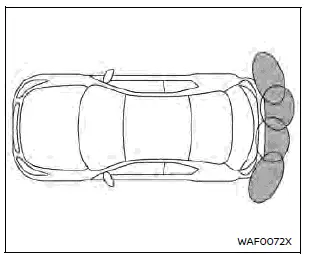
The Rear Sonar System (RSS) on the Nissan Rogue emits audible tones to alert the driver of obstacles located near the rear bumper.
When the RSS is turned on, the corresponding sonar view appears automatically in the vehicle information display.
WARNING
- The RSS is a convenience feature and not a substitute for proper parking techniques.
- The driver remains fully responsible for safety during parking and reversing. Always check the surroundings visually before maneuvering.
- Be sure to understand the RSS limitations described in this section. Indicator colors represent different distances to detected objects.
- Inclement weather or strong ultrasonic noise sources (car washes, compressed-air brakes, pneumatic drills) may affect RSS performance or cause false alerts.
- The RSS assists in detecting large stationary objects but does not prevent contact.
- The system may not detect small or moving objects. It may miss obstacles below the bumper or close to the ground. Always move slowly.
- The RSS may not detect fluffy materials (snow, cloth, cotton, fiberglass), thin objects (wire, rope), or wedge-shaped items.
If the bumper fascia becomes damaged, bent, or misaligned, the detection zone may shift, leading to incorrect distance readings or false alerts.
CAUTION
- Loud noise (such as high audio volume or open windows) may make the alert tone difficult to hear.
- Keep rear sonar sensors clean. Remove snow, ice, and dirt carefully. Do not use sharp tools to clean the sensors.
System operation
The RSS provides visual and audible alerts when obstacles are detected behind the vehicle while the shift lever is in the R (Reverse) position.
The system deactivates automatically at speeds above 6 MPH (10 km/h) and reactivates when the speed falls below this threshold.
If an obstacle is detected only by the corner sensor, the intermittent tone will stop after a few seconds. The tone also stops when the object moves away from the vehicle.
When an object is detected, a green blinking indicator and intermittent tone appear. As the vehicle gets closer, the indicator changes to yellow and blinks faster. When the vehicle becomes very close, the indicator turns solid red and the alert tone becomes continuous.
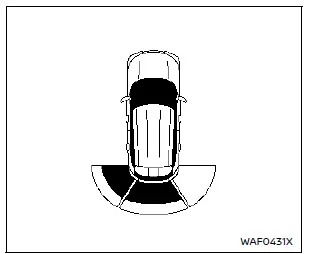
Example
As the vehicle reverses toward an obstacle, the sonar indicator appears on the vehicle information display.
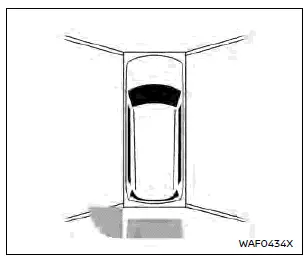
Example
The sonar indicator also appears on the center display’s camera view.
How to enable/disable the RSS
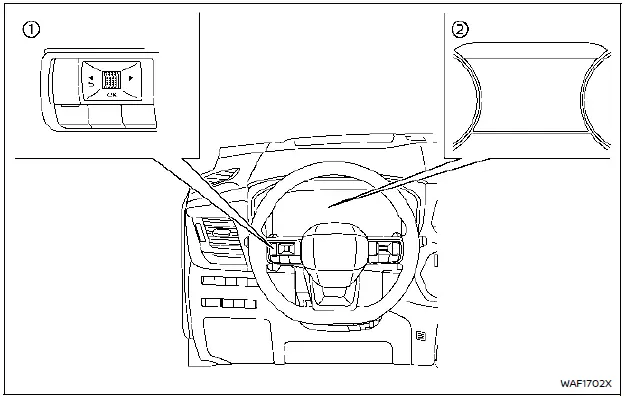
The RSS automatically activates when the ignition switch is in the ON position and the shift lever is placed in R (Reverse).
To configure RSS settings, follow these steps:
1. Press the  button until “Settings� appears in the vehicle information display, then push the scroll dial.
Use the scroll dial to select “Driver Assistance,� then push the dial.
2. Select “Parking Assist� and push the scroll dial.
3. Use the scroll dial to highlight and adjust the following options:
- Moving Object (if equipped)
- Turns ON/OFF Moving Object Detection (MOD).
- Auto Show Sonar
- Displays the sonar view automatically when RSS activates.
- Rear Sonar
- Turns the RSS ON or OFF.
- Sonar Distance
- Adjusts detection distance to “Long,� “Medium,� or “Short.�
- Sonar Volume
- Adjusts alert tone volume to “High,� “Medium,� or “Low.�
RSS limitations
WARNING
Listed below are the system limitations for the RSS. Failure to operate the vehicle in accordance with these system limitations could result in serious injury or death.
- Read and understand the limitations of the RSS as contained in this section. Inclement weather may affect the function of the RSS; this may include reduced performance or false activation.
- The system is deactivated at speeds above 6 MPH (10 km/h). It is reactivated at lower speeds.
- Inclement weather or ultrasonic sources such as an automatic car wash, compressed-air brakes, or pneumatic drills may affect RSS performance or cause false activation.
- The RSS is not designed to prevent contact with small or moving objects. Always move slowly. The system will not detect small objects below the bumper or on the ground.
- The RSS may not detect fluffy objects (snow, cloth, cotton, fiberglass), thin materials (rope, wire, chain), wedge-shaped objects, complex-shaped objects or multiple objects close together.
- The RSS may not detect objects at speeds above 3 MPH (5 km/h) and may not detect certain angled or moving objects.
- The RSS may not detect pedestrians, small children or animals.
- The RSS may not operate under the following conditions:
- • When rain, snow, ice, dirt, etc. adheres to the sonar sensor.
- • When loud sounds are present near the vehicle.
- • When the obstacle surface is diagonal to the rear of the vehicle.
- • When the sonar sensor or nearby area is extremely hot or cold.
- The RSS may unintentionally operate under the following conditions:
- When there is overgrown grass around the vehicle.
- When driving over bumps, protrusions or manhole covers.
- When driving through a draped flag or curtain.
- When snow or ice accumulates behind the vehicle.
- When driving on a steep hill.
System temporarily unavailable
When sonar blockage is detected, the system will be deactivated automatically.
The system becomes available again once the conditions disappear.
The sonar sensors may be blocked by temporary environmental conditions such as splashing water, mist or fog. The blockage can also result from ice, frost or dirt covering the sensors.
Action to take:
When the obstruction is removed or environmental conditions improve, the RSS will resume operation automatically.
System maintenance
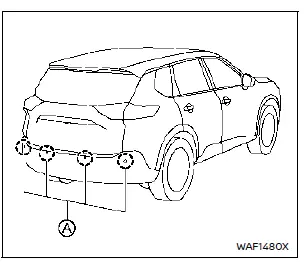
The sonar sensors A are located on the rear bumper.
- Always keep the area around the sonar sensors clean.
- If the sensors are dirty, wipe them gently with a soft cloth to avoid damage.
- The sonar sensors may be blocked by splashing water, mist, fog, ice, frost or dirt. Remove any obstruction around the sensors.
- Do not subject the sonar sensor area to strong impacts. Do not remove or disassemble the sensors. If the bumper area is deformed due to an accident, have the sensors inspected. It is recommended to visit a NISSAN dealer.
- Do not attach stickers (including transparent ones), install accessories or apply extra paint around the sensors. This may cause malfunction or improper operation.
- When using a high-pressure washer, avoid spraying directly onto the sonar sensors to prevent malfunction.
Other materials:
Pnsr Branch Line Circuit
Diagnosis Procedure
CHECK CONNECTOR
Ignition switch OFF.
Disconnect the battery cable from the negative terminal.
Check the terminals and connectors of the power network separate
relay for damage, bend and loose connection (unit side and connector
side).
Is the inspection re ...
Symptom Diagnosis. Vehicle Security Alarm Does Not Activate
Description
Alarm does not operate when alarm operating condition is satisfied.
Diagnosis Procedure
CHECK DOOR SWITCH
Check door switch. Refer to Component Function Check.
Is the inspection result normal?
YES>>
GO TO 2.
NO>>
Replace the malfunctioning door switch
CHECK HOOD S ...
Precaution. Precautions
Precaution for Supplemental Restraint System (SRS) "AIR BAG" and "SEAT BELT PRE-TENSIONER"
The Supplemental Restraint System such as “AIR BAG� and “SEAT BELT
PRE-TENSIONER�, used along with a front seat belt, helps to reduce the
risk or severity of injury to the driver and front passeng ...