
Nissan Rogue (T33) 2021-Present Service Manual: Propilot Assist 2.1 :: Basic Inspection
Diagnosis and Repair Work Flow
Work Flow
OVERALL SEQUENCE
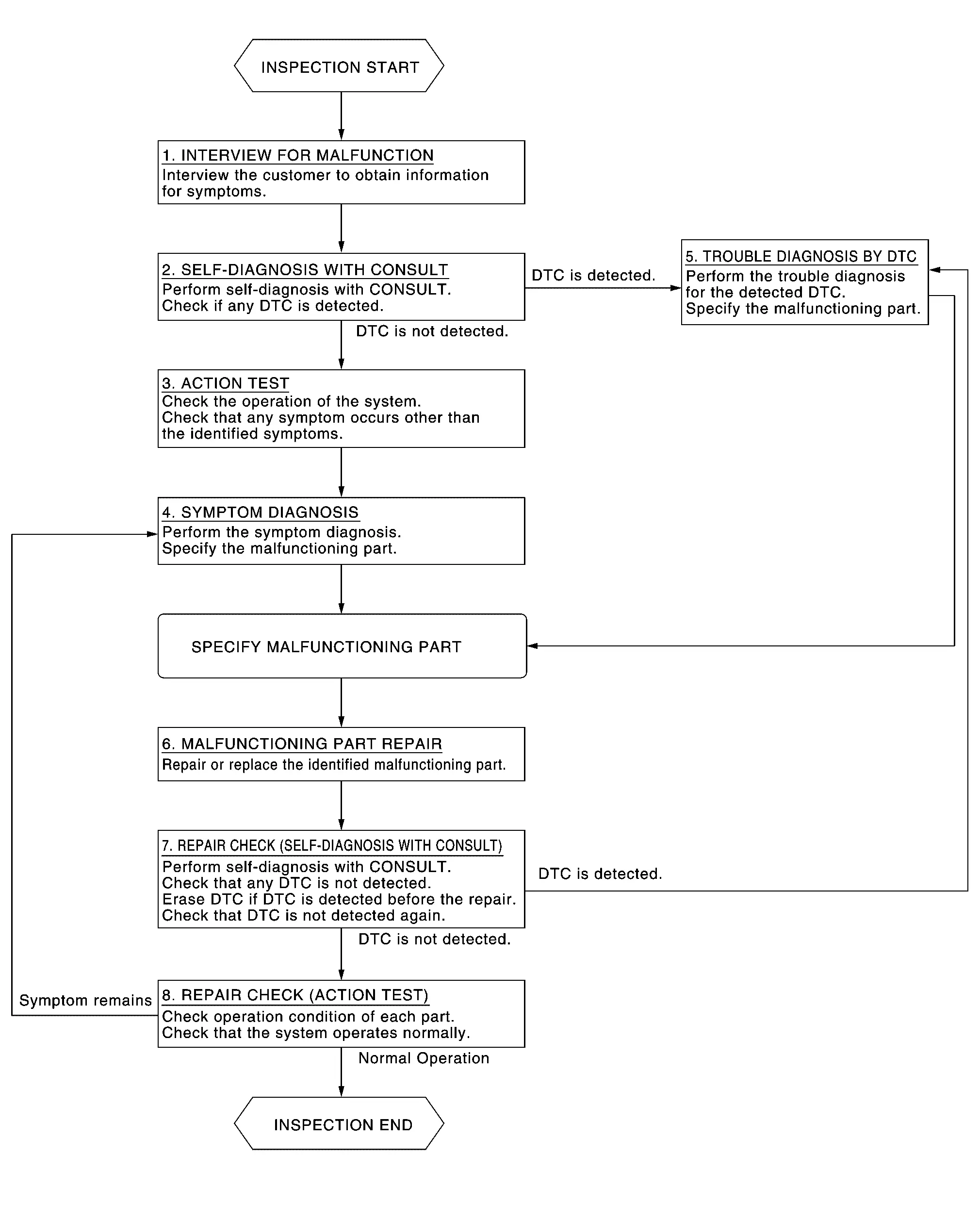
DETAILED FLOW
INTERVIEW FOR MALFUNCTION
It is also important to clarify the customer concerns before starting the inspection. Interview the customer about the concerns carefully and understand the symptoms fully.
 NOTE:
NOTE:
The customers are not professionals. Never assume that “maybe the customer means···� or “maybe the customer mentioned this symptom�.
>>
GO TO 2.
SELF-DIAGNOSIS WITH CONSULT
-
Perform “All DTC Reading� with CONSULT.
-
Check if any DTC is detected in self-diagnosis results of “LASER/RADAR�, “LANE CAMERA� and “ICC/ADAS 2�.
Is any DTC detected?
YES>>Record or print self-diagnosis results and freeze frame data (FFD). GO TO 5.
NO>>GO TO 3.
ACTION TEST
Perform the ProPILOT Assist 2.1 system action test to check the operation status. Refer to Work Procedure.
Check if any other malfunctions occur.
>>
GO TO 4.
SYMPTOM DIAGNOSIS
Perform the applicable diagnosis according to the diagnosis chart by symptom. Refer to Symptom Table.
>>
GO TO 6.
TROUBLE DIAGNOSIS BY DTC
-
Erase self-diagnostic results.
-
Ignition switch OFF → ON.
CAUTION:
Be sure to wait of 10 seconds after turning ignition switch OFF or ON.
-
Check the DTC in the self-diagnosis results.
-
Perform trouble diagnosis for the detected.
-
LASER/RADAR: Refer to DTC Index.
-
LANE CAMERA: Refer to DTC Index.
-
ICC/ADAS 2: Refer to DTC Index.
-
NOTE:
If Network-DTC is detected, first diagnose the CAN communication system.
>>
GO TO 6.
MALFUNCTIONING PART REPAIR
Repair or replace the identified malfunctioning parts.
>>
GO TO 7.
REPAIR CHECK (SELF-DIAGNOSIS WITH CONSULT)
-
Erases self-diagnosis results.
-
Perform “All DTC Reading� again after repairing or replacing the malfunctioning parts.
-
Check if any DTC is detected in self-diagnosis results of “LASER/RADAR�, “LANE CAMERA� and “ICC/ADAS 2�.
-
LASER/RADAR: Refer to DTC Index.
-
LANE CAMERA: Refer to DTC Index.
-
ICC/ADAS 2: Refer to DTC Index.
-
Is any DTC detected?
YES>>GO TO 5.
NO>>GO TO 8.
REPAIR CHECK (ACTION TEST)
Perform the ProPILOT Assist 2.1 system action test. Check if the malfunction symptom is solved or no other symptoms occur.
Is there any malfunction symptom?
YES>>GO TO 4.
NO>>INSPECTION END
Action Test
Work Procedure
After repairing the malfunction symptom of ProPILOT Assist 2.1, perform an operation check of ProPILOT Assist 2.1 and check that ProPILOT Assist 2.1 operates normally.
CAUTION:
Always drive safely when performing the action test.
CHECK FOR ProPILOT ASSIST SWITCH
-
Start the engine.
-
Press the ProPILOT Assist switch
 (less than 1.5 seconds).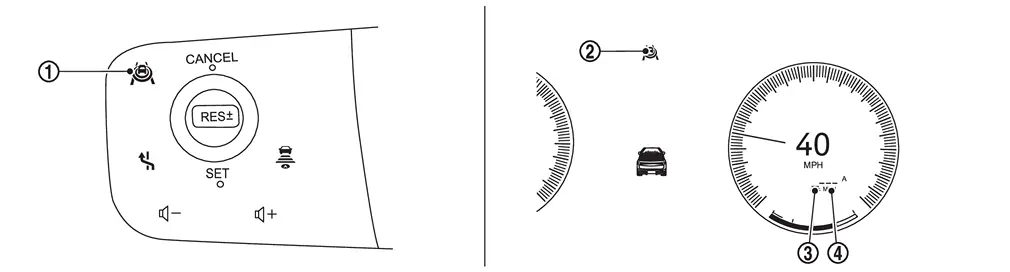
Information display status ProPILOT Assist 2.1 status indicator 
: ON (gray) Set distance indicator 
: Long mode (gray) Set Nissan Ariya vehicle speed indicator 
: “———�
“MPH� -
Check that the Nissan Ariya vehicle information display in the combination meter is in the set standby status.
-
Press ProPILOT Assist switch and check that ProPILOT Assist 2.1 operating lamp turns OFF when ProPILOT Assist 2.1 is turned OFF.
-
When the engine starts again, make sure that ProPILOT Assist 2.1 operating lamp is OFF.
>>
GO TO 2.
CHECK FOR DISTANCE SWITCH
-
Start the engine.
-
Press the ProPILOT Assist switch (less than 1.5 seconds).
-
Press the DISTANCE switch.
-
Check that the set distance indicator changes display in order of: (Long)→(Middle)→(Short).
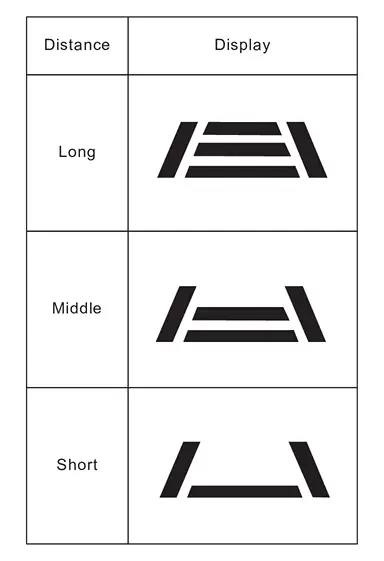 NOTE:
NOTE:
-
When ProPILOT Assist switch is turned ON, set to (long) as the initial setting.
-
When the Nissan Ariya vehicle information display is not ProPILOT Assist 2.1 screen or a pop-up appears, distance indicator is displayed on the pop-up screen.
-
>>
GO TO 3.
CHECK FOR RES+, SET-, AND CANCEL SWITCHES
-
Check that RES+, SET-, CANCEL switches are operated smoothly.
-
Check that switches come up as hand is released from the switches.
>>
GO TO 4.
SET CHECKING (1)
-
Start the engine.
-
Press the ProPILOT Assist switch (less than 1.5 seconds) and turn the ProPILOT Assist 2.1 system ON.
-
Drive the Nissan Ariya vehicle at desired vehicle speed between 30 km/h and 120 km/h (19 MPH and 75 MPH).
-
Push down the SET- switch.
-
Check that the desired speed is set and ProPILOT Assist 2.1 control starts when releasing SET- switch.
NOTE:
The set Nissan Ariya vehicle speed is indicated on the set vehicle speed indicator on the information display.
>>
GO TO 5.
CHECK FOR INCREASE OF CRUISING SPEED (1)
-
Set desired Nissan Ariya vehicle speed between 30 km/h and 120 km/h (19 MPH and 75 MPH).
CAUTION:
Never drive vehicle beyond the speed limit.
-
Check that the set Nissan Ariya vehicle speed increases when RES+ switch is pushed up.
NOTE:
The maximum set speed is 120 km/h (75 MPH).
>>
GO TO 6.
CHECK FOR DECREASE OF CRUISING SPEED (1)
-
Set desired Nissan Ariya vehicle speed between 30 km/h and 120 km/h (19 MPH and 75 MPH).
CAUTION:
Never drive vehicle beyond the speed limit.
-
Check that the set Nissan Ariya vehicle speed is reduced when SET- switch is pushed down.
NOTE:
-
The lower limit of the set Nissan Ariya vehicle speed is 30 km/h (19 MPH) approximately.
-
The control is automatically canceled when the driving Nissan Ariya vehicle speed drops below 25 km/h (16 MPH) approximately without detecting the vehicle ahead.
>>
GO TO 7.
SET CHECKING (2)
-
Stop the Nissan Ariya vehicle.
-
Drive the vehicle at less than approximately 30 km/h (19 MPH).
-
Push down the SET- switch when the system detects a Nissan Ariya vehicle ahead.
-
When releasing finger, check that vehicle-to-vehicle distance is controlled to keep proper distance from Nissan Ariya vehicle ahead according to the vehicle speed, up to vehicle speed of 30 km/h (19 MPH) approximately.
NOTE:
-
The ProPILOT Assist 2.1 cannot be set when the Nissan Ariya vehicle speed is less than 30 km/h (19 MPH) and when a vehicle ahead is not detected.
-
The control is automatically canceled when the driving Nissan Ariya vehicle speed drops below 25 km/h (16 MPH) approximately without detecting the vehicle ahead.
-
The set Nissan Ariya vehicle speed indicator on the information display is set to 30 km/h (19 MPH).
>>
GO TO 8.
CHECK FOR INCREASE OF CRUISING SPEED (2)
-
Set the ProPILOT Assist 2.1 when the Nissan Ariya vehicle speed is less than approximately 30 km/h (19 MPH) and when a vehicle ahead is detected.
-
Check that the set Nissan Ariya vehicle speed increases when RES+ switch is pushed up.
NOTE:
The maximum set speed is 120 km/h (75 MPH).
CAUTION:
Never drive Nissan Ariya vehicle beyond the speed limit.
>>
GO TO 9.
CHECK FOR DECREASE OF CRUISING SPEED (2)
-
Set the ProPILOT Assist 2.1 when the Nissan Ariya vehicle speed is less than approximately 30 km/h (19 MPH) and when a vehicle ahead is detected.
-
Set the set Nissan Ariya vehicle speed to the desired vehicle speed according to “check for increase of cruising speed�.
-
Check that the set Nissan Ariya vehicle speed is reduced when SET- switch is pushed down.
NOTE:
The lower limit of the set Nissan Ariya vehicle speed is 30 km/h (19 MPH) approximately.
>>
GO TO 10.
CHECK THE BLUE INDICATOR OF ProPILOT ASSIST 2.1 DISPLAY
Check that the ProPILOT Assist 2.1 indicator is turned blue when driving on highways or motorways with HD maps.
However, in the following cases, the indicator is not turned blue.
-
When driving beyond the speed detected by the sign detection function
-
When approaching to tollhouses, exits, junctions, intersections, or lanes reduction points nearby
-
When no GPS signal is received
-
When driving on a road that is not separated from the oncoming lane
-
When the wiper is operating at low speed or high speed
-
When judging that the driver does not hold or operate the steering wheel
-
When judging that the driver is not facing forward
-
When accelerating by depressing the accelerator pedal
-
When the approach warning is activated
-
When the lane departure warning is activated
>>
GO TO 11.
CHECK FOR CANCELLATION OF ProPILOT ASSIST 2.1
Check that the ProPILOT Assist 2.1 is canceled when performing the following operations.
-
When the brake pedal is depressed after ProPILOT Assist 2.1 is set and the Nissan Ariya vehicle is driven.
-
When the selector lever is in the “N� position after ProPILOT Assist 2.1 is set and the Nissan Ariya vehicle is driven.
-
When the ProPILOT Assist switch is turned OFF after ProPILOT Assist 2.1 is set and the Nissan Ariya vehicle is driven.
-
When the CANCEL switch is pressed after ProPILOT Assist 2.1 is set and the Nissan Ariya vehicle is driven.
>>
GO TO 12.
CHECK THAT THE SET Nissan Ariya Vehicle SPEED RETURN TO THE SAME AS BEFORE CANCELLATION
Check that the vehicle restores the previous speed kept before the system deactivation when performing the following operations.
-
Drive the Nissan Ariya vehicle when the ProPILOT Assist 2.1 is set and depress the brake pedal to cancel the control. Check that the Nissan Ariya vehicle restores the previous vehicle speed kept before the system deactivation when pushing up the RES+ switch.
-
Drive the Nissan Ariya vehicle when the ProPILOT Assist 2.1 is set and shift the selector lever to the “N� position to cancel the control. Check that the Nissan Ariya vehicle restores the previous vehicle speed kept before the system deactivation when shifting the selector lever to the “D� position and pushing up the RES+ switch.
-
Drive the Nissan Ariya vehicle when the ProPILOT Assist 2.1 is set and press the CANCEL switch to cancel the control. Check that the Nissan Ariya vehicle restores the previous vehicle speed kept before the system deactivation when pushing up the RES+ switch.
>>
INSPECTION END
Hd Map Module
Additional Service When Replacing Hd Map Module
Work Procedure
When the following parts are replaced or removed, be sure to perform the specified incidental work in order to operate the system normally.
NOTE:
Since HD map module starts updating the map data from a position close to the own Nissan Ariya vehicle after replacement, it is not necessary to wait for completion of updating the map data.
CHECK ADAS CONTROL UNIT 2 REPLACEMENT
When HD map module and ADAS control unit 2 are replaced at the same time, the work for replacing ADAS control unit 2 is performed first.
Are HD map module and ADAS control unit 2 replaced at the same time?
YES>>Perform the replacement work for ADAS control unit 2 first. Refer to Work Procedure.
NO>>GO TO 2.
HD MAP MODULE CALIBRATION
Calibrate HD map module. Refer to Work Procedure.
>>
GO TO 3.
PERFORM SELF DIAGNOSIS
Check if DTC is detected as a result of self-diagnosis for "HD MAP".
Is DTC detected?
YES>>Perform a trouble diagnosis for detected DTC and repair or replace malfunctioning parts. Refer to DTC Index.
NO>>INSPECTION END
Hd Map Module Calibration
Work Procedure
When the following parts are replaced or removed, be sure to perform the specified incidental work in order to operate the system normally.
PREPARATION BEFORE CALIBRATION
-
Place the Nissan Ariya vehicle on a level surface.
-
Adjust all tire pressures to the specified pressure. Refer to Tire Air Pressure.
>>
GO TO 2.
PERFORM CALIBRATION
 With CONSULT
-
Start the engine.
-
Select "Work Support" in "HD MAP".
-
Select "HD map module calibration".
-
Select "START".
CAUTION:
Do not shake the Nissan Ariya vehicle while performing "HD map module calibration".
Is "Completed" message displayed?
YES>>WORK END
NO>>Perform steps 1 and 2 again.
Other materials:
U2252 Can Comm Circuit
DTC Description
DTC DETECTION LOGIC DTC
CONSULT screen terms
(Trouble diagnosis content)
DTC detection condition
U2252
83
CAN comm err (ADAS control unit)
[CAN comm err (ADAS control unit)]
Diagnosis condition
Ignition switch ON
Signal (terminal)
CAN communication ...
P119e Frp Sensor
DTC Description
DTC DETECTION LOGIC DTC
CONSULT screen terms
(Trouble diagnosis content)
DTC detection condition
P119E
00
FRP SEN/CIRC
(Fuel Pressure Sensor)
Diagnosis condition
Engine running at idle
Signal (terminal)
Fuel rail pressure sensor signal
Thresho ...
Symptom Diagnosis. Vehicle Security Alarm Does Not Activate
Description
Alarm does not operate when alarm operating condition is satisfied.
Diagnosis Procedure
CHECK DOOR SWITCH
Check door switch. Refer to Component Function Check.
Is the inspection result normal?
YES>>
GO TO 2.
NO>>
Replace the malfunctioning door switch
CHECK HOOD S ...