
Nissan Rogue (T33) 2021-Present Service Manual: Propilot Assist 1.1 :: Basic Inspection
Diagnosis and Repair Work Flow
Work Flow
OVERALL SEQUENCE
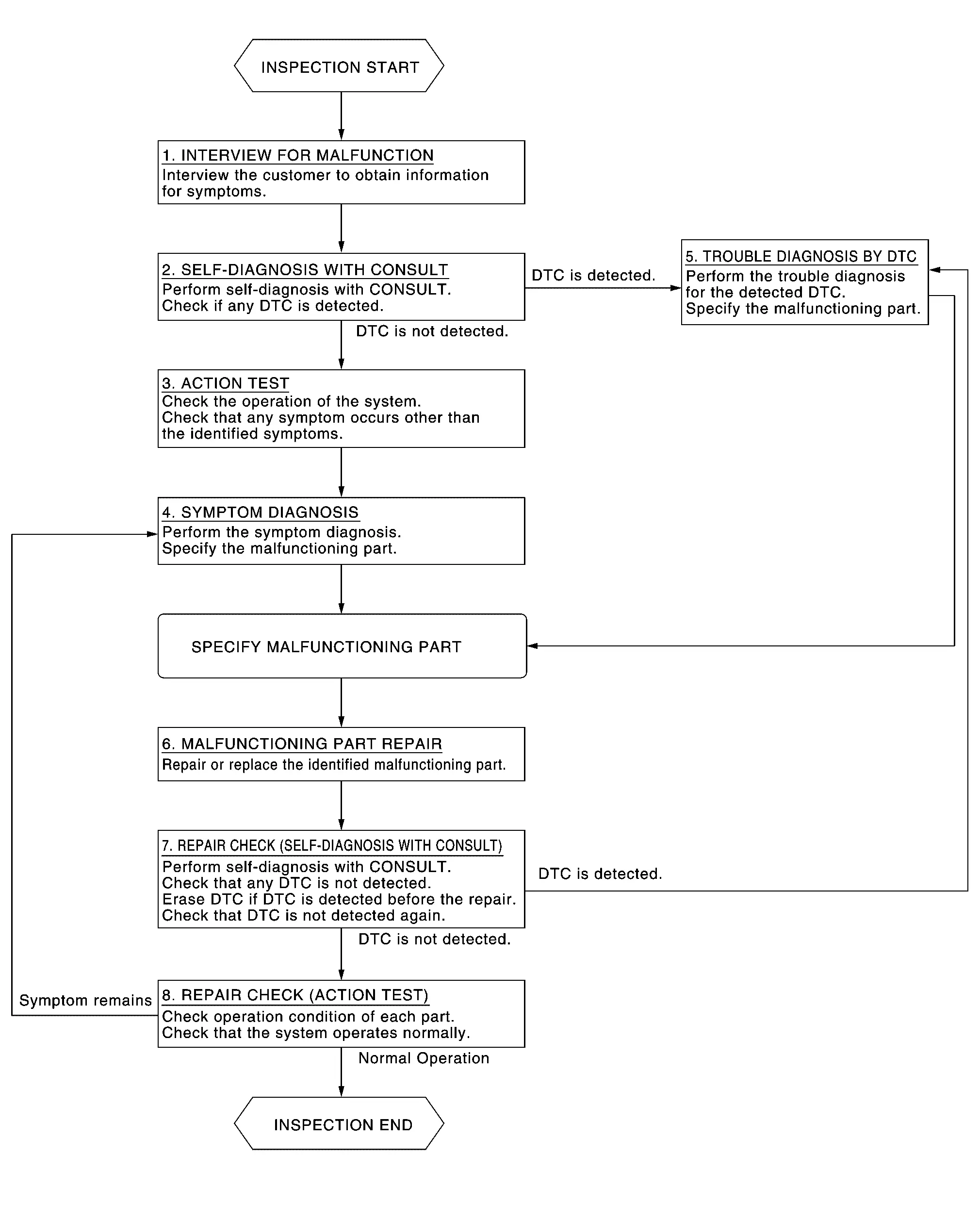
DETAILED FLOW
INTERVIEW FOR MALFUNCTION
It is also important to clarify the customer concerns before starting the inspection. Interview the customer about the concerns carefully and understand the symptoms fully.
 NOTE:
NOTE:
The customers are not professionals. Never assume that “maybe the customer means···� or “maybe the customer mentioned this symptom�.
>>
GO TO 2.
SELF-DIAGNOSIS WITH CONSULT
-
Perform “All DTC Reading� with CONSULT.
-
Check if any DTC is detected in self-diagnosis results of “LASER/RADAR�, “LANE CAMERA� and “ICC/ADAS 2�.
Is any DTC detected?
YES>>Record or print self-diagnosis results and freeze frame data (FFD). GO TO 5.
NO>>GO TO 3.
ACTION TEST
Perform the ProPILOT Assist 1.1 system action test to check the operation status. Refer to Work Procedure.
Check if any other malfunctions occur.
>>
GO TO 4.
SYMPTOM DIAGNOSIS
Perform the applicable diagnosis according to the diagnosis chart by symptom. Refer to Symptom Table.
>>
GO TO 6.
TROUBLE DIAGNOSIS BY DTC
-
Erase self-diagnostic results.
-
Ignition switch OFF → ON.
CAUTION:
Be sure to wait of 10 seconds after turning ignition switch OFF or ON.
-
Check the DTC in the self-diagnosis results.
-
Perform trouble diagnosis for the detected.
-
LASER/RADAR: Refer to DTC Index.
-
LANE CAMERA: Refer to DTC Index.
-
ICC/ADAS 2: Refer to DTC Index.
-
NOTE:
If Network-DTC is detected, first diagnose the CAN communication system.
>>
GO TO 6.
MALFUNCTIONING PART REPAIR
Repair or replace the identified malfunctioning parts.
>>
GO TO 7.
REPAIR CHECK (SELF-DIAGNOSIS WITH CONSULT)
-
Erases self-diagnosis results.
-
Perform “All DTC Reading� again after repairing or replacing the malfunctioning parts.
-
Check if any DTC is detected in self-diagnosis results of “LASER/RADAR�, “LANE CAMERA� and “ICC/ADAS 2�.
-
LASER/RADAR: Refer to DTC Index.
-
LANE CAMERA: Refer to DTC Index.
-
ICC/ADAS 2: Refer to DTC Index.
-
Is any DTC detected?
YES>>GO TO 5.
NO>>GO TO 8.
REPAIR CHECK (ACTION TEST)
Perform the ProPILOT Assist 1.1 system action test. Check if the malfunction symptom is solved or no other symptoms occur.
Is there any malfunction symptom?
YES>>GO TO 4.
NO>>INSPECTION END
Action Test
7 Inch Information Display
Work Procedure
After the front camera unit or distance sensor are replaced or a problem with ProPILOT Assist 1.1 is corrected, perform a test of ProPILOT Assist 1.1 operation and check that ProPILOT Assist 1.1 operates correctly.
CAUTION:
Always drive safely when performing the action test.
CHECK FOR ProPILOT ASSIST SWITCH
-
Start the engine.
-
Press the ProPILOT Assist switch
 (less than 1.5 seconds).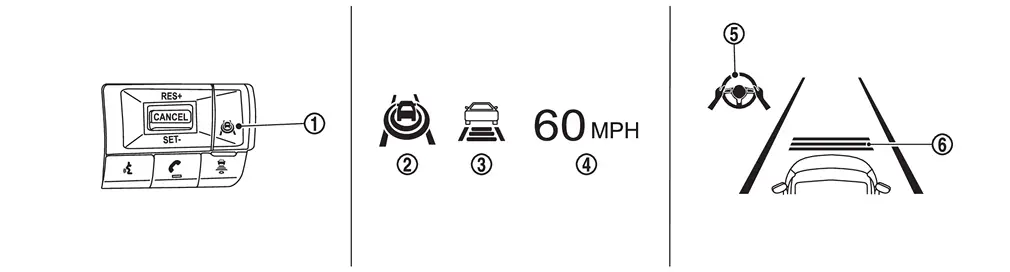
Information display status ProPILOT Assist status indicator 
: ON (Gray) Speed control status indicator/warning 
: ON (Gray) Set Nissan Ariya vehicle speed indicator 
: “———�
““MPH�Steering assist status indicator 
: ON (Gray) Set distance indicator 
: Long mode -
Check that the Nissan Ariya vehicle information display on the combination meter indicates the set standby mode.
-
Press the ProPILOT Assist switch and check that the ProPILOT Assist 1.1 indicator turns off when ProPILOT Assist 1.1 is set to OFF.
-
Check that the ProPILOT Assist 1.1 indicator is OFF after the engine is started again.
>>
GO TO 2.
CHECK FOR DISTANCE SWITCH
-
Start the engine.
-
Press the ProPILOT Assist switch (less than 1.5 seconds).
-
Press the DISTANCE switch.
-
Check that the set distance indicator changes display in order of: (Long)→(Middle)→(Short).
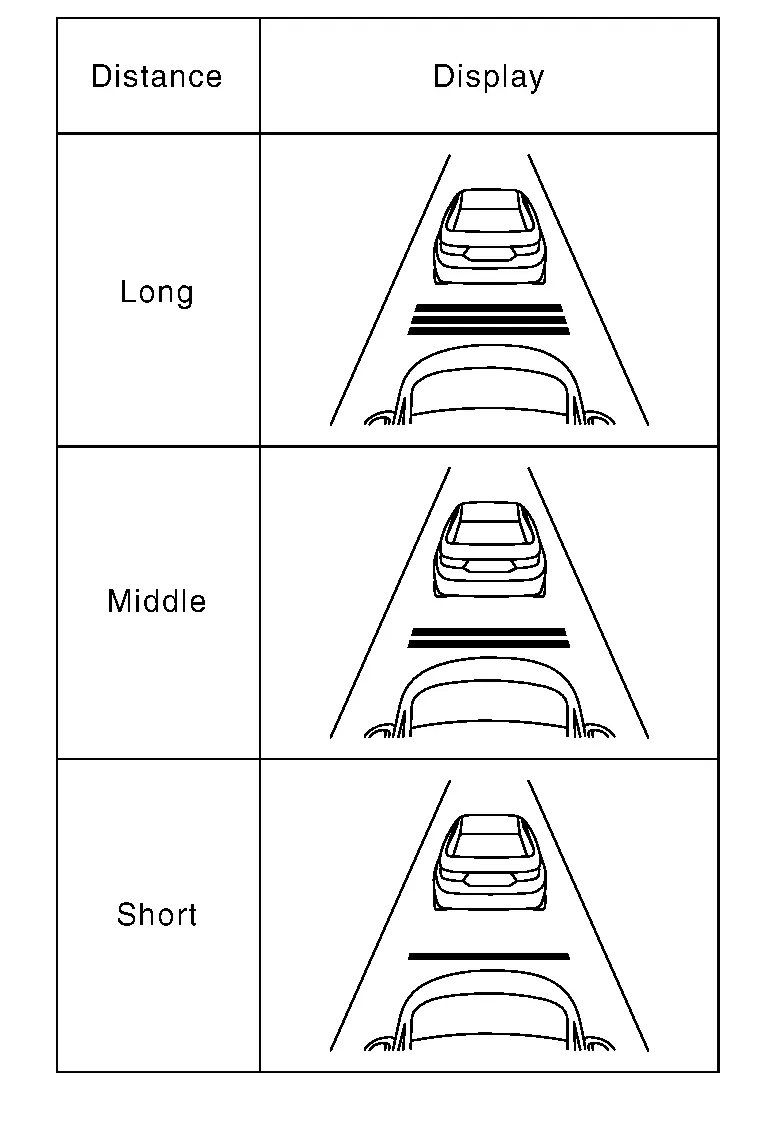 NOTE:
NOTE:
When the ProPILOT Assist switch is turned ON, initial setting set to (Long).
>>
GO TO 3.
CHECK FOR RES+, SET-, AND CANCEL SWITCHES
-
Check that RES+, SET-, CANCEL switches are operated smoothly.
-
Check that switches come up as hand is released from the switches.
>>
GO TO 4.
SET CHECKING (1)
-
Start the engine.
-
Press the ProPILOT Assist switch (less than 1.5 seconds) and turn the ProPILOT Assist 1.1 system ON.
-
Drive the Nissan Ariya vehicle at 30 km/h (20 MPH) or more.
-
Push down the SET- switch.
-
Check that the desired speed is set and ProPILOT Assist 1.1 control starts when releasing SET- switch.
NOTE:
The set Nissan Ariya vehicle speed is indicated on the set vehicle speed indicator in the ProPILOT Assist 1.1 system display on the information display.
>>
GO TO 5.
CHECK FOR INCREASE OF CRUISING SPEED (1)
-
Set the ProPILOT Assist 1.1 at desired speed.
-
Check that the set speed increases by 1 km/h (1 MPH) as RES+ switch is pushed up.
NOTE:
The maximum set speed of the ProPILOT Assist 1.1 is 144 km/h (90 MPH).
CAUTION:
Never set the cruise speed exceeding the posted speed limit.
>>
GO TO 6.
CHECK FOR DECREASE OF CRUISING SPEED (1)
-
Set the ProPILOT Assist 1.1 at desired speed.
-
Check that the set speed decreases by 1 km/h (1 MPH) as SET- switch is pushed down.
NOTE:
-
The minimum set speed is approximately 30 km/h (20 MPH).
-
Cancel the control automatically when the system does not detect any Nissan Ariya vehicle ahead.
>>
GO TO 7.
SET CHECKING (2)
-
Stop the Nissan Ariya vehicle.
-
Drive the vehicle at less than approximately 30 km/h (20 MPH).
-
Push down the SET- switch when the system detects a Nissan Ariya vehicle ahead.
-
Check that the ProPILOT Assist 1.1 is performed so that the vehicle maintains a proper distance according to the Nissan Ariya vehicle speed [maximum: approximately 30 km/h (20 MPH) when releasing SET- switch.
NOTE:
-
The ProPILOT Assist 1.1 cannot be set when the Nissan Ariya vehicle speed is less than 30 km/h (20 MPH) and when a vehicle ahead is not detected.
-
Cancel the control automatically when the system does not detect any Nissan Ariya vehicle ahead.
-
The set vehicle speed indicator in the ProPILOT Assist 1.1 system display on the information display is set to 30 km/h (20 MPH).
>>
GO TO 8.
CHECK FOR INCREASE OF CRUISING SPEED (2)
-
Set the ProPILOT Assist 1.1 when the Nissan Ariya vehicle speed is less than approximately 30 km/h (20 MPH) and when a vehicle ahead is detected.
-
Check that the set speed increases by 1 km/h (1 MPH) as RES+ switch is pushed up.
NOTE:
The maximum set speed of the ProPILOT Assist 1.1 is 144 km/h (90 MPH).
CAUTION:
Never set the cruise speed exceeding the posted speed limit.
>>
GO TO 9.
CHECK FOR DECREASE OF CRUISING SPEED (2)
-
Set the ProPILOT Assist 1.1 when the Nissan Ariya vehicle speed is less than approximately 30 km/h (20 MPH) and when a vehicle ahead is detected.
-
Set the set Nissan Ariya vehicle speed to the desired vehicle speed according to “check for increase of cruising speed�.
-
Check that the set speed decreases by 1 km/h (1 MPH) as SET- switch is pushed down.
NOTE:
The minimum the set speed is approximately 30 km/h (20 MPH).
>>
GO TO 10.
CHECK FOR CANCELLATION OF ProPILOT ASSIST 1.1
Check that the ProPILOT Assist 1.1 is canceled when performing the following operations.
-
When the brake pedal is depressed after ProPILOT Assist 1.1 is set and the Nissan Ariya vehicle is driven.
-
When the selector lever is in the “N� position after ProPILOT Assist 1.1 is set and the Nissan Ariya vehicle is driven.
-
When the ProPILOT Assist switch is turned OFF after ProPILOT Assist 1.1 is set and the Nissan Ariya vehicle is driven.
-
When the CANCEL switch is pressed after ProPILOT Assist 1.1 is set and the Nissan Ariya vehicle is driven.
>>
GO TO 11.
CHECK FOR RESTORING SPEED THAT IS SET BY ProPILOT ASSIST 1.1 BEFORE CANCELLATION
Check that the Nissan Ariya vehicle restores the previous speed kept before the system deactivation when performing the following operations.
-
Drive the Nissan Ariya vehicle when the ProPILOT Assist 1.1 is set and depress the brake pedal to cancel the control. Check that the Nissan Ariya vehicle restores the previous vehicle speed kept before the system deactivation when pushing up the RES+ switch.
-
Drive the Nissan Ariya vehicle when the ProPILOT Assist 1.1 is set and shift the selector lever to the “N� position to cancel the control. Check that the Nissan Ariya vehicle restores the previous vehicle speed kept before the system deactivation when shifting the selector lever to the “D� position and pushing up the RES+ switch.
-
Drive the Nissan Ariya vehicle when the ProPILOT Assist 1.1 is set and press the CANCEL switch to cancel the control. Check that the Nissan Ariya vehicle restores the previous vehicle speed kept before the system deactivation when pushing up the RES+ switch.
>>
INSPECTION END
Full Tft Meter
Work Procedure
After the front camera unit or distance sensor are replaced or a problem with ProPILOT Assist 1.1 is corrected, perform a test of ProPILOT Assist 1.1 operation and check that ProPILOT Assist 1.1 operates correctly.
CAUTION:
Always drive safely when performing the action test.
CHECK FOR ProPILOT ASSIST SWITCH
-
Start the engine.
-
Press the ProPILOT Assist switch
(less than 1.5 seconds).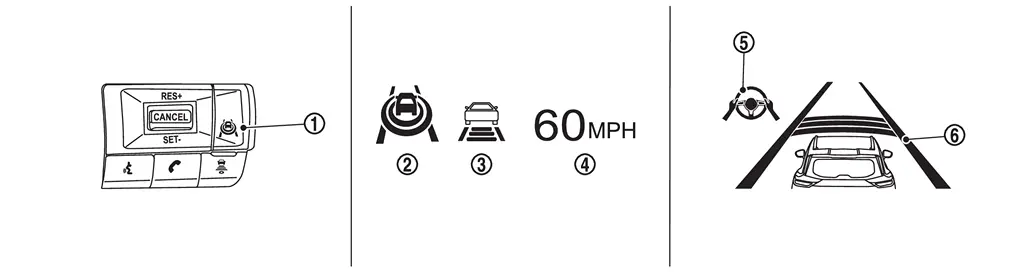
Information display status ProPILOT Assist status indicator : ON (Gray) Speed control status indicator/warning : ON (Gray) Set Nissan Ariya vehicle speed indicator : “———�
“MPH�Steering assist status indicator : ON (Gray) Set distance indicator : Long mode -
Check that the Nissan Ariya vehicle information display on the combination meter indicates the set standby mode.
-
Press the ProPILOT Assist switch and check that the ProPILOT Assist 1.1 indicator turns off when ProPILOT Assist 1.1 is set to OFF.
-
Check that the ProPILOT Assist 1.1 indicator is OFF after the engine is started again.
>>
GO TO 2.
CHECK FOR DISTANCE SWITCH
-
Start the engine.
-
Press the ProPILOT Assist switch (less than 1.5 seconds).
-
Press the DISTANCE switch.
-
Check that the set distance indicator changes display in order of: (Long)→(Middle)→(Short).
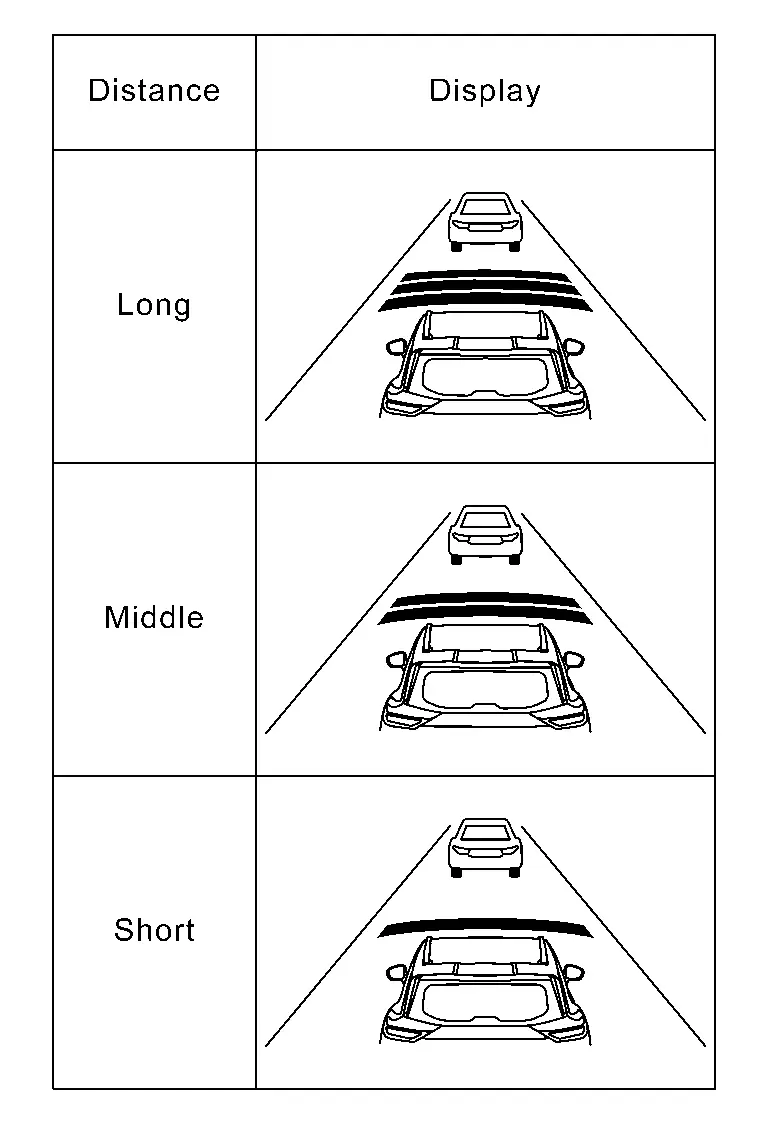 NOTE:
NOTE:
When the ProPILOT Assist switch is turned ON, initial setting set to (Long).
>>
GO TO 3.
CHECK FOR RES+, SET-, AND CANCEL SWITCHES
-
Check that RES+, SET-, CANCEL switches are operated smoothly.
-
Check that switches come up as hand is released from the switches.
>>
GO TO 4.
SET CHECKING (1)
-
Start the engine.
-
Press the ProPILOT Assist switch (less than 1.5 seconds) and turn the ProPILOT Assist 1.1 system ON.
-
Drive the Nissan Ariya vehicle at 30 km/h (20 MPH) or more.
-
Push down the SET- switch.
-
Check that the desired speed is set and ProPILOT Assist 1.1 control starts when releasing SET- switch.
NOTE:
The set Nissan Ariya vehicle speed is indicated on the set vehicle speed indicator in the ProPILOT Assist 1.1 system display on the information display.
>>
GO TO 5.
CHECK FOR INCREASE OF CRUISING SPEED (1)
-
Set the ProPILOT Assist 1.1 at desired speed.
-
Check that the set speed increases by 1 km/h (1 MPH) as RES+ switch is pushed up.
NOTE:
The maximum set speed of the ProPILOT Assist 1.1 is 144 km/h (90 MPH).
CAUTION:
Never set the cruise speed exceeding the posted speed limit.
>>
GO TO 6.
CHECK FOR DECREASE OF CRUISING SPEED (1)
-
Set the ProPILOT Assist 1.1 at desired speed.
-
Check that the set speed decreases by 1 km/h (1 MPH) as SET- switch is pushed down.
NOTE:
-
The minimum set speed is approximately 30 km/h (20 MPH).
-
Cancel the control automatically when the system does not detect any Nissan Ariya vehicle ahead.
>>
GO TO 7.
SET CHECKING (2)
-
Stop the Nissan Ariya vehicle.
-
Drive the vehicle at less than approximately 30 km/h (20 MPH).
-
Push down the SET- switch when the system detects a Nissan Ariya vehicle ahead.
-
Check that the ProPILOT Assist 1.1 is performed so that the vehicle maintains a proper distance according to the Nissan Ariya vehicle speed [maximum: approximately 30 km/h (20 MPH)] when releasing SET- switch.
NOTE:
-
The ProPILOT Assist 1.1 cannot be set when the Nissan Ariya vehicle speed is less than 30 km/h (20 MPH) and when a vehicle ahead is not detected.
-
Cancel the control automatically when the system does not detect any Nissan Ariya vehicle ahead.
-
The set vehicle speed indicator in the ProPILOT Assist 1.1 system display on the information display is set to 30 km/h (20 MPH).
>>
GO TO 8.
CHECK FOR INCREASE OF CRUISING SPEED (2)
-
Set the ProPILOT Assist 1.1 when the Nissan Ariya vehicle speed is less than approximately 30 km/h (20 MPH) and when a vehicle ahead is detected.
-
Check that the set speed increases by 1 km/h (1 MPH) as RES+ switch is pushed up.
NOTE:
The maximum set speed of the ProPILOT Assist 1.1 is 144 km/h (90 MPH).
CAUTION:
Never set the cruise speed exceeding the posted speed limit.
>>
GO TO 9.
CHECK FOR DECREASE OF CRUISING SPEED (2)
-
Set the ProPILOT Assist 1.1 when the Nissan Ariya vehicle speed is less than approximately 30 km/h (20 MPH) and when a vehicle ahead is detected.
-
Set the set Nissan Ariya vehicle speed to the desired vehicle speed according to “check for increase of cruising speed�.
-
Check that the set speed decreases by 1 km/h (1 MPH) as SET- switch is pushed down.
NOTE:
The minimum the set speed is approximately 30 km/h (20 MPH).
>>
GO TO 10.
CHECK FOR CANCELLATION OF ProPILOT ASSIST 1.1
Check that the ProPILOT Assist 1.1 is canceled when performing the following operations.
-
When the brake pedal is depressed after ProPILOT Assist 1.1 is set and the Nissan Ariya vehicle is driven.
-
When the selector lever is in the “N� position after ProPILOT Assist 1.1 is set and the Nissan Ariya vehicle is driven.
-
When the ProPILOT Assist switch is turned OFF after ProPILOT Assist 1.1 is set and the Nissan Ariya vehicle is driven.
-
When the CANCEL switch is pressed after ProPILOT Assist 1.1 is set and the Nissan Ariya vehicle is driven.
>>
GO TO 11.
CHECK FOR RESTORING SPEED THAT IS SET BY ProPILOT ASSIST 1.1 BEFORE CANCELLATION
Check that the Nissan Ariya vehicle restores the previous speed kept before the system deactivation when performing the following operations.
-
Drive the Nissan Ariya vehicle when the ProPILOT Assist 1.1 is set and depress the brake pedal to cancel the control. Check that the Nissan Ariya vehicle restores the previous vehicle speed kept before the system deactivation when pushing up the RES+ switch.
-
Drive the Nissan Ariya vehicle when the ProPILOT Assist 1.1 is set and shift the selector lever to the “N� position to cancel the control. Check that the Nissan Ariya vehicle restores the previous vehicle speed kept before the system deactivation when shifting the selector lever to the “D� position and pushing up the RES+ switch.
-
Drive the Nissan Ariya vehicle when the ProPILOT Assist 1.1 is set and press the CANCEL switch to cancel the control. Check that the Nissan Ariya vehicle restores the previous vehicle speed kept before the system deactivation when pushing up the RES+ switch.
>>
INSPECTION END
Other materials:
Automatic Brake Hold. Basic Inspection. Diagnosis and Repair Work Flow
Diagnosis and Repair Work Flow
Work Flow
DETAILED FLOWINTERVIEW FROM THE CUSTOMER
Clarify customer complaints before inspection. First of all, perform
an interview utilizing Diagnostic Work Sheet and reproduce the symptom
as well as fully understand it. Ask customer about his/her complaints
...
Intake Manifold
Exploded View
Electric throttle control actuator
Electric throttle control actuator gasket
Manifold absolute pressure (MAP) sensor
O-ring
Intake manifold support
Intake manifold
Intake manifold gasket
Comply with the assemb ...
Laser Branch Line Circuit
Diagnosis Procedure
CHECK CONNECTOR
Turn the ignition switch OFF.
Disconnect the battery cable from the negative terminal.
Check the following terminals and connectors for damage, bend and loose connection (unit side and connector side).
Distance sensor
Harness connector B2 ...