
Nissan Rogue (T33) 2021-Present Service Manual: Nissanconnect :: Basic Inspection
Diagnosis and Repair Workflow
Nissanconnect
Work Flow
OVERALL SEQUENCE
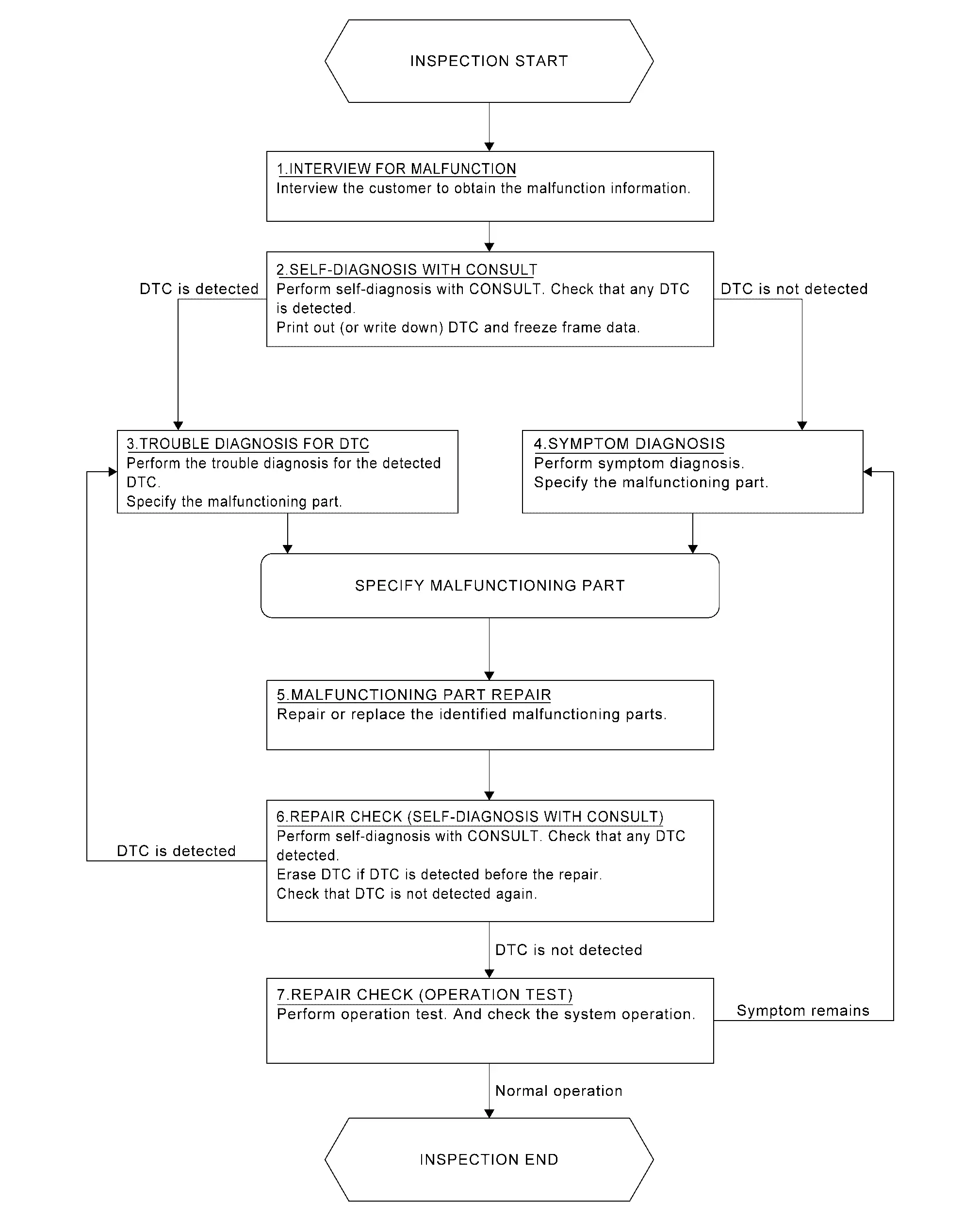
DETAILED FLOW
INTERVIEW FOR MALFUNCTION
It is also important to clarify the customer concerns before starting the inspection. Interview the customer about the concerns carefully and understand the symptoms fully.
 NOTE:
NOTE:
The customers are not professionals. Never assume that “maybe the customer means···” or “maybe the customer mentioned this symptom”.
>>
GO TO 2.
SELF-DIAGNOSIS WITH CONSULT
 CONSULT
Perform self-diagnosis of “MULTI AV” using CONSULT. Refer to CONSULT Function.
NOTE:
Skip to step 4 of the diagnosis procedure if “MULTI AV” is not displayed.
Is any DTC detected?
YES>>GO TO 3.
NO>>GO TO 4.
TROUBLE DIAGNOSIS FOR DTC
-
Check the DTC indicated in the “Self Diagnostic Result”.
-
When DTC is detected, follow the instructions below:
-
Record DTC
-
Freeze Frame Data (FFD)
-
-
Perform the relevant diagnosis referring to the DTC Index. Refer to DTC Index.
>>
GO TO 5.
SYMPTOM DIAGNOSIS
Perform the applicable diagnosis according to the diagnosis chart by symptom. Refer to Symptom Table.
>>
GO TO 5.
MALFUNCTIONING PART REPAIR
Repair or replace the identified malfunctioning parts.
>>
GO TO 6.
REPAIR CHECK (SELF-DIAGNOSIS WITH CONSULT)
With CONSULT
-
Erases self-diagnosis results.
-
Perform self-diagnosis of “MULTI AV” again after repairing or replacing the specific items.
-
Check if any DTC is detected in self-diagnosis results of “MULTI AV” .
Is any DTC detected?
YES>>GO TO 3.
NO>>GO TO 7.
REPAIR CHECK (OPERATION TEST)
Perform operation test. Check that the malfunction symptom is solved or no other symptoms occur.
Is there a malfunction symptom?
YES>>GO TO 4.
NO>>INSPECTION END
Additional Service When Replacing Av Control Unit
Work Procedure
SAVE VIN DATA (AV CONTROL UNIT)
CONSULT work support
Perform “SAVE VIN DATA” to save current VIN data.
>>
GO TO 2.
SAVE “OPERATION LOG”
CONSULT
Save Operation Log, according to the procedure of “Programming” in CONSULT Operation Manual.
NOTE:
AV control unit part number is saved in “Operating Log” saved in CONSULT.
>>
GO TO 3.
REPLACE AV CONTROL UNIT
Replace AV control unit. Refer to Removal and Installation.
>>
GO TO 4.
CHECK “OPERATION LOG”
CONSULT
Check “Operation Log” saved before replacing the AV control unit, according to the procedure of “Programming” in CONSULT Operation Manual.
NOTE:
For the Nissan Ariya vehicle that the programming is to be performed, check if “Operation Log” of parts number is in Saved Data List.
Is there an applicable Operation Log in the Saved Data List?
YES>>GO TO 5.
NO>>GO TO 6.
PERFORM AV CONTROL UNIT PROGRAMMING
CONSULT
Perform AV control unit programming, according to “Programming” of CONSULT Operation Manual. Refer to CONSULT Operation Manual.
CAUTION:
During programming, maintain the following conditions:
-
Ignition switch: ON
-
Electric load: OFF
-
Brake pedal: Not depressed
-
12V battery voltage: 12 – 13.5 V (Check the value displayed on the CONSULT screen.)
>>
GO TO 8.
READ IN AV CONTROL UNIT PART NUMBER BY “EPC LINKED”
Obtain AV control unit part number by EPC (service parts catalog), according to the procedure of “EPC linked” in CONSULT Operation Manual. Refer to CONSULT Operation Manual.
CAUTION:
Be sure to select “EPC linked”.
NOTE:
“EPC linked” allows an appropriate programming by obtaining ECU part number from EPC (service parts catalog) even when the part number cannot be obtained from the old ECU used before replacing with a new one.
>>
GO TO 7.
PERFORM PROGRAMMING (EPC LINKED)
CONSULT
Perform AV control unit programming according to the procedure of EPC linked in CONSULT Operation Manual. Refer to CONSULT Operation Manual.
CAUTION:
During programming, maintain the following conditions:
-
Ignition switch: ON
-
Electric load: OFF
-
Brake pedal: Not depressed
-
12V battery voltage: 12 – 13.5 V (Check the value displayed on the CONSULT screen.)
>>
GO TO 8.
CONFIGURATION (AV CONTROL UNIT)
CONSULT Configuration
Perform configuration. Refer to Work Procedure.
>>
GO TO 9.
WRITE VIN DATA (AV CONTROL UNIT)
CONSULT work support
Perform “WRITE VIN (SAVED DATA)” or “WRITE VIN (MANUAL INPUT)” to write VIN data.
>>
GO TO 10
CHECK NETWORK INITIAL SETTINGS
CONSULT Work Support
Select “Work Support” of “MULTI AV” and perform “Network initial settings”.
>>
WORK END
Additional Service When Replacing Bose Speaker Amp.
Work Procedure
CAUTION:
When after replacing BOSE speaker amp, Configuration must be performed. Or not doing so, BOSE speaker amp. control function does not operate normally
REPLACE BOSE SPEAKER AMP.
Replace BOSE speaker amp. Refer to Removal and Installation.
>>
GO TO 2.
CONFIGURATION (BOSE SPEAKER AMP.)
CONSULT Configuration
Perform configuration. Refer to Description.
>>
WORK END
Configuration (av Control Unit)
Description
Vehicle specification needs to be written with CONSULT because it is not written after replacing the AV control unit.
The configuration requires network connection. CONSULT connects to network and then it downloads the configuration data from the server. Then CONSULT writes the Nissan Ariya vehicle specification to the AV control unit.
Refer to Work Procedure.
NOTE:
For details the network connection and operation, refer to “CONSULT Operation Manual”.
The configuration no need to “save” configuration data from the AV control unit. The configuration data is always generated freshly at the server and then downloaded to the CONSULT.
CAUTION:
-
Complete the procedure of “Configuration” in order.
-
If incorrect “Configuration”, incidents might occur.
Work Procedure
WRITING VEHICLE SPECIFICATION
With CONSULT
Perform writing Nissan Ariya vehicle specification to AV control unit following "Automatic Configuration" procedure of "Configuration" according to CONSULT Operation Manual.
NOTE:
-
Log in the network according to CONSULT guidance.
-
For details the network connection and operation, refer to “CONSULT Operation Manual”.
>>
WORK END
Configuration (bose Speaker Amp.)
Description
Vehicle specification needs to be written with CONSULT because it is not written after replacing the BOSE speaker amp.
The configuration requires network connection. CONSULT connects to network and then it downloads the configuration data from the server. Then CONSULT writes the Nissan Ariya vehicle specification to the BOSE speaker amp.
Refer to Work Procedure.
NOTE:
For details the network connection and operation, refer to “CONSULT Operation Manual”.
The configuration no need to “save” configuration data from the BOSE speaker amp. The configuration data is always generated freshly at the server and then downloaded to the CONSULT.
CAUTION:
-
Complete the procedure of “Configuration” in order.
-
If incorrect “Configuration”, incidents might occur.
Work Procedure
WRITING VEHICLE SPECIFICATION
With CONSULT
Perform writing Nissan Ariya vehicle specification to BOSE speaker amp. following "Automatic Configuration" procedure of "Configuration" according to CONSULT Operation Manual.
NOTE:
-
Log in the network according to CONSULT guidance.
-
For details the network connection and operation, refer to “CONSULT Operation Manual”.
>>
WORK END
Other materials:
Kr15ddt. Symptom Diagnosis
Engine Control System
Symptom Table
SYSTEM — BASIC ENGINE CONTROL SYSTEM SYMPTOM Reference page
HARD/NO START/RESTART (EXCP. HA) ENGINE STALL HESITATION/SURGING/FLAT SPOT SPARK KNOCK/DETONATION LACK OF POWER/POOR ACCELERATION HIGH IDLE/LOW IDLE ROUGH IDLE/HUNTING IDLING VIBRATIO ...
Wiring Diagram. Harness Layout
Outline
Harness Layout
Refer to Harness Layout.
Engine Room Harness
Harness Layout
ENGINE ROOM HARNESS - BATTERY VIEW (WITH ProPILOT Assist 2.1)Refer to Harness Layout.ENGINE ROOM HARNESS - BATTERY VIEW (WITHOUT ProPILOT Assist 2.1)Refer to Harness Layout.ENGINE ROOM HARNESS - CABIN VIEW (WITH Pr ...
System Description. System
Lithium Ion Battery 12v
System Description
SYSTEM DIAGRAM
Component Function
12V sub battery (lithium ion battery)
Refer to 12V Sub Battery (Lithium Ion Battery).
Combination Meter
Receives li-ion battery error signal from 12V sub battery (lithium ion battery) through IPDM E/R via ...