
Nissan Rogue (T33) 2021-Present Owner’s Manual & User Guide: Keys
Intelligent Key
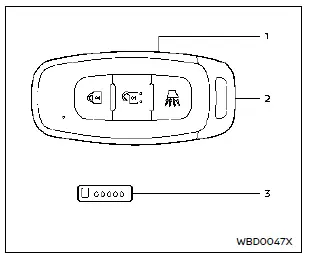
Type A (if so equipped)
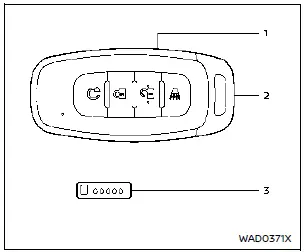
Type B (if so equipped)
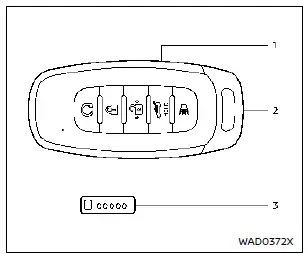
Type C (if so equipped)
- Intelligent Key (2 sets)
- Mechanical key (inside Intelligent Key) (2 sets)
- Key number plate
Basic information
Your Nissan Rogue can be operated only with Intelligent Keys that are programmed to its Intelligent Key system and the NISSAN Vehicle Immobilizer System. Up to four Intelligent Keys can be paired with one Nissan Rogue. New keys must be registered by a NISSAN dealer, and during this process all existing key codes are erased, so take every Intelligent Key you possess to the dealer.
A key number plate is supplied with the keys. Write down the number and keep it in a safe place outside the Nissan Rogue. If the keys are lost, the dealer can create duplicates using this number.
NISSAN does not store key numbers, so it is essential to keep your plate secure. The key number is required only when all keys are lost. If at least one key remains, it can be duplicated without the number.
CAUTION
- Always carry the Intelligent Key with you when driving the Nissan Rogue. The Intelligent Key is a sensitive electronic device; avoid the following to prevent damage:
- Although water-resistant, prolonged wetting can damage it. If wet, dry it immediately.
- Avoid bending, dropping or hitting it against objects.
- Performance may drop in temperatures below 14ºF (–10ºC).
- Do not leave the key in places hotter than 140ºF (60ºC).
- Do not modify the Intelligent Key.
- Do not use magnetic key holders.
- Keep it away from electronics such as TVs, computers or mobile phones.
- Do not expose it to water, salt water, and never wash it in a washing machine as this may affect its operation.
If an Intelligent Key for your Nissan Rogue is lost or stolen, the ID code of that key should be erased to prevent unauthorized access. Visit a NISSAN dealer for this procedure.
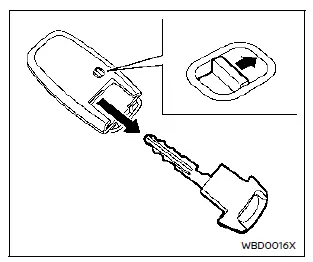
Mechanical key
To remove the mechanical key, slide the release knob on the back of the Intelligent Key. To reinstall, insert the key until the knob clicks back into the locked position.
CAUTION
Always keep the mechanical key installed inside the Intelligent Key while operating the Nissan Rogue.
Other materials:
Removal and Installation. Hood Lock
Exploded View
Hood lock
Hood lock release cable assembly
Hood lock release handle
: Clip
: N·m (kg-m, in-lb)
: Body grease
Hood Lock
Removal and Installation
REMOVALRemove front grill cover. Refer to Removal and Installation.
Disconnect hood lock switch har ...
Symptom Diagnosis. Intelligent Key System Symptoms
Diagnosis Procedure
NOTE:
Perform the self-diagnosis with CONSULT before the symptom diagnosis. Perform the trouble diagnosis if any DTC is detected.
SYMPTOM TABLE 1 (BOTH INTELLIGENT KEYS HAVE THE SAME SYMPTOMS) No. Door lock operation (remote keyless entry)
Door lock operation (request swit ...
U2259 Can Comm Circuit
DTC Description
DTC DETECTION LOGIC DTC
CONSULT screen terms
(Trouble diagnosis content)
DTC detection condition
U2259
87
CAN comm err (steering control unit)
[CAN comm err (steering control unit)]
Diagnosis condition
Ignition switch ON
Signal (terminal)
CAN commu ...