
Nissan Rogue (T33) 2021-Present Service Manual: Ecu Diagnosis Information :: Hands Free Sensor Control Unit
Reference Value
TERMINAL LAYOUT
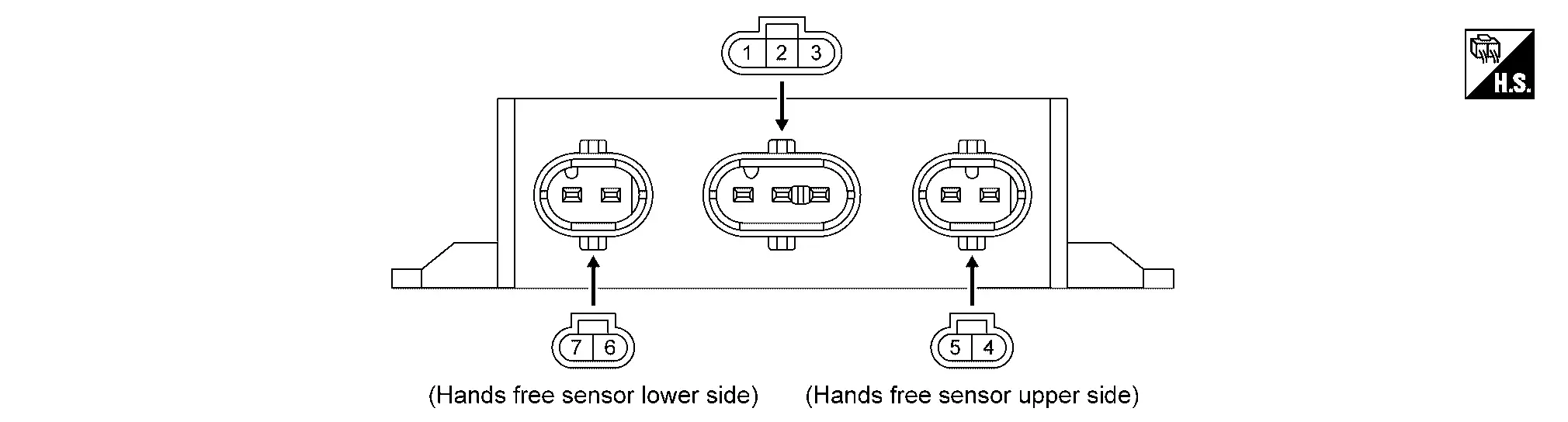
PHYSICAL VALUES
|
Terminal No. (Wire color) | Description | Condition |
Voltage (Approx.) | |||
|---|---|---|---|---|---|---|
| (+) | (–) | Signal name | Input/Output | |||
|
1 (GR) |
Ground | Serial communication | Input/Output | Ignition switch ON |
|
|
|
2 (L) |
Ground | Power supply (BAT) | Input | — | 8 – 16 V | |
|
3 (B) |
Ground | Ground | — | — | 0 V | |
|
4 (L) |
Ground | Hands free sensor (upper side) output signal | Output | — | — | |
|
5 (R) |
Ground | Hands free sensor (upper side) input signal | Input | — | — | |
|
6 (LG) |
Ground | Hands free sensor (lower side) output signal | Output | — | — | |
|
7 (P) |
Ground | Hands free sensor (lower side) input signal | Input | — | — | |
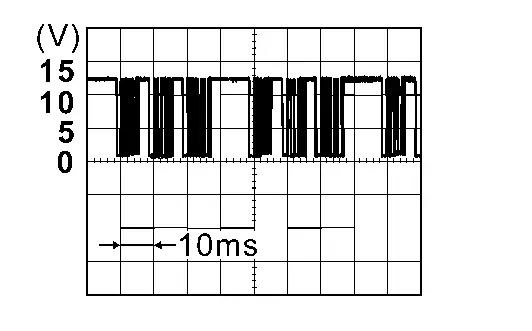
 NOTE:
NOTE:
Voltage generated in communication circuit between hands free sensor and hands free sensor control unit is extremely low and therefore cannot be measured.
Other materials:
Extérieur avant
Cette vue avant du Nissan Rogue présente les éléments de carrosserie, d’éclairage et d’aide à la conduite visibles depuis l’avant du véhicule. Les équipements marqués d’un astérisque peuvent dépendre de la finition.
Capot : accès au compartiment moteur et aux points de con ...
Side Radar (front Right) (side Radar Front Rh)
C1ec0-44 Control Unit
DTC Description
DTC DETECTION LOGIC DTC No. CONSULT screen terms (Trouble diagnosis content) DTC detection condition
C1EC0
44
Control unit
Diagnosis condition
When ignition switch is ON.
Signal (terminal)
—
Threshold
If side radar front RH ...
Engine. Starting System
Precaution :: Precautions
Precaution for Supplemental Restraint System (SRS) "AIR BAG" and "SEAT BELT PRE-TENSIONER"
The Supplemental Restraint System such as “AIR BAG� and “SEAT BELT
PRE-TENSIONER�, used along with a front seat belt, helps to reduce the
risk or severity of injury to t ...