
Nissan Rogue (T33) 2021-Present Service Manual: Basic Inspection :: Diagnosis and Repair Work Flow
Work Flow
OVERALL SEQUENCE
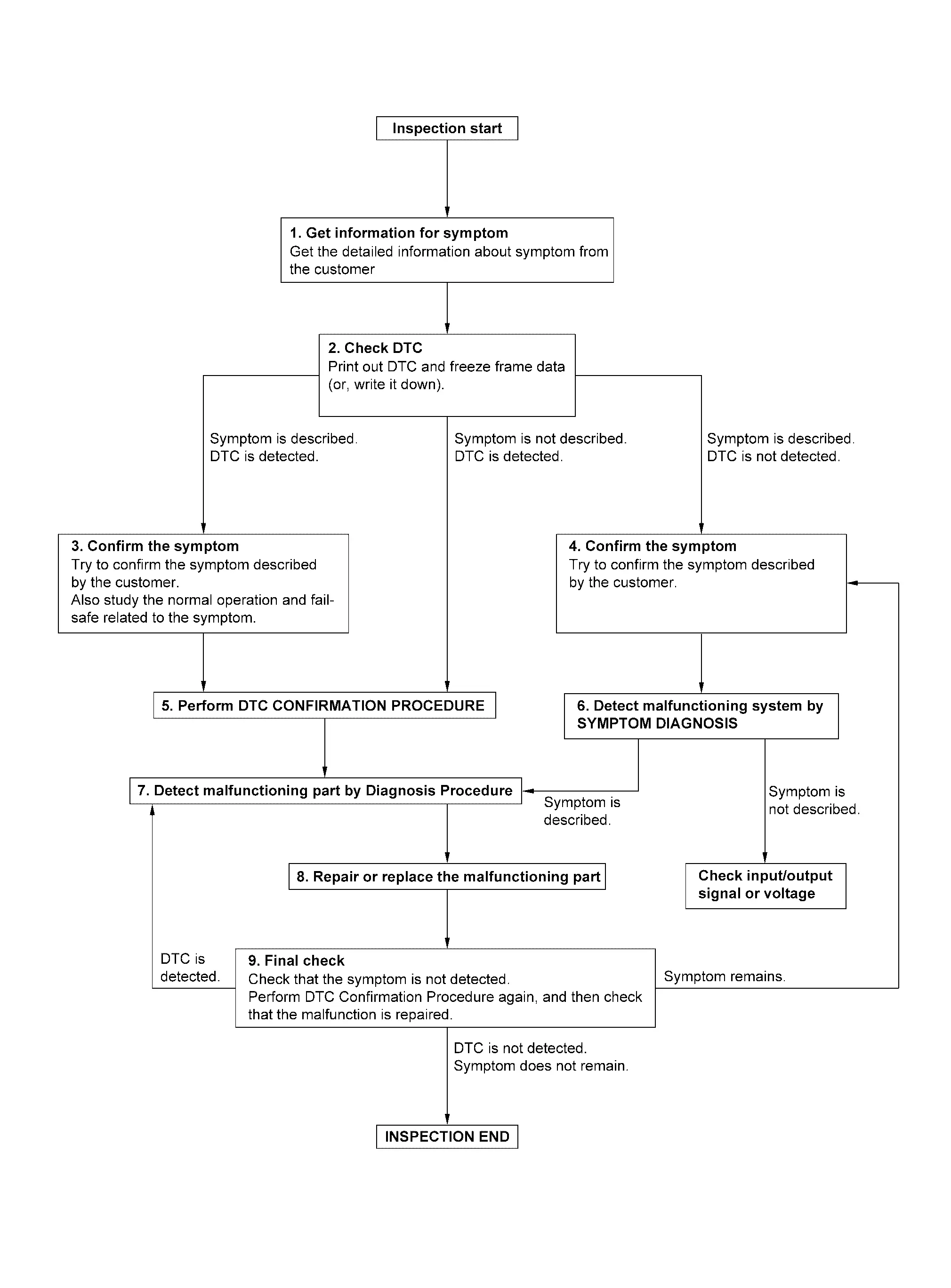
DETAILED FLOW
GET INFORMATION FOR SYMPTOM
-
Get detailed information from the customer about the symptom (the condition and the environment when the incident/malfunction occurs).
-
Check operation condition of the function that is malfunctioning.
>>
GO TO 2.
CHECK DTC
-
Check DTC.
-
Perform the following procedure if DTC is detected.
-
Record DTC and freeze frame data (print them out).
-
Erase DTC.
-
Study the relationship between the cause detected by DTC and the symptom described by the customer.
-
Are any symptoms described or any DTC detected?
Symptom is described, DTC is displayed>>GO TO 3.
Symptom is described, DTC is not displayed>>GO TO 4.
Symptom is not described, DTC is displayed>>GO TO 5.
CONFIRM THE SYMPTOM
Confirm the symptom described by the customer.
Also study the normal operation and fail-safe related to the symptom.
Verify relation between the symptom and the condition when the symptom is detected.
>>
GO TO 5.
CONFIRM THE SYMPTOM
Try to confirm the symptom described by the customer.
Verify relation between the symptom and the condition when the symptom is detected.
>>
GO TO 6.
PERFORM DTC CONFIRMATION PROCEDURE
Perform DTC CONFIRMATION PROCEDURE for the detected DTC, and then check that DTC is detected again. At this time, always connect CONSULT to the Nissan Ariya vehicle, and check diagnostic results in real time.
If two or more DTCs are detected, refer to DTC Inspection Priority Chart (Intelligent Key unit), DTC Inspection Priority Chart (automatic back door control unit) or DTC Inspection Priority Chart (BCM), and determine trouble diagnosis order.
 NOTE:
NOTE:
-
Freeze frame data is useful if the DTC is not detected.
-
Perform Component Function Check if DTC CONFIRMATION PROCEDURE is not included on Service Manual. This simplified check procedure is an effective alternative though DTC cannot be detected during this check.
If the result of Component Function Check is NG, it is the same as the detection of DTC by DTC CONFIRMATION PROCEDURE.
Is DTC detected?
YES>>GO TO 7.
NO>>Refer to Intermittent Incident.
DETECT MALFUNCTIONING SYSTEM BY SYMPTOM DIAGNOSIS
Detect malfunctioning system according to SYMPTOM DIAGNOSIS based on the confirmed symptom in step 4, and determine the trouble diagnosis order based on possible causes and symptom.
Is the symptom described?
YES>>GO TO 7.
NO>>Monitor input data from related sensors or check voltage of related module terminals using CONSULT.
DETECT MALFUNCTIONING PART BY DIAGNOSIS PROCEDURE
Inspect according to Diagnosis Procedure of the system.
Is malfunctioning part detected?
YES>>GO TO 8.
NO>>Check according to Intermittent Incident.
REPAIR OR REPLACE THE MALFUNCTIONING PART
-
Repair or replace the malfunctioning part.
-
Reconnect parts or connectors disconnected during Diagnosis Procedure again after repair and replacement.
-
Check for DTC. If DTC is displayed, erase it.
>>
GO TO 9.
FINAL CHECK
When DTC is detected in step 2, perform DTC CONFIRMATION PROCEDURE again, and then check that the malfunction is completely repaired.
When symptom is described by the customer, refer to confirmed symptom in step 3 or 4, and check that the symptom is not detected.
Is DTC detected and does symptom remain?
YES-1>>DTC is detected: GO TO 7.
YES-2>>Symptom remains: GO TO 4.
NO>>Before returning the Nissan Ariya vehicle to the customer, always erase DTC.
Other materials:
Limites du système RAB
AVERTISSEMENT
Les limites du système de freinage automatique arrière (RAB) du Nissan Rogue sont décrites ci-dessous. Le non-respect des instructions et avertissements relatifs à l’utilisation correcte du système RAB peut entraîner des blessures graves, voire mortelles. Le conducteur doit to ...
P00fe Evap Control System
DTC Description
This diagnosis detects clogs in the EVAP line between fuel tank and EVAP canister purge volume control solenoid valve.ECM
controls EVAP control system as below. ECM monitors EVAP line pressure
change to diagnose if there is no clogging between EVAP canister and
fuel tank.
E ...
Electric Shift Control Module
Exploded View
Electric shift control module
: N·m (kg-m, in-lb) : Vehicle front
Removal and Installation
REMOVALDisconnect the negative battery terminal. Refer to Exploded View.
Remove instrument side panel LH. Refer to Exploded View.
Disconnect the harn ...