
Nissan Rogue (T33) 2021-Present Service Manual: Basic Inspection :: Consult/gst Checking System
Description
-
When CONSULT/GST is connected with a data link connector
 equipped on the Nissan Ariya vehicle side, it will communicate with the
control unit equipped in the vehicle and then enable various kinds of
diagnostic tests.
equipped on the Nissan Ariya vehicle side, it will communicate with the
control unit equipped in the vehicle and then enable various kinds of
diagnostic tests.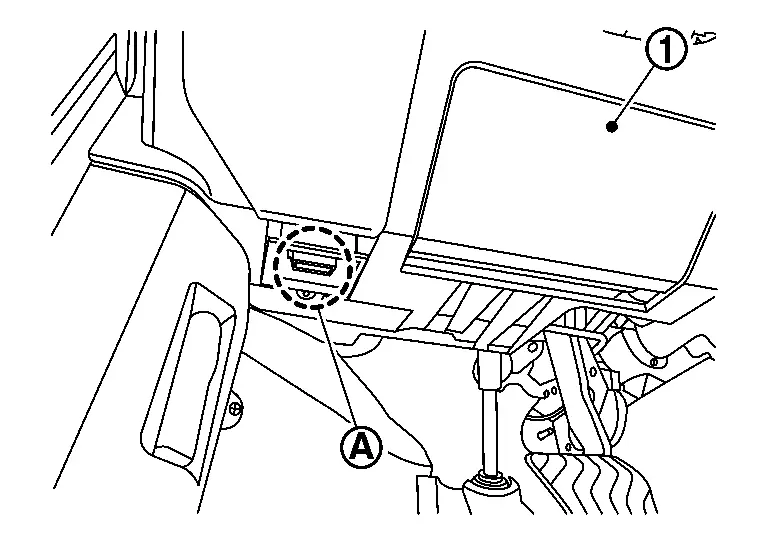

: Instrument lower panel -
Refer to CONSULT Software Operation Manual for more information.
CONSULT Function and System Application
FUNCTION
| Mode | Function |
|---|---|
| All self diagnostic results | Display all DTCs or diagnostic items that all ECUs are recording and judging. |
| Work support | This mode enables a technician to adjust some devices faster and more accurately. |
| Self diagnostic results | Retrieve DTC from ECU and display diagnostic items. |
| Data monitor | Monitor the input/output signal of the control unit in real time. |
| Network diagnosis | This mode displays a network diagnosis result about CAN |
| Active test | Send the drive signal from CONSULT to the actuator. The operation check can be performed. |
| ECU Identification | Display the ECU identification number (part number etc.) of the selected system. |
| Replace ECU | Automatically execute the programming and config required when replacing the ECU. |
| DTC work support | DTC reproduction procedure can be performed speedily and precisely. |
| Others | Other results or histories, etc. that are recorded in ECU are displayed. |
SYSTEM APPLICATION*1
| System | All Self Diagnostic Results | Work Support | Self Diagnostic Results | Data Monitor | Network diagnosis | Active Test | ECU Identification | Replace ECU | Others |
|---|---|---|---|---|---|---|---|---|---|
| ECM | x | x | x | x | x | x | x | x | • DTC work support |
| TRANSMISSION | x | x | x | x | x | - | x | x | • CALIB DATA |
| AIR BAG | x | - | x | x | x | - | x | - | • TROUBLE DIAG RECORD |
| METER | x | x | x | x | x | - | x | x | • Warning history |
| 8CH CAN GATEWAY | x | x | x | x | x | - | x | x | - |
| ABS | x | x | x | x | x | x | x | x | - |
| ADAS CONTROL UNIT 2 | x | x | x | x | x | x | x | x | - |
| AIR PRESSURE MONITOR | x | x | x | x | - | x | x | x | - |
| ANC | x | x | x | x | x | - | x | x | - |
| AUDIO AMP. | x | x | x | x | x | - | x | x | - |
| AUTO DRIVE POS. | x | x | x | x | x | x | x | x | - |
| AUTOMATIC BACK DOOR | x | x | x | x | x | - | x | x | - |
| AVM*1 | x | x | x | x | x | - | x | x | - |
| AWD/4WD | x | x | x | x | x | - | x | x | - |
| BCM | x | x | x | x | x | x | x | x | - |
| CHASSIS CONTROL | x | x | x | x | x | x | x | x | - |
| EHS_PKB | x | x | x | x | x | x | x | x | - |
| ELECTRIC OIL PUMP (AT_CVT) | x | - | x | x | x | - | x | x | - |
| ELECTRIC VTC | x | - | x | x | x | - | x | x | - |
| HVAC | x | x | x | x | x | x | x | x | - |
| ICC/ADAS 2 | x | - | x | x | x | x | x | x | - |
| INTELLIGENT KEY | x | x | x | x | x | - | x | x | - |
| IPDM E/R | x | x | x | x | x | x | x | x | - |
| IVC*1 | x | x | x | x | x | - | x | x | - |
| LANE CAMERA | x | x | x | x | x | - | x | x | - |
| LASER/RADAR | x | x | x | x | x | - | x | x | - |
| MULTI AV | x | x | x | x | x | - | x | x | - |
| OCCUPANT DETECTION | - | x | - | x | - | - | - | - | - |
| SHIFT | x | x | x | x | x | - | x | x | - |
| SIDE RADAR LEFT | x | x | x | x | x | x | x | x | - |
| SIDE RADAR RIGHT | x | x | x | x | x | x | x | x | - |
| SONAR | x | x | x | x | x | - | x | x | - |
| Sub starter & generator | x | - | x | x | x | - | x | x | - |
| VCR control module | x | - | x | x | x | - | x | x | - |
| WL CHG | x | - | x | x | x | - | x | x | - |
x: Applicable
*: If so equipped.
CONSULT/GST Data Link Connector (DLC) Circuit
INSPECTION PROCEDURE
If the CONSULT/GST cannot diagnose the system properly, check the following items.
| Symptom | Check item |
|---|---|
| CONSULT cannot access any system. |
|
| CONSULT cannot access individual system. (Other systems can be accessed.) |
|
 NOTE:
NOTE:
The DDL1 and DDL2 circuits from DLC pins 12, 13, 14 and 15 may be connected to more than one system. A short in a DDL circuit connected to a control unit in one system may affect CONSULT access to other systems.
If the GST cannot operate properly, check the circuit based on the information of SAE J1962 and ISO 15031-3.
NOTE:
For a complete DDL circuit layout, refer to one of the following:
-
CONSULT CHECKING SYSTEM - WITH TYPE A METER. Refer to: Wiring Diagram.
-
CONSULT CHECKING SYSTEM - WITH TYPE B METER. Refer to: Wiring Diagram.
For a complete CAN line layout, refer to one of the following:
-
CAN SYSTEM - WITH TYPE A METER (JAPAN PRODUCTION). Refer to: Wiring Diagram.
-
CAN SYSTEM - WITH TYPE A METER (USA PRODUCTION). Refer to: Wiring Diagram.
-
CAN SYSTEM - WITH TYPE B METER (JAPAN PRODUCTION). Refer to: Wiring Diagram.
-
CAN SYSTEM - WITH TYPE B METER (USA PRODUCTION). Refer to: Wiring Diagram.
Other materials:
Dtc/circuit Diagnosis. Rear Window Defogger Relay
Component Function Check
CHECK REAR WINDOW DEFOGGER RELAY CONTROL FUNCTION
CONSULT
Ignition switch ON.
Select “Rear defogger� in “Active test� mode of "BCM".
Touch “On�.
Check that the back door window glass is getting warmer.
NOTE:
When glass is hot, never start ...
Fuel Pressure Check
Work Procedure
FUEL PRESSURE RELEASEFUEL PRESSURE RELEASE
With CONSULT
Turn ignition switch ON.
Perform “ENGINE� in “WORK SUPPORT� mode with CONSULT.
Start the engine.
After engine stalls, crank it two or three times to release all fuel pressure.
Turn ignition swit ...
Evtc Branch Line Circuit
Diagnosis Procedure
CHECK CONNECTOR
Turn the ignition switch OFF.
Disconnect the battery cable from the negative terminal.
Check the terminals and connectors of the electric intake valve
timing control module for damage, bend and loose connection (unit side
and connector side).
...