
Nissan Rogue Service Manual: Removal and installation
ECM
Removal and Installation
EXPLODED VIEW
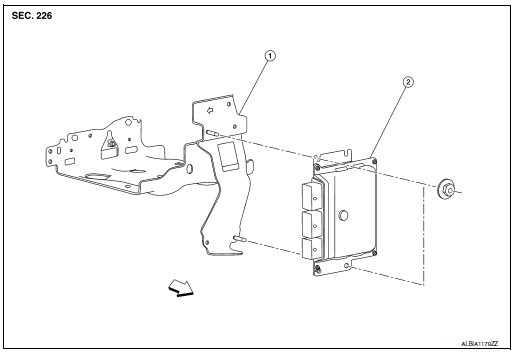
1 ECM bracket
2 ECM
 : Vehicle front
CAUTION: Perform ADDITIONAL SERVICE WHEN REPLACING ECM. Refer to EC-136, "Work Procedure".
REMOVAL
- Disconnect the battery negative terminal.
- Remove the resonator. Refer to EM-24, "Exploded View".
- Disconnect ECM harness connectors.
- Remove ECM mounting nuts, and then remove ECM.
INSTALLATION
Install in the reverse order of removal.
 Periodic maintenance
IDLE SPEED
Inspection
1.CHECK IDLE SPEED
With CONSULT
Check idle speed in “DATA MONITOR� mode of “ENGINE� using CONSULT.
With GST
Check idle speed with Service $01 of GST.
>> IN ...
 Service data and specifications (sds)
Idle Speed
Condition
Specification
No load* (in P or N position)
650 ± 50 rpm
*: Under the following conditions
A/C switch: OFF
Electric load: OFF (Ligh ...
Other materials:
Symptom diagnosis
COMBINATION SWITCH SYSTEM SYMPTOMS
Symptom Table
Perform the data monitor of CONSULT to check for any malfunctioning
item.
Check the malfunction combinations.
Identify the malfunctioning part from the agreed combination and repair
or replace the part.
NORMAL OPERA ...
Side curtain air bag module
Exploded View
Side curtain air bag module
Fron
Removal and Installation
WARNING:
Before servicing the SRS, turn ignition switch OFF, disconnect
both battery terminals then wait at
least three minutes.
Always work from the side of air bag module. Do not work in
...
Wiring diagram
ENGINE CONTROL SYSTEM
Wiring Diagram
...
